

authorization_details parameter contains details about the request that you can customize in a consent prompt to show the user.
Common use cases
Use RAR with the CIBA flow for use cases that require more fine-grained control over resource access. Common use cases include:- A payments app prompts the user to confirm a money transfer. The
authorization_detailscan be customized to show the transaction details. - An AI agent prompts the user with details about a rescheduled doctor’s appointment. The
authorization_detailscan be customized to show the new time and date.
How it works
The User Authorization with CIBA flow is similar to the User Authentication with CIBA flow, where RAR support enables clients to pass theauthorization_details to the authorization server via the /bc-authorize endpoint.
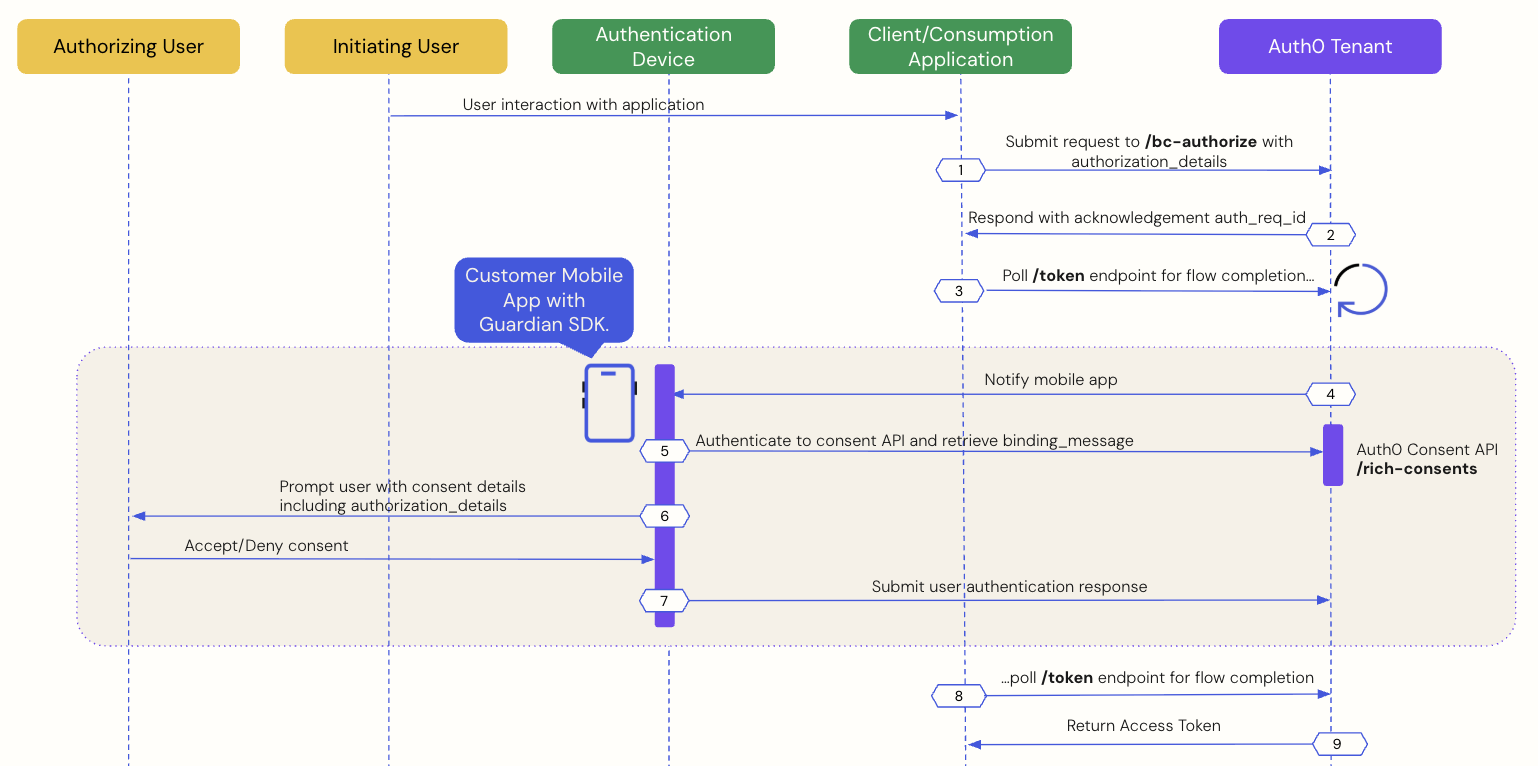
The following sequence diagram explains the end-to-end User Authorization with CIBA flow:
- Prerequisites
- Step 1: Client application initiates a CIBA request
- Step 2: Auth0 tenant acknowledges the CIBA request
- Step 3: Client application polls for a response
- Step 4: Mobile application receives the push notification
- Step 5: Mobile application retrieves the consent details
- Step 6: Mobile application presents the consent details to the user
- Step 7: Mobile application sends the user response back to Auth0
- Step 8: Auth0 receives user response after the flow completes
- Step 9: Auth0 returns access token to the client application
Prerequisites
To initiate a CIBA push request using Auth0, you must complete the following prerequisites:- Integrate your custom mobile application with the Guardian SDK. To learn more, read Configure Client-Initiated Backchannel Authentication.
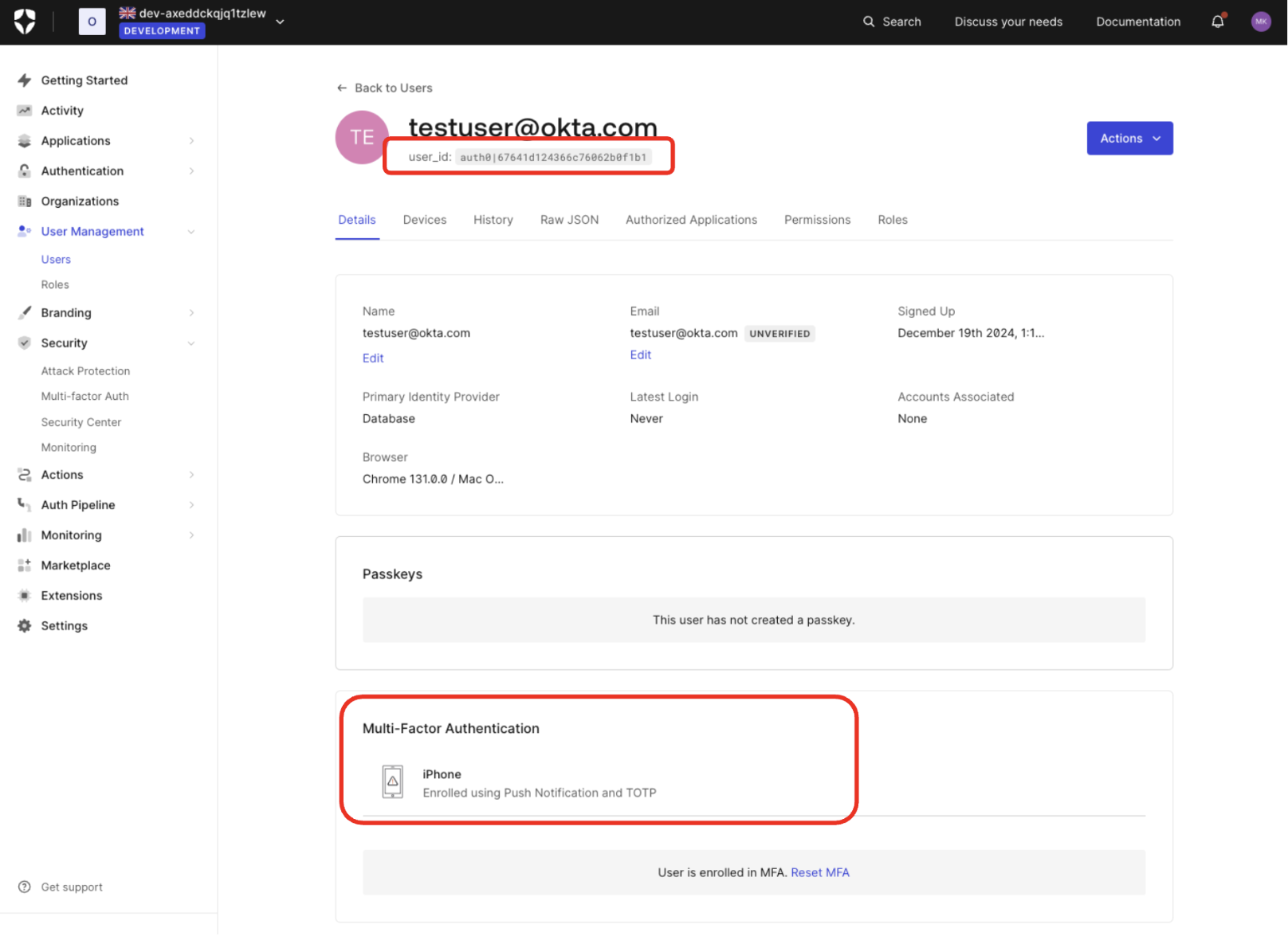
- Enroll the authorizing user in MFA using push notifications via the Guardian SDK. To verify in the , navigate to User Management > Users and click on the user:
- Configure Client-Initiated Backchannel Authentication for your tenant and application.
- Configure Rich Authorization Requests for your , which includes registering your
authorization_detailstypes.
Step 1: Client application initiates a CIBA request
Use the User Search APIs to find the authorizing user for whom you’d like to initiate a CIBA request and obtain their user ID. Once you have a user ID for the authorizing user, use the Authentication API to send a CIBA request with theauthorization_details to the /bc-authorize endpoint:
| Parameters | Description |
|---|---|
tenant | Tenant name. It can also be a custom domain. |
client_id | Client application identifier. |
client_secret | Client authentication method used for user authentication with CIBA, such as Client Secret, Private Key JWT, or mTLS Authentication. If you’re using Private Key JWT or mTLS, you don’t need to include the client secret. |
scope | If the client needs to identify the user (i.e., obtain an id_token), openid must be included. If the client only needs an access token for authorization, openid is optional, but commonly included.The scope can optionally include offline_access to request a refresh token. However, for one-time authorization of a transaction with the CIBA Flow, a refresh token is not needed and does not have any meaning in this context. |
user_id | User ID for the authorizing user that is passed within the login_hint structure. If iss_sub format is used, then the user ID is passed within the sub claim.The user ID for a federated connection may have a different format. |
request_expiry | The CIBA flow’s requested expiry is between 1 and 300 seconds, and it defaults to 300 seconds. Include the request_expiry parameter to set a custom expiry for the CIBA flow. |
binding_message | Human-readable message used to bind the CIBA flow across the authentication and consumption devices. The binding message is required and up to 64 characters. Use only alphanumeric and +-_.,:# characters |
audience | Unique identifier of the audience for the issued token. |
authorization_details | An optional JSON array of objects that describes the permissions to be authorized. You should register each object’s type value on the resource server using the resource server’s authorization_details parameter. To learn more, read Configure Rich Authorization Requests. |
Step 2: Auth0 tenant acknowledges the CIBA request
If the Auth0 tenant successfully receives thePOST request, you should receive a response containing an auth-req-id that references the request:
auth_req_id value is passed to the /token endpoint to poll for the completion of the CIBA flow.
Step 3: Client application polls for a response
Use the Authentication API to call the/token endpoint using the urn:openid:params:grant-type:ciba grant type and the auth_req_id you received from the /bc-authorize endpoint:
- cURL
- C#
- Go
- Java
/token endpoint.
Step 4: Mobile application receives the push notification
Auth0 sends a push notification to the user’s registered mobile app or device. The Guardian SDK provides methods to parse the data received from the push notification and return a ready-to-useNotification instance. The Notification instance includes a transaction linking ID, or txlinkid, that the mobile application uses to retrieve the consent details from Auth0.
The following code samples are example iOS and Android mobile push notification implementations using the Guardian SDK:
- iOS
- Android
Step 5: Mobile application retrieves the consent details
Call the Guardian SDK from your mobile application to retrieve the consent details i.e. the contents of thebinding_message from the Auth0 Consent API.
The following code samples are example iOS and Android implementations that retrieve data from the Auth0 Consent API:
- iOS
- Android
Step 6: Mobile application presents the consent details to the user
The Auth0 Consent API responds to the mobile application with the consent details, including thebinding_message, scope, audience, and authorization_details if configured. The scopes returned to the mobile application are filtered according to your RBAC policy. To learn more, read Role-Based Access Control.
The following code sample is an example response from the Auth0 Consent API:
authorization_details to the user in a push notification via the Guardian SDK. The user can accept or decline the authorization request at this point.
Step 7: Mobile application sends the user response back to Auth0
Depending on whether the user accepts or rejects the authorization request, the mobile application sends the user response back to Auth0. The following code samples are example iOS and Android implementations that handle the user response:User accepts the authorization request
- iOS
- Android
User rejects the authorization request
- iOS
- Android
Step 8: Auth0 receives user response after the flow completes
The client application completes the polling upon receiving a response from the/token endpoint. A CIBA flow always requires a response, either an approval or decline, from the authorizing user, and existing grants are not checked. This means Auth0 treats every CIBA request as a fresh authorization for the authorizing user.
Step 9: Auth0 returns access token to client application
If the user rejects the push request, Auth0 returns an error response like the following to the client application:authorization_details like the following to the client application:
id_token will only be present if the openid scope was included in the initial /bc-authorize request.
Query authorization_details
At compile time, you can query the type and objects ofauthorization_details from the consent details in a strongly typed manner as you would dynamically query JSON:
- iOS
- Android
filterAuthorizationDetailsByType() function to return all authorization_details objects that match the desired type.
The following code sample queries authorization_details with the payment type:
- iOS
- Android
filterAuthorizationDetailsByType() only returns objects matching the specified authorization_details type. As a result, your mobile application should present all relevant authorization_details to the user for consent, regardless of their type, to ensure a complete understanding of the request
You can also query the authorization_details when the AI agent or application polls the /oauth/tokenendpoint for a response:
| Parameters | Description |
|---|---|
grant_type | Set to the CIBA grant type: urn:openid:params:grant-type:ciba |
client_id | Set to the application’s client ID. |
client_secret | Set to the application’s client secret. |
auth_req_id | Returned from the Auth0 tenant when it acknowledges the CIBA request. References the CIBA request. |
authorization_details array:
Limitations
Auth0 doesn’t support:- Accessing or modifying RAR in Actions for CIBA flows.
- Advertising RAR types for clients to discover, which means you need to pre-register clients with the
authorization_detailstypes they can send. - Validating RAR objects beyond checking that they have a
typeproperty that matches allowed types for the API. Your resource server is responsible for the granular validation of the content withinauthorization_details. For more information, see Configure RAR.