> ## Documentation Index
> Fetch the complete documentation index at: https://docs-staging-quickstart-revamp.mintlify.site/llms.txt
> Use this file to discover all available pages before exploring further.
> Describes how to upgrade or change your Auth0 subscription.
# Manage Subscriptions
If you have an Enterprise subscription plan, please refer to your Auth0 agreement for details.
If you have a Self-Service subscription plan, you can manage your subscription plan from the Auth0 Dashboard:
1. Go to [Teams > Settings](https://accounts.auth0.com) for Team-based subscriptions OR [Dashboard > Settings](https://manage.auth0.com/#/tenant/general) for Tenant-based subscriptions.
2. Select the **Subscription** tab. You can customize your plan options like monthly or yearly billing, the maximum number of supported monthly Active Users, and more.
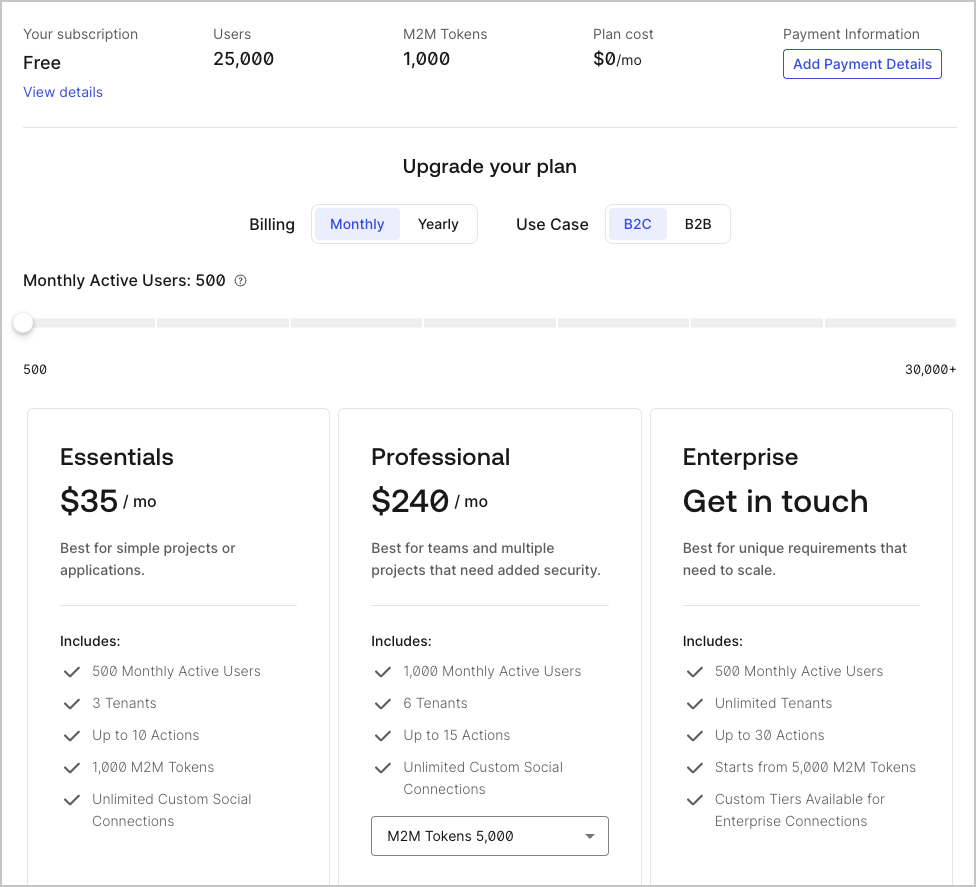 Starting 1 December 2023, any Tenant-based subscription updates (except downgrades to Free) automatically converts to a Team-based subscription, allowing you benefits such as the ability to [link multiple tenants](/docs/get-started/auth0-teams/tenant-management) within a single Self-Service subscription.
If you already have a Team-based subscription, instead of upgrading another tenant, you will have to instead link your tenant to the existing Team subscription.
## Upgrade subscriptions
You can upgrade your subscription from a Free plan to an Essentials or a Professional plan or from an Essentials to a Professional. To upgrade to an Enterprise plan, [contact Auth0 Sales](https://auth0.com/get-started?place=header\&type=button\&text=talk%20to%20sales).
1. On the **Subscription** tab, scroll to the panels describing the plan options.
2. Select a new plan and click **Checkout** to upgrade. If you do not have your billing information stored with Auth0, you'll need to provide it.
3. Click **Subscribe Now** to confirm your information and activate your new subscription.
## Downgrade to a Free subscription
1. On the **Subscription** tab, scroll to the box associated with the Free plan and click **Checkout**.
2. To confirm your subscription change, click **Subscribe Now**.
## Learn more
* [Downgrade or Cancel Auth0 Subscriptions](/docs/troubleshoot/customer-support/manage-subscriptions/downgrade-or-cancel-subscriptions)
* [Delete or Reset Tenants](/docs/troubleshoot/customer-support/manage-subscriptions/delete-or-reset-tenant)
* [Link Multiple Tenants to a Single Subscription](/docs/get-started/auth0-overview/create-tenants/child-tenants)
* [Remove Tenant Members](/docs/get-started/manage-dashboard-access/remove-dashboard-users)
* [Tenant Settings](/docs/get-started/tenant-settings)
* [Reset Account Passwords](/docs/troubleshoot/customer-support/reset-account-passwords)
Starting 1 December 2023, any Tenant-based subscription updates (except downgrades to Free) automatically converts to a Team-based subscription, allowing you benefits such as the ability to [link multiple tenants](/docs/get-started/auth0-teams/tenant-management) within a single Self-Service subscription.
If you already have a Team-based subscription, instead of upgrading another tenant, you will have to instead link your tenant to the existing Team subscription.
## Upgrade subscriptions
You can upgrade your subscription from a Free plan to an Essentials or a Professional plan or from an Essentials to a Professional. To upgrade to an Enterprise plan, [contact Auth0 Sales](https://auth0.com/get-started?place=header\&type=button\&text=talk%20to%20sales).
1. On the **Subscription** tab, scroll to the panels describing the plan options.
2. Select a new plan and click **Checkout** to upgrade. If you do not have your billing information stored with Auth0, you'll need to provide it.
3. Click **Subscribe Now** to confirm your information and activate your new subscription.
## Downgrade to a Free subscription
1. On the **Subscription** tab, scroll to the box associated with the Free plan and click **Checkout**.
2. To confirm your subscription change, click **Subscribe Now**.
## Learn more
* [Downgrade or Cancel Auth0 Subscriptions](/docs/troubleshoot/customer-support/manage-subscriptions/downgrade-or-cancel-subscriptions)
* [Delete or Reset Tenants](/docs/troubleshoot/customer-support/manage-subscriptions/delete-or-reset-tenant)
* [Link Multiple Tenants to a Single Subscription](/docs/get-started/auth0-overview/create-tenants/child-tenants)
* [Remove Tenant Members](/docs/get-started/manage-dashboard-access/remove-dashboard-users)
* [Tenant Settings](/docs/get-started/tenant-settings)
* [Reset Account Passwords](/docs/troubleshoot/customer-support/reset-account-passwords)