> ## Documentation Index
> Fetch the complete documentation index at: https://docs-staging-quickstart-revamp.mintlify.site/llms.txt
> Use this file to discover all available pages before exploring further.

> Overview of how to configure Sender Constraining for your Auth0 tenant.

# Configure Sender Constraining

<Callout icon="file-lines" color="#0EA5E9" iconType="regular">
  Sender constraining tokens using Demonstrating Proof-of-Possession (DPoP) is currently in Early Access. To request access to this feature, contact your Auth0 representative.
</Callout>

[Sender constraining](/docs/secure/sender-constraining) is an <Tooltip tip="OAuth 2.0: Authorization framework that defines authorization protocols and workflows." cta="View Glossary" href="/docs/glossary?term=OAuth+2.0">OAuth 2.0</Tooltip> and <Tooltip tip="OAuth 2.0: Authorization framework that defines authorization protocols and workflows." cta="View Glossary" href="/docs/glossary?term=OpenID">OpenID</Tooltip> Connect (OIDC) security mechanism that cryptographically binds access and <Tooltip tip="Refresh Token: Token used to obtain a renewed Access Token without forcing users to log in again." cta="View Glossary" href="/docs/glossary?term=refresh+tokens">refresh tokens</Tooltip> to the specific client application that obtained them, preventing token theft and misuse.

Auth0 supports mTLS sender constraining and Demonstrating Proof-of-Possession (DPoP). If you enable sender constraining for a client application, then you must also enforce it for the <Tooltip tip="Resource Server: Server hosting protected resources. Resource servers accept and respond to protected resource requests." cta="View Glossary" href="/docs/glossary?term=resource+server">resource server</Tooltip> you’re making API calls to.

To configure sender constraining in Auth0, you must:

* [Configure sender constraining for a client application](#configure-sender-constraining-for-a-client-application).
* [Configure sender constraining for a resource server](#configure-sender-constraining-for-a-resource-server).

## How it works

<Tooltip tip="Access Token: Authorization credential, in the form of an opaque string or JWT, used to access an API." cta="View Glossary" href="/docs/glossary?term=Access+tokens">Access tokens</Tooltip> are sender constrained in Auth0 depending on how you configure sender constraining for your client application and resource server:

1. **Requested audience:** In a token request, whether the requested audience is `/userinfo` only, or only intended to be used with the [`/userinfo`](https://auth0.com/docs/api/authentication/user-profile/get-user-info) endpoint, or is a custom API that may include `/userinfo` when you also request the openid scope, affects whether access tokens are sender constrained.
2. **Client application:** Whether you set sender constraining as `required` by the client application.
3. **Resource server:** Whether you configure sender constraining for the resource server:

   1. `none`: You have not configured sender constraining for the resource server.
   2. `allowed`: You have configured sender constraining for the resource server by setting a sender constraining method.
   3. `required`: You have configured sender constraining as required for the resource server, meaning that access tokens must be sender-constrained to an application. Requires a sender constraining method.

* **Proof-of-Possession:** Whether the client application sent a proof-of-possession assertion in the token request:

  * mTLS sender constraining: The proof of possession is demonstrated through the client's successful presentation of a specific private key (associated with a client certificate) during the TLS handshake.
  * DPoP: The proof of possession is achieved by the client creating a DPoP Proof JWT by cryptographically signing it with its private key and including the `DPoP` Proof JWT in the DPoP HTTP header of every request where the associated access token is used.

The following table describes how access tokens are issued and whether they are sender-constrained based on various client request parameters and Auth0 resource server configurations:

<table class="table">
  <thead>
    <tr>
      <th><strong>Requested Audience Type</strong></th>
      <th><strong>Client Requires PoP?</strong></th>
      <th><strong>Proof-of-Possession (PoP) Sent by Client?</strong></th>
      <th><strong>Auth0 Resource Server Policy: None</strong></th>
      <th><strong>Auth0 Resource Server Policy: Allowed (Not Required)</strong></th>
      <th><strong>Auth0 Resource Server Policy: Required</strong></th>
    </tr>
  </thead>

  <tbody>
    <tr>
      <td>Userinfo Only</td>
      <td>No</td>
      <td>No</td>
      <td>Issued, Not Sender-Constrained</td>
      <td>N/A</td>
      <td>N/A</td>
    </tr>

    <tr>
      <td>Userinfo Only</td>
      <td>No</td>
      <td>Yes</td>
      <td>Issued, Sender-Constrained</td>
      <td>N/A</td>
      <td>N/A</td>
    </tr>

    <tr>
      <td>Userinfo Only</td>
      <td>Yes</td>
      <td>No</td>
      <td>Not Issued</td>
      <td>N/A</td>
      <td>N/A</td>
    </tr>

    <tr>
      <td>Userinfo Only</td>
      <td>Yes</td>
      <td>Yes</td>
      <td>Issued, Sender-Constrained</td>
      <td>N/A</td>
      <td>N/A</td>
    </tr>

    <tr>
      <td>Custom Audience (may contain Userinfo)</td>
      <td>No</td>
      <td>No</td>
      <td>Issued, Not Sender-Constrained</td>
      <td>Issued, Not Sender-Constrained</td>
      <td>Not Issued</td>
    </tr>

    <tr>
      <td>Custom Audience (may contain Userinfo)</td>
      <td>No</td>
      <td>Yes</td>
      <td>Issued, Not Sender-Constrained</td>
      <td>Issued, Sender-Constrained</td>
      <td>Issued, Sender-Constrained</td>
    </tr>

    <tr>
      <td>Custom Audience (may contain Userinfo)</td>
      <td>Yes</td>
      <td>No</td>
      <td>Not Issued</td>
      <td>Not Issued</td>
      <td>Not Issued</td>
    </tr>

    <tr>
      <td>Custom Audience (may contain Userinfo)</td>
      <td>Yes</td>
      <td>Yes</td>
      <td>Not Issued</td>
      <td>Issued, Sender-Constrained</td>
      <td>Issued, Sender-Constrained</td>
    </tr>
  </tbody>
</table>

## Configure sender constraining for a client application

When you require sender constraining for a client application, access tokens are constrained to that application. Auth0 verifies requests to ensure that only the application that requested the token can use it to access the associated resource.

Once you configure a client application to require sender constraining, you can set the sender constraining method, either mTLS or DPoP, when configuring your resource server.

You can configure sender constraining for a client application with the <Tooltip tip="Auth0 Dashboard: Auth0's main product to configure your services." cta="View Glossary" href="/docs/glossary?term=Auth0+Dashboard">Auth0 Dashboard</Tooltip> or <Tooltip tip="Management API: A product to allow customers to perform administrative tasks." cta="View Glossary" href="/docs/glossary?term=Management+API">Management API</Tooltip>.

<Tabs>
  <Tab title="Auth0 Dashboard">
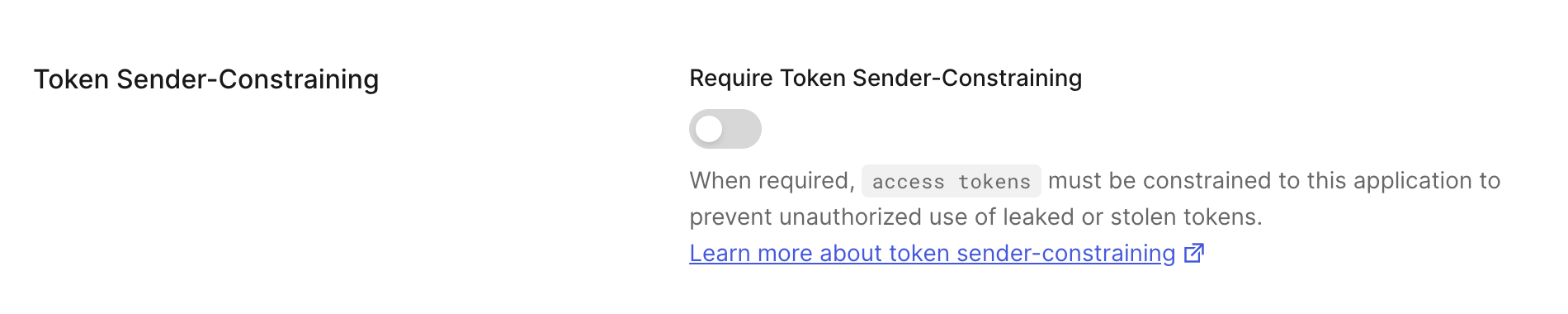
    1. Go to [Dashboard > Applications > Applications](https://manage.auth0.com/#/applications). Select the application you want to configure.
    2. Under **Settings**, scroll to **Token Sender-Constraining**.
    3. Toggle on to **Require Sender Constraining**. Toggle off to remove the requirement for Sender Constraining for the application.

    <Frame>
      <img src="https://mintcdn.com/docs-staging-quickstart-revamp/TO6FS4AgTzQGgpsU/images/cdy7uua7fh8z/3BoGW9NEYKPBkfk2tPBL7l/0f884ac3f64f17b23fd6a0e9436bb472/Screenshot_2024-07-23_at_1.30.19_PM.png?fit=max&auto=format&n=TO6FS4AgTzQGgpsU&q=85&s=d2751b82cd833d3b77902195fdc9841e" alt="" width="1900" height="380" data-path="images/cdy7uua7fh8z/3BoGW9NEYKPBkfk2tPBL7l/0f884ac3f64f17b23fd6a0e9436bb472/Screenshot_2024-07-23_at_1.30.19_PM.png" />
    </Frame>
  </Tab>

  <Tab title="Management API">
    To configure a client for Sender Constraining, use the [Management API](https://auth0.com/docs/api/management/v2).

    To require Sender Constraining for a client, send a PATCH request to [update the client's settings](https://auth0.com/docs/api/management/v2/clients/patch-clients-by-id). Set the `require_proof_of_possession` parameter to `true`.

    ```json lines
    "require_proof_of_possession": true
    ```

    To remove the requirement for Sender Constraining, set the `require_proof_of_possession` parameter to `false`.

    ```json lines
    "require_proof_of_possession": false
    ```
  </Tab>
</Tabs>

## Configure sender constraining for a resource server

Access tokens issued by Auth0 can be constrained to the sender (i.e. the client application) that needs to access APIs at a resource server.

You can configure sender constraining for a resource server with the Auth0 Dashboard or Management API.

<Tabs>
  <Tab title="Auth0 Dashboard">
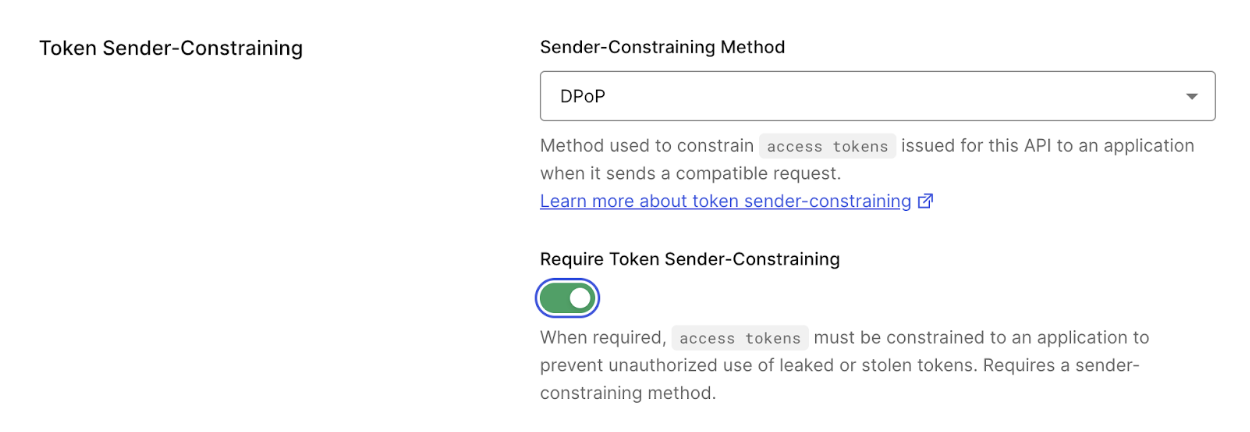
    To enable Token Binding or sender constraining, configure the **API Settings** of your API.

    1. Navigate to [Auth0 Dashboard > Applications > APIs](https://manage.auth0.com/#/apis).
    2. Select the API you want to configure.
    3. Under the **Settings** tab, find the **Token Sender-Constraining** section.
    4. Configure the following:

       1. Sender Constraining Method:

          1. **None:** Don’t enable a sender constraining method for your resource server.
          2. **mTLS**: Enable mTLS as the sender constraining method for your resource server.
          3. **DPoP:** Enable DPoP as the sender constraining method for your resource server.

    B. Toggle on **Require Token Sender Constraining**. All access tokens issued to an application for this API will be constrained to that application.

    <Frame>
      <img src="https://mintcdn.com/docs-staging-quickstart-revamp/TO6FS4AgTzQGgpsU/images/cdy7uua7fh8z/3Dv98iZosdpJMcZXfXyurn/823fa368ab874218fbb737aacac9b262/Screenshot_2025-07-28_at_3.59.01%C3%A2__PM.png?fit=max&auto=format&n=TO6FS4AgTzQGgpsU&q=85&s=8fd6b8d59ccbc09e19ede5da2f2b4b68" alt="Auth0 Dashboard > APIs > Settings > Token binding" data-og-width="1250" width="1250" data-og-height="432" height="432" data-path="images/cdy7uua7fh8z/3Dv98iZosdpJMcZXfXyurn/823fa368ab874218fbb737aacac9b262/Screenshot_2025-07-28_at_3.59.01â__PM.png" data-optimize="true" data-opv="3" srcset="https://mintcdn.com/docs-staging-quickstart-revamp/TO6FS4AgTzQGgpsU/images/cdy7uua7fh8z/3Dv98iZosdpJMcZXfXyurn/823fa368ab874218fbb737aacac9b262/Screenshot_2025-07-28_at_3.59.01%C3%A2__PM.png?w=280&fit=max&auto=format&n=TO6FS4AgTzQGgpsU&q=85&s=03b9e511246fec3a640f92a4567fca92 280w, https://mintcdn.com/docs-staging-quickstart-revamp/TO6FS4AgTzQGgpsU/images/cdy7uua7fh8z/3Dv98iZosdpJMcZXfXyurn/823fa368ab874218fbb737aacac9b262/Screenshot_2025-07-28_at_3.59.01%C3%A2__PM.png?w=560&fit=max&auto=format&n=TO6FS4AgTzQGgpsU&q=85&s=70ac9599d3a2484082eeff634adb4bf2 560w, https://mintcdn.com/docs-staging-quickstart-revamp/TO6FS4AgTzQGgpsU/images/cdy7uua7fh8z/3Dv98iZosdpJMcZXfXyurn/823fa368ab874218fbb737aacac9b262/Screenshot_2025-07-28_at_3.59.01%C3%A2__PM.png?w=840&fit=max&auto=format&n=TO6FS4AgTzQGgpsU&q=85&s=dc6e8333130e4ebc8633600269020027 840w, https://mintcdn.com/docs-staging-quickstart-revamp/TO6FS4AgTzQGgpsU/images/cdy7uua7fh8z/3Dv98iZosdpJMcZXfXyurn/823fa368ab874218fbb737aacac9b262/Screenshot_2025-07-28_at_3.59.01%C3%A2__PM.png?w=1100&fit=max&auto=format&n=TO6FS4AgTzQGgpsU&q=85&s=cf23a8be2e3e18852aca49351bc04432 1100w, https://mintcdn.com/docs-staging-quickstart-revamp/TO6FS4AgTzQGgpsU/images/cdy7uua7fh8z/3Dv98iZosdpJMcZXfXyurn/823fa368ab874218fbb737aacac9b262/Screenshot_2025-07-28_at_3.59.01%C3%A2__PM.png?w=1650&fit=max&auto=format&n=TO6FS4AgTzQGgpsU&q=85&s=0ceb57dfc19503894dd105faa4318374 1650w, https://mintcdn.com/docs-staging-quickstart-revamp/TO6FS4AgTzQGgpsU/images/cdy7uua7fh8z/3Dv98iZosdpJMcZXfXyurn/823fa368ab874218fbb737aacac9b262/Screenshot_2025-07-28_at_3.59.01%C3%A2__PM.png?w=2500&fit=max&auto=format&n=TO6FS4AgTzQGgpsU&q=85&s=0b9096d6def7fc1bc079cec7d52e4cfd 2500w" />
    </Frame>
  </Tab>

  <Tab title="Management API">
    To enable Sender Constraining with the Management API, send a PATCH request to [update the resource server](https://auth0.com/docs/api/management/v2/resource-servers/patch-resource-servers-by-id). Set the parameters of the `proof_of_possession` object to the following:

    <table class="table">
      <thead>
        <tr>
          <th><strong>Parameter</strong></th>
          <th><strong>Description</strong></th>
        </tr>
      </thead>

      <tbody>
        <tr>
          <td><code>mechanism</code></td>
          <td>Sets the sender-constraining method: <code>none</code>, <code>mtls</code>, or <code>dpop</code>.</td>
        </tr>

        <tr>
          <td><code>required</code></td>
          <td>When set to <code>true</code>, all access tokens issued to an application for this API will be constrained to that application. When set to <code>false</code>, sender constraining is not required for the application.</td>
        </tr>
      </tbody>
    </table>

    The following code sample is an example request body that configures a resource server for mTLS Sender Constraining:

    ```json lines
    "proof_of_possession": {
        "mechanism": "mtls",
        "required": true
      }
    ```
  </Tab>
</Tabs>