> ## Documentation Index
> Fetch the complete documentation index at: https://docs-staging-quickstart-revamp.mintlify.site/llms.txt
> Use this file to discover all available pages before exploring further.
> Create an instance of Auth0's Mobile Driver’s License Verification API for the mDL Verification Service.
# Create the Mobile Driver’s License Verification API
Auth0’s Mobile Driver's License Verification Service is in Early Access. To enable this feature, review and complete the [Terms and Conditions form](https://forms.gle/47YuFPkhh3RZVvt76), and our team will be in contact with you. To learn more about Auth0’s release stages, read Product Release Stages.
The Mobile Driver's License Verification API is a system API for customers to initiate a verification request for a user’s Mobile Driver’s License (mDL).
## Create the mDL Verification API
Once you've been approved to join the EA, you can create the mDL Verification API.
1. Navigate to [**Auth0 Dashboard > Applications > APIs**](https://manage.auth0.com/#/apis).
2. Select **Create API**.
3. Enter the following information:
1. **Name**: Verification API
2. **Identifier**: `https://{account.namespace}/vdcs/`
3. **JSON Web Token (JWT) Profile**: Auth0
4. **JSON Web Token (JWT) Signing Algorithm**: RS256
5. Select **Create**.
#### Enable mDL verification
1. To enable mDL for your application:
2. Navigate to [**Applications > Applications**](https://manage.auth0.com/#/applications).
3. Choose the application you want to use with Verification API.
4. Select the **APIs** tab.
5. Enable Verification API.
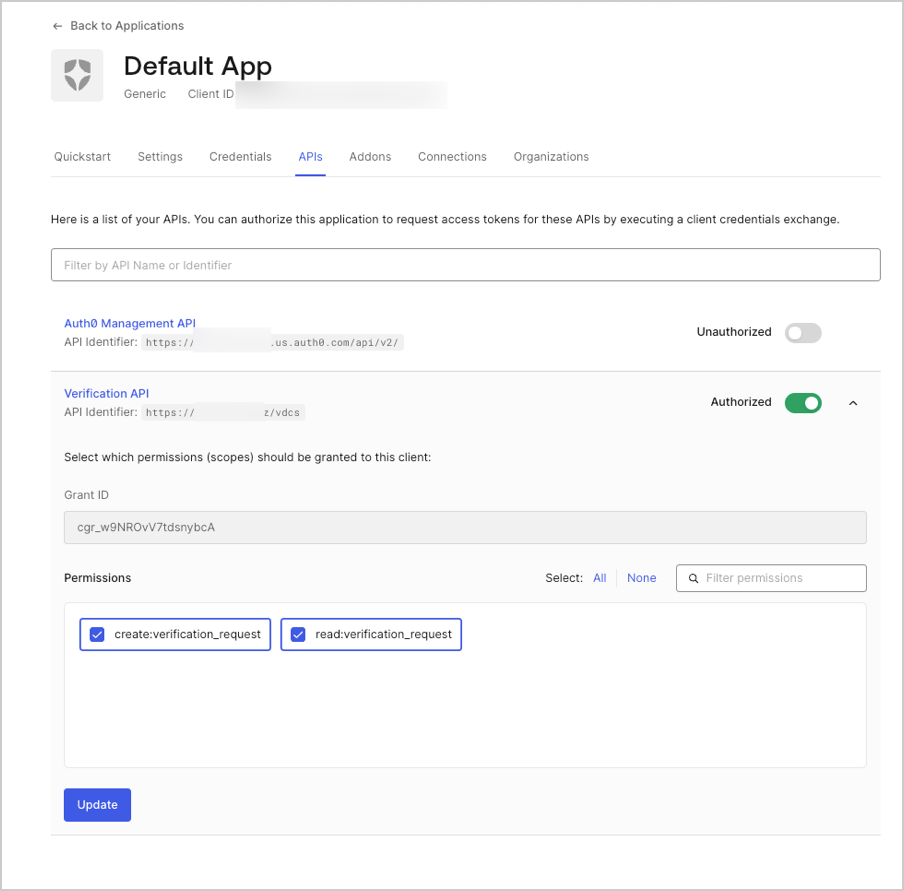 6. In the drop-down menu, choose the associated permissions:
1. `create:verification_request`
2. `read:verification_request`
7. Select **Update**.
1. Make a `POST` call to the [Create a Resource Server](https://auth0.com/docs/api/management/v2/resource-servers/post-resource-servers) endpoint.
```bash cURL lines
curl --request POST \
--url 'https://{yourDomain}/api/v2/resource-servers/post-resource-servers' \
--header 'content-type: application/json' \
--data '{"name"}'
```
```csharp C# lines
var client = new RestClient("https://{yourDomain}/api/v2/resource-servers/post-resource-servers");
var request = new RestRequest(Method.POST);
request.AddHeader("content-type", "application/json");
request.AddParameter("application/json", "{\"name\"}", ParameterType.RequestBody);
IRestResponse response = client.Execute(request);
```
```go Go lines expandable
package main
import (
"fmt"
"strings"
"net/http"
"io/ioutil"
)
func main() {
url := "https://{yourDomain}/api/v2/resource-servers/post-resource-servers"
payload := strings.NewReader("{\"name\"}")
req, _ := http.NewRequest("POST", url, payload)
req.Header.Add("content-type", "application/json")
res, _ := http.DefaultClient.Do(req)
defer res.Body.Close()
body, _ := ioutil.ReadAll(res.Body)
fmt.Println(res)
fmt.Println(string(body))
}
```
```java Java lines
HttpResponse response = Unirest.post("https://{yourDomain}/api/v2/resource-servers/post-resource-servers")
.header("content-type", "application/json")
.body("{\"name\"}")
.asString();
```
```javascript Node.JS lines
var axios = require("axios").default;
var options = {
method: 'POST',
url: 'https://{yourDomain}/api/v2/resource-servers/post-resource-servers',
headers: {'content-type': 'application/json'},
data: '{"name"}'
};
axios.request(options).then(function (response) {
console.log(response.data);
}).catch(function (error) {
console.error(error);
});
```
```obj-c Obj-C lines
#import
NSDictionary *headers = @{ @"content-type": @"application/json" };
NSData *postData = [[NSData alloc] initWithData:[@"{"name"}" dataUsingEncoding:NSUTF8StringEncoding]];
NSMutableURLRequest *request = [NSMutableURLRequest requestWithURL:[NSURL URLWithString:@"https://{yourDomain}/api/v2/resource-servers/post-resource-servers"]
cachePolicy:NSURLRequestUseProtocolCachePolicy
timeoutInterval:10.0];
[request setHTTPMethod:@"POST"];
[request setAllHTTPHeaderFields:headers];
[request setHTTPBody:postData];
NSURLSession *session = [NSURLSession sharedSession];
NSURLSessionDataTask *dataTask = [session dataTaskWithRequest:request
completionHandler:^(NSData *data, NSURLResponse *response, NSError *error) {
if (error) {
NSLog(@"%@", error);
} else {
NSHTTPURLResponse *httpResponse = (NSHTTPURLResponse *) response;
NSLog(@"%@", httpResponse);
}
}];
[dataTask resume];
```
```php PHP lines expandable
$curl = curl_init();
curl_setopt_array($curl, [
CURLOPT_URL => "https://{yourDomain}/api/v2/resource-servers/post-resource-servers",
CURLOPT_RETURNTRANSFER => true,
CURLOPT_ENCODING => "",
CURLOPT_MAXREDIRS => 10,
CURLOPT_TIMEOUT => 30,
CURLOPT_HTTP_VERSION => CURL_HTTP_VERSION_1_1,
CURLOPT_CUSTOMREQUEST => "POST",
CURLOPT_POSTFIELDS => "{\"name\"}",
CURLOPT_HTTPHEADER => [
"content-type: application/json"
],
]);
$response = curl_exec($curl);
$err = curl_error($curl);
curl_close($curl);
if ($err) {
echo "cURL Error #:" . $err;
} else {
echo $response;
}
```
```python Python lines
import http.client
conn = http.client.HTTPSConnection("")
payload = "{\"name\"}"
headers = { 'content-type': "application/json" }
conn.request("POST", "/{yourDomain}/api/v2/resource-servers/post-resource-servers", payload, headers)
res = conn.getresponse()
data = res.read()
print(data.decode("utf-8"))
```
```ruby Ruby lines
import http.client
conn = http.client.HTTPSConnection("")
payload = "{\"name\"}"
headers = { 'content-type': "application/json" }
conn.request("POST", "/{yourDomain}/api/v2/resource-servers/post-resource-servers", payload, headers)
res = conn.getresponse()
data = res.read()
print(data.decode("utf-8"))
```
```swift Swift lines
import Foundation
let headers = ["content-type": "application/json"]
let postData = NSData(data: "{"name"}".data(using: String.Encoding.utf8)!)
let request = NSMutableURLRequest(url: NSURL(string: "https://{yourDomain}/api/v2/resource-servers/post-resource-servers")! as URL,
cachePolicy: .useProtocolCachePolicy,
timeoutInterval: 10.0)
request.httpMethod = "POST"
request.allHTTPHeaderFields = headers
request.httpBody = postData as Data
let session = URLSession.shared
let dataTask = session.dataTask(with: request as URLRequest, completionHandler: { (data, response, error) -> Void in
if (error != nil) {
print(error)
} else {
let httpResponse = response as? HTTPURLResponse
print(httpResponse)
}
})
```
2. Enable the permissions by following instructions for [Management API](/docs/get-started/apis/add-api-permissions#use-the-management-api).
6. In the drop-down menu, choose the associated permissions:
1. `create:verification_request`
2. `read:verification_request`
7. Select **Update**.
1. Make a `POST` call to the [Create a Resource Server](https://auth0.com/docs/api/management/v2/resource-servers/post-resource-servers) endpoint.
```bash cURL lines
curl --request POST \
--url 'https://{yourDomain}/api/v2/resource-servers/post-resource-servers' \
--header 'content-type: application/json' \
--data '{"name"}'
```
```csharp C# lines
var client = new RestClient("https://{yourDomain}/api/v2/resource-servers/post-resource-servers");
var request = new RestRequest(Method.POST);
request.AddHeader("content-type", "application/json");
request.AddParameter("application/json", "{\"name\"}", ParameterType.RequestBody);
IRestResponse response = client.Execute(request);
```
```go Go lines expandable
package main
import (
"fmt"
"strings"
"net/http"
"io/ioutil"
)
func main() {
url := "https://{yourDomain}/api/v2/resource-servers/post-resource-servers"
payload := strings.NewReader("{\"name\"}")
req, _ := http.NewRequest("POST", url, payload)
req.Header.Add("content-type", "application/json")
res, _ := http.DefaultClient.Do(req)
defer res.Body.Close()
body, _ := ioutil.ReadAll(res.Body)
fmt.Println(res)
fmt.Println(string(body))
}
```
```java Java lines
HttpResponse response = Unirest.post("https://{yourDomain}/api/v2/resource-servers/post-resource-servers")
.header("content-type", "application/json")
.body("{\"name\"}")
.asString();
```
```javascript Node.JS lines
var axios = require("axios").default;
var options = {
method: 'POST',
url: 'https://{yourDomain}/api/v2/resource-servers/post-resource-servers',
headers: {'content-type': 'application/json'},
data: '{"name"}'
};
axios.request(options).then(function (response) {
console.log(response.data);
}).catch(function (error) {
console.error(error);
});
```
```obj-c Obj-C lines
#import
NSDictionary *headers = @{ @"content-type": @"application/json" };
NSData *postData = [[NSData alloc] initWithData:[@"{"name"}" dataUsingEncoding:NSUTF8StringEncoding]];
NSMutableURLRequest *request = [NSMutableURLRequest requestWithURL:[NSURL URLWithString:@"https://{yourDomain}/api/v2/resource-servers/post-resource-servers"]
cachePolicy:NSURLRequestUseProtocolCachePolicy
timeoutInterval:10.0];
[request setHTTPMethod:@"POST"];
[request setAllHTTPHeaderFields:headers];
[request setHTTPBody:postData];
NSURLSession *session = [NSURLSession sharedSession];
NSURLSessionDataTask *dataTask = [session dataTaskWithRequest:request
completionHandler:^(NSData *data, NSURLResponse *response, NSError *error) {
if (error) {
NSLog(@"%@", error);
} else {
NSHTTPURLResponse *httpResponse = (NSHTTPURLResponse *) response;
NSLog(@"%@", httpResponse);
}
}];
[dataTask resume];
```
```php PHP lines expandable
$curl = curl_init();
curl_setopt_array($curl, [
CURLOPT_URL => "https://{yourDomain}/api/v2/resource-servers/post-resource-servers",
CURLOPT_RETURNTRANSFER => true,
CURLOPT_ENCODING => "",
CURLOPT_MAXREDIRS => 10,
CURLOPT_TIMEOUT => 30,
CURLOPT_HTTP_VERSION => CURL_HTTP_VERSION_1_1,
CURLOPT_CUSTOMREQUEST => "POST",
CURLOPT_POSTFIELDS => "{\"name\"}",
CURLOPT_HTTPHEADER => [
"content-type: application/json"
],
]);
$response = curl_exec($curl);
$err = curl_error($curl);
curl_close($curl);
if ($err) {
echo "cURL Error #:" . $err;
} else {
echo $response;
}
```
```python Python lines
import http.client
conn = http.client.HTTPSConnection("")
payload = "{\"name\"}"
headers = { 'content-type': "application/json" }
conn.request("POST", "/{yourDomain}/api/v2/resource-servers/post-resource-servers", payload, headers)
res = conn.getresponse()
data = res.read()
print(data.decode("utf-8"))
```
```ruby Ruby lines
import http.client
conn = http.client.HTTPSConnection("")
payload = "{\"name\"}"
headers = { 'content-type': "application/json" }
conn.request("POST", "/{yourDomain}/api/v2/resource-servers/post-resource-servers", payload, headers)
res = conn.getresponse()
data = res.read()
print(data.decode("utf-8"))
```
```swift Swift lines
import Foundation
let headers = ["content-type": "application/json"]
let postData = NSData(data: "{"name"}".data(using: String.Encoding.utf8)!)
let request = NSMutableURLRequest(url: NSURL(string: "https://{yourDomain}/api/v2/resource-servers/post-resource-servers")! as URL,
cachePolicy: .useProtocolCachePolicy,
timeoutInterval: 10.0)
request.httpMethod = "POST"
request.allHTTPHeaderFields = headers
request.httpBody = postData as Data
let session = URLSession.shared
let dataTask = session.dataTask(with: request as URLRequest, completionHandler: { (data, response, error) -> Void in
if (error != nil) {
print(error)
} else {
let httpResponse = response as? HTTPURLResponse
print(httpResponse)
}
})
```
2. Enable the permissions by following instructions for [Management API](/docs/get-started/apis/add-api-permissions#use-the-management-api).