> ## Documentation Index
> Fetch the complete documentation index at: https://docs-staging-quickstart-revamp.mintlify.site/llms.txt
> Use this file to discover all available pages before exploring further.

> This tutorial demonstrates how to add user login to a Java EE web application.

# Add Login to Your Java EE web application

export const LoggedInForm = ({sampleApp}) => {
  const LS_APPS_KEY = "auth_demo_apps";
  const LS_APP_CFG_KEY = "auth_demo_app_cfg";
  const CHANNEL = "auth_flows_sync_v1";
  const mkChannel = () => new BroadcastChannel(CHANNEL);
  function uid() {
    return Math.random().toString(36).slice(2) + Date.now().toString(36);
  }
  function loadApps() {
    const raw = localStorage.getItem(LS_APPS_KEY);
    if (raw) return JSON.parse(raw);
    const seeded = [{
      id: "mz9iNEIo2PHu7oeh8QRt19ndTyyCIgai",
      name: "Default App"
    }];
    localStorage.setItem(LS_APPS_KEY, JSON.stringify(seeded));
    return seeded;
  }
  function saveApps(apps) {
    localStorage.setItem(LS_APPS_KEY, JSON.stringify(apps));
  }
  function loadCfg() {
    const raw = localStorage.getItem(LS_APP_CFG_KEY);
    return raw ? JSON.parse(raw) : {};
  }
  function saveCfg(cfg) {
    localStorage.setItem(LS_APP_CFG_KEY, JSON.stringify(cfg));
  }
  const RightChevron = ({className = "w-5 h-5", ...props}) => <svg xmlns="http://www.w3.org/2000/svg" viewBox="0 0 24 24" stroke="currentColor" fill="none" strokeWidth="2" strokeLinecap="round" strokeLinejoin="round" className={className} {...props}>
      <polyline points="9 18 15 12 9 6" />
    </svg>;
  const LightningIcon = () => <svg width="24" height="24" viewBox="0 0 48 48" fill="none" xmlns="http://www.w3.org/2000/svg">
      <path fillRule="evenodd" clipRule="evenodd" className="fill-[#3F59E4] dark:fill-[#99A7F1]" d="M24.971 30.152H7.088c-1.786 0-2.745-2.103-1.574-3.453l19.07-21.988c1.33-1.532 3.835-.4 3.569 1.607L24.97 30.152z" />
      <path fillRule="evenodd" clipRule="evenodd" className="fill-[#3F59E4] dark:fill-[#99A7F1]" d="M23.201 17.885h17.885c1.787 0 2.746 2.102 1.575 3.453l-19.073 21.99c-1.33 1.532-3.835.4-3.568-1.607L23.2 17.885z" />
    </svg>;
  const LayersIcon = () => <svg width="24" height="24" viewBox="0 0 48 48" fill="none" xmlns="http://www.w3.org/2000/svg">
      <path className="fill-[#3F59E4] dark:fill-[#99A7F1]" d="M34.54 29.135l6.373 3.183c1.566.782 1.566 3.017 0 3.8l-14.815 7.396a4.623 4.623 0 01-4.125 0L7.174 36.12c-1.565-.782-1.565-3.017 0-3.798l6.532-3.214" />
      <path className="fill-[#AAB6F3] dark:fill-[#3449BA]" d="M34.54 18.86l6.373 3.183c1.566.782 1.566 3.016 0 3.8L26.098 33.24a4.623 4.623 0 01-4.125 0L7.174 25.843c-1.565-.781-1.565-3.016 0-3.798l6.33-3.164" />
      <path className="fill-[#CFD6F8] dark:fill-[#22307C]" d="M21.94 23.058L7.306 15.745c-1.62-.81-1.62-3.123 0-3.932l14.631-7.319a4.693 4.693 0 014.194 0l14.648 7.319c1.622.81 1.62 3.124 0 3.932L26.13 23.058c-1.321.66-2.873.66-4.191 0z" />
    </svg>;
  const GithubIcon = () => <svg xmlns="http://www.w3.org/2000/svg" viewBox="0 0 24 24" fill="none" stroke="currentColor" strokeWidth="2" strokeLinecap="round" strokeLinejoin="round" className="w-5 h-5">
      <path d="M9 19c-5 1.5-5-2.5-7-3m14 6v-3.87a3.37 3.37 0 0 0-.94-2.61c3.14-.35 6.44-1.54 6.44-7A5.44 5.44 0 0 0 20 4.77 5.07 5.07 0 0 0 19.91 1S18.73.65 16 2.48a13.38 13.38 0 0 0-7 0C6.27.65 5.09 1 5.09 1A5.07 5.07 0 0 0 5 4.77a5.44 5.44 0 0 0-1.5 3.78c0 5.42 3.3 6.61 6.44 7A3.37 3.37 0 0 0 9 18.13V22"></path>
    </svg>;
  function IconTile({children}) {
    return <div className="
          shrink-0 grid place-items-center w-10 h-10 rounded-lg
          bg-indigo-50 ring-1 ring-indigo-200/60
          dark:bg-indigo-950/40 dark:ring-white/10
        ">
        {children}
      </div>;
  }
  function Card({className = "", children}) {
    return <div className={`rounded-2xl shadow-sm ring-1 ring-zinc-200 dark:ring-zinc-800 ${className}`}>{children}</div>;
  }
  function Button({variant = "primary", type = "button", onClick, children}) {
    const base = "inline-flex items-center justify-center gap-2 h-10 px-4 rounded-xl font-medium transition";
    let styles = "";
    if (variant === "primary") {
      styles = "mint-bg-indigo-600 text-white hover:mint-bg-indigo-700";
    } else if (variant === "outline") {
      styles = "border border-zinc-300 dark:border-zinc-700 mint-bg-transparent hover:mint-bg-zinc-50 dark:hover:mint-bg-zinc-800";
    } else if (variant === "ghost") {
      styles = "hover:mint-bg-zinc-100 dark:hover:mint-bg-zinc-800";
    }
    return <button type={type} onClick={onClick} className={`${base} ${styles}`}>
        {children}
      </button>;
  }
  function Input({id, label, value, onChange, placeholder, name}) {
    return <label className="block space-y-1">
        <span className="text-sm text-zinc-700 dark:text-zinc-300">{label}</span>
        <input id={id} name={name} className="w-full h-11 px-3 rounded-xl border border-zinc-300 dark:border-zinc-700 bg-white dark:bg-zinc-900 text-zinc-900 dark:text-zinc-100 focus:outline-none focus:ring-2 focus:ring-indigo-500" placeholder={placeholder} value={value} onChange={e => onChange(e.target.value)} />
      </label>;
  }
  function Select({label, value, onChange, options}) {
    return <label className="block space-y-1 max-w-[300px]">
        <span className="text-sm text-zinc-700 dark:text-zinc-300">{label}</span>
        <div className="relative">
          <select className="w-full h-11 appearance-none px-3 pr-9 rounded-xl border border-zinc-300 dark:border-zinc-700 bg-white dark:bg-zinc-900 text-zinc-900 dark:text-zinc-100 focus:outline-none focus:ring-2 focus:ring-indigo-500" value={value} onChange={e => onChange(e.target.value)}>
            <optgroup label="Generic Applications">
              {options.map(o => <option key={o.id} value={o.id}>
                  {o.name}
                </option>)}
            </optgroup>
          </select>
          <svg className="pointer-events-none absolute right-3 top-1/2 -translate-y-1/2 w-5 h-5 text-zinc-500" viewBox="0 0 24 24">
            <path d="M7 10l5 5 5-5z" fill="currentColor" />
          </svg>
        </div>
      </label>;
  }
  function Toast({open, onClose, children}) {
    useEffect(() => {
      if (!open) return;
      const t = setTimeout(onClose, 2200);
      return () => clearTimeout(t);
    }, [open, onClose]);
    return <div className={`fixed right-4 top-4 z-50 transition ${open ? "opacity-100 translate-y-0" : "opacity-0 -translate-y-2 pointer-events-none"}`}>
        <div className="flex items-center gap-2 rounded-xl shadow ring-1 ring-emerald-200 bg-white dark:bg-zinc-900 px-4 py-2">
          <span className="w-1.5 h-8 rounded-l bg-emerald-500" />
          <svg className="w-5 h-5 text-emerald-600" viewBox="0 0 24 24" fill="none" stroke="currentColor" strokeWidth="2">
            <path d="M20 6L9 17l-5-5" />
          </svg>
          <span className="text-sm text-zinc-900 dark:text-zinc-100">{children}</span>
        </div>
      </div>;
  }
  function Flows() {
    const [route, setRoute] = useState("menu");
    const [apps, setApps] = useState(loadApps());
    const [cfg, setCfg] = useState(loadCfg());
    const [selected, setSelected] = useState(apps[0]?.id || "");
    const [toast, setToast] = useState(false);
    const [bc] = useState(() => mkChannel());
    useEffect(() => {
      if (!apps.find(a => a.id === selected)) {
        setSelected(apps[0]?.id || "");
      }
    }, [apps, selected]);
    useEffect(() => {
      const onMsg = e => {
        const {type, payload} = e.data || ({});
        switch (type) {
          case "NAV":
            setRoute(payload.route);
            break;
          case "SELECT":
            setSelected(payload.appId);
            break;
          case "APPS_UPDATED":
            setApps(loadApps());
            break;
          case "CFG_UPDATED":
            setCfg(loadCfg());
            setToast(true);
            break;
          default:
            break;
        }
      };
      bc.addEventListener("message", onMsg);
      return () => bc.removeEventListener("message", onMsg);
    }, [bc]);
    const nav = nextRoute => {
      setRoute(nextRoute);
      bc.postMessage({
        type: "NAV",
        payload: {
          route: nextRoute
        }
      });
    };
    const selectApp = appId => {
      setSelected(appId);
      bc.postMessage({
        type: "SELECT",
        payload: {
          appId
        }
      });
    };
    const onCreate = name => {
      const id = uid();
      const next = [...apps, {
        id,
        name: name || "Untitled"
      }];
      setApps(next);
      saveApps(next);
      bc.postMessage({
        type: "APPS_UPDATED"
      });
      selectApp(id);
      nav("integrate");
    };
    const onSaveCfg = (appId, data) => {
      const next = {
        ...cfg,
        [appId]: data
      };
      setCfg(next);
      saveCfg(next);
      setToast(true);
      bc.postMessage({
        type: "CFG_UPDATED"
      });
    };
    return <div>
        {route === "menu" && <Menu onCreate={() => nav("create")} onIntegrate={() => nav("integrate")} />}

        {route === "create" && <CreateForm onCancel={() => nav("menu")} onSave={onCreate} />}

        {route === "integrate" && <IntegrateForm apps={apps} selected={selected} onSelect={selectApp} saved={cfg[selected]} onSave={data => onSaveCfg(selected, data)} onCancel={() => nav("menu")} />}

        <Toast open={toast} onClose={() => setToast(false)}>
          Successfully saved your changes.
        </Toast>
      </div>;
  }
  function Menu({onCreate, onIntegrate}) {
    return <ul className="space-y-4 list-none login_list">
        <li className="list-none !px-0">
          <button onClick={onCreate} className="w-full text-left">
            <Card className="p-5 hover:shadow-md transition">
              <div className="flex items-center justify-between">
                <div className="flex items-center gap-4">
                  <IconTile>
                    <LightningIcon />
                  </IconTile>
                  <h2 className="text-lg">Create a new application</h2>
                </div>
                <RightChevron className="w-4 h-4 text-zinc-500" />
              </div>
            </Card>
          </button>
        </li>
        <li className="list-none !px-0">
          <button onClick={onIntegrate} className="w-full text-left">
            <Card className="p-5 hover:shadow-md transition">
              <div className="flex items-center justify-between">
                <div className="flex items-center gap-4">
                  <IconTile>
                    <LayersIcon />
                  </IconTile>
                  <h2 className="text-lg">Integrate with an existing application</h2>
                </div>
                <RightChevron className="w-4 h-4 text-zinc-500" />
              </div>
            </Card>
          </button>
        </li>
        <li className="list-none !px-0">
          <a className="no_external_icon block" href={sampleApp ? sampleApp : "/"} target="_blank" rel="noreferrer">
            <Card className="p-5 hover:shadow-md transition">
              <div className="flex items-center justify-between">
                <div className="flex items-center gap-4">
                  <IconTile>
                    <GithubIcon />
                  </IconTile>
                  <h2 className="text-lg">View a sample application</h2>
                </div>
                <RightChevron className="w-4 h-4 text-zinc-500" />
              </div>
            </Card>
          </a>
        </li>
      </ul>;
  }
  function CreateForm({onSave, onCancel}) {
    const [name, setName] = useState("");
    return <div className="space-y-6">
        <Input id="app-name" label="Application Name" placeholder="My App" value={name} onChange={setName} />
        <p className="text-sm text-zinc-500">You can change this later in the application settings.</p>
        <div className="flex gap-3">
          <Button onClick={() => onSave(name)}>Save</Button>
          <Button variant="outline" onClick={onCancel}>
            Cancel
          </Button>
        </div>
      </div>;
  }
  function IntegrateForm({apps, selected, onSelect, saved, onSave, onCancel}) {
    const [callbacks, setCallbacks] = useState(saved?.callbacks ?? "");
    const [logouts, setLogouts] = useState(saved?.logouts ?? "");
    const [origins, setOrigins] = useState(saved?.origins ?? "");
    useEffect(() => {
      setCallbacks(loadCfg()[selected]?.callbacks ?? "");
      setLogouts(loadCfg()[selected]?.logouts ?? "");
      setOrigins(loadCfg()[selected]?.origins ?? "");
    }, [selected]);
    return <div className="space-y-6">
        <div>
          <span className="block text-sm text-zinc-600 dark:text-zinc-300 mb-1">Select your Application</span>
          <Select label="" value={selected} onChange={onSelect} options={apps} />
        </div>

        <form className="space-y-4" onSubmit={e => {
      e.preventDefault();
      onSave({
        callbacks,
        logouts,
        origins
      });
    }}>
          <Input id="callbacks" name="callbacks" label="Callback URLs" placeholder="http://localhost:3000" value={callbacks} onChange={setCallbacks} />
          <Input id="logout" name="allowed_logout_urls" label="Logout URLs" placeholder="http://localhost:3000" value={logouts} onChange={setLogouts} />
          <Input id="origins" name="web_origins" label="Allowed Web Origins" placeholder="http://localhost:3000" value={origins} onChange={setOrigins} />

          <div className="flex gap-3 pt-2">
            <Button type="submit">Save</Button>
            <Button variant="outline" type="button" onClick={onCancel}>
              Cancel
            </Button>
          </div>
        </form>
      </div>;
  }
  return <div className="w-full mx-auto py-8">
      <Flows />
    </div>;
};

export const SignUpForm = () => {
  return <div className="flex flex-col gap-2 items-center h-full">
      <img noZoom src="/docs/img/quickstarts/action_hero_dashboard.svg" alt="Sign up for an Auth0 account" style={{
    width: "250px",
    height: "250px"
  }} />
      <span className="text-center" style={{
    width: "400px"
  }}>
        Sign up for an{" "}
        <a href="https://auth0.com/signup" target="_blank" rel="noopener noreferrer">
          Auth0 account
        </a>{" "}
        or{" "}
        <span className="font-semibold text-primary cursor-pointer" onClick={() => console.log("log in")}>
          log in
        </span>{" "}
        to your existing account to integrate directly with your own tenant.
      </span>
      <button onClick={() => console.log("sign up")} className="bg-primary dark:bg-primary-light text-white dark:text-black px-4 py-2 rounded-md mt-4 font-medium" style={{
    width: "140px"
  }}>
        Sign up
      </button>
    </div>;
};

export const SideMenuSectionItem = ({id, children}) => {
  return <div id={`side-menu-item-${id}`} className="recipe-side-menu-item flex flex-col w-full h-full">
      {children}
    </div>;
};

export const SideMenu = ({sections, children}) => {
  const [visibleSection, setVisibleSection] = useState(sections[0]?.id ?? null);
  const checkVisibility = () => {
    let currentVisible = null;
    const viewportHeight = window.innerHeight;
    const scrollY = window.scrollY;
    sections.forEach(({id}) => {
      const section = document.getElementById(id);
      if (section) {
        const rect = section.getBoundingClientRect();
        const sectionTop = rect.top + scrollY;
        const sectionBottom = sectionTop + rect.height;
        const multiplier = viewportHeight > 1600 ? 0.34 : 0.22;
        if (scrollY + viewportHeight * multiplier >= sectionTop && scrollY <= sectionBottom) {
          currentVisible = id;
        }
      }
    });
    if (currentVisible && currentVisible !== visibleSection) {
      setVisibleSection(currentVisible);
    }
  };
  useEffect(() => {
    const throttledCheck = () => {
      setTimeout(checkVisibility, 100);
    };
    checkVisibility();
    window.addEventListener("scroll", throttledCheck);
    return () => {
      window.removeEventListener("scroll", throttledCheck);
    };
  }, [sections, visibleSection]);
  useEffect(() => {
    sections.forEach(({id}) => {
      const section = document.getElementById(id);
      const sideMenuItem = document.getElementById(`side-menu-item-${id}`);
      if (section) {
        if (id === visibleSection) {
          section.classList.add("active-section");
        } else {
          section.classList.remove("active-section");
        }
      }
      if (sideMenuItem) {
        if (id === visibleSection) {
          sideMenuItem.classList.add("active-side-menu-item");
        } else {
          sideMenuItem.classList.remove("active-side-menu-item");
        }
      }
    });
  }, [visibleSection, sections]);
  return <div className="recipe-side-menu sticky px-2 py-1" style={{
    height: "calc(100vh - 7rem)",
    top: "7rem",
    scrollMarginTop: "var(--scroll-mt)"
  }}>
      {children.map(child => {
    if (child.props.id === visibleSection) {
      return child;
    }
    return null;
  })}
    </div>;
};

export const Section = ({id, title, stepNumber, children, isSingleColumn = false}) => {
  return <div id={id} className={`recipe-section flex flex-col transition-opacity duration-200`}>
      {}
      <Step title={title} stepNumber={stepNumber} titleSize="h3">
        {children}
      </Step>
    </div>;
};

export const Content = ({title, children}) => {
  return <div className="recipe-content flex flex-col">
      {title && <h1 className="text-3xl">{title}</h1>}
      {children}
    </div>;
};

export const Recipe = ({children, isSingleColumn = false}) => {
  return <div className={`pl-4 recipe-container mx-auto grid grid-cols-1 gap-10 relative ${isSingleColumn ? "md:grid-cols-1" : "md:grid-cols-2"}`}>
      {children}
    </div>;
};

export const sections = [{
  id: "system-requirements",
  title: "System Requirements"
}, {
  id: "configure-auth0",
  title: "Configure Auth0"
}, {
  id: "configure-java-ee-to-use-auth0",
  title: "Configure Java EE to use Auth0"
}, {
  id: "configure-java-ee-security",
  title: "Configure Java EE Security"
}, {
  id: "trigger-authentication",
  title: "Trigger authentication"
}, {
  id: "display-user-information",
  title: "Display user information"
}, {
  id: "handle-logout",
  title: "Handle logout"
}, {
  id: "run-the-sample",
  title: "Run the sample"
}];

<Recipe>
  <Content>
    This tutorial demonstrates how to add user login to a Java EE web application. We recommend that you log in to
    follow this quickstart with examples configured for your account.

    <Section id={sections[0].id} title={sections[0].title} stepNumber="1">
      This tutorial and sample project have been tested with the following:

      * Java 11
    </Section>

    <Section id={sections[1].id} title={sections[1].title} stepNumber="2">
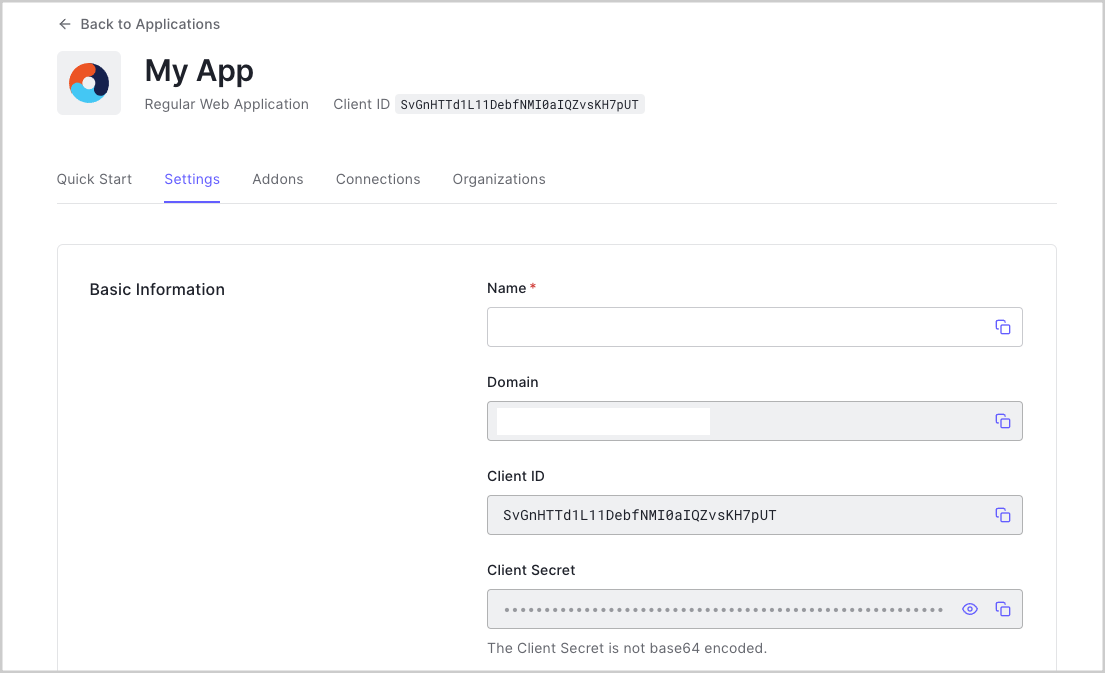
      ### Get Your Application Keys

      When you signed up for Auth0, a new application was created for you, or you could have created a new one. You
      will need some details about that application to communicate with Auth0. You can get these details from the [Application
      Settings](https://manage.auth0.com/#/applications) section in the Auth0 dashboard.

      <Frame>
        <img src="https://mintcdn.com/docs-staging-quickstart-revamp/AmyDKn5Na0kFZtbL/images/cdy7uua7fh8z/1NtemqhRTHLFgWkGyAVSC6/ae66506a56ffab891e8a36e1344e6376/uwp.png?fit=max&auto=format&n=AmyDKn5Na0kFZtbL&q=85&s=7f0a59b62159be8fcdec58bb8fe3c1ba" width="1105" height="673" data-path="images/cdy7uua7fh8z/1NtemqhRTHLFgWkGyAVSC6/ae66506a56ffab891e8a36e1344e6376/uwp.png" />
      </Frame>

      You need the following information:

      * **Domain**
      * **Client ID**
      * **Client Secret**

      <Info>
        If you download the sample from the top of this page, these details are filled out for you.
      </Info>

      ### Configure Callback URLs

      A callback URL is a URL in your application where Auth0 redirects the user after they have authenticated. The
      callback URL for your app must be added to the **Allowed Callback URLs** field in your [Application
      Settings](https://manage.auth0.com/#/applications). If this field is not set, users will be unable to log in to the application and will get an error.

      <Info>
        If you are following along with the sample project you downloaded from the top of this page, the
        callback URL you need to add to the **Allowed Callback URLs** field is
        `http://localhost:3000/callback`.
      </Info>

      ### Configure Logout URLs

      A logout URL is a URL in your application that Auth0 can return to after the user has been logged out of the
      authorization server. This is specified in the `returnTo` query parameter. The logout URL for your app
      must be added to the **Allowed Logout URLs** field in your [Application Settings](https://manage.auth0.com/#/applications). If this field is not set, users will be
      unable to log out from the application and will get an error.

      <Info>
        If you are following along with the sample project you downloaded from the top of this page, the logout
        URL you need to add to the **Allowed Logout URLs** field is `http://localhost:3000/`.
      </Info>
    </Section>

    <Section id={sections[2].id} title={sections[2].title} stepNumber="3">
      ### Set up dependencies

      To integrate your Java EE application with Auth0, add the following dependencies:

      * **javax.javaee-api**: The Java EE 8 API necessary to write applications using Java EE 8. The actual
        implementation is provided by the application container, so it does not need to be included in the WAR file.
      * **javax.security.enterprise**: The Java EE 8 Security API that enables handling security concerns in an EE
        application. Like the `javax.javaee-api` dependency, the implementation is provided by the
        application container, so is not included in the WAR file.
      * **auth0-java-mvc-commons**: The [Auth0 Java MVC SDK](https://github.com/auth0/auth0-java-mvc-common) allows you to use Auth0 with Java for server-side MVC web
        applications. It generates the Authorize URL that your application needs to call in order to authenticate a
        user using Auth0.

      If you are using Maven, add these dependencies to your `pom.xml`:

      ```xml lines
      <!-- pom.xml -->
      <dependency>
      <groupId>com.auth0</groupId>
      <artifactId>mvc-auth-commons</artifactId>
      <version>[1.0, 2.0)</version>
      </dependency>
      <dependency>
      <groupId>javax</groupId>
      <artifactId>javaee-api</artifactId>
      <version>8.0.1</version>
      <scope>provided</scope>
      </dependency>
      <dependency>
      <groupId>javax.security.enterprise</groupId>
      <artifactId>javax.security.enterprise-api</artifactId>
      <version>1.0</version>
      <scope>provided</scope>
      </dependency>
      ```

      If you are using Gradle, add them to your `build.gradle`:

      ```java lines
      // build.gradle
      providedCompile 'javax:javaee-api:8.0.1'
      providedCompile 'javax.security.enterprise:javax.security.enterprise-api:1.0'
      implementation 'com.auth0:mvc-auth-commons:1. '
      ```

      ### Configure your Java EE application

      <Info>
        The sample that accompanies this tutorial is written using JSP and tested with the [WildFly](https://wildfly.org/) application server.
        You may need to adjust some of the steps if you working with a different application container or
        technologies.
      </Info>

      Your Java EE application needs some information in order to authenticate users with your Auth0 application. The
      deployment descriptor `web.xml`file can be used to store this information, though you could store them
      in a different secured location.

      This information will be used to configure the **auth0-java-mvc-commons** library to enable users to login to
      your application. To learn more about the library, including its various configuration options, see the [README](https://github.com/auth0/auth0-java-mvc-common/blob/master/README.md) of the library.
    </Section>

    <Section id={sections[3].id} title={sections[3].title} stepNumber="4">
      The Java EE 8 Security API introduced the `HttpAuthenticationMechanism` interface to enable
      applications to obtain a user's credentials. Default implementations exist for Basic and form-based
      authentication, and it provides an easy way to configure a custom authentication strategy.

      To authenticate with Auth0, provide custom implementations of the following interfaces:

      * HttpAuthenticationMechanism: Responsible for handling the authentication workflow for users returning from
        Auth0. ([JavaDoc](https://javaee.github.io/javaee-spec/javadocs/javax/security/enterprise/authentication/mechanism/http/HttpAuthenticationMechanism.html)).
      * IdentityStore: Responsible for validating the user's credentials ([JavaDoc](https://javaee.github.io/javaee-spec/javadocs/javax/security/enterprise/identitystore/IdentityStore.html)).
      * CallerPrincipal: Represents the caller principal of the current HTTP request ([JavaDoc](https://javaee.github.io/javaee-spec/javadocs/javax/security/enterprise/CallerPrincipal.html)).
      * Credential: Represents the credential the caller will use to authenticate ([JavaDoc](https://javaee.github.io/javaee-spec/javadocs/javax/security/enterprise/credential/Credential.html)).

      First, make your Auth0 settings available to the application by creating an @ApplicationScoped bean to retrieve
      the values from the web context and make them available via getters.

      Next, create a custom `CallerPrincipal` that represents the caller of the current request:

      ```java lines
      // src/main/java/com/auth0/example/security/Auth0JwtPrincipal.java
      public class Auth0JwtPrincipal extends CallerPrincipal {
      private final DecodedJWT idToken;


      Auth0JwtPrincipal(DecodedJWT idToken) {

          super(idToken.getClaim(&quot;name&quot;).asString());

          this.idToken = idToken;

      }


      public DecodedJWT getIdToken() {

          return this.idToken;

      }

      }
      ```

      You can now implement a custom `Credential` that will be used to represent the user's credentials. It
      will hold information about the principal:

      ```java lines
      // src/main/java/com/auth0/example/security/Auth0JwtCredential.java
      class Auth0JwtCredential implements Credential {
      private Auth0JwtPrincipal auth0JwtPrincipal;


      Auth0JwtCredential(String token) {

          DecodedJWT decodedJWT = JWT.decode(token);

          this.auth0JwtPrincipal = new Auth0JwtPrincipal(decodedJWT);

      }


      Auth0JwtPrincipal getAuth0JwtPrincipal() {

          return auth0JwtPrincipal;

      }

      }
      ```

      You now have defined the classes that represent a calling principal and credential. Next, create a custom
      implementation of `IdentityStore`. This class will be responsible for validating the user's
      credentials:

      ```java lines
      // src/main/java/com/auth0/example/security/Auth0JwtIdentityStore.java
      @ApplicationScoped
      public class Auth0JwtIdentityStore implements IdentityStore {
      @Override

      public CredentialValidationResult validate(final Credential credential) {

          CredentialValidationResult result = CredentialValidationResult.NOT_VALIDATED_RESULT;

          if (credential instanceof Auth0JwtCredential) {

              Auth0JwtCredential auth0JwtCredential = (Auth0JwtCredential) credential;

              result = new CredentialValidationResult(auth0JwtCredential.getAuth0JwtPrincipal());

          }

          return result;

      }

      }
      ```

      If the `credential` is an `Auth0Credential`, the calling user is authenticated and valid,
      so a `CredentialValidationResult` created with the credential is returned to indicate success. If it is
      not an `Auth0Credential`, return `CredentialValidationResult.NOT_VALIDATED_RESULT`.

      Before implementing the `HttpAuthenticationMechanism` interface that will use all these collaborators,
      create a bean that will provide a configured instance of the `AuthenticationController` from the Auth0
      Java MVC SDK. The `AuthenticationController` is used to build the authorization URL where users will
      login, and handle the token exchange to authenticate users.

      * If your Auth0 Application is configured to use the \*\*RS256 signing algorithm \*\*(the default when creating
        a new Auth0 Application), you need to configure a `JwkProvider`to fetch the public key used to
        verify the token's signature. See the [jwks-rsa-java repository](https://github.com/auth0/jwks-rsa-java) to learn about additional configuration options.
      * If your Auth0 Application is configured to use the **HS256 signing algorithm**, there is no need to
        configure the `JwkProvider`.

      <Info>
        To learn more about the available signing algorithms, refer to the [documentation](https://auth0.com/docs/tokens/concepts/signing-algorithms).
      </Info>

      The sample below shows how to configure the `AuthenticationController` for use with the **RS256
      signing algorithm**:

      ```java lines
      // src/main/java/com/auth0/example/security/Auth0AuthenticationProvider.java
      @ApplicationScoped
      public class Auth0AuthenticationProvider {
      @Produces

      public AuthenticationController authenticationController(Auth0AuthenticationConfig config) {

          JwkProvider jwkProvider = new JwkProviderBuilder(config.getDomain()).build();

          return AuthenticationController.newBuilder(config.getDomain(), config.getClientId(), config.getClientSecret())

                  .withJwkProvider(jwkProvider)

                  .build();

      }

      }
      ```

      Finally, implement a custom `HttpAuthenticationMechanism`

      \`\`

      ```java lines expandable
      // src/main/java/com/auth0/example/security/Auth0AuthenticationMechanism.java
      @ApplicationScoped
      @AutoApplySession
      public class Auth0AuthenticationMechanism implements HttpAuthenticationMechanism {
      private final AuthenticationController authenticationController;

      private final IdentityStoreHandler identityStoreHandler;


      @Inject

      Auth0AuthenticationMechanism(AuthenticationController authenticationController, IdentityStoreHandler identityStoreHandler) {

          this.authenticationController = authenticationController;

          this.identityStoreHandler = identityStoreHandler;

      }


      @Override

      public AuthenticationStatus validateRequest(HttpServletRequest httpServletRequest,

                                                  HttpServletResponse httpServletResponse,

                                                  HttpMessageContext httpMessageContext) throws AuthenticationException {


          // Exchange the code for the ID token, and notify container of result.

          if (isCallbackRequest(httpServletRequest)) {

              try {

                  Tokens tokens = authenticationController.handle(httpServletRequest, httpServletResponse);

                  Auth0JwtCredential auth0JwtCredential = new Auth0JwtCredential(tokens.getIdToken());

                  CredentialValidationResult result = identityStoreHandler.validate(auth0JwtCredential);

                  return httpMessageContext.notifyContainerAboutLogin(result);

              } catch (IdentityVerificationException e) {

                  return httpMessageContext.responseUnauthorized();

              }

          }

          return httpMessageContext.doNothing();

      }


      private boolean isCallbackRequest(HttpServletRequest request) {

          return request.getRequestURI().equals(&quot;/callback&quot;) &amp;&amp; request.getParameter(&quot;code&quot;) != null;

      }

      }
      ```

      The class overrides the `validateRequest` method, which is called on every request to our application,
      and is responsible for notifying the container of the authentication status.

      This sample uses the [Authorization Code
      Flow](https://auth0.com/docs/flows/concepts/auth-code) to exchange an Authorization Code for a token during the authentication flow. If this request is to the
      `/callback` endpoint and contains the `code` request parameter, it does a few important
      things:

      * Calls the `handle`method of the `AuthenticationController`to exchange the
        Authorization Code for an ID token and an access token.
      * Uses the ID token to create a new `Auth0Credential`.
      * Calls the `validate`method of the custom `IdentityStore`implementation to obtain the
        validation result.
      * Notifies the application container of the login status.

      If the requested resource is not `/callback`, return `httpMessageContext.doNothing()` to
      allow the request processing to continue. You will see shortly how to use the authentication information when
      triggering authentication and displaying web views.

      Finally, note that the `@AutoApplySession` annotation has been added to allow the container to create
      a session for the authenticated user.
    </Section>

    <Section id={sections[4].id} title={sections[4].title} stepNumber="5">
      To enable a user to log in, create a Servlet that will handle requests to the `/login` path.

      The `LoginController` is responsible for redirecting the request to the proper authorization URL,
      where the user can authenticate with Auth0. It uses the `AuthenticationController` from the Auth0 Java
      MVC SDK to build the correct authorization URL, using the configuration values injected via
      `Auth0AuthenticationConfig`. By default, this sample requests the `"openid profile email"`
      scopes, to allow the application to retrieve basic profile information from the authenticated user. You can read
      more about these scopes in the [OpenID
      Connect Scopes](https://auth0.com/docs/scopes/current/oidc-scopes) documentation.

      Once the user has entered their credentials and authorized the requested permissions, Auth0 will issue a request
      to the `callbackUrl`, and include a `code` query parameter which can be exchanged for an ID
      token and an access token. Recall that the `Auth0HttpAuthenticationMechanism` created above handles
      this exchange so that it can notify the application container of authentication status. This allows the Servlet
      that handles requests to the `/callback` path to simply forward the request on to the originally
      requested resource prior to logging in, or simply redirect to the home page:

      ```java lines
      // src/main/com/auth0/example/web/CallbackServlet.java
      @WebServlet(urlPatterns = {"/callback"})
      public class CallbackServlet extends HttpServlet {
      @Override

      public void doGet(HttpServletRequest request, HttpServletResponse response) throws IOException {

          String referer = (String) request.getSession().getAttribute(&quot;Referer&quot;);

          String redirectTo = referer != null ? referer : &quot;/&quot;;


          response.sendRedirect(redirectTo);

      }

      }
      ```
    </Section>

    <Section id={sections[5].id} title={sections[5].title} stepNumber="6">
      You can use the `Auth0JwtPrincipal` to get profile information for the authenticated user. The
      `HomeServlet.java` code sample demonstrates how to use the claims on the [ID token](https://auth0.com/docs/tokens/id-token) to set profile data as a request
      attribute.

      You can then use that profile information in your view to display information about the user:

      ```xml lines

      <!-- src/main/webapp/WEB-INF/jsp/fragments/navbar.jspf -->
      <c:choose>
      <c:when test="{empty profile}">
      <li>
      <form action="/login" method="GET">
      <input type="submit" value="Login"/>
      </form>
      </li>
      </c:when>
      <c:otherwise>
      <li>
      <a href="#">
      <!-- Profile image should be set to the profile picture from the id token -->
      <img src="{profile.get('picture').asString()}" alt="Profile picture"/>
      </a>
      <div>
      <!-- Show the user's full name from the id token here -->
      <div>"{profile.get('name').asString()}"</div>
      <a href="/profile">Profile</a>
      <a href="/logout">Log out</a>
      </div>
      </li>
      </c:otherwise>
      </c:choose>
      ```
    </Section>

    <Section id={sections[6].id} title={sections[6].title} stepNumber="7">
      To log a user out, you should clear the application session and log the user out of Auth0. This is handled in the
      `LogoutServlet`.

      First, clear the session by calling `request.getSession().invalidate()`. Then construct the logout
      URL, being sure to include the `returnTo` query parameter, which is where the user will be redirected
      to after logging out. Finally, redirect the response to the application's logout URL.
    </Section>

    <Section id={sections[7].id} title={sections[7].title} stepNumber="8">
      To build and run the sample, execute the wildfly:run Maven goal to start an embedded WildFly application server
      with this application deployed to it. See the [WildFly Maven Plugin](https://docs.jboss.org/wildfly/plugins/maven/latest/) documentation for more information.

      If you are using Linux or MacOS:

      ```sh lines
      ./mvnw clean wildfly:run
      ```

      Windows:

      ```sh lines
      mvnw.cmd clean wildfly:run
      ```

      Point your browser to `http:``//localhost:3000.` Follow the **Log In** link to log in or
      sign up to your Auth0 tenant.

      Upon successful login, you will see the user's profile picture and a drop-down menu where the Log In link was.
      You can then view the user's profile page by clicking the **Profile** link. You can log out by clicking the
      **Logout** link in the drop-down menu.
    </Section>

    ## Next Steps

    Excellent work! If you made it this far, you should now have login, logout, and user profile information running in your application.

    This concludes our quickstart tutorial, but there is so much more to explore. To learn more about what you can do with Auth0, check out:

    * [Auth0 Dashboard](https://manage.auth0.com/dashboard/us/dev-gja8kxz4ndtex3rq) - Learn how to configure and manage your Auth0 tenant and applications
    * [auth0-java-mvc-common SDK](https://github.com/auth0/auth0-java-mvc-common) - Explore the SDK used in this tutorial more fully
    * [Auth0 Marketplace](https://marketplace.auth0.com/) - Discover integrations you can enable to extend Auth0’s functionality
  </Content>

  <SideMenu sections={sections}>
    <SideMenuSectionItem id={sections[0].id}>
      <SignUpForm />
    </SideMenuSectionItem>

    <SideMenuSectionItem id={sections[1].id}>
      <SignUpForm />
    </SideMenuSectionItem>

    <SideMenuSectionItem id={sections[2].id}>
      <CodeGroup>
        ```xml src/main/webapp/WEB-INF/web.xml lines
        <!-- `src/main/webapp/WEB-INF/web.xml`-->

        <env-entry>
            <env-entry-name>auth0.domain</env-entry-name>
            <env-entry-type>java.lang.String</env-entry-type>
            <env-entry-value>dev-gja8kxz4ndtex3rq.us.auth0.com</env-entry-value>
        </env-entry>
        <env-entry>
            <env-entry-name>auth0.clientId</env-entry-name>
            <env-entry-type>java.lang.String</env-entry-type>
            <env-entry-value>mz9iNEIo2PHu7oeh8QRt19ndTyyCIgai</env-entry-value>
        </env-entry>
        <env-entry>
            <env-entry-name>auth0.clientSecret</env-entry-name>
            <env-entry-type>java.lang.String</env-entry-type>
            <env-entry-value>yLTW7npKO4g1HHsCENiZbOaHHXLmhVefJxdNnXcyhOBOomZ2tgjJjSC2pMK7Swvr</env-entry-value>
        </env-entry>
        <env-entry>
            <env-entry-name>auth0.scope</env-entry-name>
            <env-entry-type>java.lang.String</env-entry-type>
            <env-entry-value>openid profile email</env-entry-value>
        </env-entry>
        ```

        ```java src/main/java/com/auth0/example/security/Auth0AuthenticationConfig.java lines 
        // src/main/java/com/auth0/example/security/Auth0AuthenticationConfig.java

        @ApplicationScoped
        public class Auth0AuthenticationConfig {

            private String domain;
            private String clientId;
            private String clientSecret;
            private String scope;

            @PostConstruct
            public void init() {
                // Get authentication config values from env-entries in web.xml
                try {
                    Context env = (Context)new InitialContext().lookup("java:comp/env");

                    this.domain = (String) env.lookup("auth0.domain");
                    this.clientId = (String) env.lookup("auth0.clientId");
                    this.clientSecret = (String) env.lookup("auth0.clientSecret");
                    this.scope = (String) env.lookup("auth0.scope");
                } catch (NamingException ne) {
                    throw new IllegalArgumentException("Unable to lookup auth0 configuration properties from web.xml", ne);
                }

                if (this.domain == null || this.clientId == null || this.clientSecret == null || this.scope == null) {
                    throw new IllegalArgumentException("domain, clientId, clientSecret, and scope must be set in web.xml");
                }
            }

            public String getDomain() {
                 return domain;
            }

            public String getClientId() {
                 return clientId;
            }

            public String getClientSecret() {
                 return clientSecret;
            }

            public String getScope() {
                return scope;
            }
        }
        ```

        ```java src/main/java/com/auth0/example/web/LoginServlet.java lines 
        // src/main/java/com/auth0/example/web/LoginServlet.java

        @WebServlet(urlPatterns = "/login")
        public class LoginServlet extends HttpServlet {
            private final Auth0AuthenticationConfig config;
            private final AuthenticationController authenticationController;

            @Inject
            LoginServlet(Auth0AuthenticationConfig config, AuthenticationController authenticationController) {
                this.config = config;
                this.authenticationController = authenticationController;
            }

            @Override
            public void doGet(HttpServletRequest request, HttpServletResponse response) throws ServletException, IOException {
                // URL where the application will receive the authorization code (e.g., http://localhost:3000/callback)
                String callbackUrl = String.format(
                        "%s://%s:%s/callback",
                        request.getScheme(),
                        request.getServerName(),
                        request.getServerPort()
                );

                // Create the authorization URL to redirect the user to, to begin the authentication flow.
                String authURL = authenticationController.buildAuthorizeUrl(request, response, callbackUrl)
                        .withScope(config.getScope())
                        .build();

                response.sendRedirect(authURL);
            }
        }
        ```

        ```java src/main/java/com/auth0/example/web/HomeServlet.java lines
        // src/main/java/com/auth0/example/web/HomeServlet.java

        @WebServlet(urlPatterns = "")
        public class HomeServlet extends HttpServlet {

            @Override
            public void doGet(HttpServletRequest request, HttpServletResponse response) throws ServletException, IOException {
                Principal principal = request.getUserPrincipal();

                if (principal instanceof Auth0JwtPrincipal) {
                    Auth0JwtPrincipal auth0JwtPrincipal = (Auth0JwtPrincipal) principal;
                    request.setAttribute("profile", auth0JwtPrincipal.getIdToken().getClaims());
                }
                request.getRequestDispatcher("/WEB-INF/jsp/home.jsp").forward(request, response);
            }
        }
        ```

        ```java src/main/java/com/auth0/example/web/LogoutServlet.java lines 
        // src/main/java/com/auth0/example/web/LogoutServlet.java

        @WebServlet(urlPatterns = "/logout")
        public class LogoutServlet extends HttpServlet {
            private final Auth0AuthenticationConfig config;

            @Inject
            LogoutServlet(Auth0AuthenticationConfig config) {
                this.config = config;
            }

            @Override
            protected void doGet(final HttpServletRequest request, final HttpServletResponse response) throws ServletException, IOException {
                clearSession(request);
                response.sendRedirect(getLogoutUrl(request));
            }

            private void clearSession(HttpServletRequest request) {
                if (request.getSession() != null) {
                    request.getSession().invalidate();
                }
            }

            private String getLogoutUrl(HttpServletRequest request) {
                String returnUrl = String.format("%s://%s", request.getScheme(), request.getServerName());
                int port = request.getServerPort();
                String scheme = request.getScheme();

                if (("http".equals(scheme) && port != 80) ||
                        ("https".equals(scheme) && port != 443)) {
                    returnUrl += ":" + port;
                }

                returnUrl += "/";

                // Build logout URL like:
                // https://dev-gja8kxz4ndtex3rq.us.auth0.com/v2/logout?client_id=mz9iNEIo2PHu7oeh8QRt19ndTyyCIgai&returnTo=http://localhost:3000/
                String logoutUrl = String.format(
                        "https://%s/v2/logout?client_id=%s&returnTo=%s",
                        config.getDomain(),
                        config.getClientId(),
                        returnUrl
                );

                return logoutUrl;
            }
        }
        ```
      </CodeGroup>
    </SideMenuSectionItem>

    <SideMenuSectionItem id={sections[3].id}>
      <CodeGroup>
        ```java src/main/java/com/auth0/example/security/Auth0AuthenticationConfig.java lines 
        // src/main/java/com/auth0/example/security/Auth0AuthenticationConfig.java

        @ApplicationScoped
        public class Auth0AuthenticationConfig {

            private String domain;
            private String clientId;
            private String clientSecret;
            private String scope;

            @PostConstruct
            public void init() {
                // Get authentication config values from env-entries in web.xml
                try {
                    Context env = (Context)new InitialContext().lookup("java:comp/env");

                    this.domain = (String) env.lookup("auth0.domain");
                    this.clientId = (String) env.lookup("auth0.clientId");
                    this.clientSecret = (String) env.lookup("auth0.clientSecret");
                    this.scope = (String) env.lookup("auth0.scope");
                } catch (NamingException ne) {
                    throw new IllegalArgumentException("Unable to lookup auth0 configuration properties from web.xml", ne);
                }

                if (this.domain == null || this.clientId == null || this.clientSecret == null || this.scope == null) {
                    throw new IllegalArgumentException("domain, clientId, clientSecret, and scope must be set in web.xml");
                }
            }

            public String getDomain() {
                 return domain;
            }

            public String getClientId() {
                 return clientId;
            }

            public String getClientSecret() {
                 return clientSecret;
            }

            public String getScope() {
                return scope;
            }
        }
        ```

        ```xml src/main/webapp/WEB-INF/web.xml lines
        <!-- `src/main/webapp/WEB-INF/web.xml`-->

        <env-entry>
            <env-entry-name>auth0.domain</env-entry-name>
            <env-entry-type>java.lang.String</env-entry-type>
            <env-entry-value>dev-gja8kxz4ndtex3rq.us.auth0.com</env-entry-value>
        </env-entry>
        <env-entry>
            <env-entry-name>auth0.clientId</env-entry-name>
            <env-entry-type>java.lang.String</env-entry-type>
            <env-entry-value>mz9iNEIo2PHu7oeh8QRt19ndTyyCIgai</env-entry-value>
        </env-entry>
        <env-entry>
            <env-entry-name>auth0.clientSecret</env-entry-name>
            <env-entry-type>java.lang.String</env-entry-type>
            <env-entry-value>yLTW7npKO4g1HHsCENiZbOaHHXLmhVefJxdNnXcyhOBOomZ2tgjJjSC2pMK7Swvr</env-entry-value>
        </env-entry>
        <env-entry>
            <env-entry-name>auth0.scope</env-entry-name>
            <env-entry-type>java.lang.String</env-entry-type>
            <env-entry-value>openid profile email</env-entry-value>
        </env-entry>
        ```

        ```java src/main/java/com/auth0/example/web/LoginServlet.java lines 
        // src/main/java/com/auth0/example/web/LoginServlet.java

        @WebServlet(urlPatterns = "/login")
        public class LoginServlet extends HttpServlet {
            private final Auth0AuthenticationConfig config;
            private final AuthenticationController authenticationController;

            @Inject
            LoginServlet(Auth0AuthenticationConfig config, AuthenticationController authenticationController) {
                this.config = config;
                this.authenticationController = authenticationController;
            }

            @Override
            public void doGet(HttpServletRequest request, HttpServletResponse response) throws ServletException, IOException {
                // URL where the application will receive the authorization code (e.g., http://localhost:3000/callback)
                String callbackUrl = String.format(
                        "%s://%s:%s/callback",
                        request.getScheme(),
                        request.getServerName(),
                        request.getServerPort()
                );

                // Create the authorization URL to redirect the user to, to begin the authentication flow.
                String authURL = authenticationController.buildAuthorizeUrl(request, response, callbackUrl)
                        .withScope(config.getScope())
                        .build();

                response.sendRedirect(authURL);
            }
        }
        ```

        ```java src/main/java/com/auth0/example/web/HomeServlet.java lines
        // src/main/java/com/auth0/example/web/HomeServlet.java

        @WebServlet(urlPatterns = "")
        public class HomeServlet extends HttpServlet {

            @Override
            public void doGet(HttpServletRequest request, HttpServletResponse response) throws ServletException, IOException {
                Principal principal = request.getUserPrincipal();

                if (principal instanceof Auth0JwtPrincipal) {
                    Auth0JwtPrincipal auth0JwtPrincipal = (Auth0JwtPrincipal) principal;
                    request.setAttribute("profile", auth0JwtPrincipal.getIdToken().getClaims());
                }
                request.getRequestDispatcher("/WEB-INF/jsp/home.jsp").forward(request, response);
            }
        }
        ```

        ```java src/main/java/com/auth0/example/web/LogoutServlet.java lines 
        // src/main/java/com/auth0/example/web/LogoutServlet.java

        @WebServlet(urlPatterns = "/logout")
        public class LogoutServlet extends HttpServlet {
            private final Auth0AuthenticationConfig config;

            @Inject
            LogoutServlet(Auth0AuthenticationConfig config) {
                this.config = config;
            }

            @Override
            protected void doGet(final HttpServletRequest request, final HttpServletResponse response) throws ServletException, IOException {
                clearSession(request);
                response.sendRedirect(getLogoutUrl(request));
            }

            private void clearSession(HttpServletRequest request) {
                if (request.getSession() != null) {
                    request.getSession().invalidate();
                }
            }

            private String getLogoutUrl(HttpServletRequest request) {
                String returnUrl = String.format("%s://%s", request.getScheme(), request.getServerName());
                int port = request.getServerPort();
                String scheme = request.getScheme();

                if (("http".equals(scheme) && port != 80) ||
                        ("https".equals(scheme) && port != 443)) {
                    returnUrl += ":" + port;
                }

                returnUrl += "/";

                // Build logout URL like:
                // https://dev-gja8kxz4ndtex3rq.us.auth0.com/v2/logout?client_id=mz9iNEIo2PHu7oeh8QRt19ndTyyCIgai&returnTo=http://localhost:3000/
                String logoutUrl = String.format(
                        "https://%s/v2/logout?client_id=%s&returnTo=%s",
                        config.getDomain(),
                        config.getClientId(),
                        returnUrl
                );

                return logoutUrl;
            }
        }
        ```
      </CodeGroup>
    </SideMenuSectionItem>

    <SideMenuSectionItem id={sections[4].id}>
      <CodeGroup>
        ```java src/main/java/com/auth0/example/web/LoginServlet.java lines 
        // src/main/java/com/auth0/example/web/LoginServlet.java

        @WebServlet(urlPatterns = "/login")
        public class LoginServlet extends HttpServlet {
            private final Auth0AuthenticationConfig config;
            private final AuthenticationController authenticationController;

            @Inject
            LoginServlet(Auth0AuthenticationConfig config, AuthenticationController authenticationController) {
                this.config = config;
                this.authenticationController = authenticationController;
            }

            @Override
            public void doGet(HttpServletRequest request, HttpServletResponse response) throws ServletException, IOException {
                // URL where the application will receive the authorization code (e.g., http://localhost:3000/callback)
                String callbackUrl = String.format(
                        "%s://%s:%s/callback",
                        request.getScheme(),
                        request.getServerName(),
                        request.getServerPort()
                );

                // Create the authorization URL to redirect the user to, to begin the authentication flow.
                String authURL = authenticationController.buildAuthorizeUrl(request, response, callbackUrl)
                        .withScope(config.getScope())
                        .build();

                response.sendRedirect(authURL);
            }
        }
        ```

        ```xml src/main/webapp/WEB-INF/web.xml lines
        <!-- `src/main/webapp/WEB-INF/web.xml`-->

        <env-entry>
            <env-entry-name>auth0.domain</env-entry-name>
            <env-entry-type>java.lang.String</env-entry-type>
            <env-entry-value>dev-gja8kxz4ndtex3rq.us.auth0.com</env-entry-value>
        </env-entry>
        <env-entry>
            <env-entry-name>auth0.clientId</env-entry-name>
            <env-entry-type>java.lang.String</env-entry-type>
            <env-entry-value>mz9iNEIo2PHu7oeh8QRt19ndTyyCIgai</env-entry-value>
        </env-entry>
        <env-entry>
            <env-entry-name>auth0.clientSecret</env-entry-name>
            <env-entry-type>java.lang.String</env-entry-type>
            <env-entry-value>yLTW7npKO4g1HHsCENiZbOaHHXLmhVefJxdNnXcyhOBOomZ2tgjJjSC2pMK7Swvr</env-entry-value>
        </env-entry>
        <env-entry>
            <env-entry-name>auth0.scope</env-entry-name>
            <env-entry-type>java.lang.String</env-entry-type>
            <env-entry-value>openid profile email</env-entry-value>
        </env-entry>
        ```

        ```java src/main/java/com/auth0/example/security/Auth0AuthenticationConfig.java lines 
        // src/main/java/com/auth0/example/security/Auth0AuthenticationConfig.java

        @ApplicationScoped
        public class Auth0AuthenticationConfig {

            private String domain;
            private String clientId;
            private String clientSecret;
            private String scope;

            @PostConstruct
            public void init() {
                // Get authentication config values from env-entries in web.xml
                try {
                    Context env = (Context)new InitialContext().lookup("java:comp/env");

                    this.domain = (String) env.lookup("auth0.domain");
                    this.clientId = (String) env.lookup("auth0.clientId");
                    this.clientSecret = (String) env.lookup("auth0.clientSecret");
                    this.scope = (String) env.lookup("auth0.scope");
                } catch (NamingException ne) {
                    throw new IllegalArgumentException("Unable to lookup auth0 configuration properties from web.xml", ne);
                }

                if (this.domain == null || this.clientId == null || this.clientSecret == null || this.scope == null) {
                    throw new IllegalArgumentException("domain, clientId, clientSecret, and scope must be set in web.xml");
                }
            }

            public String getDomain() {
                 return domain;
            }

            public String getClientId() {
                 return clientId;
            }

            public String getClientSecret() {
                 return clientSecret;
            }

            public String getScope() {
                return scope;
            }
        }
        ```

        ```java src/main/java/com/auth0/example/web/HomeServlet.java lines
        // src/main/java/com/auth0/example/web/HomeServlet.java

        @WebServlet(urlPatterns = "")
        public class HomeServlet extends HttpServlet {

            @Override
            public void doGet(HttpServletRequest request, HttpServletResponse response) throws ServletException, IOException {
                Principal principal = request.getUserPrincipal();

                if (principal instanceof Auth0JwtPrincipal) {
                    Auth0JwtPrincipal auth0JwtPrincipal = (Auth0JwtPrincipal) principal;
                    request.setAttribute("profile", auth0JwtPrincipal.getIdToken().getClaims());
                }
                request.getRequestDispatcher("/WEB-INF/jsp/home.jsp").forward(request, response);
            }
        }
        ```

        ```java src/main/java/com/auth0/example/web/LogoutServlet.java lines 
        // src/main/java/com/auth0/example/web/LogoutServlet.java

        @WebServlet(urlPatterns = "/logout")
        public class LogoutServlet extends HttpServlet {
            private final Auth0AuthenticationConfig config;

            @Inject
            LogoutServlet(Auth0AuthenticationConfig config) {
                this.config = config;
            }

            @Override
            protected void doGet(final HttpServletRequest request, final HttpServletResponse response) throws ServletException, IOException {
                clearSession(request);
                response.sendRedirect(getLogoutUrl(request));
            }

            private void clearSession(HttpServletRequest request) {
                if (request.getSession() != null) {
                    request.getSession().invalidate();
                }
            }

            private String getLogoutUrl(HttpServletRequest request) {
                String returnUrl = String.format("%s://%s", request.getScheme(), request.getServerName());
                int port = request.getServerPort();
                String scheme = request.getScheme();

                if (("http".equals(scheme) && port != 80) ||
                        ("https".equals(scheme) && port != 443)) {
                    returnUrl += ":" + port;
                }

                returnUrl += "/";

                // Build logout URL like:
                // https://dev-gja8kxz4ndtex3rq.us.auth0.com/v2/logout?client_id=mz9iNEIo2PHu7oeh8QRt19ndTyyCIgai&returnTo=http://localhost:3000/
                String logoutUrl = String.format(
                        "https://%s/v2/logout?client_id=%s&returnTo=%s",
                        config.getDomain(),
                        config.getClientId(),
                        returnUrl
                );

                return logoutUrl;
            }
        }
        ```
      </CodeGroup>
    </SideMenuSectionItem>

    <SideMenuSectionItem id={sections[5].id}>
      <CodeGroup>
        ```java src/main/java/com/auth0/example/web/HomeServlet.java lines
        // src/main/java/com/auth0/example/web/HomeServlet.java

        @WebServlet(urlPatterns = "")
        public class HomeServlet extends HttpServlet {

            @Override
            public void doGet(HttpServletRequest request, HttpServletResponse response) throws ServletException, IOException {
                Principal principal = request.getUserPrincipal();

                if (principal instanceof Auth0JwtPrincipal) {
                    Auth0JwtPrincipal auth0JwtPrincipal = (Auth0JwtPrincipal) principal;
                    request.setAttribute("profile", auth0JwtPrincipal.getIdToken().getClaims());
                }
                request.getRequestDispatcher("/WEB-INF/jsp/home.jsp").forward(request, response);
            }
        }
        ```

        ```xml src/main/webapp/WEB-INF/web.xml lines
        <!-- `src/main/webapp/WEB-INF/web.xml`-->

        <env-entry>
            <env-entry-name>auth0.domain</env-entry-name>
            <env-entry-type>java.lang.String</env-entry-type>
            <env-entry-value>dev-gja8kxz4ndtex3rq.us.auth0.com</env-entry-value>
        </env-entry>
        <env-entry>
            <env-entry-name>auth0.clientId</env-entry-name>
            <env-entry-type>java.lang.String</env-entry-type>
            <env-entry-value>mz9iNEIo2PHu7oeh8QRt19ndTyyCIgai</env-entry-value>
        </env-entry>
        <env-entry>
            <env-entry-name>auth0.clientSecret</env-entry-name>
            <env-entry-type>java.lang.String</env-entry-type>
            <env-entry-value>yLTW7npKO4g1HHsCENiZbOaHHXLmhVefJxdNnXcyhOBOomZ2tgjJjSC2pMK7Swvr</env-entry-value>
        </env-entry>
        <env-entry>
            <env-entry-name>auth0.scope</env-entry-name>
            <env-entry-type>java.lang.String</env-entry-type>
            <env-entry-value>openid profile email</env-entry-value>
        </env-entry>
        ```

        ```java src/main/java/com/auth0/example/security/Auth0AuthenticationConfig.java lines 
        // src/main/java/com/auth0/example/security/Auth0AuthenticationConfig.java

        @ApplicationScoped
        public class Auth0AuthenticationConfig {

            private String domain;
            private String clientId;
            private String clientSecret;
            private String scope;

            @PostConstruct
            public void init() {
                // Get authentication config values from env-entries in web.xml
                try {
                    Context env = (Context)new InitialContext().lookup("java:comp/env");

                    this.domain = (String) env.lookup("auth0.domain");
                    this.clientId = (String) env.lookup("auth0.clientId");
                    this.clientSecret = (String) env.lookup("auth0.clientSecret");
                    this.scope = (String) env.lookup("auth0.scope");
                } catch (NamingException ne) {
                    throw new IllegalArgumentException("Unable to lookup auth0 configuration properties from web.xml", ne);
                }

                if (this.domain == null || this.clientId == null || this.clientSecret == null || this.scope == null) {
                    throw new IllegalArgumentException("domain, clientId, clientSecret, and scope must be set in web.xml");
                }
            }

            public String getDomain() {
                 return domain;
            }

            public String getClientId() {
                 return clientId;
            }

            public String getClientSecret() {
                 return clientSecret;
            }

            public String getScope() {
                return scope;
            }
        }
        ```

        ```java src/main/java/com/auth0/example/web/LoginServlet.java lines 
        // src/main/java/com/auth0/example/web/LoginServlet.java

        @WebServlet(urlPatterns = "/login")
        public class LoginServlet extends HttpServlet {
            private final Auth0AuthenticationConfig config;
            private final AuthenticationController authenticationController;

            @Inject
            LoginServlet(Auth0AuthenticationConfig config, AuthenticationController authenticationController) {
                this.config = config;
                this.authenticationController = authenticationController;
            }

            @Override
            public void doGet(HttpServletRequest request, HttpServletResponse response) throws ServletException, IOException {
                // URL where the application will receive the authorization code (e.g., http://localhost:3000/callback)
                String callbackUrl = String.format(
                        "%s://%s:%s/callback",
                        request.getScheme(),
                        request.getServerName(),
                        request.getServerPort()
                );

                // Create the authorization URL to redirect the user to, to begin the authentication flow.
                String authURL = authenticationController.buildAuthorizeUrl(request, response, callbackUrl)
                        .withScope(config.getScope())
                        .build();

                response.sendRedirect(authURL);
            }
        }
        ```

        ```java src/main/java/com/auth0/example/web/LogoutServlet.java lines 
        // src/main/java/com/auth0/example/web/LogoutServlet.java

        @WebServlet(urlPatterns = "/logout")
        public class LogoutServlet extends HttpServlet {
            private final Auth0AuthenticationConfig config;

            @Inject
            LogoutServlet(Auth0AuthenticationConfig config) {
                this.config = config;
            }

            @Override
            protected void doGet(final HttpServletRequest request, final HttpServletResponse response) throws ServletException, IOException {
                clearSession(request);
                response.sendRedirect(getLogoutUrl(request));
            }

            private void clearSession(HttpServletRequest request) {
                if (request.getSession() != null) {
                    request.getSession().invalidate();
                }
            }

            private String getLogoutUrl(HttpServletRequest request) {
                String returnUrl = String.format("%s://%s", request.getScheme(), request.getServerName());
                int port = request.getServerPort();
                String scheme = request.getScheme();

                if (("http".equals(scheme) && port != 80) ||
                        ("https".equals(scheme) && port != 443)) {
                    returnUrl += ":" + port;
                }

                returnUrl += "/";

                // Build logout URL like:
                // https://dev-gja8kxz4ndtex3rq.us.auth0.com/v2/logout?client_id=mz9iNEIo2PHu7oeh8QRt19ndTyyCIgai&returnTo=http://localhost:3000/
                String logoutUrl = String.format(
                        "https://%s/v2/logout?client_id=%s&returnTo=%s",
                        config.getDomain(),
                        config.getClientId(),
                        returnUrl
                );

                return logoutUrl;
            }
        }
        ```
      </CodeGroup>
    </SideMenuSectionItem>

    <SideMenuSectionItem id={sections[6].id}>
      <CodeGroup>
        ```java src/main/java/com/auth0/example/web/LogoutServlet.java lines 
        // src/main/java/com/auth0/example/web/LogoutServlet.java

        @WebServlet(urlPatterns = "/logout")
        public class LogoutServlet extends HttpServlet {
            private final Auth0AuthenticationConfig config;

            @Inject
            LogoutServlet(Auth0AuthenticationConfig config) {
                this.config = config;
            }

            @Override
            protected void doGet(final HttpServletRequest request, final HttpServletResponse response) throws ServletException, IOException {
                clearSession(request);
                response.sendRedirect(getLogoutUrl(request));
            }

            private void clearSession(HttpServletRequest request) {
                if (request.getSession() != null) {
                    request.getSession().invalidate();
                }
            }

            private String getLogoutUrl(HttpServletRequest request) {
                String returnUrl = String.format("%s://%s", request.getScheme(), request.getServerName());
                int port = request.getServerPort();
                String scheme = request.getScheme();

                if (("http".equals(scheme) && port != 80) ||
                        ("https".equals(scheme) && port != 443)) {
                    returnUrl += ":" + port;
                }

                returnUrl += "/";

                // Build logout URL like:
                // https://dev-gja8kxz4ndtex3rq.us.auth0.com/v2/logout?client_id=mz9iNEIo2PHu7oeh8QRt19ndTyyCIgai&returnTo=http://localhost:3000/
                String logoutUrl = String.format(
                        "https://%s/v2/logout?client_id=%s&returnTo=%s",
                        config.getDomain(),
                        config.getClientId(),
                        returnUrl
                );

                return logoutUrl;
            }
        }
        ```

        ```xml src/main/webapp/WEB-INF/web.xml lines
        <!-- `src/main/webapp/WEB-INF/web.xml`-->

        <env-entry>
            <env-entry-name>auth0.domain</env-entry-name>
            <env-entry-type>java.lang.String</env-entry-type>
            <env-entry-value>dev-gja8kxz4ndtex3rq.us.auth0.com</env-entry-value>
        </env-entry>
        <env-entry>
            <env-entry-name>auth0.clientId</env-entry-name>
            <env-entry-type>java.lang.String</env-entry-type>
            <env-entry-value>mz9iNEIo2PHu7oeh8QRt19ndTyyCIgai</env-entry-value>
        </env-entry>
        <env-entry>
            <env-entry-name>auth0.clientSecret</env-entry-name>
            <env-entry-type>java.lang.String</env-entry-type>
            <env-entry-value>yLTW7npKO4g1HHsCENiZbOaHHXLmhVefJxdNnXcyhOBOomZ2tgjJjSC2pMK7Swvr</env-entry-value>
        </env-entry>
        <env-entry>
            <env-entry-name>auth0.scope</env-entry-name>
            <env-entry-type>java.lang.String</env-entry-type>
            <env-entry-value>openid profile email</env-entry-value>
        </env-entry>
        ```

        ```java src/main/java/com/auth0/example/security/Auth0AuthenticationConfig.java lines 
        // src/main/java/com/auth0/example/security/Auth0AuthenticationConfig.java

        @ApplicationScoped
        public class Auth0AuthenticationConfig {

            private String domain;
            private String clientId;
            private String clientSecret;
            private String scope;

            @PostConstruct
            public void init() {
                // Get authentication config values from env-entries in web.xml
                try {
                    Context env = (Context)new InitialContext().lookup("java:comp/env");

                    this.domain = (String) env.lookup("auth0.domain");
                    this.clientId = (String) env.lookup("auth0.clientId");
                    this.clientSecret = (String) env.lookup("auth0.clientSecret");
                    this.scope = (String) env.lookup("auth0.scope");
                } catch (NamingException ne) {
                    throw new IllegalArgumentException("Unable to lookup auth0 configuration properties from web.xml", ne);
                }

                if (this.domain == null || this.clientId == null || this.clientSecret == null || this.scope == null) {
                    throw new IllegalArgumentException("domain, clientId, clientSecret, and scope must be set in web.xml");
                }
            }

            public String getDomain() {
                 return domain;
            }

            public String getClientId() {
                 return clientId;
            }

            public String getClientSecret() {
                 return clientSecret;
            }

            public String getScope() {
                return scope;
            }
        }
        ```

        ```java src/main/java/com/auth0/example/web/LoginServlet.java lines 
        // src/main/java/com/auth0/example/web/LoginServlet.java

        @WebServlet(urlPatterns = "/login")
        public class LoginServlet extends HttpServlet {
            private final Auth0AuthenticationConfig config;
            private final AuthenticationController authenticationController;

            @Inject
            LoginServlet(Auth0AuthenticationConfig config, AuthenticationController authenticationController) {
                this.config = config;
                this.authenticationController = authenticationController;
            }

            @Override
            public void doGet(HttpServletRequest request, HttpServletResponse response) throws ServletException, IOException {
                // URL where the application will receive the authorization code (e.g., http://localhost:3000/callback)
                String callbackUrl = String.format(
                        "%s://%s:%s/callback",
                        request.getScheme(),
                        request.getServerName(),
                        request.getServerPort()
                );

                // Create the authorization URL to redirect the user to, to begin the authentication flow.
                String authURL = authenticationController.buildAuthorizeUrl(request, response, callbackUrl)
                        .withScope(config.getScope())
                        .build();

                response.sendRedirect(authURL);
            }
        }
        ```

        ```java src/main/java/com/auth0/example/web/HomeServlet.java lines
        // src/main/java/com/auth0/example/web/HomeServlet.java

        @WebServlet(urlPatterns = "")
        public class HomeServlet extends HttpServlet {

            @Override
            public void doGet(HttpServletRequest request, HttpServletResponse response) throws ServletException, IOException {
                Principal principal = request.getUserPrincipal();

                if (principal instanceof Auth0JwtPrincipal) {
                    Auth0JwtPrincipal auth0JwtPrincipal = (Auth0JwtPrincipal) principal;
                    request.setAttribute("profile", auth0JwtPrincipal.getIdToken().getClaims());
                }
                request.getRequestDispatcher("/WEB-INF/jsp/home.jsp").forward(request, response);
            }
        }
        ```
      </CodeGroup>
    </SideMenuSectionItem>

    <SideMenuSectionItem id={sections[7].id}>
      <SignUpForm />
    </SideMenuSectionItem>
  </SideMenu>
</Recipe>