> ## Documentation Index
> Fetch the complete documentation index at: https://docs-staging-quickstart-revamp.mintlify.site/llms.txt
> Use this file to discover all available pages before exploring further.
> Learn how to view permissions assigned to a user using the Auth0 Dashboard and Management API.
# View User Permissions
You can view the [permissions](/docs/manage-users/access-control/rbac) assigned to a user using the Auth0 Dashboard. This task can also be performed using the Management API. The assigned permissions are used with the API Authorization Core feature set.
## Prerequisites
For role-based access control (RBAC) to work properly, you must enable it for your API using either the Dashboard or the Management API. The Authorization Core functionality is different from the Authorization Extension. For a comparison, read [Authorization Core vs. Authorization Extension](/docs/manage-users/access-control/authorization-core-vs-authorization-extension).
## Dashboard
1. Go to [Dashboard > Manage Users > Users](https://manage.auth0.com/#/users) and click the name of the user to view.
2. Click the **Permissions** view.
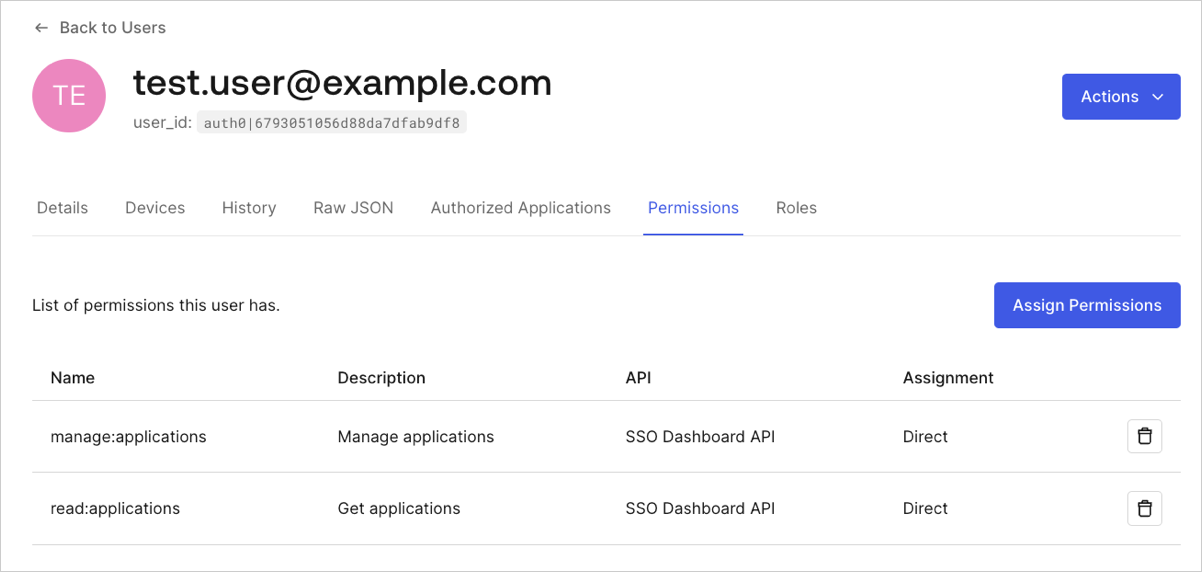 The following information is displayed for each permission:
| Column | Description |
| ----------- | -------------------------------------------------------------------------------------------- |
| Name | Name of the permission from the permission definition. |
| Description | Description of the permission from the permission definition. |
| API | Name of the API to which the permission is attached. |
| Assignment | Indicates whether the permission is directly assigned to the user or is assigned via a role. |
## Management API
Make a `GET` call to the [Get User Permissions endpoint](https://auth0.com/docs/api/management/v2#!/Users/get_permissions). Be sure to replace `USER_ID` and `MGMT_API_ACCESS_TOKEN` placeholder values with your user ID and Management API access token, respectively.
```bash cURL lines
curl --request GET \
--url 'https://{yourDomain}/api/v2/users/USER_ID/permissions' \
--header 'authorization: Bearer MGMT_API_ACCESS_TOKEN'
```
```csharp C# lines
var client = new RestClient("https://{yourDomain}/api/v2/users/USER_ID/permissions");
var request = new RestRequest(Method.GET);
request.AddHeader("authorization", "Bearer MGMT_API_ACCESS_TOKEN");
IRestResponse response = client.Execute(request);
```
```go Go lines
package main
import (
"fmt"
"net/http"
"io/ioutil"
)
func main() {
url := "https://{yourDomain}/api/v2/users/USER_ID/permissions"
req, _ := http.NewRequest("GET", url, nil)
req.Header.Add("authorization", "Bearer MGMT_API_ACCESS_TOKEN")
res, _ := http.DefaultClient.Do(req)
defer res.Body.Close()
body, _ := ioutil.ReadAll(res.Body)
fmt.Println(res)
fmt.Println(string(body))
}
```
```java Java lines
HttpResponse response = Unirest.get("https://{yourDomain}/api/v2/users/USER_ID/permissions")
.header("authorization", "Bearer MGMT_API_ACCESS_TOKEN")
.asString();
```
```javascript Node.JS lines
var axios = require("axios").default;
var options = {
method: 'GET',
url: 'https://{yourDomain}/api/v2/users/USER_ID/permissions',
headers: {authorization: 'Bearer MGMT_API_ACCESS_TOKEN'}
};
axios.request(options).then(function (response) {
console.log(response.data);
}).catch(function (error) {
console.error(error);
});
```
```obj-c Obj-C lines
#import
NSDictionary *headers = @{ @"authorization": @"Bearer MGMT_API_ACCESS_TOKEN" };
NSMutableURLRequest *request = [NSMutableURLRequest requestWithURL:[NSURL URLWithString:@"https://{yourDomain}/api/v2/users/USER_ID/permissions"]
cachePolicy:NSURLRequestUseProtocolCachePolicy
timeoutInterval:10.0];
[request setHTTPMethod:@"GET"];
[request setAllHTTPHeaderFields:headers];
NSURLSession *session = [NSURLSession sharedSession];
NSURLSessionDataTask *dataTask = [session dataTaskWithRequest:request
completionHandler:^(NSData *data, NSURLResponse *response, NSError *error) {
if (error) {
NSLog(@"%@", error);
} else {
NSHTTPURLResponse *httpResponse = (NSHTTPURLResponse *) response;
NSLog(@"%@", httpResponse);
}
}];
[dataTask resume];
```
```php PHP lines
$curl = curl_init();
curl_setopt_array($curl, [
CURLOPT_URL => "https://{yourDomain}/api/v2/users/USER_ID/permissions",
CURLOPT_RETURNTRANSFER => true,
CURLOPT_ENCODING => "",
CURLOPT_MAXREDIRS => 10,
CURLOPT_TIMEOUT => 30,
CURLOPT_HTTP_VERSION => CURL_HTTP_VERSION_1_1,
CURLOPT_CUSTOMREQUEST => "GET",
CURLOPT_HTTPHEADER => [
"authorization: Bearer MGMT_API_ACCESS_TOKEN"
],
]);
$response = curl_exec($curl);
$err = curl_error($curl);
curl_close($curl);
if ($err) {
echo "cURL Error #:" . $err;
} else {
echo $response;
}
```
```python Python lines
import http.client
conn = http.client.HTTPSConnection("")
headers = { 'authorization': "Bearer MGMT_API_ACCESS_TOKEN" }
conn.request("GET", "/{yourDomain}/api/v2/users/USER_ID/permissions", headers=headers)
res = conn.getresponse()
data = res.read()
print(data.decode("utf-8"))
```
```ruby Ruby lines
require 'uri'
require 'net/http'
require 'openssl'
url = URI("https://{yourDomain}/api/v2/users/USER_ID/permissions")
http = Net::HTTP.new(url.host, url.port)
http.use_ssl = true
http.verify_mode = OpenSSL::SSL::VERIFY_NONE
request = Net::HTTP::Get.new(url)
request["authorization"] = 'Bearer MGMT_API_ACCESS_TOKEN'
response = http.request(request)
puts response.read_body
```
```swift Swift lines
import Foundation
let headers = ["authorization": "Bearer MGMT_API_ACCESS_TOKEN"]
let request = NSMutableURLRequest(url: NSURL(string: "https://{yourDomain}/api/v2/users/USER_ID/permissions")! as URL,
cachePolicy: .useProtocolCachePolicy,
timeoutInterval: 10.0)
request.httpMethod = "GET"
request.allHTTPHeaderFields = headers
let session = URLSession.shared
let dataTask = session.dataTask(with: request as URLRequest, completionHandler: { (data, response, error) -> Void in
if (error != nil) {
print(error)
} else {
let httpResponse = response as? HTTPURLResponse
print(httpResponse)
}
})
dataTask.resume()
```
| Value | Description |
| ----------------------- | ------------------------------------------------------------------------------------------------------------------- |
| `USER_ID` | Τhe ID of the user for whom you want to get permissions. |
| `MGMT_API_ACCESS_TOKEN` | [Access Token for the Management API](https://auth0.com/docs/api/management/v2/tokens) with the scope `read:users`. |
## Learn more
* [Assign Permissions to Users](/docs/manage-users/access-control/configure-core-rbac/rbac-users/assign-permissions-to-users)
* [Remove Permissions from Users](/docs/manage-users/access-control/configure-core-rbac/rbac-users/remove-permissions-from-users)
The following information is displayed for each permission:
| Column | Description |
| ----------- | -------------------------------------------------------------------------------------------- |
| Name | Name of the permission from the permission definition. |
| Description | Description of the permission from the permission definition. |
| API | Name of the API to which the permission is attached. |
| Assignment | Indicates whether the permission is directly assigned to the user or is assigned via a role. |
## Management API
Make a `GET` call to the [Get User Permissions endpoint](https://auth0.com/docs/api/management/v2#!/Users/get_permissions). Be sure to replace `USER_ID` and `MGMT_API_ACCESS_TOKEN` placeholder values with your user ID and Management API access token, respectively.
```bash cURL lines
curl --request GET \
--url 'https://{yourDomain}/api/v2/users/USER_ID/permissions' \
--header 'authorization: Bearer MGMT_API_ACCESS_TOKEN'
```
```csharp C# lines
var client = new RestClient("https://{yourDomain}/api/v2/users/USER_ID/permissions");
var request = new RestRequest(Method.GET);
request.AddHeader("authorization", "Bearer MGMT_API_ACCESS_TOKEN");
IRestResponse response = client.Execute(request);
```
```go Go lines
package main
import (
"fmt"
"net/http"
"io/ioutil"
)
func main() {
url := "https://{yourDomain}/api/v2/users/USER_ID/permissions"
req, _ := http.NewRequest("GET", url, nil)
req.Header.Add("authorization", "Bearer MGMT_API_ACCESS_TOKEN")
res, _ := http.DefaultClient.Do(req)
defer res.Body.Close()
body, _ := ioutil.ReadAll(res.Body)
fmt.Println(res)
fmt.Println(string(body))
}
```
```java Java lines
HttpResponse response = Unirest.get("https://{yourDomain}/api/v2/users/USER_ID/permissions")
.header("authorization", "Bearer MGMT_API_ACCESS_TOKEN")
.asString();
```
```javascript Node.JS lines
var axios = require("axios").default;
var options = {
method: 'GET',
url: 'https://{yourDomain}/api/v2/users/USER_ID/permissions',
headers: {authorization: 'Bearer MGMT_API_ACCESS_TOKEN'}
};
axios.request(options).then(function (response) {
console.log(response.data);
}).catch(function (error) {
console.error(error);
});
```
```obj-c Obj-C lines
#import
NSDictionary *headers = @{ @"authorization": @"Bearer MGMT_API_ACCESS_TOKEN" };
NSMutableURLRequest *request = [NSMutableURLRequest requestWithURL:[NSURL URLWithString:@"https://{yourDomain}/api/v2/users/USER_ID/permissions"]
cachePolicy:NSURLRequestUseProtocolCachePolicy
timeoutInterval:10.0];
[request setHTTPMethod:@"GET"];
[request setAllHTTPHeaderFields:headers];
NSURLSession *session = [NSURLSession sharedSession];
NSURLSessionDataTask *dataTask = [session dataTaskWithRequest:request
completionHandler:^(NSData *data, NSURLResponse *response, NSError *error) {
if (error) {
NSLog(@"%@", error);
} else {
NSHTTPURLResponse *httpResponse = (NSHTTPURLResponse *) response;
NSLog(@"%@", httpResponse);
}
}];
[dataTask resume];
```
```php PHP lines
$curl = curl_init();
curl_setopt_array($curl, [
CURLOPT_URL => "https://{yourDomain}/api/v2/users/USER_ID/permissions",
CURLOPT_RETURNTRANSFER => true,
CURLOPT_ENCODING => "",
CURLOPT_MAXREDIRS => 10,
CURLOPT_TIMEOUT => 30,
CURLOPT_HTTP_VERSION => CURL_HTTP_VERSION_1_1,
CURLOPT_CUSTOMREQUEST => "GET",
CURLOPT_HTTPHEADER => [
"authorization: Bearer MGMT_API_ACCESS_TOKEN"
],
]);
$response = curl_exec($curl);
$err = curl_error($curl);
curl_close($curl);
if ($err) {
echo "cURL Error #:" . $err;
} else {
echo $response;
}
```
```python Python lines
import http.client
conn = http.client.HTTPSConnection("")
headers = { 'authorization': "Bearer MGMT_API_ACCESS_TOKEN" }
conn.request("GET", "/{yourDomain}/api/v2/users/USER_ID/permissions", headers=headers)
res = conn.getresponse()
data = res.read()
print(data.decode("utf-8"))
```
```ruby Ruby lines
require 'uri'
require 'net/http'
require 'openssl'
url = URI("https://{yourDomain}/api/v2/users/USER_ID/permissions")
http = Net::HTTP.new(url.host, url.port)
http.use_ssl = true
http.verify_mode = OpenSSL::SSL::VERIFY_NONE
request = Net::HTTP::Get.new(url)
request["authorization"] = 'Bearer MGMT_API_ACCESS_TOKEN'
response = http.request(request)
puts response.read_body
```
```swift Swift lines
import Foundation
let headers = ["authorization": "Bearer MGMT_API_ACCESS_TOKEN"]
let request = NSMutableURLRequest(url: NSURL(string: "https://{yourDomain}/api/v2/users/USER_ID/permissions")! as URL,
cachePolicy: .useProtocolCachePolicy,
timeoutInterval: 10.0)
request.httpMethod = "GET"
request.allHTTPHeaderFields = headers
let session = URLSession.shared
let dataTask = session.dataTask(with: request as URLRequest, completionHandler: { (data, response, error) -> Void in
if (error != nil) {
print(error)
} else {
let httpResponse = response as? HTTPURLResponse
print(httpResponse)
}
})
dataTask.resume()
```
| Value | Description |
| ----------------------- | ------------------------------------------------------------------------------------------------------------------- |
| `USER_ID` | Τhe ID of the user for whom you want to get permissions. |
| `MGMT_API_ACCESS_TOKEN` | [Access Token for the Management API](https://auth0.com/docs/api/management/v2/tokens) with the scope `read:users`. |
## Learn more
* [Assign Permissions to Users](/docs/manage-users/access-control/configure-core-rbac/rbac-users/assign-permissions-to-users)
* [Remove Permissions from Users](/docs/manage-users/access-control/configure-core-rbac/rbac-users/remove-permissions-from-users)