> ## Documentation Index
> Fetch the complete documentation index at: https://docs-staging-quickstart-revamp.mintlify.site/llms.txt
> Use this file to discover all available pages before exploring further.
> Learn how to use Rich Authorization Requests (RAR) with the Authorization Code Flow.
# Authorization Code Flow with Rich Authorization Requests (RAR)
To use Highly Regulated Identity features, you must have an Enterprise Plan with the Highly Regulated Identity add-on. Refer to [Auth0 Pricing](https://auth0.com/pricing/) for details.
Using [Rich Authorization Requests (RAR)](https://datatracker.ietf.org/doc/html/draft-ietf-oauth-rar), clients can request and obtain fine-grained authorization data from resource owners, such as end users. Clients can pass RAR data to the Pushed Authorization Request (PAR) endpoint as part of the Authorization Code Flow. To learn more, read [Configure Pushed Authorization Requests](/docs/get-started/applications/configure-par).
In a traditional OAuth 2.0 flow, when a client requests access to a resource server using [scopes](/docs/get-started/apis/scopes), the resource owner grants the client access to those resources. In a Rich Authorization Request, clients can pass an `authorization_details` parameter to the `/par` endpoint to request more granular permissions than those requested in scopes. This allows for more fine-grained control over resource access for both clients and resource owners, mitigating security risks associated with over-provisioning access.
Because Auth0 only supports validating `authorization_details` types, you must implement validation for the JSON objects in `authorization_details`. To learn more, read [Configure Rich Authorization Requests](/docs/get-started/apis/configure-rich-authorization-requests).
## How it works
In a Rich Authorization Request, the `authorization_details` parameter is a JSON array of objects, each of which must include a `type` field represented as a string. The `type` field determines the customizable object fields. An `authorization_details` array may contain multiple entries of the same type.
The following example for a Rich Authorization Request is of type `money_transfer`. It contains the following object fields:
1. `instructedAmount`: The amount of money in USD to be transferred.
2. `sourceAccount`: The source bank account from which the money will be transferred.
3. `destinationAccount`: The destination bank account to which the money will be transferred.
4. `beneficiary`: The recipient of the money transfer.
5. `subject`: The subject line of the money transfer.
```bash lines
curl --location 'https://$tenant/oauth/par' \
--request POST \
--header 'Content-Type: application/x-www-form-urlencoded' \
--data-urlencode 'client_id=$client_id' \
--data-urlencode 'client_secret=$client_secret' \
--data-urlencode 'redirect_uri=https://jwt.io' \
--data-urlencode 'audience=urn:my-api' \
--data-urlencode 'response_type=code' \
--data-urlencode 'authorization_details=[{"type": "money_transfer", "instructedAmount": {"amount": 2500, "currency": "USD"}, "sourceAccount": "xxxxxxxxxxx1234", "destinationAccount": "xxxxxxxxxxx9876", "beneficiary": "Hanna Herwitz", "subject": "A Lannister Always Pays His Debts"}]'
```
Auth0 presents the `authorization_details` to the user to authorize in a custom consent screen. To learn more, read [Set customized consent prompt](#set-customized-consent-prompt).
You must pass the `authorization_details` parameter to the `/par` endpoint, which enables the Auth0 Authorization Server to perform early validation of the `type`. The `/par` endpoint passes authorization requests on the back channel to avoid sensitive data leaking in the front channel, such as the browser. Once you’ve passed the authorization request to the `/par` endpoint, the application will redirect to the `/authorize` endpoint and then proceed with the Authorization Code Flow. To learn more, read [Authorization Code Flow with PAR](/docs/get-started/authentication-and-authorization-flow/authorization-code-flow/authorization-code-flow-with-par).
To complete the Authorization Code Flow, exchange the authorization code at the `/oauth/token` endpoint, as in the following example:
```json lines
POST https://$tenant/oauth/token
Content-Type: application/x-www-form-urlencoded
grant_type=authorization_code&client_id=[CLIENT_ID]&client_secret=[CLIENT_SECRET]&code=[AUTHZ_CODE]&redirect_uri=https://jwt.io
```
When successful, you should receive a response with the access token and `authorization_details` array:
```json lines
{
"access_token": "ey...ZQ",
"expires_in": 86400,
"authorization_details": [
{
"type": "money_transfer",
"instructedAmount": {"amount": 2500, "currency": "USD"},
"sourceAccount": "xxxxxxxxxxx1234",
"destinationAccount": "xxxxxxxxxxx9876",
"beneficiary": "Hanna Herwitz",
"subject": "A Lannister Always Pays His Debts"
}
],
"token_type": "Bearer"
}
```
As part of [JWT best practices](https://datatracker.ietf.org/doc/html/rfc9068#name-privacy-considerations), the client can use `authorization_details` to understand the scope of the authorization granted to it without having to inspect the access token. If the requested audience is an API that requires [JWE access tokens](/docs/secure/tokens/json-web-tokens), the `/oauth/token`endpoint returns a response that omits all object fields except for `type` from `authorization_details`. Access token claims are unaffected in the response.
```json lines
{
"iss": "https://my_tenant.auth0.com/",
"sub": "auth0|me",
"aud": "https://myapi.authzero.com",
"iat": 1683661385,
"exp": 1683747785,
"azp": "my_client",
"authorization_details": [
{
"type": "money_transfer",
"instructedAmount": {"amount": 2500, "currency": "USD"},
"sourceAccount": "xxxxxxxxxxx1234",
"destinationAccount": "xxxxxxxxxxx9876",
"beneficiary": "Hanna Herwitz",
"subject": "A Lannister Always Pays His Debts"
}
]
}
```
## Configure RAR for the Authorization Code Flow
To configure RAR for a resource server, you need to register `authorization_details` types. To learn more, read [Configure Rich Authorization Requests](/docs/get-started/apis/configure-rich-authorization-requests).
For the Authorization Code Flow, you need to do additional configurations:
1. [Set customized consent prompt](#set-customized-consent-prompt)
### Prerequisites
Before configuring Rich Authorization Requests for a resource server during the Authorization Code Flow, you must:
* Create a [custom domain](/docs/customize/custom-domains).
* Create a [custom Universal Login Pages](/docs/customize/login-pages/universal-login/customize-templates) template. To learn how to customize a Universal Login Page template, read the [Page templates API](/docs/customize/login-pages/universal-login/customize-templates#page-templates-api) documentation.
## Set customized consent prompt
You can render the `authorization_details` of a Rich Authorization Request in the consent prompt. To do so, configure the `customized-consent` prompt with the appropriate template partials.
In the following `PUT` request, configure the customized consent partials:
```bash lines
curl --location --request PUT "https://$tenant/api/v2/prompts/customized-consent/partials" \
--header "Authorization: Bearer $management_access_token" \
--header "Content-Type: application/json" \
--data '{
"customized-consent": {
"form-content": "Operation Details
Transaction Type
{{ transaction.params.authorization_details[0].type }}
Amount
{{ transaction.params.authorization_details[0].instructedAmount.amount }} {{ transaction.params.authorization_details[0].instructedAmount.currency }}
Recipient
{{ transaction.params.authorization_details[0].beneficiary }}
Destination Account
{{ transaction.params.authorization_details[0].destinationAccount }}
"
}
}'
```
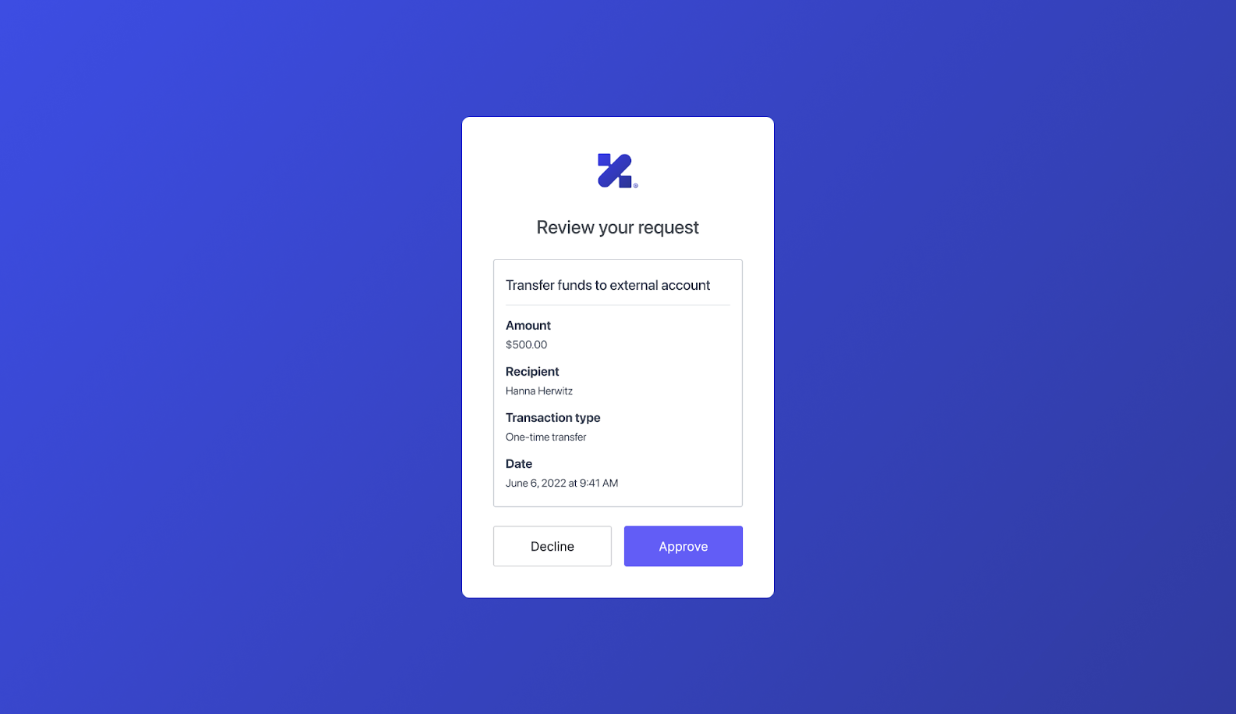
The customized consent template renders the `authorization_details` in the following consent prompt that Auth0 shows to the end user:
 To learn more about how to customize the consent prompt, read:
* [Customize Universal Login Pages](/docs/customize/login-pages/universal-login/customize-templates)
* [Customize Universal Login with the No-Code Editor](/docs/customize/login-pages/universal-login/customize-themes)
### Access authorization\_details in Actions
Auth0 does not support updating RAR using Actions.
Auth0 exposes the `authorization_details` parameter in the [post-login Action](/docs/customize/actions/explore-triggers/signup-and-login-triggers/login-trigger/post-login-event-object) via the `event.transaction.requested_authorization_details` property. You can reference this property in an Action to show transaction details to the user in an [MFA challenge](/docs/secure/highly-regulated-identity/transactional-authorization-with-authorization-code-flow#push-notifications).
## What doesn’t Auth0 support?
Auth0 doesn’t support:
* Update RAR using Actions.
* Advertise RAR types for clients to discover.
* Validating RAR objects beyond checking that they have a type property that matches allowed types for the API. For more information, see [Configure RAR](/docs/get-started/apis/configure-rich-authorization-requests).
## Learn more
* [Configure Rich Authorization Requests (RAR)](/docs/get-started/apis/configure-rich-authorization-requests)
To learn more about how to customize the consent prompt, read:
* [Customize Universal Login Pages](/docs/customize/login-pages/universal-login/customize-templates)
* [Customize Universal Login with the No-Code Editor](/docs/customize/login-pages/universal-login/customize-themes)
### Access authorization\_details in Actions
Auth0 does not support updating RAR using Actions.
Auth0 exposes the `authorization_details` parameter in the [post-login Action](/docs/customize/actions/explore-triggers/signup-and-login-triggers/login-trigger/post-login-event-object) via the `event.transaction.requested_authorization_details` property. You can reference this property in an Action to show transaction details to the user in an [MFA challenge](/docs/secure/highly-regulated-identity/transactional-authorization-with-authorization-code-flow#push-notifications).
## What doesn’t Auth0 support?
Auth0 doesn’t support:
* Update RAR using Actions.
* Advertise RAR types for clients to discover.
* Validating RAR objects beyond checking that they have a type property that matches allowed types for the API. For more information, see [Configure RAR](/docs/get-started/apis/configure-rich-authorization-requests).
## Learn more
* [Configure Rich Authorization Requests (RAR)](/docs/get-started/apis/configure-rich-authorization-requests)