> ## Documentation Index
> Fetch the complete documentation index at: https://docs-staging-quickstart-revamp.mintlify.site/llms.txt
> Use this file to discover all available pages before exploring further.

> Learn how to rotate an application's client secret using the Auth Dashboard or the Management API.

# Rotate Client Secrets

You can change an application's <Tooltip tip="Client Secret: Secret used by a client (application) to authenticate with the Authorization Server; it should be known to only the client and the Authorization Server and must be sufficiently random to not be guessable." cta="View Glossary" href="/docs/glossary?term=client+secret">client secret</Tooltip> using the <Tooltip tip="Client Secret: Secret used by a client (application) to authenticate with the Authorization Server; it should be known to only the client and the Authorization Server and must be sufficiently random to not be guessable." cta="View Glossary" href="/docs/glossary?term=Auth0+Dashboard">Auth0 Dashboard</Tooltip> or the Auth0 <Tooltip tip="Auth0 Dashboard: Auth0's main product to configure your services." cta="View Glossary" href="/docs/glossary?term=Management+API">Management API</Tooltip>. When you rotate a client secret, you must update any authorized applications with the new value.

<Callout icon="file-lines" color="#0EA5E9" iconType="regular">
  Client secrets should not be stored in public client applications. To learn more, read [Confidential and Public Applications.](/docs/get-started/applications/confidential-and-public-applications)
</Callout>

<Warning>
  New secrets may be delayed up to thirty seconds while rotating. To minimize downtime, we suggest you store the new client secret in your application's code/system configuration as a fallback to the previous secret. This way, if the client application request doesn't work with the old secret, your app will use the new secret.

  Secrets can be stored in a list (or similar structure) until they're no longer needed. Once you're sure that an old secret is obsolete, you can remove its value from your app's code.
</Warning>

## Use the Dashboard

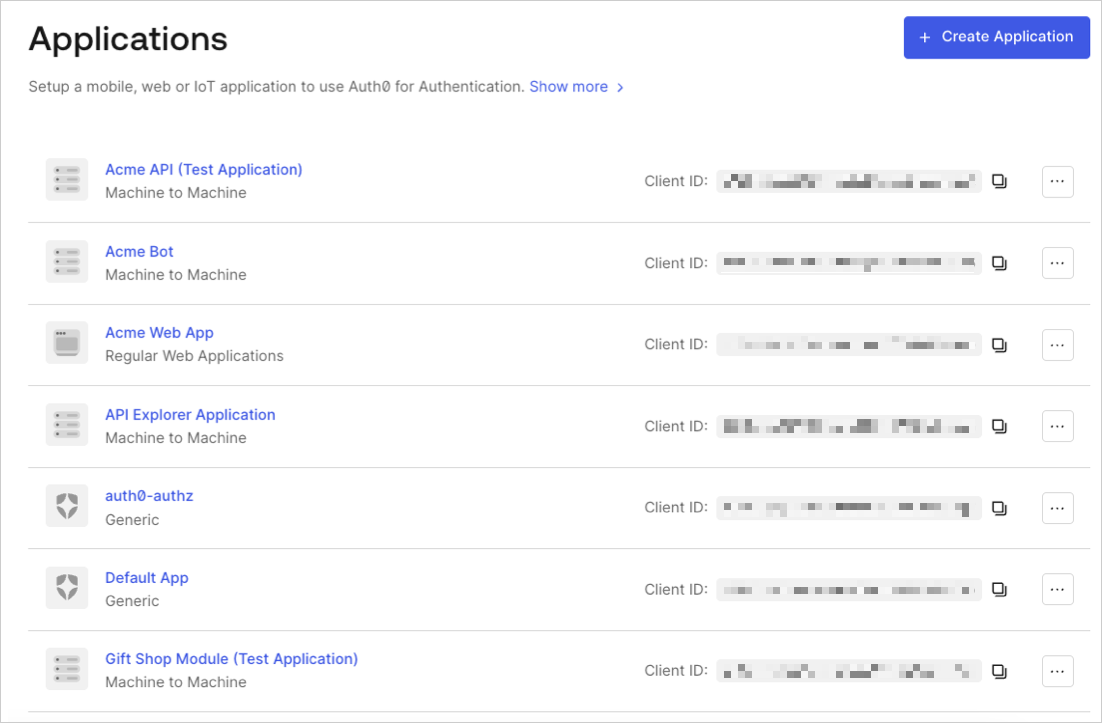
1. In the Auth0 Dashboard, go to [Applications > Applications](https://manage.auth0.com/#/applications), and then select the name of the application to view.

   <Frame>
     <img src="https://mintcdn.com/docs-staging-quickstart-revamp/fNPG21NgQLCA0axA/images/cdy7uua7fh8z/1ecNwGgFQZxdP57p0tp3jT/cd608fcfae22e195b604e2707e5a848d/App_List_-_EN.png?fit=max&auto=format&n=fNPG21NgQLCA0axA&q=85&s=ff75cb008e71ad2325aa9af896c20b47" alt="Dashboard Applications List" width="1102" height="723" data-path="images/cdy7uua7fh8z/1ecNwGgFQZxdP57p0tp3jT/cd608fcfae22e195b604e2707e5a848d/App_List_-_EN.png" />
   </Frame>
2. Scroll to the bottom of the **Settings** page, locate the **Danger Zone**, select **Rotate**, and confirm.
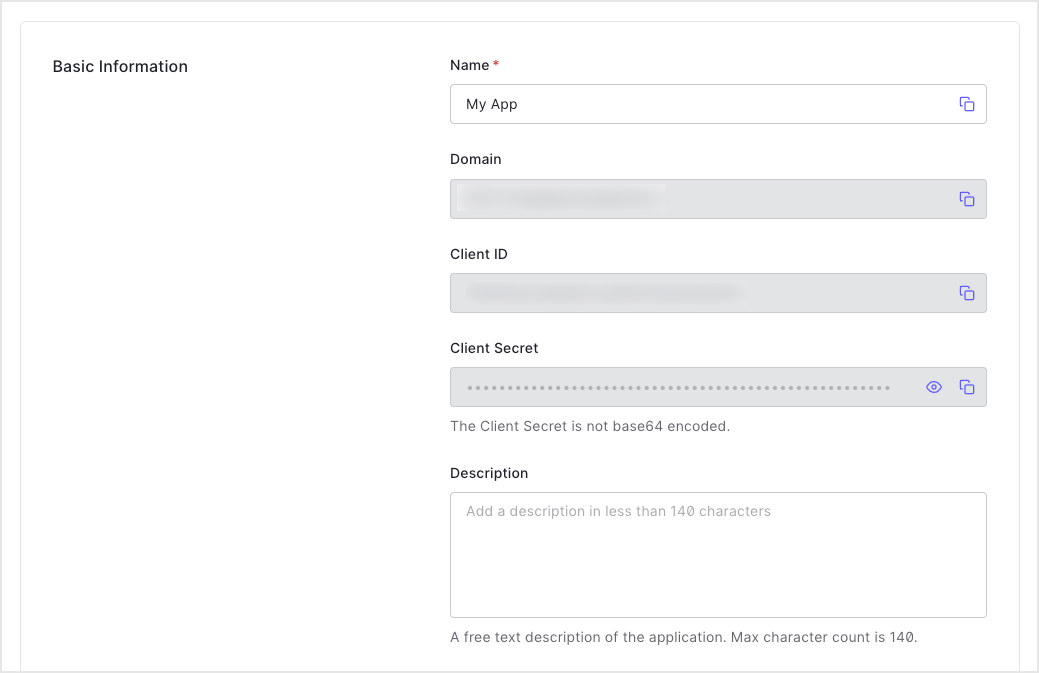
3. Scroll to the top of the page, and switch to the **Credentials** tab.
4. View your new secret by locating **Client Secret**, and selecting the eye icon.
   <Frame>
     <img src="https://mintcdn.com/docs-staging-quickstart-revamp/95MUIRU4PPeO3xcE/images/cdy7uua7fh8z/2GPUw7BODYuYYH3658Upz3/92a49ec57e6b4d07be96093989baac03/2023-04-11_15-34-58.png?fit=max&auto=format&n=95MUIRU4PPeO3xcE&q=85&s=504d5367189c66058ff423a461794e7a" alt="Dashboard Applications Application Settings Tab Basic Information" width="1039" height="673" data-path="images/cdy7uua7fh8z/2GPUw7BODYuYYH3658Upz3/92a49ec57e6b4d07be96093989baac03/2023-04-11_15-34-58.png" />
   </Frame>
5. Update authorized applications with the new value.

## Use the Management API

1. Call the Management API [Rotate a client secret](https://auth0.com/docs/api/management/v2#!/Clients/post_rotate_secret) endpoint. Replace the `YOUR_CLIENT_ID` and `MGMT_API_ACCESS_TOKEN` placeholder values with your client ID and Management API access token, respectively.

   <CodeGroup>
     ```bash cURL lines
     curl --request POST \
       --url 'https://{yourDomain}/api/v2/clients/%7ByourClientId%7D/rotate-secret' \
       --header 'authorization: Bearer {yourMgmtApiAccessToken}'
     ```

     ```csharp C# lines
     var client = new RestClient("https://{yourDomain}/api/v2/clients/%7ByourClientId%7D/rotate-secret");
     var request = new RestRequest(Method.POST);
     request.AddHeader("authorization", "Bearer {yourMgmtApiAccessToken}");
     IRestResponse response = client.Execute(request);
     ```

     ```go Go lines
     package main

     import (
     	"fmt"
     	"net/http"
     	"io/ioutil"
     )

     func main() {

     	url := "https://{yourDomain}/api/v2/clients/%7ByourClientId%7D/rotate-secret"

     	req, _ := http.NewRequest("POST", url, nil)

     	req.Header.Add("authorization", "Bearer {yourMgmtApiAccessToken}")

     	res, _ := http.DefaultClient.Do(req)

     	defer res.Body.Close()
     	body, _ := ioutil.ReadAll(res.Body)

     	fmt.Println(res)
     	fmt.Println(string(body))

     }
     ```

     ```java Java lines
     HttpResponse response = Unirest.post("https://{yourDomain}/api/v2/clients/%7ByourClientId%7D/rotate-secret")
       .header("authorization", "Bearer {yourMgmtApiAccessToken}")
       .asString();
     ```

     ```javascript Node.JS lines
     var axios = require("axios").default;

     var options = {
       method: 'POST',
       url: 'https://{yourDomain}/api/v2/clients/%7ByourClientId%7D/rotate-secret',
       headers: {authorization: 'Bearer {yourMgmtApiAccessToken}'}
     };

     axios.request(options).then(function (response) {
       console.log(response.data);
     }).catch(function (error) {
       console.error(error);
     });
     ```

     ```obj-c Obj-C lines
     #import <Foundation/Foundation.h>

     NSDictionary *headers = @{ @"authorization": @"Bearer {yourMgmtApiAccessToken}" };

     NSMutableURLRequest *request = [NSMutableURLRequest requestWithURL:[NSURL URLWithString:@"https://{yourDomain}/api/v2/clients/%7ByourClientId%7D/rotate-secret"]
                                                            cachePolicy:NSURLRequestUseProtocolCachePolicy
                                                        timeoutInterval:10.0];
     [request setHTTPMethod:@"POST"];
     [request setAllHTTPHeaderFields:headers];

     NSURLSession *session = [NSURLSession sharedSession];
     NSURLSessionDataTask *dataTask = [session dataTaskWithRequest:request
                                                 completionHandler:^(NSData *data, NSURLResponse *response, NSError *error) {
                                                     if (error) {
                                                         NSLog(@"%@", error);
                                                     } else {
                                                         NSHTTPURLResponse *httpResponse = (NSHTTPURLResponse *) response;
                                                         NSLog(@"%@", httpResponse);
                                                     }
                                                 }];
     [dataTask resume];
     ```

     ```php PHP lines
     $curl = curl_init();

     curl_setopt_array($curl, [
       CURLOPT_URL => "https://{yourDomain}/api/v2/clients/%7ByourClientId%7D/rotate-secret",
       CURLOPT_RETURNTRANSFER => true,
       CURLOPT_ENCODING => "",
       CURLOPT_MAXREDIRS => 10,
       CURLOPT_TIMEOUT => 30,
       CURLOPT_HTTP_VERSION => CURL_HTTP_VERSION_1_1,
       CURLOPT_CUSTOMREQUEST => "POST",
       CURLOPT_HTTPHEADER => [
         "authorization: Bearer {yourMgmtApiAccessToken}"
       ],
     ]);

     $response = curl_exec($curl);
     $err = curl_error($curl);

     curl_close($curl);

     if ($err) {
       echo "cURL Error #:" . $err;
     } else {
       echo $response;
     }
     ```

     ```python Python lines
     import http.client

     conn = http.client.HTTPSConnection("")

     headers = { 'authorization': "Bearer {yourMgmtApiAccessToken}" }

     conn.request("POST", "/{yourDomain}/api/v2/clients/%7ByourClientId%7D/rotate-secret", headers=headers)

     res = conn.getresponse()

     data = res.read()

     print(data.decode("utf-8"))
     ```

     ```ruby Ruby lines
     require 'uri'
     require 'net/http'
     require 'openssl'
     url = URI("https://{yourDomain}/api/v2/clients/%7ByourClientId%7D/rotate-secret")
     http = Net::HTTP.new(url.host, url.port)
     http.use_ssl = true
     http.verify_mode = OpenSSL::SSL::VERIFY_NONE
     request = Net::HTTP::Post.new(url)
     request["authorization"] = 'Bearer {yourMgmtApiAccessToken}'
     response = http.request(request)
     puts response.read_body
     ```

     ```swift Swift lines
     import Foundation

     let headers = ["authorization": "Bearer {yourMgmtApiAccessToken}"]

     let request = NSMutableURLRequest(url: NSURL(string: "https://{yourDomain}/api/v2/clients/%7ByourClientId%7D/rotate-secret")! as URL,
                                             cachePolicy: .useProtocolCachePolicy,
                                         timeoutInterval: 10.0)
     request.httpMethod = "POST"
     request.allHTTPHeaderFields = headers

     let session = URLSession.shared
     let dataTask = session.dataTask(with: request as URLRequest, completionHandler: { (data, response, error) -> Void in
       if (error != nil) {
         print(error)
       } else {
         let httpResponse = response as? HTTPURLResponse
         print(httpResponse)
       }
     })

     dataTask.resume()
     ```
   </CodeGroup>

   <table class="table">
     <thead>
       <tr>
         <th><strong>Value</strong></th>
         <th><strong>Description</strong></th>
       </tr>
     </thead>

     <tbody>
       <tr>
         <td><code>YOUR\_CLIENT\_ID</code></td>
         <td>Τhe ID of the application to be updated.</td>
       </tr>

       <tr>
         <td><code>MGMT\_API\_ACCESS\_TOKEN</code></td>
         <td><a href="https://auth0.com/docs/api/management/v2/tokens">Access Tokens for the Management API</a> with the scope  <code>update:client\_keys</code>.</td>
       </tr>
     </tbody>
   </table>

2. Update authorized applications with the new value.

### Set a custom client secret

You can use the Management API [Update a client](https://auth0.com/docs/api/management/v2/#!/Clients/patch_clients_by_id) endpoint to to set a client secret manually instead of requesting a rotation to an automatically generated secret. Your application is configured with the future secret as a fallback ahead of the actual rotation.

```bash lines
   curl --request PATCH \
   --url https://{TenantDomain}/api/v2/clients/{ClientID} \
   --header 'Authorization: Bearer {AccessToken}' \
   --header 'Content-Type: application/json' \
   --data '{
      "client_secret": "{CustomClientSecret}"
      }'
```

## Learn more

* [View Signing Certificates](/docs/get-started/tenant-settings/signing-keys/view-signing-certificates)
* [Signing Algorithms](/docs/get-started/applications/signing-algorithms)
* [Change Application Signing Algorithms](/docs/get-started/applications/change-application-signing-algorithms)
