> ## Documentation Index
> Fetch the complete documentation index at: https://docs-staging-quickstart-revamp.mintlify.site/llms.txt
> Use this file to discover all available pages before exploring further.
> Learn how to decouple APIs from applications that consume them and define third-party apps that you don't control or may not trust.
# User Consent and Third-Party Applications
The [OIDC](/docs/authenticate/protocols/openid-connect-protocol)-conformant authentication pipeline supports defining resource servers (such as APIs) as entities separate from applications. This lets you decouple APIs from the applications that consume them, and also lets you define [third-party applications](/docs/get-started/applications/confidential-and-public-applications/first-party-and-third-party-applications) that allow external parties to securely access protected resources behind your API.
## Consent dialog
If a user authenticates through a third-party application and the application requests authorization to access the user's information or perform some action at an API on their behalf, the user will see a consent dialog.
For example, this request:
```http lines
GET /authorize?
client_id=some_third_party_client
&redirect_uri=https://fabrikam.com/contoso_social
&response_type=token id_token
&__scope=openid profile email read:posts write:posts__
&__audience=https://social.contoso.com__
&nonce=...
&state=...
```
Will result in this user consent dialog:
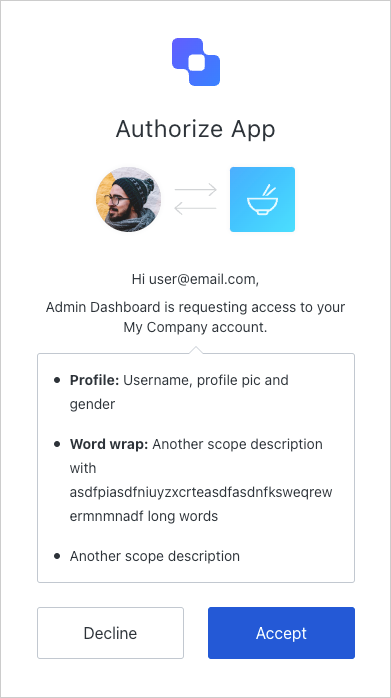 If the user allows the application's request, this creates a user grant, which represents the user's consent to this combination of application, resource server, and requested scopes. The application then receives a successful authentication response from Auth0 as usual.
Once consent has been given, the user won't see the consent dialog during subsequent logins until consent is revoked explicitly.
## Scope descriptions
By default, the consent page will use the scopes' names to prompt for the user's consent. As shown below, you should define scopes using the **action:resource\_name** format.
If the user allows the application's request, this creates a user grant, which represents the user's consent to this combination of application, resource server, and requested scopes. The application then receives a successful authentication response from Auth0 as usual.
Once consent has been given, the user won't see the consent dialog during subsequent logins until consent is revoked explicitly.
## Scope descriptions
By default, the consent page will use the scopes' names to prompt for the user's consent. As shown below, you should define scopes using the **action:resource\_name** format.
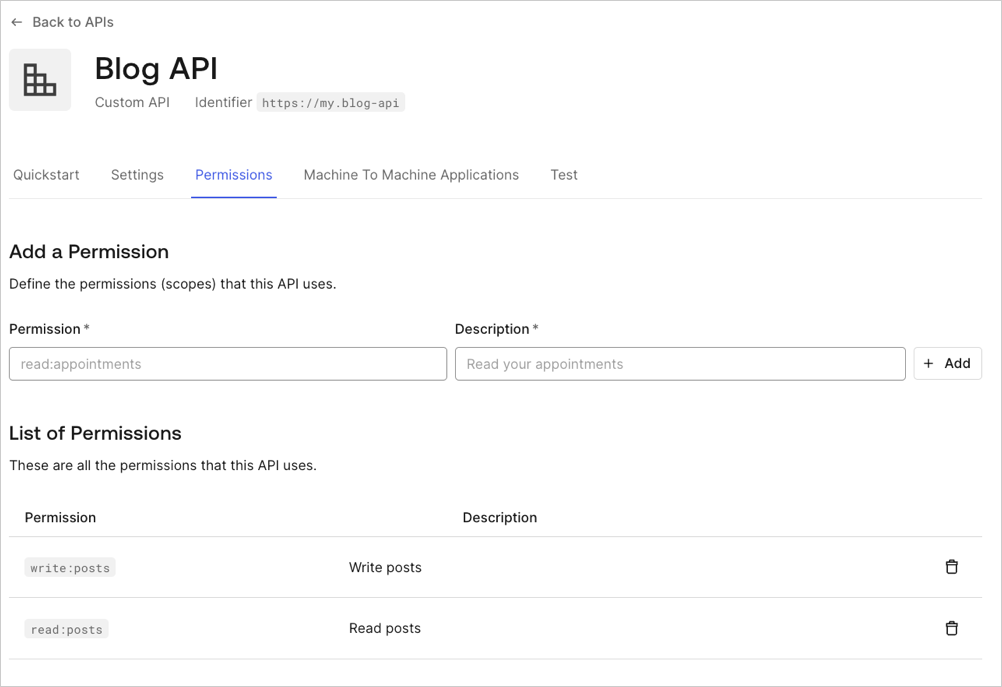 The consent page groups scopes for the same resource and displays all actions for that resource in a single line. For example, the configuration above would result in **Posts: read and write your posts**.
If you would like to display the **Description** field instead, you can do so by setting the tenant's **use\_scope\_descriptions\_for\_consent** to **true**. This will affect consent prompts for all of the APIs on that tenant.
To set the **use\_scope\_descriptions\_for\_consent** flag, you will need to make the appropriate call to the API:
```bash cURL lines
curl --request PATCH \
--url 'https://{yourDomain}/api/v2/tenants/settings' \
--header 'authorization: Bearer API2_ACCESS_TOKEN' \
--header 'cache-control: no-cache' \
--header 'content-type: application/json' \
--data '{ "flags": { "use_scope_descriptions_for_consent": true } }'
```
```csharp C# lines
var client = new RestClient("https://{yourDomain}/api/v2/tenants/settings");
var request = new RestRequest(Method.PATCH);
request.AddHeader("content-type", "application/json");
request.AddHeader("authorization", "Bearer API2_ACCESS_TOKEN");
request.AddHeader("cache-control", "no-cache");
request.AddParameter("application/json", "{ \"flags\": { \"use_scope_descriptions_for_consent\": true } }", ParameterType.RequestBody);
IRestResponse response = client.Execute(request);
```
```go Go lines expandable
package main
import (
"fmt"
"strings"
"net/http"
"io/ioutil"
)
func main() {
url := "https://{yourDomain}/api/v2/tenants/settings"
payload := strings.NewReader("{ \"flags\": { \"use_scope_descriptions_for_consent\": true } }")
req, _ := http.NewRequest("PATCH", url, payload)
req.Header.Add("content-type", "application/json")
req.Header.Add("authorization", "Bearer API2_ACCESS_TOKEN")
req.Header.Add("cache-control", "no-cache")
res, _ := http.DefaultClient.Do(req)
defer res.Body.Close()
body, _ := ioutil.ReadAll(res.Body)
fmt.Println(res)
fmt.Println(string(body))
}
```
```java Java lines
HttpResponse response = Unirest.patch("https://{yourDomain}/api/v2/tenants/settings")
.header("content-type", "application/json")
.header("authorization", "Bearer API2_ACCESS_TOKEN")
.header("cache-control", "no-cache")
.body("{ \"flags\": { \"use_scope_descriptions_for_consent\": true } }")
.asString();
```
```javascript Node.JS lines
var axios = require("axios").default;
var options = {
method: 'PATCH',
url: 'https://{yourDomain}/api/v2/tenants/settings',
headers: {
'content-type': 'application/json',
authorization: 'Bearer API2_ACCESS_TOKEN',
'cache-control': 'no-cache'
},
data: {flags: {use_scope_descriptions_for_consent: true}}
};
axios.request(options).then(function (response) {
console.log(response.data);
}).catch(function (error) {
console.error(error);
});
```
```obj-c Obj-C lines expandable
#import
NSDictionary *headers = @{ @"content-type": @"application/json",
@"authorization": @"Bearer API2_ACCESS_TOKEN",
@"cache-control": @"no-cache" };
NSDictionary *parameters = @{ @"flags": @{ @"use_scope_descriptions_for_consent": @YES } };
NSData *postData = [NSJSONSerialization dataWithJSONObject:parameters options:0 error:nil];
NSMutableURLRequest *request = [NSMutableURLRequest requestWithURL:[NSURL URLWithString:@"https://{yourDomain}/api/v2/tenants/settings"]
cachePolicy:NSURLRequestUseProtocolCachePolicy
timeoutInterval:10.0];
[request setHTTPMethod:@"PATCH"];
[request setAllHTTPHeaderFields:headers];
[request setHTTPBody:postData];
NSURLSession *session = [NSURLSession sharedSession];
NSURLSessionDataTask *dataTask = [session dataTaskWithRequest:request
completionHandler:^(NSData *data, NSURLResponse *response, NSError *error) {
if (error) {
NSLog(@"%@", error);
} else {
NSHTTPURLResponse *httpResponse = (NSHTTPURLResponse *) response;
NSLog(@"%@", httpResponse);
}
}];
[dataTask resume];
```
```php PHP lines expandable
$curl = curl_init();
curl_setopt_array($curl, [
CURLOPT_URL => "https://{yourDomain}/api/v2/tenants/settings",
CURLOPT_RETURNTRANSFER => true,
CURLOPT_ENCODING => "",
CURLOPT_MAXREDIRS => 10,
CURLOPT_TIMEOUT => 30,
CURLOPT_HTTP_VERSION => CURL_HTTP_VERSION_1_1,
CURLOPT_CUSTOMREQUEST => "PATCH",
CURLOPT_POSTFIELDS => "{ \"flags\": { \"use_scope_descriptions_for_consent\": true } }",
CURLOPT_HTTPHEADER => [
"authorization: Bearer API2_ACCESS_TOKEN",
"cache-control: no-cache",
"content-type: application/json"
],
]);
$response = curl_exec($curl);
$err = curl_error($curl);
curl_close($curl);
if ($err) {
echo "cURL Error #:" . $err;
} else {
echo $response;
}
```
```python Python lines
import http.client
conn = http.client.HTTPSConnection("")
payload = "{ \"flags\": { \"use_scope_descriptions_for_consent\": true } }"
headers = {
'content-type': "application/json",
'authorization': "Bearer API2_ACCESS_TOKEN",
'cache-control': "no-cache"
}
conn.request("PATCH", "/{yourDomain}/api/v2/tenants/settings", payload, headers)
res = conn.getresponse()
data = res.read()
print(data.decode("utf-8"))
```
```ruby Ruby lines
require 'uri'
require 'net/http'
require 'openssl'
url = URI("https://{yourDomain}/api/v2/tenants/settings")
http = Net::HTTP.new(url.host, url.port)
http.use_ssl = true
http.verify_mode = OpenSSL::SSL::VERIFY_NONE
request = Net::HTTP::Patch.new(url)
request["content-type"] = 'application/json'
request["authorization"] = 'Bearer API2_ACCESS_TOKEN'
request["cache-control"] = 'no-cache'
request.body = "{ \"flags\": { \"use_scope_descriptions_for_consent\": true } }"
response = http.request(request)
puts response.read_body
```
```swift Swift lines expandable
import Foundation
let headers = [
"content-type": "application/json",
"authorization": "Bearer API2_ACCESS_TOKEN",
"cache-control": "no-cache"
]
let parameters = ["flags": ["use_scope_descriptions_for_consent": true]] as [String : Any]
let postData = JSONSerialization.data(withJSONObject: parameters, options: [])
let request = NSMutableURLRequest(url: NSURL(string: "https://{yourDomain}/api/v2/tenants/settings")! as URL,
cachePolicy: .useProtocolCachePolicy,
timeoutInterval: 10.0)
request.httpMethod = "PATCH"
request.allHTTPHeaderFields = headers
request.httpBody = postData as Data
let session = URLSession.shared
let dataTask = session.dataTask(with: request as URLRequest, completionHandler: { (data, response, error) -> Void in
if (error != nil) {
print(error)
} else {
let httpResponse = response as? HTTPURLResponse
print(httpResponse)
}
})
dataTask.resume()
```
## Handle rejected permissions
If a user decides to reject consent to the application, they will be redirected to the `redirect_uri` specified in the request with an `access_denied` error:
```http lines
HTTP/1.1 302 Found
Location: https://fabrikam.com/contoso_social#
error=access_denied
&state=...
```
## Skip consent for first-party applications
First-party applications can skip the consent dialog, but only if the API they are trying to access on behalf of the user has the **Allow Skipping User Consent** option enabled.
To navigate to the **Allow Skipping User Consent** toggle, select **Applications > APIs > (select the api) > Settings > Access Settings.**
Note that this option only allows verifiable first-party applications to skip consent at the moment. As `localhost` is never a verifiable first-party (because any malicious application may run on `localhost` for a user), Auth0 will always display the consent dialog for applications running on `localhost` regardless of whether they are marked as first-party applications. During development, you can work around this by modifying your `/etc/hosts` file to add an entry such as the following:
`127.0.0.1 myapp.example`
Similarly, you cannot skip consent (even for first-party applications) if `localhost` is used in the application's `redirect_uri` parameter and is present in any of the application's **Allowed Callback URLs** (found in [Dashboard > Applications > Settings](https://manage.auth0.com/#/applications/\{yourClientId}/settings)).
Since third-party applications are assumed to be untrusted, they are not able to skip consent dialogs.
## Revoke consent
If a user has provided consent but you would like to revoke it:
1. Go to [Auth0 Dashboard > User Management > Users](https://manage.auth0.com/#/users), and click the user for whom you would like to revoke consent.
2. Click the **Authorized Applications** tab,
3. Click **Revoke** next to the appropriate application.
## Password-based flows
When using the [Resource Owner Password Flow](/docs/get-started/authentication-and-authorization-flow/resource-owner-password-flow), no consent dialog is involved because the user directly provides their password to the application, which is equivalent to granting the application full access to the user's account.
## Force users to provide consent
When redirecting to the `/authorize` endpoint, including the `prompt=consent` parameter will force users to provide consent, even if they have an existing user grant for the application and requested scopes.
## Learn more
* [First-Party and Third-Party Applications](/docs/get-started/applications/confidential-and-public-applications/first-party-and-third-party-applications)
* [View Application Ownership](/docs/get-started/applications/confidential-and-public-applications/view-application-ownership)
* [Confidential and Public Applications](/docs/get-started/applications/confidential-and-public-applications)
* [Enable Third-Party Applications](/docs/get-started/applications/confidential-and-public-applications/enable-third-party-applications)
* [Application Grant Types](/docs/get-started/applications/application-grant-types)
The consent page groups scopes for the same resource and displays all actions for that resource in a single line. For example, the configuration above would result in **Posts: read and write your posts**.
If you would like to display the **Description** field instead, you can do so by setting the tenant's **use\_scope\_descriptions\_for\_consent** to **true**. This will affect consent prompts for all of the APIs on that tenant.
To set the **use\_scope\_descriptions\_for\_consent** flag, you will need to make the appropriate call to the API:
```bash cURL lines
curl --request PATCH \
--url 'https://{yourDomain}/api/v2/tenants/settings' \
--header 'authorization: Bearer API2_ACCESS_TOKEN' \
--header 'cache-control: no-cache' \
--header 'content-type: application/json' \
--data '{ "flags": { "use_scope_descriptions_for_consent": true } }'
```
```csharp C# lines
var client = new RestClient("https://{yourDomain}/api/v2/tenants/settings");
var request = new RestRequest(Method.PATCH);
request.AddHeader("content-type", "application/json");
request.AddHeader("authorization", "Bearer API2_ACCESS_TOKEN");
request.AddHeader("cache-control", "no-cache");
request.AddParameter("application/json", "{ \"flags\": { \"use_scope_descriptions_for_consent\": true } }", ParameterType.RequestBody);
IRestResponse response = client.Execute(request);
```
```go Go lines expandable
package main
import (
"fmt"
"strings"
"net/http"
"io/ioutil"
)
func main() {
url := "https://{yourDomain}/api/v2/tenants/settings"
payload := strings.NewReader("{ \"flags\": { \"use_scope_descriptions_for_consent\": true } }")
req, _ := http.NewRequest("PATCH", url, payload)
req.Header.Add("content-type", "application/json")
req.Header.Add("authorization", "Bearer API2_ACCESS_TOKEN")
req.Header.Add("cache-control", "no-cache")
res, _ := http.DefaultClient.Do(req)
defer res.Body.Close()
body, _ := ioutil.ReadAll(res.Body)
fmt.Println(res)
fmt.Println(string(body))
}
```
```java Java lines
HttpResponse response = Unirest.patch("https://{yourDomain}/api/v2/tenants/settings")
.header("content-type", "application/json")
.header("authorization", "Bearer API2_ACCESS_TOKEN")
.header("cache-control", "no-cache")
.body("{ \"flags\": { \"use_scope_descriptions_for_consent\": true } }")
.asString();
```
```javascript Node.JS lines
var axios = require("axios").default;
var options = {
method: 'PATCH',
url: 'https://{yourDomain}/api/v2/tenants/settings',
headers: {
'content-type': 'application/json',
authorization: 'Bearer API2_ACCESS_TOKEN',
'cache-control': 'no-cache'
},
data: {flags: {use_scope_descriptions_for_consent: true}}
};
axios.request(options).then(function (response) {
console.log(response.data);
}).catch(function (error) {
console.error(error);
});
```
```obj-c Obj-C lines expandable
#import
NSDictionary *headers = @{ @"content-type": @"application/json",
@"authorization": @"Bearer API2_ACCESS_TOKEN",
@"cache-control": @"no-cache" };
NSDictionary *parameters = @{ @"flags": @{ @"use_scope_descriptions_for_consent": @YES } };
NSData *postData = [NSJSONSerialization dataWithJSONObject:parameters options:0 error:nil];
NSMutableURLRequest *request = [NSMutableURLRequest requestWithURL:[NSURL URLWithString:@"https://{yourDomain}/api/v2/tenants/settings"]
cachePolicy:NSURLRequestUseProtocolCachePolicy
timeoutInterval:10.0];
[request setHTTPMethod:@"PATCH"];
[request setAllHTTPHeaderFields:headers];
[request setHTTPBody:postData];
NSURLSession *session = [NSURLSession sharedSession];
NSURLSessionDataTask *dataTask = [session dataTaskWithRequest:request
completionHandler:^(NSData *data, NSURLResponse *response, NSError *error) {
if (error) {
NSLog(@"%@", error);
} else {
NSHTTPURLResponse *httpResponse = (NSHTTPURLResponse *) response;
NSLog(@"%@", httpResponse);
}
}];
[dataTask resume];
```
```php PHP lines expandable
$curl = curl_init();
curl_setopt_array($curl, [
CURLOPT_URL => "https://{yourDomain}/api/v2/tenants/settings",
CURLOPT_RETURNTRANSFER => true,
CURLOPT_ENCODING => "",
CURLOPT_MAXREDIRS => 10,
CURLOPT_TIMEOUT => 30,
CURLOPT_HTTP_VERSION => CURL_HTTP_VERSION_1_1,
CURLOPT_CUSTOMREQUEST => "PATCH",
CURLOPT_POSTFIELDS => "{ \"flags\": { \"use_scope_descriptions_for_consent\": true } }",
CURLOPT_HTTPHEADER => [
"authorization: Bearer API2_ACCESS_TOKEN",
"cache-control: no-cache",
"content-type: application/json"
],
]);
$response = curl_exec($curl);
$err = curl_error($curl);
curl_close($curl);
if ($err) {
echo "cURL Error #:" . $err;
} else {
echo $response;
}
```
```python Python lines
import http.client
conn = http.client.HTTPSConnection("")
payload = "{ \"flags\": { \"use_scope_descriptions_for_consent\": true } }"
headers = {
'content-type': "application/json",
'authorization': "Bearer API2_ACCESS_TOKEN",
'cache-control': "no-cache"
}
conn.request("PATCH", "/{yourDomain}/api/v2/tenants/settings", payload, headers)
res = conn.getresponse()
data = res.read()
print(data.decode("utf-8"))
```
```ruby Ruby lines
require 'uri'
require 'net/http'
require 'openssl'
url = URI("https://{yourDomain}/api/v2/tenants/settings")
http = Net::HTTP.new(url.host, url.port)
http.use_ssl = true
http.verify_mode = OpenSSL::SSL::VERIFY_NONE
request = Net::HTTP::Patch.new(url)
request["content-type"] = 'application/json'
request["authorization"] = 'Bearer API2_ACCESS_TOKEN'
request["cache-control"] = 'no-cache'
request.body = "{ \"flags\": { \"use_scope_descriptions_for_consent\": true } }"
response = http.request(request)
puts response.read_body
```
```swift Swift lines expandable
import Foundation
let headers = [
"content-type": "application/json",
"authorization": "Bearer API2_ACCESS_TOKEN",
"cache-control": "no-cache"
]
let parameters = ["flags": ["use_scope_descriptions_for_consent": true]] as [String : Any]
let postData = JSONSerialization.data(withJSONObject: parameters, options: [])
let request = NSMutableURLRequest(url: NSURL(string: "https://{yourDomain}/api/v2/tenants/settings")! as URL,
cachePolicy: .useProtocolCachePolicy,
timeoutInterval: 10.0)
request.httpMethod = "PATCH"
request.allHTTPHeaderFields = headers
request.httpBody = postData as Data
let session = URLSession.shared
let dataTask = session.dataTask(with: request as URLRequest, completionHandler: { (data, response, error) -> Void in
if (error != nil) {
print(error)
} else {
let httpResponse = response as? HTTPURLResponse
print(httpResponse)
}
})
dataTask.resume()
```
## Handle rejected permissions
If a user decides to reject consent to the application, they will be redirected to the `redirect_uri` specified in the request with an `access_denied` error:
```http lines
HTTP/1.1 302 Found
Location: https://fabrikam.com/contoso_social#
error=access_denied
&state=...
```
## Skip consent for first-party applications
First-party applications can skip the consent dialog, but only if the API they are trying to access on behalf of the user has the **Allow Skipping User Consent** option enabled.
To navigate to the **Allow Skipping User Consent** toggle, select **Applications > APIs > (select the api) > Settings > Access Settings.**
Note that this option only allows verifiable first-party applications to skip consent at the moment. As `localhost` is never a verifiable first-party (because any malicious application may run on `localhost` for a user), Auth0 will always display the consent dialog for applications running on `localhost` regardless of whether they are marked as first-party applications. During development, you can work around this by modifying your `/etc/hosts` file to add an entry such as the following:
`127.0.0.1 myapp.example`
Similarly, you cannot skip consent (even for first-party applications) if `localhost` is used in the application's `redirect_uri` parameter and is present in any of the application's **Allowed Callback URLs** (found in [Dashboard > Applications > Settings](https://manage.auth0.com/#/applications/\{yourClientId}/settings)).
Since third-party applications are assumed to be untrusted, they are not able to skip consent dialogs.
## Revoke consent
If a user has provided consent but you would like to revoke it:
1. Go to [Auth0 Dashboard > User Management > Users](https://manage.auth0.com/#/users), and click the user for whom you would like to revoke consent.
2. Click the **Authorized Applications** tab,
3. Click **Revoke** next to the appropriate application.
## Password-based flows
When using the [Resource Owner Password Flow](/docs/get-started/authentication-and-authorization-flow/resource-owner-password-flow), no consent dialog is involved because the user directly provides their password to the application, which is equivalent to granting the application full access to the user's account.
## Force users to provide consent
When redirecting to the `/authorize` endpoint, including the `prompt=consent` parameter will force users to provide consent, even if they have an existing user grant for the application and requested scopes.
## Learn more
* [First-Party and Third-Party Applications](/docs/get-started/applications/confidential-and-public-applications/first-party-and-third-party-applications)
* [View Application Ownership](/docs/get-started/applications/confidential-and-public-applications/view-application-ownership)
* [Confidential and Public Applications](/docs/get-started/applications/confidential-and-public-applications)
* [Enable Third-Party Applications](/docs/get-started/applications/confidential-and-public-applications/enable-third-party-applications)
* [Application Grant Types](/docs/get-started/applications/application-grant-types)