> ## Documentation Index
> Fetch the complete documentation index at: https://docs-staging-quickstart-revamp.mintlify.site/llms.txt
> Use this file to discover all available pages before exploring further.

> Learn how to enable role-based access control (RBAC) for an API using the Auth0 Dashboard or the Management API.

# Enable Role-Based Access Control for APIs

You can enable [role-based access control (RBAC)](/docs/manage-users/access-control/rbac) using the <Tooltip tip="Auth0 Dashboard: Auth0's main product to configure your services." cta="View Glossary" href="/docs/glossary?term=Auth0+Dashboard">Auth0 Dashboard</Tooltip> or the <Tooltip tip="Auth0 Dashboard: Auth0's main product to configure your services." cta="View Glossary" href="/docs/glossary?term=Management+API">Management API</Tooltip>. This enables the API Authorization Core feature set.

When RBAC is enabled, the `scope` claim of the <Tooltip tip="Access Token: Authorization credential, in the form of an opaque string or JWT, used to access an API." cta="View Glossary" href="/docs/glossary?term=access+token">access token</Tooltip> includes an intersection of the requested permissions and the permissions assigned to the user, regardless of whether permissions are also included in the access token. When RBAC is disabled, an application can request any permission defined for the API, and the `scope` claim includes all requested permissions.

<Callout icon="file-lines" color="#0EA5E9" iconType="regular">
  If you configure any [Actions](/docs/customize/actions) that modify access token scopes, they will override the scopes set by RBAC.
</Callout>

## Dashboard

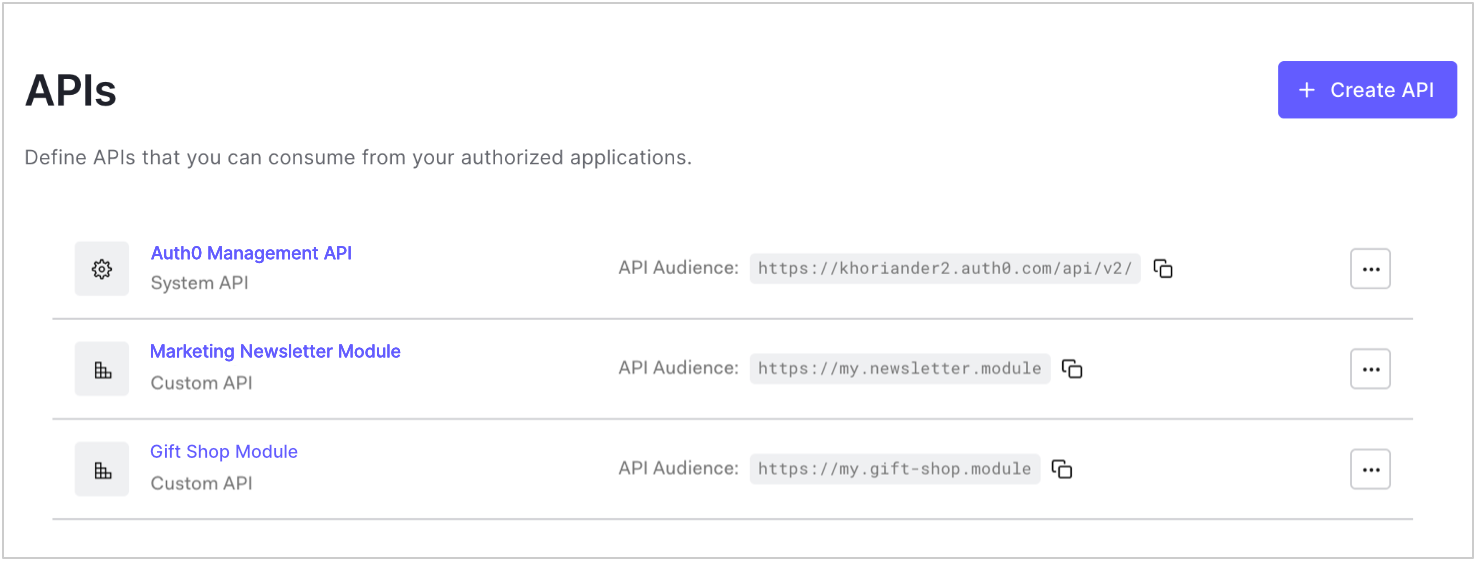
1. Go to [Dashboard > Applications > APIs](https://manage.auth0.com/#/apis) and click the name of the API to view.

   <Frame>
     <img src="https://mintcdn.com/docs-staging-quickstart-revamp/d9I4PO9-WombE4fE/images/cdy7uua7fh8z/3rhmhghYZDSi6YWHRA5yMQ/c71340259481b0b6787d5f3887cfda0f/dashboard-apis-list.png?fit=max&auto=format&n=d9I4PO9-WombE4fE&q=85&s=c930c8f1c76062697ec7bc1a1cdba631" alt="Dashboard Applications APIs List" width="1478" height="562" data-path="images/cdy7uua7fh8z/3rhmhghYZDSi6YWHRA5yMQ/c71340259481b0b6787d5f3887cfda0f/dashboard-apis-list.png" />
   </Frame>
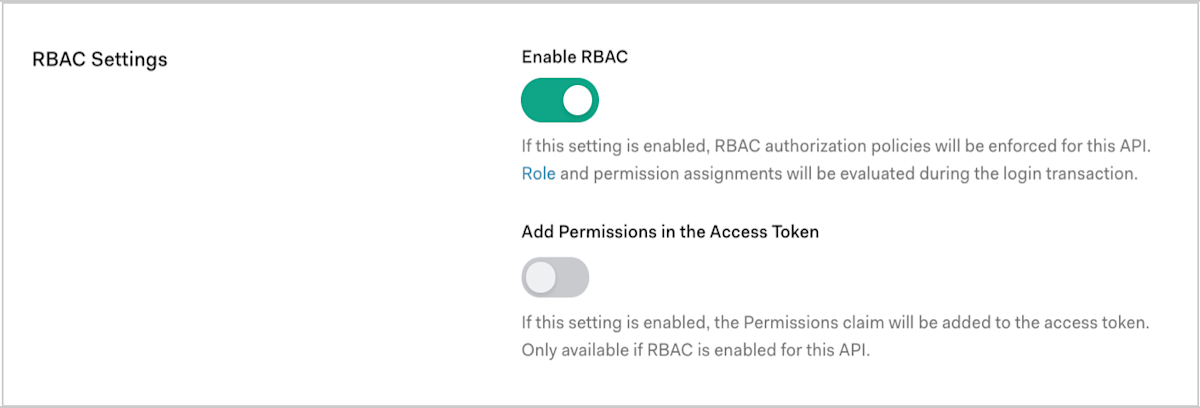
2. Scroll to **RBAC Settings** and enable the **Enable RBAC** toggle.
   <Frame>
     <img src="https://mintcdn.com/docs-staging-quickstart-revamp/rHYM5iMy6d7A-FVR/images/cdy7uua7fh8z/65tKb6aj0ktc2qXLUVlV3e/641adef615d6af9e5a3b588ff397af87/dashboard-apis-edit_view-settings_rbac-settings.png?fit=max&auto=format&n=rHYM5iMy6d7A-FVR&q=85&s=3c19ea44f46cf539d21fba3dc4c328df" alt="Auth0 Dashboard API Settings RBAC toggle" width="1200" height="408" data-path="images/cdy7uua7fh8z/65tKb6aj0ktc2qXLUVlV3e/641adef615d6af9e5a3b588ff397af87/dashboard-apis-edit_view-settings_rbac-settings.png" />
   </Frame>
3. To include all permissions assigned to the user in the `permissions` claim of the access token, enable the **Add Permissions in the Access Token** toggle, and click **Save**. Including permissions in the access token allows you to make minimal calls to retrieve permissions, but increases token size.
   Once you’ve enabled the **Add Permissions in the Access Token** toggle, Auth0 also updates your token dialect based on the [access token profile](/docs/secure/tokens/access-tokens/access-token-profiles) you’ve set for the API:

   * If your token dialect is `access_token`, Auth0 updates it to `access_token_authz`, which is equivalent to the `access_token` profile with the `permissions` claim included.
   * If your token dialect is `rfc9068_profile`, Auth0 updates it to `rfc9068_profile_authz`, which is equivalent to the `rfc9068_profile` with the `permissions` claim included.

   To learn more about the available token dialects, read [Token dialect options](#token-dialect-options).

## Management API

To enable RBAC using the Management API, make a PATCH request to the [Update a resource server endpoint](https://auth0.com/docs/api/management/v2/resource-servers/patch-resource-servers-by-id). In the PATCH request, set `enforce_policies` to `true`:

<CodeGroup>
  ```bash cURL lines
  curl --request PATCH \
    --url 'https://{yourDomain}/api/v2/resource-servers/API_ID' \
    --header 'authorization: Bearer MGMT_API_ACCESS_TOKEN' \
    --header 'cache-control: no-cache' \
    --header 'content-type: application/json' \
    --data '{ "enforce_policies": "true", "token_dialect": "TOKEN_DIALECT" }'
  ```

  ```csharp C# lines
  var client = new RestClient("https://{yourDomain}/api/v2/resource-servers/API_ID");
  var request = new RestRequest(Method.PATCH);
  request.AddHeader("content-type", "application/json");
  request.AddHeader("authorization", "Bearer MGMT_API_ACCESS_TOKEN");
  request.AddHeader("cache-control", "no-cache");
  request.AddParameter("application/json", "{ \"enforce_policies\": \"true\", \"token_dialect\": \"TOKEN_DIALECT\" }", ParameterType.RequestBody);
  IRestResponse response = client.Execute(request);
  ```

  ```go Go lines expandable
  package main

  import (
  	"fmt"
  	"strings"
  	"net/http"
  	"io/ioutil"
  )

  func main() {

  	url := "https://{yourDomain}/api/v2/resource-servers/API_ID"

  	payload := strings.NewReader("{ \"enforce_policies\": \"true\", \"token_dialect\": \"TOKEN_DIALECT\" }")

  	req, _ := http.NewRequest("PATCH", url, payload)

  	req.Header.Add("content-type", "application/json")
  	req.Header.Add("authorization", "Bearer MGMT_API_ACCESS_TOKEN")
  	req.Header.Add("cache-control", "no-cache")

  	res, _ := http.DefaultClient.Do(req)

  	defer res.Body.Close()
  	body, _ := ioutil.ReadAll(res.Body)

  	fmt.Println(res)
  	fmt.Println(string(body))

  }
  ```

  ```java Java lines
  HttpResponse<String> response = Unirest.patch("https://{yourDomain}/api/v2/resource-servers/API_ID")
    .header("content-type", "application/json")
    .header("authorization", "Bearer MGMT_API_ACCESS_TOKEN")
    .header("cache-control", "no-cache")
    .body("{ \"enforce_policies\": \"true\", \"token_dialect\": \"TOKEN_DIALECT\" }")
    .asString();
  ```

  ```javascript Node.JS lines
  var axios = require("axios").default;

  var options = {
    method: 'PATCH',
    url: 'https://{yourDomain}/api/v2/resource-servers/API_ID',
    headers: {
      'content-type': 'application/json',
      authorization: 'Bearer MGMT_API_ACCESS_TOKEN',
      'cache-control': 'no-cache'
    },
    data: {enforce_policies: 'true', token_dialect: 'TOKEN_DIALECT'}
  };

  axios.request(options).then(function (response) {
    console.log(response.data);
  }).catch(function (error) {
    console.error(error);
  });
  ```

  ```obj-c Obj-C lines expandable
  #import <Foundation/Foundation.h>

  NSDictionary *headers = @{ @"content-type": @"application/json",
                             @"authorization": @"Bearer MGMT_API_ACCESS_TOKEN",
                             @"cache-control": @"no-cache" };
  NSDictionary *parameters = @{ @"enforce_policies": @"true",
                                @"token_dialect": @"TOKEN_DIALECT" };

  NSData *postData = [NSJSONSerialization dataWithJSONObject:parameters options:0 error:nil];

  NSMutableURLRequest *request = [NSMutableURLRequest requestWithURL:[NSURL URLWithString:@"https://{yourDomain}/api/v2/resource-servers/API_ID"]
                                                         cachePolicy:NSURLRequestUseProtocolCachePolicy
                                                     timeoutInterval:10.0];
  [request setHTTPMethod:@"PATCH"];
  [request setAllHTTPHeaderFields:headers];
  [request setHTTPBody:postData];

  NSURLSession *session = [NSURLSession sharedSession];
  NSURLSessionDataTask *dataTask = [session dataTaskWithRequest:request
                                              completionHandler:^(NSData *data, NSURLResponse *response, NSError *error) {
                                                  if (error) {
                                                      NSLog(@"%@", error);
                                                  } else {
                                                      NSHTTPURLResponse *httpResponse = (NSHTTPURLResponse *) response;
                                                      NSLog(@"%@", httpResponse);
                                                  }
                                              }];
  [dataTask resume];
  ```

  ```php PHP lines expandable
  $curl = curl_init();

  curl_setopt_array($curl, [
    CURLOPT_URL => "https://{yourDomain}/api/v2/resource-servers/API_ID",
    CURLOPT_RETURNTRANSFER => true,
    CURLOPT_ENCODING => "",
    CURLOPT_MAXREDIRS => 10,
    CURLOPT_TIMEOUT => 30,
    CURLOPT_HTTP_VERSION => CURL_HTTP_VERSION_1_1,
    CURLOPT_CUSTOMREQUEST => "PATCH",
    CURLOPT_POSTFIELDS => "{ \"enforce_policies\": \"true\", \"token_dialect\": \"TOKEN_DIALECT\" }",
    CURLOPT_HTTPHEADER => [
      "authorization: Bearer MGMT_API_ACCESS_TOKEN",
      "cache-control: no-cache",
      "content-type: application/json"
    ],
  ]);

  $response = curl_exec($curl);
  $err = curl_error($curl);

  curl_close($curl);

  if ($err) {
    echo "cURL Error #:" . $err;
  } else {
    echo $response;
  }
  ```

  ```python Python lines
  import http.client

  conn = http.client.HTTPSConnection("")

  payload = "{ \"enforce_policies\": \"true\", \"token_dialect\": \"TOKEN_DIALECT\" }"

  headers = {
      'content-type': "application/json",
      'authorization': "Bearer MGMT_API_ACCESS_TOKEN",
      'cache-control': "no-cache"
      }

  conn.request("PATCH", "/{yourDomain}/api/v2/resource-servers/API_ID", payload, headers)

  res = conn.getresponse()
  data = res.read()

  print(data.decode("utf-8"))
  ```

  ```ruby Ruby lines
  require 'uri'
  require 'net/http'
  require 'openssl'

  url = URI("https://{yourDomain}/api/v2/resource-servers/API_ID")

  http = Net::HTTP.new(url.host, url.port)
  http.use_ssl = true
  http.verify_mode = OpenSSL::SSL::VERIFY_NONE

  request = Net::HTTP::Patch.new(url)
  request["content-type"] = 'application/json'
  request["authorization"] = 'Bearer MGMT_API_ACCESS_TOKEN'
  request["cache-control"] = 'no-cache'
  request.body = "{ \"enforce_policies\": \"true\", \"token_dialect\": \"TOKEN_DIALECT\" }"

  response = http.request(request)
  puts response.read_body
  ```

  ```swift Swift lines expandable
  import Foundation

  let headers = [
    "content-type": "application/json",
    "authorization": "Bearer MGMT_API_ACCESS_TOKEN",
    "cache-control": "no-cache"
  ]
  let parameters = [
    "enforce_policies": "true",
    "token_dialect": "TOKEN_DIALECT"
  ] as [String : Any]

  let postData = JSONSerialization.data(withJSONObject: parameters, options: [])

  let request = NSMutableURLRequest(url: NSURL(string: "https://{yourDomain}/api/v2/resource-servers/API_ID")! as URL,
                                          cachePolicy: .useProtocolCachePolicy,
                                      timeoutInterval: 10.0)
  request.httpMethod = "PATCH"
  request.allHTTPHeaderFields = headers
  request.httpBody = postData as Data

  let session = URLSession.shared
  let dataTask = session.dataTask(with: request as URLRequest, completionHandler: { (data, response, error) -> Void in
    if (error != nil) {
      print(error)
    } else {
      let httpResponse = response as? HTTPURLResponse
      print(httpResponse)
    }
  })

  dataTask.resume()
  ```
</CodeGroup>

Replace `API_ID`, `MGMT_API_ACCESS_TOKEN`, and `TOKEN_DIALECT` with their respective values, as shown in the following table:

<table class="table">
  <thead>
    <tr>
      <th>Parameter</th>
      <th>Description</th>
    </tr>
  </thead>

  <tbody>
    <tr>
      <td><code>API\_ID</code></td>
      <td>ID of the API for which you want to enable RBAC.</td>
    </tr>

    <tr>
      <td><code>MGMT\_API\_ACCESS\_TOKEN</code></td>
      <td><a href="https://auth0.com/docs/api/management/v2/tokens">Access Token for the Management API</a> with the scope <code>update:resource\_servers</code>.</td>
    </tr>

    <tr>
      <td><code>TOKEN\_DIALECT</code></td>
      <td>Dialect of the access token for the specified API. To learn more, read <a href="#token-dialect-options">Token dialect options</a>.</td>
    </tr>
  </tbody>
</table>

### Token dialect options

Auth0 supports the following token dialects:

<table class="table">
  <thead>
    <tr>
      <th>Value</th>
      <th>Description</th>
    </tr>
  </thead>

  <tbody>
    <tr>
      <td><code>access\_token</code></td>
      <td>The Auth0 default token profile generates an access token formatted as a <a href="/docs/secure/tokens/json-web-tokens">JSON Web Token (JWT)</a>. In the <code>scope</code> claim of the access token, includes an intersection of the requested permissions and the permissions assigned to the user. No <code>permissions</code> claim is passed. To learn more, read <a href="/docs/secure/tokens/access-tokens/access-token-profiles">Access Token Profiles</a>.</td>
    </tr>

    <tr>
      <td><code>access\_token\_authz</code></td>
      <td>The Auth0 default token profile (<code>access\_token</code>) with the <code>permissions</code> claim. In the <code>scope</code> claim of the access token, includes an intersection of the requested permissions and the permissions assigned to the user. In the <code>permissions</code> claim of the access token, includes all permissions assigned to the user. Allows you to make minimal calls to retrieve permissions, but increases token size.</td>
    </tr>

    <tr>
      <td><code>rfc9068\_profile</code></td>
      <td>The RFC 9068 token profile generates an access token formatted as a JWT following the <a href="https://datatracker.ietf.org/doc/html/rfc9068">IETF JWT Profile for OAuth 2.0 Access Tokens (RFC 9068)</a>. In the <code>scope</code> claim of the access token, includes an intersection of the requested permissions and the permissions assigned to the user. No <code>permissions</code> claim is passed. To learn more, read <a href="/docs/secure/tokens/access-tokens/access-token-profiles">Access Token Profiles</a>.</td>
    </tr>

    <tr>
      <td><code>rfc9068\_profile\_authz</code></td>
      <td>The RFC 9068 token profile (<code>rfc9068\_profile</code>) with the <code>permissions</code> claim. In the <code>scope</code> claim of the access token, includes an intersection of the requested permissions and the permissions assigned to the user. In the <code>permissions</code> claim of the access token, includes all permissions assigned to the user. Allows you to make minimal calls to retrieve permissions, but increases token size.</td>
    </tr>
  </tbody>
</table>

## Learn more

* [Manage Role-Based Access Control Users](/docs/manage-users/access-control/configure-core-rbac/rbac-users)
* [Manage Role-Based Access Control Permissions](/docs/manage-users/access-control/configure-core-rbac/manage-permissions)
* [Sample Use Cases: Role-Based Access Control](/docs/manage-users/access-control/sample-use-cases-role-based-access-control)
* [Troubleshoot Role-Based Access Control and Authorization](/docs/troubleshoot/authentication-issues/troubleshoot-rbac-authorization)
