> ## Documentation Index
> Fetch the complete documentation index at: https://docs-staging-quickstart-revamp.mintlify.site/llms.txt
> Use this file to discover all available pages before exploring further.

> Learn how to add permissions to APIs using the Auth Dashboard or the Management API.

# Add API Permissions

You can add permissions to an API using the <Tooltip tip="Auth0 Dashboard: Auth0's main product to configure your services." cta="View Glossary" href="/docs/glossary?term=Auth0+Dashboard">Auth0 Dashboard</Tooltip> or the <Tooltip tip="Auth0 Dashboard: Auth0's main product to configure your services." cta="View Glossary" href="/docs/glossary?term=Management+API">Management API</Tooltip>.

<Warning>
  By default, any user of any application can ask for any permission defined here. You can implement access policies to limit this behavior via [rules](/docs/customize/rules).
</Warning>

## Use the Dashboard

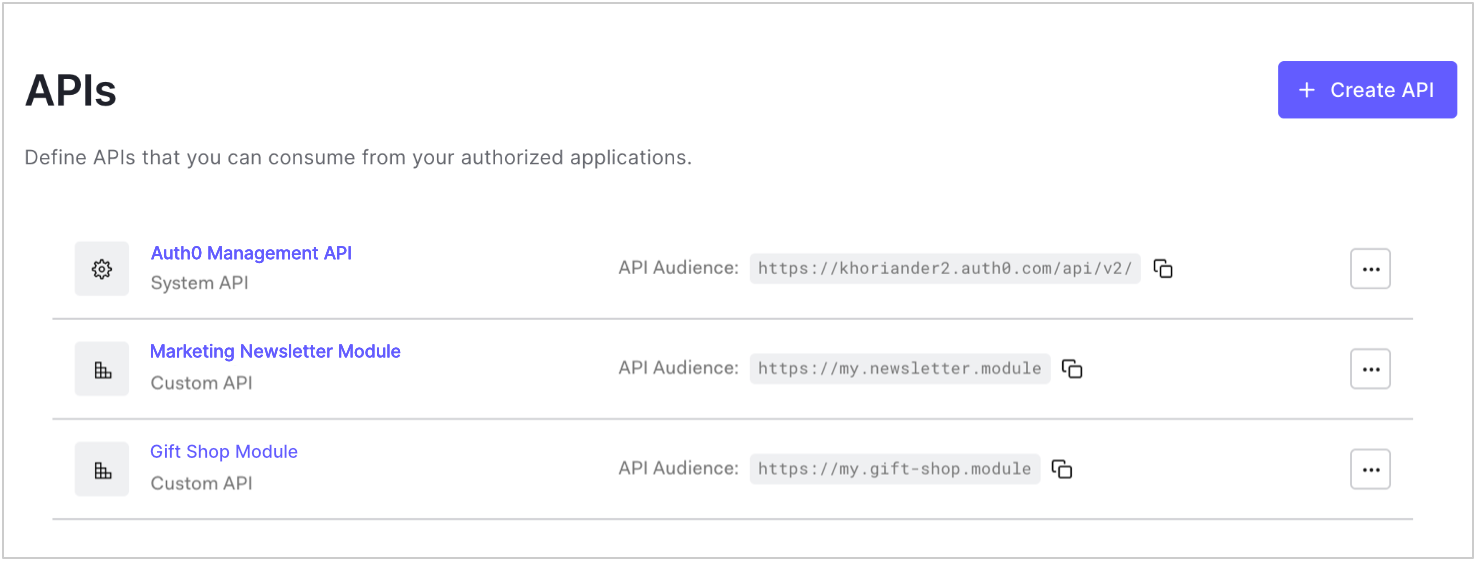
1. Go to [Dashboard > Applications > APIs](https://manage.auth0.com/#/apis) and click the name of the API to view.

   <Frame>
     <img src="https://mintcdn.com/docs-staging-quickstart-revamp/d9I4PO9-WombE4fE/images/cdy7uua7fh8z/3rhmhghYZDSi6YWHRA5yMQ/c71340259481b0b6787d5f3887cfda0f/dashboard-apis-list.png?fit=max&auto=format&n=d9I4PO9-WombE4fE&q=85&s=c930c8f1c76062697ec7bc1a1cdba631" alt="Dashboard Applications APIs List" width="1478" height="562" data-path="images/cdy7uua7fh8z/3rhmhghYZDSi6YWHRA5yMQ/c71340259481b0b6787d5f3887cfda0f/dashboard-apis-list.png" />
   </Frame>
2. Go to the **Permissions** tab and enter a permission name and description for the permission you want to add. Be sure not to use any reserved permission names (see Reserved names section).

   <Frame>
     <img src="https://mintcdn.com/docs-staging-quickstart-revamp/MuTsjoV4fPPSGZz9/images/cdy7uua7fh8z/32Pb185OFs2mC6z2fmunEw/2708c52c2869d016066cc456dd00b6a2/dashboard-applications-apis-permissions.png?fit=max&auto=format&n=MuTsjoV4fPPSGZz9&q=85&s=7d3e0ac440a9c03e4c0acbe998e0f3c1" alt="Dashboard Add API Permissions API Define Permissions Screen" width="1598" height="1382" data-path="images/cdy7uua7fh8z/32Pb185OFs2mC6z2fmunEw/2708c52c2869d016066cc456dd00b6a2/dashboard-applications-apis-permissions.png" />
   </Frame>
3. Click **Add**. Remember that individual Applications may need permissions and/or scopes updated to interact properly with the API.

## Use the Management API

<Callout icon="file-lines" color="#0EA5E9" iconType="regular">
  Patching the permissions with an empty object removes the permissions completely.
</Callout>

Make a `PATCH` call to the [Update Resource Server endpoint](https://auth0.com/docs/api/management/v2/resource-servers/patch-resource-servers-by-id). Be sure to replace `API_ID`, `MGMT_API_ACCESS_TOKEN`, `PERMISSION_NAME`, and `PERMISSION_DESC` placeholder values with your API ID, Management API <Tooltip tip="Access Token: Authorization credential, in the form of an opaque string or JWT, used to access an API." cta="View Glossary" href="/docs/glossary?term=Access+Token">Access Token</Tooltip>, permission name(s), and permission description(s), respectively. Be sure not to use any reserved permission names (see Reserved names section).

<CodeGroup>
  ```bash cURL lines
  curl --request PATCH \
    --url 'https://{yourDomain}/api/v2/resource-servers/API_ID' \
    --header 'authorization: Bearer MGMT_API_ACCESS_TOKEN' \
    --header 'cache-control: no-cache' \
    --header 'content-type: application/json' \
    --data '{ "scopes": [ { "value": "PERMISSION_NAME", "description": "PERMISSION_DESC" }, { "value": "PERMISSION_NAME", "description": "PERMISSION_DESC" } ] }'
  ```

  ```csharp C# lines
  var client = new RestClient("https://{yourDomain}/api/v2/resource-servers/API_ID");
  var request = new RestRequest(Method.PATCH);
  request.AddHeader("content-type", "application/json");
  request.AddHeader("authorization", "Bearer MGMT_API_ACCESS_TOKEN");
  request.AddHeader("cache-control", "no-cache");
  request.AddParameter("application/json", "{ \"scopes\": [ { \"value\": \"PERMISSION_NAME\", \"description\": \"PERMISSION_DESC\" }, { \"value\": \"PERMISSION_NAME\", \"description\": \"PERMISSION_DESC\" } ] }", ParameterType.RequestBody);
  IRestResponse response = client.Execute(request);
  ```

  ```go Go lines expandable
  package main

  import (
  	"fmt"
  	"strings"
  	"net/http"
  	"io/ioutil"
  )

  func main() {

  	url := "https://{yourDomain}/api/v2/resource-servers/API_ID"

  	payload := strings.NewReader("{ \"scopes\": [ { \"value\": \"PERMISSION_NAME\", \"description\": \"PERMISSION_DESC\" }, { \"value\": \"PERMISSION_NAME\", \"description\": \"PERMISSION_DESC\" } ] }")

  	req, _ := http.NewRequest("PATCH", url, payload)

  	req.Header.Add("content-type", "application/json")
  	req.Header.Add("authorization", "Bearer MGMT_API_ACCESS_TOKEN")
  	req.Header.Add("cache-control", "no-cache")

  	res, _ := http.DefaultClient.Do(req)

  	defer res.Body.Close()
  	body, _ := ioutil.ReadAll(res.Body)

  	fmt.Println(res)
  	fmt.Println(string(body))

  }
  ```

  ```java Java lines
  HttpResponse<String> response = Unirest.patch("https://{yourDomain}/api/v2/resource-servers/API_ID")
    .header("content-type", "application/json")
    .header("authorization", "Bearer MGMT_API_ACCESS_TOKEN")
    .header("cache-control", "no-cache")
    .body("{ \"scopes\": [ { \"value\": \"PERMISSION_NAME\", \"description\": \"PERMISSION_DESC\" }, { \"value\": \"PERMISSION_NAME\", \"description\": \"PERMISSION_DESC\" } ] }")
    .asString();
  ```

  ```javascript Node.JS lines
  var axios = require("axios").default;

  var options = {
    method: 'PATCH',
    url: 'https://{yourDomain}/api/v2/resource-servers/API_ID',
    headers: {
      'content-type': 'application/json',
      authorization: 'Bearer MGMT_API_ACCESS_TOKEN',
      'cache-control': 'no-cache'
    },
    data: {
      scopes: [
        {value: 'PERMISSION_NAME', description: 'PERMISSION_DESC'},
        {value: 'PERMISSION_NAME', description: 'PERMISSION_DESC'}
      ]
    }
  };

  axios.request(options).then(function (response) {
    console.log(response.data);
  }).catch(function (error) {
    console.error(error);
  });
  ```

  ```obj-c Obj-C lines expandable
  #import <Foundation/Foundation.h>

  NSDictionary *headers = @{ @"content-type": @"application/json",
                             @"authorization": @"Bearer MGMT_API_ACCESS_TOKEN",
                             @"cache-control": @"no-cache" };
  NSDictionary *parameters = @{ @"scopes": @[ @{ @"value": @"PERMISSION_NAME", @"description": @"PERMISSION_DESC" }, @{ @"value": @"PERMISSION_NAME", @"description": @"PERMISSION_DESC" } ] };

  NSData *postData = [NSJSONSerialization dataWithJSONObject:parameters options:0 error:nil];

  NSMutableURLRequest *request = [NSMutableURLRequest requestWithURL:[NSURL URLWithString:@"https://{yourDomain}/api/v2/resource-servers/API_ID"]
                                                         cachePolicy:NSURLRequestUseProtocolCachePolicy
                                                     timeoutInterval:10.0];
  [request setHTTPMethod:@"PATCH"];
  [request setAllHTTPHeaderFields:headers];
  [request setHTTPBody:postData];

  NSURLSession *session = [NSURLSession sharedSession];
  NSURLSessionDataTask *dataTask = [session dataTaskWithRequest:request
                                              completionHandler:^(NSData *data, NSURLResponse *response, NSError *error) {
                                                  if (error) {
                                                      NSLog(@"%@", error);
                                                  } else {
                                                      NSHTTPURLResponse *httpResponse = (NSHTTPURLResponse *) response;
                                                      NSLog(@"%@", httpResponse);
                                                  }
                                              }];
  [dataTask resume];
  ```

  ```php PHP lines expandable
  $curl = curl_init();

  curl_setopt_array($curl, [
    CURLOPT_URL => "https://{yourDomain}/api/v2/resource-servers/API_ID",
    CURLOPT_RETURNTRANSFER => true,
    CURLOPT_ENCODING => "",
    CURLOPT_MAXREDIRS => 10,
    CURLOPT_TIMEOUT => 30,
    CURLOPT_HTTP_VERSION => CURL_HTTP_VERSION_1_1,
    CURLOPT_CUSTOMREQUEST => "PATCH",
    CURLOPT_POSTFIELDS => "{ \"scopes\": [ { \"value\": \"PERMISSION_NAME\", \"description\": \"PERMISSION_DESC\" }, { \"value\": \"PERMISSION_NAME\", \"description\": \"PERMISSION_DESC\" } ] }",
    CURLOPT_HTTPHEADER => [
      "authorization: Bearer MGMT_API_ACCESS_TOKEN",
      "cache-control: no-cache",
      "content-type: application/json"
    ],
  ]);

  $response = curl_exec($curl);
  $err = curl_error($curl);

  curl_close($curl);

  if ($err) {
    echo "cURL Error #:" . $err;
  } else {
    echo $response;
  }
  ```

  ```python Python lines
  import http.client

  conn = http.client.HTTPSConnection("")

  payload = "{ \"scopes\": [ { \"value\": \"PERMISSION_NAME\", \"description\": \"PERMISSION_DESC\" }, { \"value\": \"PERMISSION_NAME\", \"description\": \"PERMISSION_DESC\" } ] }"

  headers = {
      'content-type': "application/json",
      'authorization': "Bearer MGMT_API_ACCESS_TOKEN",
      'cache-control': "no-cache"
      }

  conn.request("PATCH", "/{yourDomain}/api/v2/resource-servers/API_ID", payload, headers)

  res = conn.getresponse()
  data = res.read()

  print(data.decode("utf-8"))
  ```

  ```ruby Ruby lines
  require 'uri'
  require 'net/http'
  require 'openssl'

  url = URI("https://{yourDomain}/api/v2/resource-servers/API_ID")

  http = Net::HTTP.new(url.host, url.port)
  http.use_ssl = true
  http.verify_mode = OpenSSL::SSL::VERIFY_NONE

  request = Net::HTTP::Patch.new(url)
  request["content-type"] = 'application/json'
  request["authorization"] = 'Bearer MGMT_API_ACCESS_TOKEN'
  request["cache-control"] = 'no-cache'
  request.body = "{ \"scopes\": [ { \"value\": \"PERMISSION_NAME\", \"description\": \"PERMISSION_DESC\" }, { \"value\": \"PERMISSION_NAME\", \"description\": \"PERMISSION_DESC\" } ] }"

  response = http.request(request)
  puts response.read_body
  ```

  ```swift Swift lines expandable
  import Foundation

  let headers = [
    "content-type": "application/json",
    "authorization": "Bearer MGMT_API_ACCESS_TOKEN",
    "cache-control": "no-cache"
  ]
  let parameters = ["scopes": [
      [
        "value": "PERMISSION_NAME",
        "description": "PERMISSION_DESC"
      ],
      [
        "value": "PERMISSION_NAME",
        "description": "PERMISSION_DESC"
      ]
    ]] as [String : Any]

  let postData = JSONSerialization.data(withJSONObject: parameters, options: [])

  let request = NSMutableURLRequest(url: NSURL(string: "https://{yourDomain}/api/v2/resource-servers/API_ID")! as URL,
                                          cachePolicy: .useProtocolCachePolicy,
                                      timeoutInterval: 10.0)
  request.httpMethod = "PATCH"
  request.allHTTPHeaderFields = headers
  request.httpBody = postData as Data

  let session = URLSession.shared
  let dataTask = session.dataTask(with: request as URLRequest, completionHandler: { (data, response, error) -> Void in
    if (error != nil) {
      print(error)
    } else {
      let httpResponse = response as? HTTPURLResponse
      print(httpResponse)
    }
  })

  dataTask.resume()
  ```
</CodeGroup>

<Callout icon="file-lines" color="#0EA5E9" iconType="regular">
  When adding or updating scopes, Management API requires that you pass all scopes you would to include. If any of the existing scopes are not passed, they will be removed.
</Callout>

<table class="table">
  <thead>
    <tr>
      <th>Value</th>
      <th>Description</th>
    </tr>
  </thead>

  <tbody>
    <tr>
      <td><code>API\_ID</code></td>
      <td>ID of the API for which you want to delete permissions.</td>
    </tr>

    <tr>
      <td><code>MGMT\_API\_ACCESS\_TOKEN</code></td>
      <td><a href="https://auth0.com/docs/api/management/v2/tokens">Access Token for the Management API</a> with the scope <code>update:resource\_servers</code>.</td>
    </tr>

    <tr>
      <td><code>PERMISSION\_NAME</code></td>
      <td>Name(s) of the permission(s) you want to keep for the specified API.</td>
    </tr>

    <tr>
      <td><code>PERMISSION\_DESC</code></td>
      <td>User-friendly description(s) of the permission(s) you want to keep for the specified API.</td>
    </tr>
  </tbody>
</table>

## Reserved names

The following permission names are reserved and cannot be set as custom API permissions:

* address
* created\_at
* email
* email\_verified
* family\_name
* given\_name
* identities
* name
* nickname
* offline\_access
* <Tooltip tip="OpenID: Open standard for authentication that allows applications to verify users' identities without collecting and storing login information." cta="View Glossary" href="/docs/glossary?term=openid">openid</Tooltip>
* phone
* picture
* profile

## Learn more

* [Customize Consent Prompts](/docs/customize/login-pages/customize-consent-prompts)
* [Configure Logical API for Multiple APIs](/docs/get-started/apis/set-logical-api)
* [Role-Based Access Control](/docs/manage-users/access-control/rbac)
* [Enable Role-Based Access Control for APIs](/docs/get-started/apis/enable-role-based-access-control-for-apis)
* [Check API Calls](/docs/troubleshoot/authentication-issues/check-api-calls)
