> ## Documentation Index
> Fetch the complete documentation index at: https://docs-staging-quickstart-revamp.mintlify.site/llms.txt
> Use this file to discover all available pages before exploring further.

> Learn how to create rules using the Auth Dashboard or the Management API.

# Create Rules

<Warning>
  The End of Life (EOL) date of Rules and Hooks will be **November 18, 2026**, and they are no longer available to new tenants created as of **October 16, 2023**. Existing tenants with active Hooks will retain Hooks product access through end of life.

  We highly recommend that you use Actions to extend Auth0. With Actions, you have access to rich type information, inline documentation, and public `npm` packages, and can connect external integrations that enhance your overall extensibility experience. To learn more about what Actions offer, read [Understand How Auth0 Actions Work](/docs/customize/actions/actions-overview).

  To help with your migration, we offer guides that will help you [migrate from Rules to Actions](/docs/customize/actions/migrate/migrate-from-rules-to-actions) and [migrate from Hooks to Actions](/docs/customize/actions/migrate/migrate-from-hooks-to-actions). We also have a dedicated [Move to Actions](https://auth0.com/extensibility/movetoactions) page that highlights feature comparisons, [an Actions demo](https://www.youtube.com/watch?v=UesFSY1klrI), and other resources to help you on your migration journey.

  To read more about the Rules and Hooks deprecation, read our blog post: [Preparing for Rules and Hooks End of Life](https://auth0.com/blog/preparing-for-rules-and-hooks-end-of-life/).
</Warning>

<Warning>
  Because we plan to remove Rules and Hooks functions in 2026, you should create new Rules or Hooks only in your Development environment and only to test migration to Actions.

  To learn how to migrate your Rules to Actions, read [Migrate from Rules to Actions](/docs/customize/actions/migrate/migrate-from-rules-to-actions). To learn how to migrate your Hooks to Actions, read [Migrate from Hooks to Actions](/docs/customize/actions/migrate/migrate-from-hooks-to-actions).
</Warning>

You can build your own rule(s) to support your specific functionality requirements. You can modify a pre-existing rule template or choose to start from scratch using one of our samples. Auth0 provides a number of pre-existing rules and rule templates to help you achieve your goal(s). To see a list, visit our[rules repository on GitHub](https://github.com/auth0/rules).

## How rules work

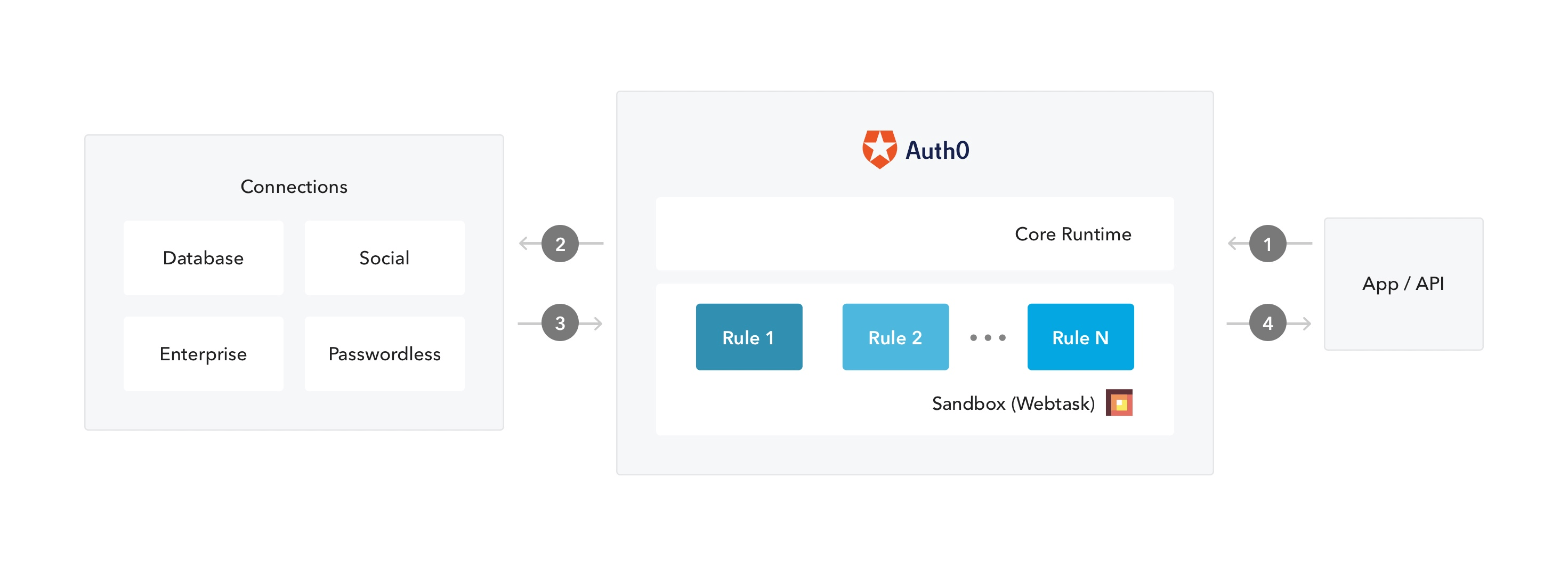
Rules are JavaScript functions that execute when a user authenticates to your application. They run once the authentication process is complete, and you can use them to customize and extend Auth0's capabilities. For security reasons, your rules code executes isolated from the code of other Auth0 tenants in a sandbox. Rules also run during the token refresh flow. To learn more, read [Refresh Tokens](/docs/secure/tokens/refresh-tokens).

In Auth0, the authentication transaction flow works as follows when you use rules:

<Frame>
  <img src="https://mintcdn.com/docs-staging-quickstart-revamp/MuTsjoV4fPPSGZz9/images/cdy7uua7fh8z/2gtBtkPChIyguA24x6enx2/ffbb8e21e86920ef9914f6fc126dc1df/flow.png?fit=max&auto=format&n=MuTsjoV4fPPSGZz9&q=85&s=a63989a632225cc94838b90b79efd43e" alt="Rules in the Authentication Flow diagram" width="2942" height="1062" data-path="images/cdy7uua7fh8z/2gtBtkPChIyguA24x6enx2/ffbb8e21e86920ef9914f6fc126dc1df/flow.png" />
</Frame>

1. An app initiates an authentication request to Auth0.
2. Auth0 routes the request to an identity provider through a configured connection.
3. The user authenticates successfully.
4. The ID token and/or access token is passed through the rules pipeline, then sent to the application.

## Prerequisite

If you plan to use global variables in your rule, be sure to configure your rules variables first. To learn more, read [Configure Global Variables for Rules](/docs/customize/rules/configure-global-variables-for-rules).

## Use the Dashboard

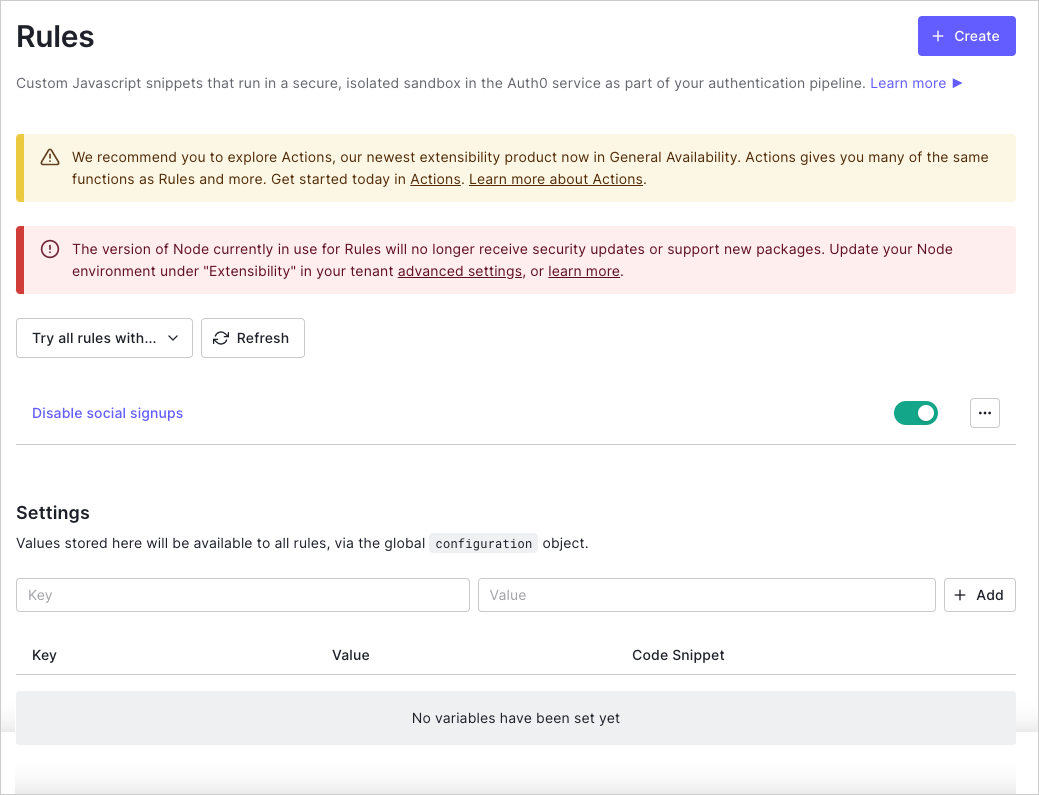
1. Go to [Dashboard > Auth Pipeline > Rules](https://manage.auth0.com/#/rules) and click **Create**.
   <Frame>
     <img src="https://mintcdn.com/docs-staging-quickstart-revamp/R8rXfTj95YBIEuC2/images/cdy7uua7fh8z/4OiSXzc5fYgPagHdOGbfvj/a589bdf811df66658fe21c509aed610c/Dashboard_-_Auth_Pipeline_-_Rules.png?fit=max&auto=format&n=R8rXfTj95YBIEuC2&q=85&s=a7556b0762c92b2cc3526f6f35a9654e" alt="Dashboard - Auth Pipeline - Rules " width="1039" height="795" data-path="images/cdy7uua7fh8z/4OiSXzc5fYgPagHdOGbfvj/a589bdf811df66658fe21c509aed610c/Dashboard_-_Auth_Pipeline_-_Rules.png" />
   </Frame>
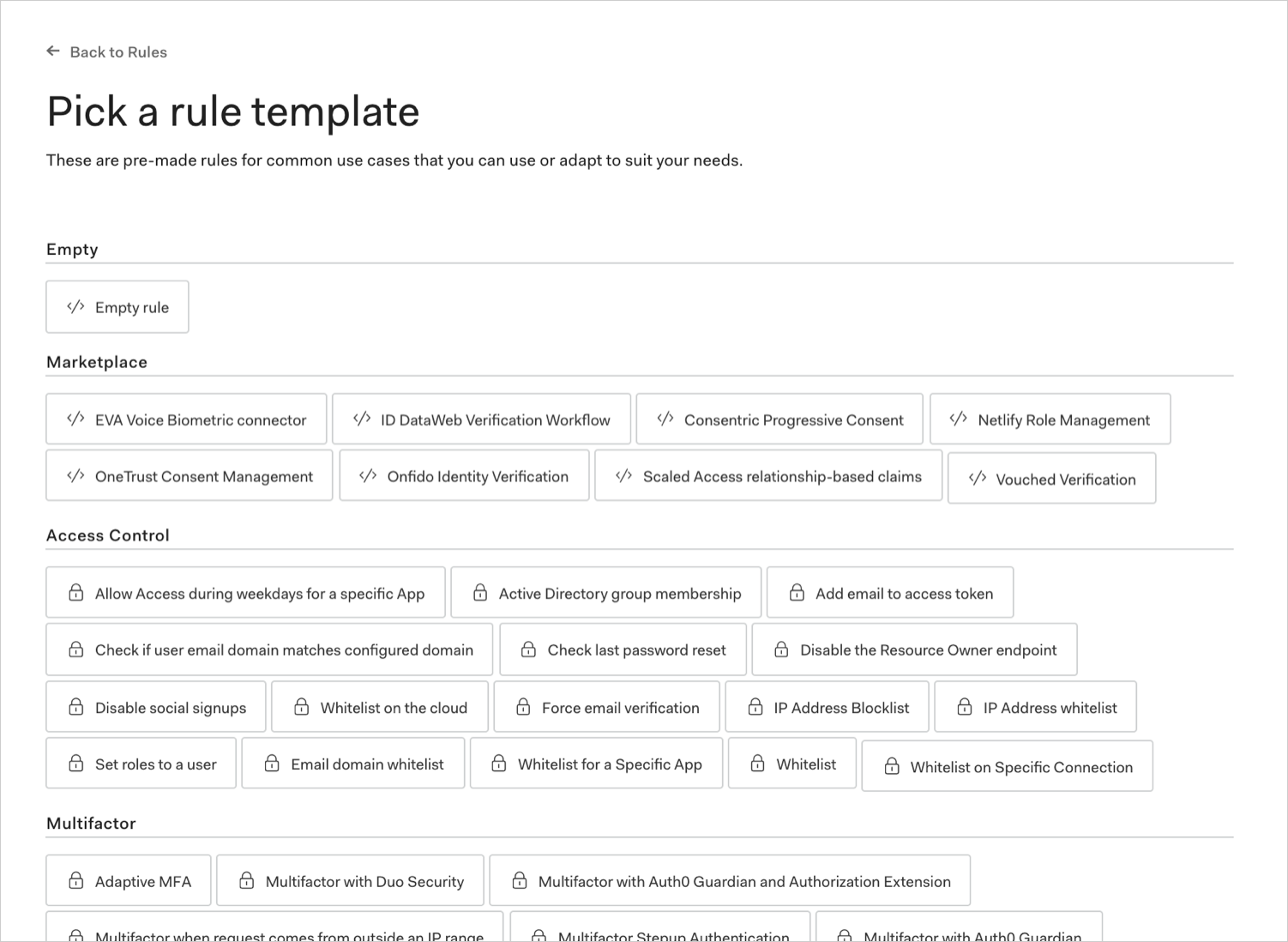
2. Select a rule template.

   <Frame>
     <img src="https://mintcdn.com/docs-staging-quickstart-revamp/0yzvW89mU3tfXF-c/images/cdy7uua7fh8z/6IydSSjg2oQrdSzErcTYtN/d17348a98c597a74b2989c298764b9e1/dashboard-rules-create_choose-template.png?fit=max&auto=format&n=0yzvW89mU3tfXF-c&q=85&s=247a2ec1e805059b6ad7d44ff0d9fdb4" alt="Dashboard - Auth Pipeline - Rules - Template" width="1502" height="1098" data-path="images/cdy7uua7fh8z/6IydSSjg2oQrdSzErcTYtN/d17348a98c597a74b2989c298764b9e1/dashboard-rules-create_choose-template.png" />
   </Frame>
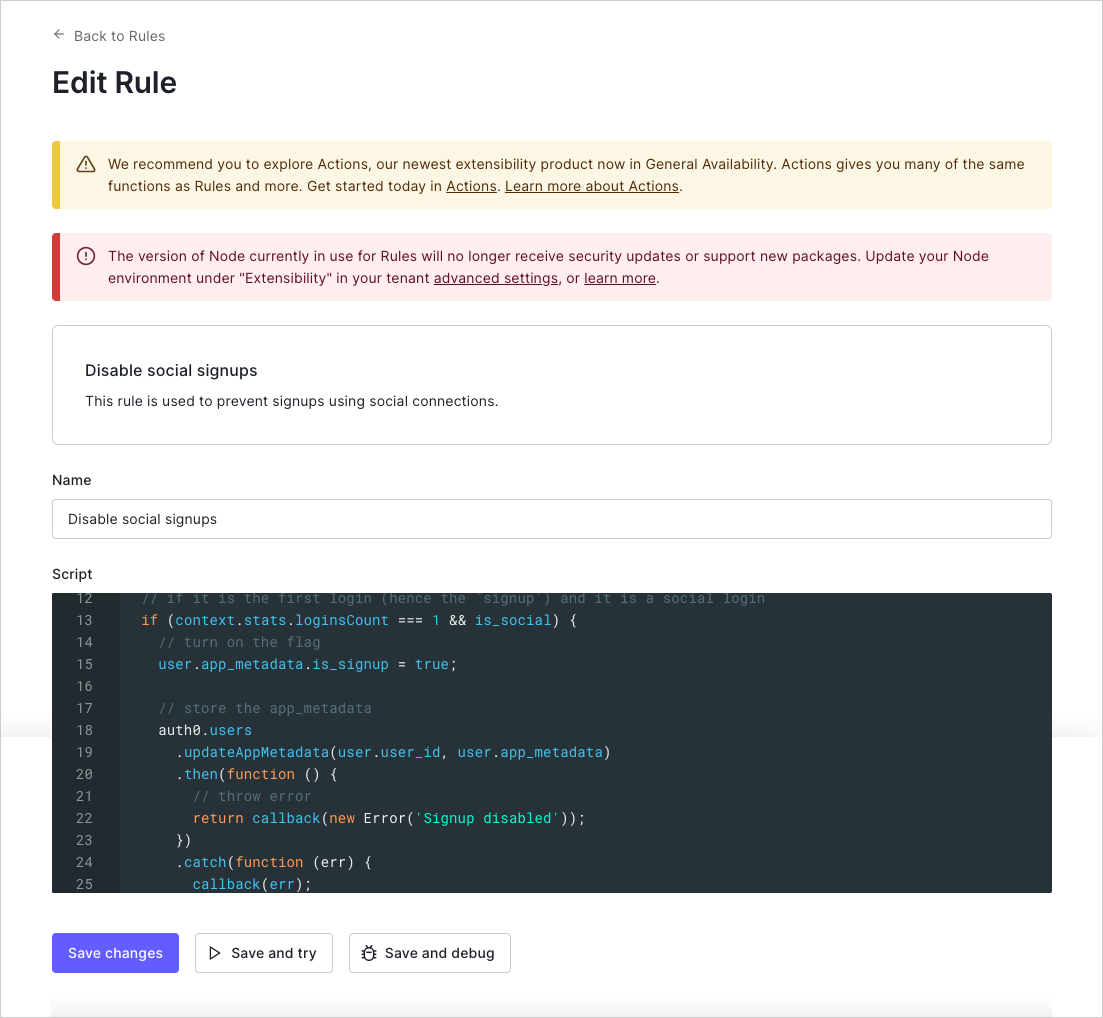
3. Name the rule, modify the script to suit your needs, and click **Save changes**.
   <Frame>
     <img src="https://mintcdn.com/docs-staging-quickstart-revamp/A1o6LcInzX_m5Dvq/images/cdy7uua7fh8z/5CoC6cnazv2uT1iSq6OGsm/6cb30d9479971be771313da80acc4802/Dashboard_-_Auth_Pipeline_-_Rules_-_Edit_Rule.png?fit=max&auto=format&n=A1o6LcInzX_m5Dvq&q=85&s=7c9fe090fbd9697b3b9d0bbad6ef68d3" alt="Dashboard - Auth Pipeline - Rules - Edit Rule" width="1103" height="1018" data-path="images/cdy7uua7fh8z/5CoC6cnazv2uT1iSq6OGsm/6cb30d9479971be771313da80acc4802/Dashboard_-_Auth_Pipeline_-_Rules_-_Edit_Rule.png" />
   </Frame>

## Use the Management API

Make a `POST` call to the [Create Rule endpoint](https://auth0.com/docs/api/management/v2#!/Rules/post_rules). Be sure to replace `MGMT_API_ACCESS_TOKEN`, `RULE_NAME`, `RULE_SCRIPT`, `RULE_ORDER`, and `RULE_ENABLED` placeholder values with your <Tooltip tip="Management API: A product to allow customers to perform administrative tasks." cta="View Glossary" href="/docs/glossary?term=Management+API">Management API</Tooltip> <Tooltip tip="Management API: A product to allow customers to perform administrative tasks." cta="View Glossary" href="/docs/glossary?term=Access+Token">Access Token</Tooltip>, rule name, rule script, rule order number, and rule enabled value, respectively.

<CodeGroup>
  ```bash cURL lines
  curl --request POST \
    --url 'https://{yourDomain}/api/v2/rules' \
    --header 'authorization: Bearer MGMT_API_ACCESS_TOKEN' \
    --header 'cache-control: no-cache' \
    --header 'content-type: application/json' \
    --data '{ "name": "RULE_NAME", "script": "RULE_SCRIPT" }'
  ```

  ```csharp C# lines
  var client = new RestClient("https://{yourDomain}/api/v2/rules");
  var request = new RestRequest(Method.POST);
  request.AddHeader("content-type", "application/json");
  request.AddHeader("authorization", "Bearer MGMT_API_ACCESS_TOKEN");
  request.AddHeader("cache-control", "no-cache");
  request.AddParameter("application/json", "{ \"name\": \"RULE_NAME\", \"script\": \"RULE_SCRIPT\" }", ParameterType.RequestBody);
  IRestResponse response = client.Execute(request);
  ```

  ```go Go lines expandable
  package main

  import (
  	"fmt"
  	"strings"
  	"net/http"
  	"io/ioutil"
  )

  func main() {

  	url := "https://{yourDomain}/api/v2/rules"

  	payload := strings.NewReader("{ \"name\": \"RULE_NAME\", \"script\": \"RULE_SCRIPT\" }")

  	req, _ := http.NewRequest("POST", url, payload)

  	req.Header.Add("content-type", "application/json")
  	req.Header.Add("authorization", "Bearer MGMT_API_ACCESS_TOKEN")
  	req.Header.Add("cache-control", "no-cache")

  	res, _ := http.DefaultClient.Do(req)

  	defer res.Body.Close()
  	body, _ := ioutil.ReadAll(res.Body)

  	fmt.Println(res)
  	fmt.Println(string(body))

  }
  ```

  ```java Java lines
  HttpResponse<String> response = Unirest.post("https://{yourDomain}/api/v2/rules")
    .header("content-type", "application/json")
    .header("authorization", "Bearer MGMT_API_ACCESS_TOKEN")
    .header("cache-control", "no-cache")
    .body("{ \"name\": \"RULE_NAME\", \"script\": \"RULE_SCRIPT\" }")
    .asString();
  ```

  ```javascript Node.JS lines
  var axios = require("axios").default;

  var options = {
    method: 'POST',
    url: 'https://{yourDomain}/api/v2/rules',
    headers: {
      'content-type': 'application/json',
      authorization: 'Bearer MGMT_API_ACCESS_TOKEN',
      'cache-control': 'no-cache'
    },
    data: {name: 'RULE_NAME', script: 'RULE_SCRIPT'}
  };

  axios.request(options).then(function (response) {
    console.log(response.data);
  }).catch(function (error) {
    console.error(error);
  });
  ```

  ```obj-c Obj-C lines expandable
  #import <Foundation/Foundation.h>

  NSDictionary *headers = @{ @"content-type": @"application/json",
                             @"authorization": @"Bearer MGMT_API_ACCESS_TOKEN",
                             @"cache-control": @"no-cache" };
  NSDictionary *parameters = @{ @"name": @"RULE_NAME",
                                @"script": @"RULE_SCRIPT" };

  NSData *postData = [NSJSONSerialization dataWithJSONObject:parameters options:0 error:nil];

  NSMutableURLRequest *request = [NSMutableURLRequest requestWithURL:[NSURL URLWithString:@"https://{yourDomain}/api/v2/rules"]
                                                         cachePolicy:NSURLRequestUseProtocolCachePolicy
                                                     timeoutInterval:10.0];
  [request setHTTPMethod:@"POST"];
  [request setAllHTTPHeaderFields:headers];
  [request setHTTPBody:postData];

  NSURLSession *session = [NSURLSession sharedSession];
  NSURLSessionDataTask *dataTask = [session dataTaskWithRequest:request
                                              completionHandler:^(NSData *data, NSURLResponse *response, NSError *error) {
                                                  if (error) {
                                                      NSLog(@"%@", error);
                                                  } else {
                                                      NSHTTPURLResponse *httpResponse = (NSHTTPURLResponse *) response;
                                                      NSLog(@"%@", httpResponse);
                                                  }
                                              }];
  [dataTask resume];
  ```

  ```php PHP lines expandable
  $curl = curl_init();

  curl_setopt_array($curl, [
    CURLOPT_URL => "https://{yourDomain}/api/v2/rules",
    CURLOPT_RETURNTRANSFER => true,
    CURLOPT_ENCODING => "",
    CURLOPT_MAXREDIRS => 10,
    CURLOPT_TIMEOUT => 30,
    CURLOPT_HTTP_VERSION => CURL_HTTP_VERSION_1_1,
    CURLOPT_CUSTOMREQUEST => "POST",
    CURLOPT_POSTFIELDS => "{ \"name\": \"RULE_NAME\", \"script\": \"RULE_SCRIPT\" }",
    CURLOPT_HTTPHEADER => [
      "authorization: Bearer MGMT_API_ACCESS_TOKEN",
      "cache-control: no-cache",
      "content-type: application/json"
    ],
  ]);

  $response = curl_exec($curl);
  $err = curl_error($curl);

  curl_close($curl);

  if ($err) {
    echo "cURL Error #:" . $err;
  } else {
    echo $response;
  }
  ```

  ```python Python lines
  import http.client

  conn = http.client.HTTPSConnection("")

  payload = "{ \"name\": \"RULE_NAME\", \"script\": \"RULE_SCRIPT\" }"

  headers = {
      'content-type': "application/json",
      'authorization': "Bearer MGMT_API_ACCESS_TOKEN",
      'cache-control': "no-cache"
      }

  conn.request("POST", "/{yourDomain}/api/v2/rules", payload, headers)

  res = conn.getresponse()
  data = res.read()

  print(data.decode("utf-8"))
  ```

  ```ruby Ruby lines
  require 'uri'
  require 'net/http'
  require 'openssl'

  url = URI("https://{yourDomain}/api/v2/rules")

  http = Net::HTTP.new(url.host, url.port)
  http.use_ssl = true
  http.verify_mode = OpenSSL::SSL::VERIFY_NONE

  request = Net::HTTP::Post.new(url)
  request["content-type"] = 'application/json'
  request["authorization"] = 'Bearer MGMT_API_ACCESS_TOKEN'
  request["cache-control"] = 'no-cache'
  request.body = "{ \"name\": \"RULE_NAME\", \"script\": \"RULE_SCRIPT\" }"

  response = http.request(request)
  puts response.read_body
  ```

  ```swift Swift lines expandable
  import Foundation

  let headers = [
    "content-type": "application/json",
    "authorization": "Bearer MGMT_API_ACCESS_TOKEN",
    "cache-control": "no-cache"
  ]
  let parameters = [
    "name": "RULE_NAME",
    "script": "RULE_SCRIPT"
  ] as [String : Any]

  let postData = JSONSerialization.data(withJSONObject: parameters, options: [])

  let request = NSMutableURLRequest(url: NSURL(string: "https://{yourDomain}/api/v2/rules")! as URL,
                                          cachePolicy: .useProtocolCachePolicy,
                                      timeoutInterval: 10.0)
  request.httpMethod = "POST"
  request.allHTTPHeaderFields = headers
  request.httpBody = postData as Data

  let session = URLSession.shared
  let dataTask = session.dataTask(with: request as URLRequest, completionHandler: { (data, response, error) -> Void in
    if (error != nil) {
      print(error)
    } else {
      let httpResponse = response as? HTTPURLResponse
      print(httpResponse)
    }
  })

  dataTask.resume()
  ```
</CodeGroup>

<table class="table">
  <thead>
    <tr>
      <th><strong>Value</strong></th>
      <th><strong>Description</strong></th>
    </tr>
  </thead>

  <tbody>
    <tr>
      <td><code>MGMT\_API\_ACCESS\_TOKEN</code></td>
      <td>Access Token for the Management API with the scope <code>create:rules</code>.</td>
    </tr>

    <tr>
      <td><code>RULE\_NAME</code></td>
      <td>Name of the rule you would like to create. The rule name can only contain alphanumeric characters, spaces, and hyphens; it may not start or end with spaces or hyphens.</td>
    </tr>

    <tr>
      <td><code>RULE\_SCRIPT</code></td>
      <td>Script that contains the code for the rule. Should match what you would enter if you were creating a new rule using the Dashboard.</td>
    </tr>

    <tr>
      <td><code>RULE\_ORDER</code> (optional)</td>
      <td>Integer that represents the order in which the rule should be executed in relation to other rules. Rules with lower numbers are executed before rules with higher numbers. If no order number is provided, the rule will execute last.</td>
    </tr>

    <tr>
      <td><code>RULE\_ENABLED</code> (optional)</td>
      <td>Boolean that represents whether the rules is enabled (<code>true</code>) or disabled (<code>false</code>).</td>
    </tr>
  </tbody>
</table>

<Warning>
  We expose IPv6 addresses in our public endpoints (e.g., `travel0.us.auth0.com`). If a request arrives from a machine that supports IPv6, then the `context.request.ip` property will contain an IPv6 address. If you perform manual IP address manipulation, we suggest you use the [ipaddr.js@1.9.0 library](https://www.npmjs.com/package/ipaddr.js/v/1.9.0).
</Warning>

## Manage rate limits

For rules that call Auth0 APIs, you should always handle rate limiting by checking the `X-RateLimit-Remaining` header and acting appropriately when the number returned nears 0. You should also add logic to handle cases in which you exceed the provided rate limits and receive the HTTP Status Code 429 (Too Many Requests); in this case, if a retry is needed, it is best to allow for a back-off to avoid going into an infinite retry loop. To learn more about rate limits, read [Rate Limit Policy For Auth0 APIs](/docs/troubleshoot/customer-support/operational-policies/rate-limit-policy).

## Available modules

Rules run in a JavaScript sandbox configured for a specific Node.js version.

The sandbox supports all versions of the JavaScript language (and associated syntax) for the configured Node.js version, and a large number of Node.js modules. For a list of supported sandbox modules, check out [Can I require: Auth0 Extensibility](https://auth0-extensions.github.io/canirequire/).

## Learn more

* [Configure Global Variables for Rules](/docs/customize/rules/configure-global-variables-for-rules)
* [Rules Environment Best Practices](/docs/rules-best-practices/rules-environment-best-practices)