> ## Documentation Index
> Fetch the complete documentation index at: https://docs-staging-quickstart-revamp.mintlify.site/llms.txt
> Use this file to discover all available pages before exploring further.

> Learn about the ACUL ACUL Signup screen classes

# Signup screen classes

## Signup screen class

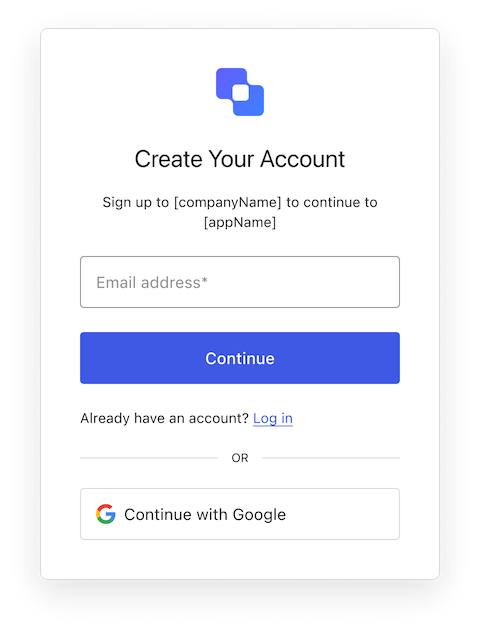
The Signup screen class is part of the [Identifier First Authentication](/docs/authenticate/login/auth0-universal-login/identifier-first) flow and collects the user's identifier. Depending on your tenant setup, this identifier can be an email, phone number, or username.

<Frame>
  <img src="https://mintcdn.com/docs-staging-quickstart-revamp/A1o6LcInzX_m5Dvq/images/cdy7uua7fh8z/5IrmDuvj5xma8DmkIMJ7ol/42363cde670f86561666c9e930f76883/Screenshot_2025-02-05_at_15.43.23.png?fit=max&auto=format&n=A1o6LcInzX_m5Dvq&q=85&s=5a00b760dbf92bca5246356242e2ab6e" alt="ACUL Signup screen image" width="374" height="736" data-path="images/cdy7uua7fh8z/5IrmDuvj5xma8DmkIMJ7ol/42363cde670f86561666c9e930f76883/Screenshot_2025-02-05_at_15.43.23.png" />
</Frame>

Import and instantiate the Signup screen class

```js lines
import Signup from '@auth0/auth0-acul-js/signup';
const signupManager = new Signup();

// SDK Properties return a string, number or boolean
// ex. "login-id"
signupManager.screen.name;

// SDK Methods return an object or array
// ex. { signup: "/signup_url", reset_password: "/reset_password_url"} 
signupManager.screenLinks();
```

### Properties

The Signup screen class properties are:
<Tabs>
  <Tab title="branding">
    ```ts lines expandable
    interface branding {
      settings: null | BrandingSettings;
      themes: null | BrandingThemes;
    }

    interface BrandingSettings {
      colors?: {
        pageBackground?: string | {
          angleDeg: number;
          end: string;
          start: string;
          type: string;
        };
        primary?: string;
      };
      faviconUrl?: string;
      font?: {url: string;};
      logoUrl?: string;
    }

    interface BrandingThemes {
      default: {
        borders: Record<string, string | number | boolean>;
        colors: Record<string, string>;
        displayName: string;
        fonts: Record<string, string | boolean | object>;
        pageBackground: Record<string, string>;
        widget: Record<string, string | number>;
      };
    }
    ```
  </Tab>

  <Tab title="client">
    ```ts lines
    interface client {
      description: null | string;
      id: string;
      logoUrl: null | string;
      name: string;
      metadata: null | {[key: string]: string;};
    }
    ```
  </Tab>

  <Tab title="organization">
    ```ts lines
    interface organization {
      branding: null | {
        colors?: {
          pageBackground?: string;
          primary?: string;
        };
        logoUrl?: string;
      };
      displayName: null | string;
      id: null | string;
      metadata: null | {[key: string]: string;};
      name: null | string;
      usage: null | string;
    }
    ```
  </Tab>

  <Tab title="prompt">
    ```ts lines
    interface prompt{
      name: string;
    }
    ```
  </Tab>

  <Tab title="screen">
    ```ts lines
    interface screen {
     captcha: null | CaptchaContext;
     captchaImage: null | string;
     captchaProvider: null | string;
     captchaSiteKey: null | string;
     data: null | {
       loginLink?: string;
       name?: string;
     };
     isCaptchaAvailable: boolean;
     links: null | Record<string, string>;
     name: string;
     texts: null | Record<string, string>;
    }

    interface CaptchaContext {
      image?: string;
      provider: string;
      siteKey?: string;
    }
    ```
  </Tab>

  <Tab title="tenant">
    ```ts lines
    interface tenant {
      enabledFactors: null | string[];
      enabledLocales: null | string[];
      friendlyName: null | string;
      name: null | string;
    }
    ```
  </Tab>

  <Tab title="transaction">
    ```ts lines expandable
    interface TransactionMembersOnSignup {
      alternateConnections: null | (Connection | EnterpriseConnection)[];
      connectionStrategy: null | string;
      countryCode: null | string;
      countryPrefix: null | string;
      currentConnection: null | Connection;
      errors: null | Error[];
      hasErrors: boolean;
      isPasskeyEnabled: boolean;
      locale: string;
      optionalIdentifiers: null | ("email" | "username" | "phone")[];
      requiredIdentifiers: null | ("email" | "username" | "phone")[];
      state: string;
      usernamePolicy: null | UsernamePolicy;
    }

    interface Connection {
      metadata?: Record<string, string>;
      name: string;
      strategy: string;
    }

    interface EnterpriseConnection {
      metadata?: Record<string, string>;
      name: string;
      options: {
        displayName?: string;
        iconUrl?: string;
        showAsButton: boolean;
      };
      strategy: string;
    }

    interface UsernamePolicy {
      allowedFormats: {
        usernameInEmailFormat: boolean;
        usernameInPhoneFormat: boolean;
      };
      maxLength: number;
      minLength: number;
    }
    ```
  </Tab>

  <Tab title="untrustedData">
    ```ts lines
    interface untrustedData {
      authorizationParams: null | {
        login_hint?: string;
        screen_hint?: string;
        ui_locales?: string;
        [key: `ext-${string}`]: string;
      };
      submittedFormData: null | {
        [key: string]:
            | string
            | number
            | boolean
            | undefined;
      };
    }
    ```
  </Tab>

  <Tab title="user">
    ```ts lines
    interface user {
      appMetadata: null | {[key: string]: string;};
      email: null | string;
      enrolledDevices: null | ShortEntity<"device">[];
      enrolledEmails: null | ShortEntity<"email">[];
      enrolledFactors: null | string[];
      enrolledPhoneNumbers: null | ShortEntity<"phoneNumber">[];
      id: null | string;
      organizations: null | {
        branding: undefined | {logoUrl: undefined | string;};
        displayName: undefined | string;
        organizationId: undefined | string;
        organizationName: undefined | string;
      }[];
      phoneNumber: null | string;
      picture: null | string;
      userMetadata: null | {[key: string]: string;};
      username: null | string;
    }

    ShortEntity<Key>: {
        id: number;
    } & Record<Key, string>
    ```
  </Tab>
</Tabs>

### Methods

The Signup screen class methods are:

#### pickCountryCode( options? )

This method redirects the user to the country code selection list, where they can update the country code prefix for their phone number.

```js lines
import Signup from "@auth0/auth0-acul-js/signup";
const signupManager = new Signup();

signupManager.pickCountryCode();
```

#### signup( options? )

This method redirects the user to the next step in the authentication flow. Depending on the server configuration, this screen can include inputs for one or more of the following: email, username, or phone number. For more details, review [Flexible Identifiers](/docs/authenticate/database-connections/flexible-identifiers-and-attributes).

```js lines
import Signup from '@auth0/auth0-acul-js/signup';

const signupManager = new Signup();

signupManager.signup({
 email: 'test@example.com',
 password: 'P@$$wOrd123!',
});
```

<table class="table">
  <thead>
    <tr>
      <th><strong>Parameter</strong>                 </th>
      <th><strong>Type</strong></th>
      <th><strong>Required</strong></th>
      <th><strong>Description</strong></th>
    </tr>
  </thead>

  <tbody>
    <tr>
      <td><code>email</code></td>
      <td>string</td>
      <td>Conditionally</td>
      <td>The user’s email.</td>
    </tr>

    <tr>
      <td><code>phone</code></td>
      <td>string</td>
      <td>Conditionally</td>
      <td>The user’s phone number.</td>
    </tr>

    <tr>
      <td><code>username</code></td>
      <td>string</td>
      <td>Conditionally</td>
      <td>The user’s username.</td>
    </tr>

    <tr>
      <td><code>password</code></td>
      <td>string</td>
      <td>Conditionally</td>
      <td>The user’s password.</td>
    </tr>

    <tr>
      <td><code>captcha</code></td>
      <td>string</td>
      <td>Conditionally</td>
      <td>The captcha code or response from the captcha provider. This property is required if your Auth0 tenant has Bot Detection enabled.</td>
    </tr>

    <tr>
      <td><code>\[key: string]</code></td>
      <td>string | number | boolean | undefined</td>
      <td>No</td>
      <td>Additional data collected from the user. This data is accessible in the <code>pre-user-registration</code> Action trigger.</td>
    </tr>
  </tbody>
</table>

#### federatedSignup( options? )

This method redirects the user to the social or enterprise <Tooltip tip="Identity Provider (IdP): Service that stores and manages digital identities." cta="View Glossary" href="/docs/glossary?term=identity+provider">identity provider</Tooltip> (IdP) for authentication. Review [Social Identity Providers](/docs/authenticate/identity-providers/social-identity-providers) and [Enterprise Identity Providers](/docs/authenticate/identity-providers/enterprise-identity-providers) for details.

```js lines
import Signup from '@auth0/auth0-acul-js/signup';

const signupManager = new Signup();

signupManager.federatedSignup({
 connection: 'google-oauth2'
});
```

<table class="table">
  <thead>
    <tr>
      <th><strong>Parameter</strong></th>
      <th><strong>Type</strong></th>
      <th><strong>Required</strong></th>
      <th><strong>Description</strong></th>
    </tr>
  </thead>

  <tbody>
    <tr>
      <td><code>connection</code></td>
      <td>string</td>
      <td>Yes</td>
      <td>The identifier for the connection.</td>
    </tr>

    <tr>
      <td><code>\[key: string]</code></td>
      <td>string | number | boolean | undefined</td>
      <td>No</td>
      <td>Additional data collected from the user.</td>
    </tr>
  </tbody>
</table>

## Signup ID screen class

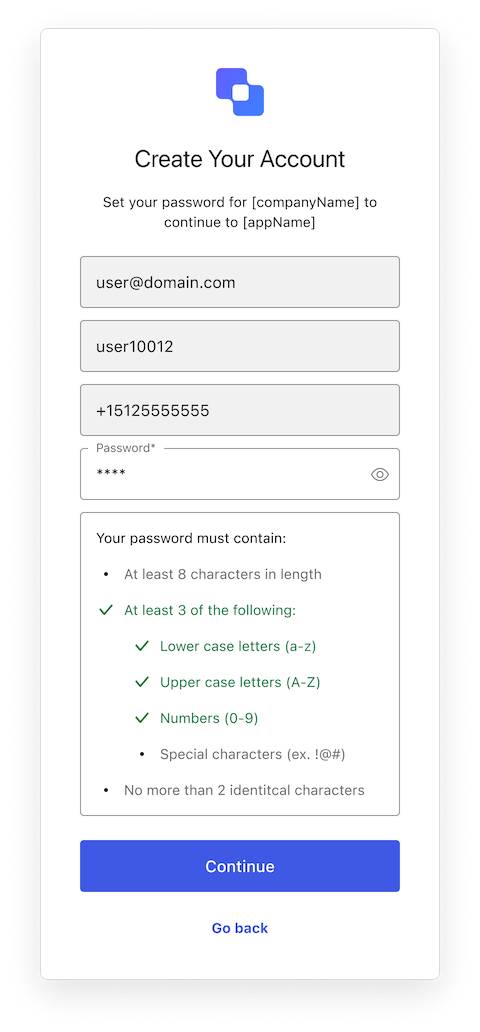
The Signup ID screen class is part of the [Identifier First Authentication](/docs/authenticate/login/auth0-universal-login/identifier-first) flow and collects the user's identifier. Depending on your tenant setup, this identifier can be an email, phone number, or username.

<Frame>
  <img src="https://mintcdn.com/docs-staging-quickstart-revamp/rHYM5iMy6d7A-FVR/images/cdy7uua7fh8z/5lzGYj0k4VcxvPCBYH37SO/ebd291cc0dbd673a70f93530f724bf65/Signup_ID.png?fit=max&auto=format&n=rHYM5iMy6d7A-FVR&q=85&s=67beadc6157f0edc76ddb3c90f54160a" alt="Signup ID" width="480" height="632" data-path="images/cdy7uua7fh8z/5lzGYj0k4VcxvPCBYH37SO/ebd291cc0dbd673a70f93530f724bf65/Signup_ID.png" />
</Frame>

Import and instantiate the Signup ID screen class

```js lines
import SignupId from '@auth0/auth0-acul-js/signup-id';
const signupIdManager = new SignupId();

// SDK Properties return a string, number or boolean
// ex. "signup-id"
signupIdManager.screen.name;

// SDK Methods return an object or array
// ex. { login: "/login_url"} 
signupIdManager.screenLinks();
```

### Properties

The Signup ID screen class properties are:
<Tabs>
  <Tab title="branding">
    ```ts lines expandable
    interface branding {
      settings: null | BrandingSettings;
      themes: null | BrandingThemes;
    }

    interface BrandingSettings {
      colors?: {
        pageBackground?: string | {
          angleDeg: number;
          end: string;
          start: string;
          type: string;
        };
        primary?: string;
      };
      faviconUrl?: string;
      font?: {url: string;};
      logoUrl?: string;
    }

    interface BrandingThemes {
      default: {
        borders: Record<string, string | number | boolean>;
        colors: Record<string, string>;
        displayName: string;
        fonts: Record<string, string | boolean | object>;
        pageBackground: Record<string, string>;
        widget: Record<string, string | number>;
      };
    }
    ```
  </Tab>

  <Tab title="client">
    ```ts lines
    interface client {
      description: null | string;
      id: string;
      logoUrl: null | string;
      name: string;
      metadata: null | {[key: string]: string;};
    }
    ```
  </Tab>

  <Tab title="organization">
    ```ts lines
    interface organization {
      branding: null | {
        colors?: {
          pageBackground?: string;
          primary?: string;
        };
        logoUrl?: string;
      };
      displayName: null | string;
      id: null | string;
      metadata: null | {[key: string]: string;};
      name: null | string;
      usage: null | string;
    }
    ```
  </Tab>

  <Tab title="prompt">
    ```ts lines
    interface prompt{
      name: string;
    }
    ```
  </Tab>

  <Tab title="screen">
    ```ts lines
    interface screen {
      captcha: null | CaptchaContext;
      captchaImage: null | string;
      captchaProvider: null | string;
      captchaSiteKey: null | string;
      data: null | Record<string, string>;
      isCaptchaAvailable: boolean;
      links: null | Record<string, string>;
      loginLink: null | string;
      name: string;
      texts: null | Record<string, string>;
    }

    interface CaptchaContext {
      image?: string;
      provider: string;
      siteKey?: string;
    }
    ```
  </Tab>

  <Tab title="tenant">
    ```ts lines
    interface tenant {
      enabledFactors: null | string[];
      enabledLocales: null | string[];
      friendlyName: null | string;
      name: null | string;
    }
    ```
  </Tab>

  <Tab title="transaction">
    ```ts lines expandable
    interface transaction {
      alternateConnections: null | (Connection | EnterpriseConnection)[];
      connectionStrategy: null | string;
      countryCode: null | string;
      countryPrefix: null | string;
      currentConnection: null | Connection;
      errors: null | Error[];
      hasErrors: boolean;
      isPasskeyEnabled: boolean;
      locale: string;
      optionalIdentifiers: null | ("email" | "username" | "phone")[];
      requiredIdentifiers: null | ("email" | "username" | "phone")[];
      state: string;
      usernamePolicy: null | UsernamePolicy;
    }

    interface Connection {
      metadata?: Record<string, string>;
      name: string;
      strategy: string;
    }

    interface EnterpriseConnection {
      metadata?: Record<string, string>;
      name: string;
      options: {
        display_name?: string;
        icon_url?: string;
        show_as_button: boolean;
      };
      strategy: string;
    }

    interface UsernamePolicy {
      allowedFormats: {
        usernameInEmailFormat: boolean;
        usernameInPhoneFormat: boolean;
      };
      maxLength: number;
      minLength: number;
    }
    ```
  </Tab>

  <Tab title="unstrustedData">
    ```ts lines
    interface untrustedData {
      authorizationParams: null | {
        login_hint?: string;
        screen_hint?: string;
        ui_locales?: string;
        [key: `ext-${string}`]: string;
      };
      submittedFormData: null | {
        [key: string]:
            | string
            | number
            | boolean
            | undefined;
      };
    }
    ```
  </Tab>

  <Tab title="user">
    ```ts lines
    interface user {
      appMetadata: null | {[key: string]: string;};
      email: null | string;
      enrolledDevices: null | ShortEntity<"device">[];
      enrolledEmails: null | ShortEntity<"email">[];
      enrolledFactors: null | string[];
      enrolledPhoneNumbers: null | ShortEntity<"phoneNumber">[];
      id: null | string;
      organizations: null | {
        branding: undefined | {logoUrl: undefined | string;};
        displayName: undefined | string;
        organizationId: undefined | string;
        organizationName: undefined | string;
      }[];
      phoneNumber: null | string;
      picture: null | string;
      userMetadata: null | {[key: string]: string;};
      username: null | string;
    }

    ShortEntity<Key>: {
        id: number;
    } & Record<Key, string>
    ```
  </Tab>
</Tabs>

### Methods

The Signup ID screen class methods are:

#### signup( options? )

This method takes the user to the next step in the authentication flow. Depending on the server configuration, this screen can include inputs for one or more of the following: email, username, or phone number. For more details, review [Flexible Identifiers](/docs/authenticate/database-connections/flexible-identifiers-and-attributes).

```js lines
import SignupId from "@auth0/auth0-acul-js/signup-id";

const signupIdManager = new SignupId();
const { transaction } = signupIdManager;

//get mandatory & optional identifiers required for signup
const mandatoryIdentifier = transaction.getRequiredIdentifiers(); // eg: email
const optionalIdentifiers = transaction.getOptionalIdentifiers() // eg: phone

const signupParams = {
 email : "testEmail",
 phone : "+91923456789"
};

signupIdManager.signup(signupParams);
```

<table class="table">
  <thead>
    <tr>
      <th><strong>Parameter</strong>                 </th>
      <th><strong>Type</strong></th>
      <th><strong>Required</strong></th>
      <th><strong>Description</strong></th>
    </tr>
  </thead>

  <tbody>
    <tr>
      <td><code>email</code></td>
      <td>string</td>
      <td>Conditionally</td>
      <td>The user’s email.</td>
    </tr>

    <tr>
      <td><code>phone</code></td>
      <td>string</td>
      <td>Conditionally</td>
      <td>The user’s phone number.</td>
    </tr>

    <tr>
      <td><code>username</code></td>
      <td>string</td>
      <td>Conditionally</td>
      <td>The user’s username.</td>
    </tr>

    <tr>
      <td><code>captcha</code></td>
      <td>string</td>
      <td>Conditionally</td>
      <td>The captcha code or response from the captcha provider. This property is required if your Auth0 tenant has Bot Detection enabled.</td>
    </tr>

    <tr>
      <td><code>\[key: string]</code></td>
      <td>string | number | boolean | undefined</td>
      <td>No</td>
      <td>Additional data collected from the user. This data is accessible in the <code>pre-user-registration</code> Action trigger.</td>
    </tr>
  </tbody>
</table>

#### federatedSignup( options? )

This method redirects the user to the social or enterprise identity provider (IdP) for authentication. Review [Social Identity Providers](/docs/authenticate/identity-providers/social-identity-providers) and [Enterprise Identity Providers](/docs/authenticate/identity-providers/enterprise-identity-providers) for details.

```js lines
import SignupId from "@auth0/auth0-acul-js/signup-id";

const signupIdManager = new SignupId();
const { transaction } = signupIdManager;

//get social connections
const socialConnection = transaction.getAlternateConnections(); //eg: "google-oauth2"

const signupParams = {
 connection : socialConnection[0].name, // "google-oauth2"
};

signupIdManager.federatedSignup(signupParams);
```

<table class="table">
  <thead>
    <tr>
      <th><strong>Parameter</strong></th>
      <th><strong>Type</strong></th>
      <th><strong>Required</strong></th>
      <th><strong>Description</strong></th>
    </tr>
  </thead>

  <tbody>
    <tr>
      <td><code>connection</code></td>
      <td>string</td>
      <td>Yes</td>
      <td>The identifier for the connection.</td>
    </tr>

    <tr>
      <td><code>\[key: string]</code></td>
      <td>string | number | boolean | undefined</td>
      <td>No</td>
      <td>Additional data collected from the user.</td>
    </tr>
  </tbody>
</table>

## Signup Password screen class

The Signup Password screen class is part of the [Identifier First Authentication](/docs/authenticate/login/auth0-universal-login/identifier-first) flow and allows the user to create a password for their profile.

<Frame>
  <img src="https://mintcdn.com/docs-staging-quickstart-revamp/OF4RJhPvadaf5sdD/images/cdy7uua7fh8z/5h85r3sVhe8mVw7rDkDwTD/02c3521d9d6c4d490c1a64ae37ecca72/Signup_Password_with_Flexible_IDs.png?fit=max&auto=format&n=OF4RJhPvadaf5sdD&q=85&s=425f998fa382f527297664d7e690314a" alt="Signup Password with Flexible IDs" width="480" height="1032" data-path="images/cdy7uua7fh8z/5h85r3sVhe8mVw7rDkDwTD/02c3521d9d6c4d490c1a64ae37ecca72/Signup_Password_with_Flexible_IDs.png" />
</Frame>

Import and instantiate the Signup Password screen class

```js lines
import SignupPassword from '@auth0/auth0-acul-js/signup-password';
const signupPasswordManager = new SignupPassword();

// SDK Properties return a string, number or boolean
// ex. "signup-password"
signupPasswordManager.screen.name;

// SDK Methods return an object or array
// ex. { login: "/login_url", edit_identifier: "/edit_url"} 
signupPasswordManager.screenLinks();
```

### Properties

The Signup Password screen class properties are:

<Tabs>
  <Tab title="branding">
    ```ts lines expandable
    interface branding {
      settings: null | BrandingSettings;
      themes: null | BrandingThemes;
    }

    interface BrandingSettings {
      colors?: {
        pageBackground?: string | {
          angleDeg: number;
          end: string;
          start: string;
          type: string;
        };
        primary?: string;
      };
      faviconUrl?: string;
      font?: {url: string;};
      logoUrl?: string;
    }

    interface BrandingThemes {
      default: {
        borders: Record<string, string | number | boolean>;
        colors: Record<string, string>;
        displayName: string;
        fonts: Record<string, string | boolean | object>;
        pageBackground: Record<string, string>;
        widget: Record<string, string | number>;
      };
    }
    ```
  </Tab>

  <Tab title="client">
    ```ts lines
    interface client {
      description: null | string;
      id: string;
      logoUrl: null | string;
      name: string;
      metadata: null | {[key: string]: string;};
    }
    ```
  </Tab>

  <Tab title="organization">
    ```ts lines
    interface organization {
      branding: null | {
        colors?: {
          pageBackground?: string;
          primary?: string;
        };
        logoUrl?: string;
      };
      displayName: null | string;
      id: null | string;
      metadata: null | {[key: string]: string;};
      name: null | string;
      usage: null | string;
    }
    ```
  </Tab>

  <Tab title="prompt">
    ```ts lines
    interface prompt{
      name: string;
    }
    ```
  </Tab>

  <Tab title="screen">
    ```ts lines
    interface screen {
      captcha: null | CaptchaContext;
      captchaImage: null | string;
      captchaProvider: null | string;
      captchaSiteKey: null | string;
      data: null | {
        email?: string;
        phone?: string;
        username?: string;
      };
      editLink: null | string;
      isCaptchaAvailable: boolean;
      links: null | Record<string, string>;
      loginLink: null | string;
      name: string;
      texts: null | Record<string, string>;
    }

    interface CaptchaContext {
      image?: string;
      provider: string;
      siteKey?: string;
    }
    ```
  </Tab>

  <Tab title="tenant">
    ```ts lines
    interface tenant {
      enabledFactors: null | string[];
      enabledLocales: null | string[];
      friendlyName: null | string;
      name: null | string;
    }
    ```
  </Tab>

  <Tab title="transaction">
    ```ts lines expandable
    interface transaction {
      alternateConnections: null | (Connection | EnterpriseConnection)[];
      connectionStrategy: null | string;
      countryCode: null | string;
      countryPrefix: null | string;
      currentConnection: null | Connection;
      errors: null | Error[];
      hasErrors: boolean;
      isPasskeyEnabled: boolean;
      locale: string;
      optionalIdentifiers: null | ("email" | "username" | "phone")[];
      passwordPolicy: null | PasswordPolicy;
      requiredIdentifiers: null | ("email" | "username" | "phone")[];
      state: string;
    }

    interface Connection {
      metadata?: Record<string, string>;
      name: string;
      strategy: string;
    }

    interface EnterpriseConnection {
      metadata?: Record<string, string>;
      name: string;
      options: {
        display_name?: string;
        icon_url?: string;
        show_as_button: boolean;
      };
      strategy: string;
    }

    interface PasswordPolicy {
        minLength?: number;
        policy:
            | "low"
            | "fair"
            | "good"
            | "excellent";
    }
    ```
  </Tab>

  <Tab title="untrustedData">
    ```ts lines
    interface untrustedData {
      authorizationParams: null | {
        login_hint?: string;
        screen_hint?: string;
        ui_locales?: string;
        [key: `ext-${string}`]: string;
      };
      submittedFormData: null | {
        [key: string]:
            | string
            | number
            | boolean
            | undefined;
      };
    }
    ```
  </Tab>

  <Tab title="user">
    ```ts lines
    interface user {
      appMetadata: null | {[key: string]: string;};
      email: null | string;
      enrolledDevices: null | ShortEntity<"device">[];
      enrolledEmails: null | ShortEntity<"email">[];
      enrolledFactors: null | string[];
      enrolledPhoneNumbers: null | ShortEntity<"phoneNumber">[];
      id: null | string;
      organizations: null | {
        branding: undefined | {logoUrl: undefined | string;};
        displayName: undefined | string;
        organizationId: undefined | string;
        organizationName: undefined | string;
      }[];
      phoneNumber: null | string;
      picture: null | string;
      userMetadata: null | {[key: string]: string;};
      username: null | string;
    }

    ShortEntity<Key>: {
        id: number;
    } & Record<Key, string>
    ```
  </Tab>
</Tabs>

### Methods

The Signup Password screen class method is:

#### signup( options? )

This method submits the identifier from the previous step and the provided password to create the user's account. Once created, the user is directed to the next step.

```js lines
signupPasswordManager.signup({
  email: <EmailFieldValue>
  phone: <PhoneFieldValue>
  username: <UsernameFieldValue>
  password: ********
});
```

<table class="table">
  <thead>
    <tr>
      <th><strong>Parameter</strong>                 </th>
      <th><strong>Type</strong></th>
      <th><strong>Required</strong></th>
      <th><strong>Description</strong></th>
    </tr>
  </thead>

  <tbody>
    <tr>
      <td><code>captcha</code></td>
      <td>string</td>
      <td>Conditionally</td>
      <td>The captcha code or response from the captcha provider. This property is required if your Auth0 tenant has Bot Detection enabled.</td>
    </tr>

    <tr>
      <td><code>email</code></td>
      <td>string</td>
      <td>Conditionally</td>
      <td>The user’s email.</td>
    </tr>

    <tr>
      <td><code>password</code></td>
      <td>string</td>
      <td>Yes</td>
      <td>The user’s password.</td>
    </tr>

    <tr>
      <td><code>phone</code></td>
      <td>string</td>
      <td>Conditionally</td>
      <td>The user’s phone number.</td>
    </tr>

    <tr>
      <td><code>username</code></td>
      <td>string</td>
      <td>Conditionally</td>
      <td>The user’s username.</td>
    </tr>

    <tr>
      <td><code>\[key: string]</code></td>
      <td>string | number | boolean | undefined</td>
      <td>No</td>
      <td>Additional data collected from the user. This data is accessible in the <code>pre-user-registration</code> Action trigger.</td>
    </tr>
  </tbody>
</table>

## Passkey Enrollment screen class

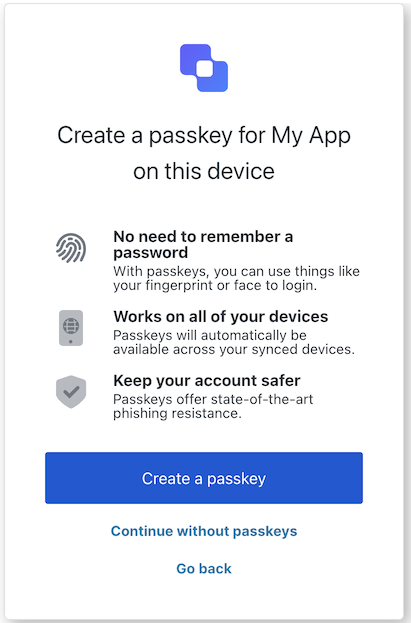
The Passkey Enrollment screen class is part of the [Identifier First Authentication](/docs/authenticate/login/auth0-universal-login/identifier-first) flow. It allows the user to create a passkey to use as their authentication credential for all subsequent authentications on your application. Review [Passkeys](/docs/authenticate/database-connections/passkeys) to learn more about using passkeys in Auth0.

<Frame>
  <img src="https://mintcdn.com/docs-staging-quickstart-revamp/jp6vZz7DhptSlPIu/images/cdy7uua7fh8z/7haU4kXN2y0zikB9kanO8J/f32a48edc265d906aa063de96e9f3b89/Passkey_Enrollment.png?fit=max&auto=format&n=jp6vZz7DhptSlPIu&q=85&s=8f06e40ab2ca3df075f056a131cea237" alt="" width="411" height="623" data-path="images/cdy7uua7fh8z/7haU4kXN2y0zikB9kanO8J/f32a48edc265d906aa063de96e9f3b89/Passkey_Enrollment.png" />
</Frame>

Import and instantiate the Passkey Enrollment screen class

```js lines
import PasskeyEnrollment from '@auth0/auth0-acul-js/passkey-enrollment';
const passskeyEnrollmentManager = new PasskeyEnrollment();

// SDK Properties return a string, number or boolean
// ex. "passkey-enrollment"
passskeyEnrollmentManager.screen.name;

// SDK Methods return an object or array
// ex. { back: "/back_url" } 
passskeyEnrollmentManager.screenLinks();
```

### Properties

The Passkey Enrollment screen class properties are:

<Tabs>
  <Tab title="branding">
    ```ts lines expandable
    interface branding {
      settings: null | BrandingSettings;
      themes: null | BrandingThemes;
    }

    interface BrandingSettings {
      colors?: {
        pageBackground?: string | {
          angleDeg: number;
          end: string;
          start: string;
          type: string;
        };
        primary?: string;
      };
      faviconUrl?: string;
      font?: {url: string;};
      logoUrl?: string;
    }

    interface BrandingThemes {
      default: {
        borders: Record<string, string | number | boolean>;
        colors: Record<string, string>;
        displayName: string;
        fonts: Record<string, string | boolean | object>;
        pageBackground: Record<string, string>;
        widget: Record<string, string | number>;
      };
    }
    ```
  </Tab>

  <Tab title="client">
    ```ts lines
    interface client {
      description: null | string;
      id: string;
      logoUrl: null | string;
      name: string;
      metadata: null | {[key: string]: string;};
    }
    ```
  </Tab>

  <Tab title="organization">
    ```ts lines
    interface organization {
      branding: null | {
        colors?: {
          pageBackground?: string;
          primary?: string;
        };
        logoUrl?: string;
      };
      displayName: null | string;
      id: null | string;
      metadata: null | {[key: string]: string;};
      name: null | string;
      usage: null | string;
    }
    ```
  </Tab>

  <Tab title="prompt">
    ```ts lines
    interface prompt{
      name: string;
    }
    ```
  </Tab>

  <Tab title="screen">
    ```ts lines expandable
    interface screen {
      backLink: null | string;
      captcha: null | CaptchaContext;
      captchaImage: null | string;
      captchaProvider: null | string;
      captchaSiteKey: null | string;
      data: null | Record<string, string>;
      isCaptchaAvailable: boolean;
      links: null | Record<string, string>;
      loginLink: null | string;
      name: string;
      publicKey: null | {
        authenticatorSelection: {
          residentKey: string;
          userVerification: string;
        };
        challenge: string;
        pubKeyCredParams: [{
          alg: number;
          type: string;
        }];
        rp: {
          id: string;
          name: string;
        };
        user: {
          displayName: string;
          id: string;
          name: string;
        };
      };
      texts: null | Record<string, string>;
    }

    interface CaptchaContext {
      image?: string;
      provider: string;
      siteKey?: string;
    }
    ```
  </Tab>

  <Tab title="tenant">
    ```ts lines
    interface tenant {
      enabledFactors: null | string[];
      enabledLocales: null | string[];
      friendlyName: null | string;
      name: null | string;
    }
    ```
  </Tab>

  <Tab title="transaction">
    ```ts lines expandable
    interface transaction {
      alternateConnections: null | (Connection | EnterpriseConnection)[];
      connectionStrategy: null | string;
      countryCode: null | string;
      countryPrefix: null | string;
      currentConnection: null | Connection;
      errors: null | Error[];  
      hasErrors: boolean;
      locale: string;
      state: string;
    }

    interface Connection {
      metadata?: Record<string, string>;
      name: string;
      strategy: string;
    }

    interface EnterpriseConnection {
      metadata?: Record<string, string>;
      name: string;
      options: {
        displayName?: string;
        iconUrl?: string;
        showAsButton: boolean;
      };
      strategy: string;
    }
    ```
  </Tab>

  <Tab title="untrustedData">
    ```ts lines
    interface untrustedData {
      authorizationParams: null | {
        login_hint?: string;
        screen_hint?: string;
        ui_locales?: string;
        [key: `ext-${string}`]: string;
      };
      submittedFormData: null | {
        [key: string]:
            | string
            | number
            | boolean
            | undefined;
      };
    }
    ```
  </Tab>

  <Tab title="user">
    ```ts lines
    interface user {
      appMetadata: null | {[key: string]: string;};
      email: null | string;
      enrolledDevices: null | ShortEntity<"device">[];
      enrolledEmails: null | ShortEntity<"email">[];
      enrolledFactors: null | string[];
      enrolledPhoneNumbers: null | ShortEntity<"phoneNumber">[];
      id: null | string;
      organizations: null | {
        branding: undefined | {logoUrl: undefined | string;};
        displayName: undefined | string;
        organizationId: undefined | string;
        organizationName: undefined | string;
      }[];
      phoneNumber: null | string;
      picture: null | string;
      userMetadata: null | {[key: string]: string;};
      username: null | string;
    }

    ShortEntity<Key>: {
        id: number;
    } & Record<Key, string>
    ```
  </Tab>
</Tabs>

### Methods

The Passkey Enrollment screen class method are:

#### abortPasskeyEnrollment( options? )

This method sends the user to the Signup Password Screen to create their password.

```javascript lines
// This method does not support any parameters
passkeyEnrollment.abortPasskeyEnrollment();
```

<table class="table">
  <thead>
    <tr>
      <th><strong>Parameter</strong>                 </th>
      <th><strong>Type</strong></th>
      <th><strong>Required</strong></th>
      <th><strong>Description</strong></th>
    </tr>
  </thead>

  <tbody>
    <tr>
      <td><code>\[key: string]</code></td>
      <td>string | number | boolean | undefined</td>
      <td>No</td>
      <td>Optional data collected from user.</td>
    </tr>
  </tbody>
</table>

#### continuePasskeyEnrollment( options? )

Create a passkey and authenticate the user. After creating the passkey, this method sends the user to the `redirect_url`.

```javascript lines
// This method does not support any parameters
passkeyEnrollment.continuePasskeyEnrollment();
```

<table class="table">
  <thead>
    <tr>
      <th><strong>Parameter</strong>                 </th>
      <th><strong>Type</strong></th>
      <th><strong>Required</strong></th>
      <th><strong>Description</strong></th>
    </tr>
  </thead>

  <tbody>
    <tr>
      <td><code>\[key: string]</code></td>
      <td>string | number | boolean | undefined</td>
      <td>No</td>
      <td>Optional data collected from user.</td>
    </tr>
  </tbody>
</table>

## Passkey Enrollment Local screen class

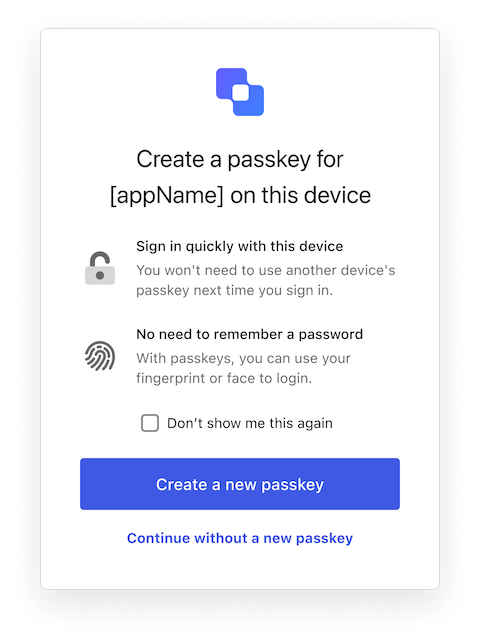
The Passkey Enrollment Local screen class is part of the [Identifier First Authentication](/docs/authenticate/login/auth0-universal-login/identifier-first) flow. It allows the user to create a passkey to use as their authentication credential for all subsequent authentications on your application. Review [Passkeys](/docs/authenticate/database-connections/passkeys) to learn more about using passkeys in Auth0

<Frame>
  <img src="https://mintcdn.com/docs-staging-quickstart-revamp/KCEsvkqT5-VRQ297/images/cdy7uua7fh8z/7FZiX1waboFh7cd7HmKSwX/df095b993e61cb453b3e8db8dec81ce3/Passkey_Enrollment_Local.png?fit=max&auto=format&n=KCEsvkqT5-VRQ297&q=85&s=9b2310af50b47e7c585d3206febe4613" alt="Passkey Enrollment Local" width="480" height="642" data-path="images/cdy7uua7fh8z/7FZiX1waboFh7cd7HmKSwX/df095b993e61cb453b3e8db8dec81ce3/Passkey_Enrollment_Local.png" />
</Frame>

Import and instantiate the Passkey Enrollment Local screen class

```js lines
import PasskeyEnrollmentLocal from '@auth0/auth0-acul-js/passkey-enrollment-local';
const passskeyEnrollmentLocalManager = new PasskeyEnrollmentLocal();

// SDK Properties return a string, number or boolean
// ex. "passkey-enrollment-local"
passskeyEnrollmentLocalManager.screen.name;

// SDK Methods return an object or array
// ex. { back: "/back_url" } 
passskeyEnrollmentLocalManager.screenLinks();
```

### Properties

The Passkey Enrollment Local screen class properties are:

<Tabs>
  <Tab title="branding">
    ```ts lines expandable
    interface branding {
      settings: null | BrandingSettings;
      themes: null | BrandingThemes;
    }

    interface BrandingSettings {
      colors?: {
        pageBackground?: string | {
          angleDeg: number;
          end: string;
          start: string;
          type: string;
        };
        primary?: string;
      };
      faviconUrl?: string;
      font?: {url: string;};
      logoUrl?: string;
    }

    interface BrandingThemes {
      default: {
        borders: Record<string, string | number | boolean>;
        colors: Record<string, string>;
        displayName: string;
        fonts: Record<string, string | boolean | object>;
        pageBackground: Record<string, string>;
        widget: Record<string, string | number>;
      };
    }
    ```
  </Tab>

  <Tab title="client">
    ```ts lines
    interface client {
      description: null | string;
      id: string;
      logoUrl: null | string;
      name: string;
      metadata: null | {[key: string]: string;};
    }
    ```
  </Tab>

  <Tab title="organization">
    ```ts lines
    interface organization {
      branding: null | {
        colors?: {
          pageBackground?: string;
          primary?: string;
        };
        logoUrl?: string;
      };
      displayName: null | string;
      id: null | string;
      metadata: null | {[key: string]: string;};
      name: null | string;
      usage: null | string;
    }
    ```
  </Tab>

  <Tab title="prompt">
    ```ts lines
    interface prompt{
      name: string;
    }
    ```
  </Tab>

  <Tab title="screen">
    ```ts lines expandable
    interface screen {
      captcha: null | CaptchaContext;
      captchaImage: null | string;
      captchaProvider: null | string;
      captchaSiteKey: null | string;
      data: null | Record<string, string>;
      isCaptchaAvailable: boolean;
      links: null | Record<string, string>;
      name: string;
      publicKey: null | {
        authenticatorSelection: {
          residentKey: string;
          userVerification: string;
        };
        challenge: string;
        pubKeyCredParams: [{
          alg: number;
          type: string;
        }];
        rp: {
          id: string;
          name: string;
        };
        user: {
          displayName: string;
          id: string;
          name: string;
        };
      };
      texts: null | Record<string, string>;
    }

    interface CaptchaContext {
      image?: string;
      provider: string;
      siteKey?: string;
    }
    ```
  </Tab>

  <Tab title="tenant">
    ```ts lines
    interface tenant {
      enabledFactors: null | string[];
      enabledLocales: null | string[];
      friendlyName: null | string;
      name: null | string;
    }
    ```
  </Tab>

  <Tab title="transaction">
    ```ts lines expandable
    interface transaction {
      alternateConnections: null | (Connection | EnterpriseConnection)[];
      connectionStrategy: null | string;
      countryCode: null | string;
      countryPrefix: null | string;
      currentConnection: null | Connection;
      errors: null | Error[];  
      hasErrors: boolean;
      locale: string;
      state: string;
    }

    interface Connection {
      metadata?: Record<string, string>;
      name: string;
      strategy: string;
    }

    interface EnterpriseConnection {
      metadata?: Record<string, string>;
      name: string;
      options: {
        displayName?: string;
        iconUrl?: string;
        showAsButton: boolean;
      };
      strategy: string;
    }
    ```
  </Tab>

  <Tab title="untrustedData">
    ```ts lines
    interface untrustedData {
      authorizationParams: null | {
        login_hint?: string;
        screen_hint?: string;
        ui_locales?: string;
        [key: `ext-${string}`]: string;
      };
      submittedFormData: null | {
        [key: string]:
            | string
            | number
            | boolean
            | undefined;
      };
    }
    ```
  </Tab>

  <Tab title="user">
    ```ts lines
    interface user {
      appMetadata: null | {[key: string]: string;};
      email: null | string;
      enrolledDevices: null | ShortEntity<"device">[];
      enrolledEmails: null | ShortEntity<"email">[];
      enrolledFactors: null | string[];
      enrolledPhoneNumbers: null | ShortEntity<"phoneNumber">[];
      id: null | string;
      organizations: null | {
        branding: undefined | {logoUrl: undefined | string;};
        displayName: undefined | string;
        organizationId: undefined | string;
        organizationName: undefined | string;
      }[];
      phoneNumber: null | string;
      picture: null | string;
      userMetadata: null | {[key: string]: string;};
      username: null | string;
    }

    ShortEntity<Key>: {
        id: number;
    } & Record<Key, string>
    ```
  </Tab>
</Tabs>

### Methods

The Passkey Enrollment Local screen class method are:

#### abortPasskeyEnrollment( options )

Skip the passkey creation and provide a password instead. This method sends the user to the Signup Password Screen to create their password.

```js lines
passkeyEnrollment.abortPasskeyEnrollment({
  doNotShowAgain: <BooleanFieldValue>
});
```

<table class="table">
  <thead>
    <tr>
      <th><strong>Parameter</strong></th>
      <th><strong>Type</strong></th>
      <th><strong>Required</strong></th>
      <th><strong>Description</strong></th>
    </tr>
  </thead>

  <tbody>
    <tr>
      <td><code>doNotShowAgain</code></td>
      <td>boolean</td>
      <td>Yes</td>
      <td>Indicates whether or not the user wants to be reminded to create a passkey again after skipping initial creation.</td>
    </tr>
  </tbody>
</table>

#### continuePasskeyEnrollment( options? )

Create a passkey and authenticate the user. After creating the passkey, this operation sends the user to the `redirect_url.`

```javascript lines
// This method does not support any parameters
passkeyEnrollment.continuePasskeyEnrollment();
```

<table class="table">
  <thead>
    <tr>
      <th><strong>Parameter</strong>                 </th>
      <th><strong>Type</strong></th>
      <th><strong>Required</strong></th>
      <th><strong>Description</strong></th>
    </tr>
  </thead>

  <tbody>
    <tr>
      <td><code>\[key: string]</code></td>
      <td>string | number | boolean | undefined</td>
      <td>No</td>
      <td>Optional data collected from user.</td>
    </tr>
  </tbody>
</table>

## Phone Identifier Challenge screen class

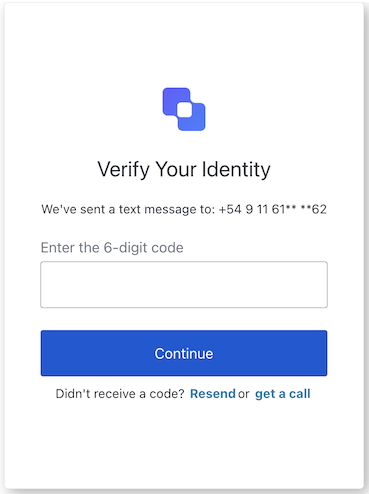
The Phone Identifier Challenge screen class is part of the [Identifier First Authentication](/docs/authenticate/login/auth0-universal-login/identifier-first) flow and verifies the user's phone number before allowing them to sign up. For more details, review A[ctivate and Configure Attributes for Flexible Identifiers](/docs/authenticate/database-connections/activate-and-configure-attributes-for-flexible-identifiers).

<Frame>
  <img src="https://mintcdn.com/docs-staging-quickstart-revamp/TO6FS4AgTzQGgpsU/images/cdy7uua7fh8z/3Cog5ZVlHphrRltcyZkq2d/c959fd72052731922ba251516403d0ac/Screenshot_2025-02-06_at_20.11.38.png?fit=max&auto=format&n=TO6FS4AgTzQGgpsU&q=85&s=cbb9901bc35736ea521e4ee485f99e04" alt="undefined" width="369" height="494" data-path="images/cdy7uua7fh8z/3Cog5ZVlHphrRltcyZkq2d/c959fd72052731922ba251516403d0ac/Screenshot_2025-02-06_at_20.11.38.png" />
</Frame>

Import and instantiate the Phone Identifier Challenge screen class

```js lines
import PhoneIdentifierChallenge from '@auth0/auth0-acul-js/phone-identifier-challenge';
const phoneIdentifierChallengeManager = new PhoneIdentifierChallenge();

// SDK Properties return a string, number or boolean
// ex. "phone-identifier-challenge"
phoneIdentifierChallengeManager.screen.name;

// SDK Methods return an object or array
// ex. data: { message_type: "text", phone: "+1234567890" };
phoneIdentifierChallengeManager.screenData();
```

### Properties

The Phone Identifier Challenge screen class properties are:

<Tabs>
  <Tab title="branding">
    ```ts lines expandable
    interface branding {
      settings: null | BrandingSettings;
      themes: null | BrandingThemes;
    }

    interface BrandingSettings {
      colors?: {
        pageBackground?: string | {
          angleDeg: number;
          end: string;
          start: string;
          type: string;
        };
        primary?: string;
      };
      faviconUrl?: string;
      font?: {url: string;};
      logoUrl?: string;
    }

    interface BrandingThemes {
      default: {
        borders: Record<string, string | number | boolean>;
        colors: Record<string, string>;
        displayName: string;
        fonts: Record<string, string | boolean | object>;
        pageBackground: Record<string, string>;
        widget: Record<string, string | number>;
      };
    }
    ```
  </Tab>

  <Tab title="client">
    ```ts lines
    interface client {
      description: null | string;
      id: string;
      logoUrl: null | string;
      name: string;
      metadata: null | {[key: string]: string;};
    }
    ```
  </Tab>

  <Tab title="organization">
    ```ts lines
    interface organization {
      branding: null | {
        colors?: {
          pageBackground?: string;
          primary?: string;
        };
        logoUrl?: string;
      };
      displayName: null | string;
      id: null | string;
      metadata: null | {[key: string]: string;};
      name: null | string;
      usage: null | string;
    }
    ```
  </Tab>

  <Tab title="prompt">
    ```ts lines
    interface prompt{
      name: string;
    }
    ```
  </Tab>

  <Tab title="screen">
    ```ts lines
    interface screen {
      captcha: null | CaptchaContext;
      captchaImage: null | string;
      captchaProvider: null | string;
      captchaSiteKey: null | string;
      data: null | {
        messageType?: "text" | "voice";
        phone?: string;
      };
      isCaptchaAvailable: boolean;
      links: null | Record<string, string>;
      name: string;
      texts: null | Record<string, string>;
    }

    interface CaptchaContext {
      image?: string;
      provider: string;
      siteKey?: string;
    }
    ```
  </Tab>

  <Tab title="tenant">
    ```ts lines
    interface tenant {
      enabledFactors: null | string[];
      enabledLocales: null | string[];
      friendlyName: null | string;
      name: null | string;
    }
    ```
  </Tab>

  <Tab title="transaction">
    ```ts lines expandable
    interface transaction {
      alternateConnections: null | (Connection | EnterpriseConnection)[];
      connectionStrategy: null | string;
      countryCode: null | string;
      countryPrefix: null | string;
      currentConnection: null | Connection;
      errors: null | Error[];  
      hasErrors: boolean;
      locale: string;
      state: string;
    }

    interface Connection {
      metadata?: Record<string, string>;
      name: string;
      strategy: string;
    }

    interface EnterpriseConnection {
      metadata?: Record<string, string>;
      name: string;
      options: {
        displayName?: string;
        iconUrl?: string;
        showAsButton: boolean;
      };
      strategy: string;
    }
    ```
  </Tab>

  <Tab title="untrustedData">
    ```ts lines
    interface untrustedData {
      authorizationParams: null | {
        login_hint?: string;
        screen_hint?: string;
        ui_locales?: string;
        [key: `ext-${string}`]: string;
      };
      submittedFormData: null | {
        [key: string]:
            | string
            | number
            | boolean
            | undefined;
      };
    }
    ```
  </Tab>

  <Tab title="user">
    ```ts lines
    interface user {
      appMetadata: null | {[key: string]: string;};
      email: null | string;
      enrolledDevices: null | ShortEntity<"device">[];
      enrolledEmails: null | ShortEntity<"email">[];
      enrolledFactors: null | string[];
      enrolledPhoneNumbers: null | ShortEntity<"phoneNumber">[];
      id: null | string;
      organizations: null | {
        branding: undefined | {logoUrl: undefined | string;};
        displayName: undefined | string;
        organizationId: undefined | string;
        organizationName: undefined | string;
      }[];
      phoneNumber: null | string;
      picture: null | string;
      userMetadata: null | {[key: string]: string;};
      username: null | string;
    }

    ShortEntity<Key>: {
        id: number;
    } & Record<Key, string>
    ```
  </Tab>
</Tabs>

### Methods

The Phone Identifier Challenge screen class method are:

#### resendCode( options? )

This method sends a new OTP code to the email provided in the previous step.

```javascript lines
// This method does not support any parameters
phoneIdentifierChallenge.resendCode();
```

<table class="table">
  <thead>
    <tr>
      <th><strong>Parameter</strong>                 </th>
      <th><strong>Type</strong></th>
      <th><strong>Required</strong></th>
      <th><strong>Description</strong></th>
    </tr>
  </thead>

  <tbody>
    <tr>
      <td><code>\[key: string]</code></td>
      <td>string | number | boolean | undefined</td>
      <td>No</td>
      <td>Optional data collected from user.</td>
    </tr>
  </tbody>
</table>

#### returnToPrevious( options? )

This method returns the user to the previous step.

```javascript lines
// This method does not support any parameters
phoneIdentifierChallenge.returnToPrevious();
```

<table class="table">
  <thead>
    <tr>
      <th><strong>Parameter</strong>                 </th>
      <th><strong>Type</strong></th>
      <th><strong>Required</strong></th>
      <th><strong>Description</strong></th>
    </tr>
  </thead>

  <tbody>
    <tr>
      <td><code>\[key: string]</code></td>
      <td>string | number | boolean | undefined</td>
      <td>No</td>
      <td>Optional data collected from user.</td>
    </tr>
  </tbody>
</table>

#### submitPhoneChallenge( options )

This method verifies the provided phone number and allows the user to continue signing up.

```js lines
phoneIdentifierChallenge.submitPhoneChallenge({
    code: "<CodeFieldValue>"
});
```

<table class="table">
  <thead>
    <tr>
      <th><strong>Parameter</strong></th>
      <th><strong>Type</strong></th>
      <th><strong>Required</strong></th>
      <th><strong>Description</strong></th>
    </tr>
  </thead>

  <tbody>
    <tr>
      <td><code>captcha</code></td>
      <td>string</td>
      <td>Conditionally</td>
      <td>The captcha code or response from the captcha provider. This property is required if your Auth0 tenant has Bot Detection enabled.</td>
    </tr>

    <tr>
      <td><code>code</code></td>
      <td>string</td>
      <td>Yes</td>
      <td>The OTP code sent to the phone number.</td>
    </tr>

    <tr>
      <td><code>\[key: string]</code></td>
      <td>string | number | boolean | undefined</td>
      <td>No</td>
      <td>Optional data collected from user.</td>
    </tr>
  </tbody>
</table>

## Phone Identifier Enrollment screen class

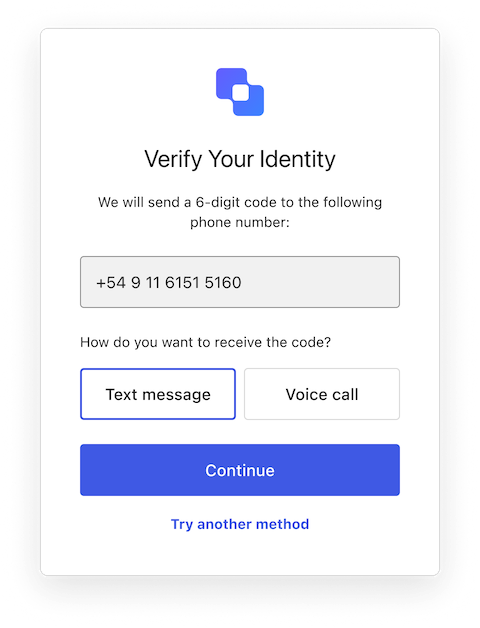
The Phone Identifier Enrollment screen class is part of the [Identifier First Authentication](/docs/authenticate/login/auth0-universal-login/identifier-first) flow and allows the user to select a method for verifying their phone number before continuing the signup process. For more details, review A[ctivate and Configure Attributes for Flexible Identifiers](/docs/authenticate/database-connections/activate-and-configure-attributes-for-flexible-identifiers).

<Frame>
  <img src="https://mintcdn.com/docs-staging-quickstart-revamp/jp6vZz7DhptSlPIu/images/cdy7uua7fh8z/7kuQwDVmt0NkHCbQObLj8d/b690fd899f7c8525532d6d640298f2cd/PhoneIdentifierEnrollment.png?fit=max&auto=format&n=jp6vZz7DhptSlPIu&q=85&s=695547f1013d2c21a0fd5ff96e306f2a" alt="PhoneIdentifierEnrollment" width="480" height="628" data-path="images/cdy7uua7fh8z/7kuQwDVmt0NkHCbQObLj8d/b690fd899f7c8525532d6d640298f2cd/PhoneIdentifierEnrollment.png" />
</Frame>

Import and instantiate the Phone Identifier Enrollment screen class

```js lines
import PhoneIdentifierEnrollment from '@auth0/auth0-acul-js/phone-identifier-enrollment';
const phoneIdentifierEnrollmentManager = new PhoneIdentifierEnrollment();

// SDK Properties return a string, number or boolean
// ex. "phone-identifier-enrollment"
phoneIdentifierEnrollmentManager.screen.name;

// SDK Methods return an object or array
// ex. { phone_number: "+1234567890" } 
phoneIdentifierEnrollmentManager.screenData();
```

### Properties

The Phone Identifier Enrollment screen class properties are:

<Tabs>
  <Tab title="branding">
    ```ts lines expandable
    interface branding {
      settings: null | BrandingSettings;
      themes: null | BrandingThemes;
    }

    interface BrandingSettings {
      colors?: {
        pageBackground?: string | {
          angleDeg: number;
          end: string;
          start: string;
          type: string;
        };
        primary?: string;
      };
      faviconUrl?: string;
      font?: {url: string;};
      logoUrl?: string;
    }

    interface BrandingThemes {
      default: {
        borders: Record<string, string | number | boolean>;
        colors: Record<string, string>;
        displayName: string;
        fonts: Record<string, string | boolean | object>;
        pageBackground: Record<string, string>;
        widget: Record<string, string | number>;
      };
    }
    ```
  </Tab>

  <Tab title="client">
    ```ts lines
    interface client {
      description: null | string;
      id: string;
      logoUrl: null | string;
      name: string;
      metadata: null | {[key: string]: string;};
    }
    ```
  </Tab>

  <Tab title="organization">
    ```ts lines
    interface organization {
      branding: null | {
        colors?: {
          pageBackground?: string;
          primary?: string;
        };
        logoUrl?: string;
      };
      displayName: null | string;
      id: null | string;
      metadata: null | {[key: string]: string;};
      name: null | string;
      usage: null | string;
    }
    ```
  </Tab>

  <Tab title="prompt">
    ```ts lines
    interface prompt{
      name: string;
    }
    ```
  </Tab>

  <Tab title="screen">
    ```ts lines
    interface screen {
      captcha: null | CaptchaContext;
      captchaImage: null | string;
      captchaProvider: null | string;
      captchaSiteKey: null | string;
      data: null | {
        messageType?: "text" | "voice";
        phone?: "string";
      };
      editIdentifierLink: null | string;
      isCaptchaAvailable: boolean;
      links: null | Record<string, string>;
      name: string;
      texts: null | Record<string, string>;
    }

    interface CaptchaContext {
      image?: string;
      provider: string;
      siteKey?: string;
    }
    ```
  </Tab>

  <Tab title="tenant">
    ```ts lines
    interface tenant {
      enabledFactors: null | string[];
      enabledLocales: null | string[];
      friendlyName: null | string;
      name: null | string;
    }
    ```
  </Tab>

  <Tab title="transaction">
    ```ts lines expandable
    interface transaction {
      alternateConnections: null | (Connection | EnterpriseConnection)[];
      connectionStrategy: null | string;
      countryCode: null | string;
      countryPrefix: null | string;
      currentConnection: null | Connection;
      errors: null | Error[];  
      hasErrors: boolean;
      locale: string;
      state: string;
    }

    interface Connection {
      metadata?: Record<string, string>;
      name: string;
      strategy: string;
    }

    interface EnterpriseConnection {
      metadata?: Record<string, string>;
      name: string;
      options: {
        displayName?: string;
        iconUrl?: string;
        showAsButton: boolean;
      };
      strategy: string;
    }
    ```
  </Tab>

  <Tab title="untrustedData">
    ```ts lines
    interface untrustedData {
      authorizationParams: null | {
        login_hint?: string;
        screen_hint?: string;
        ui_locales?: string;
        [key: `ext-${string}`]: string;
      };
      submittedFormData: null | {
        [key: string]:
            | string
            | number
            | boolean
            | undefined;
      };
    }
    ```
  </Tab>

  <Tab title="user">
    ```ts lines
    interface user {
      appMetadata: null | {[key: string]: string;};
      email: null | string;
      enrolledDevices: null | ShortEntity<"device">[];
      enrolledEmails: null | ShortEntity<"email">[];
      enrolledFactors: null | string[];
      enrolledPhoneNumbers: null | ShortEntity<"phoneNumber">[];
      id: null | string;
      organizations: null | {
        branding: undefined | {logoUrl: undefined | string;};
        displayName: undefined | string;
        organizationId: undefined | string;
        organizationName: undefined | string;
      }[];
      phoneNumber: null | string;
      picture: null | string;
      userMetadata: null | {[key: string]: string;};
      username: null | string;
    }

    ShortEntity<Key>: {
        id: number;
    } & Record<Key, string>
    ```
  </Tab>
</Tabs>

### Methods

The Phone Identifier Enrollment screen class method are:

#### continuePhoneEnrollment( options )

Send an OTP code via the user's chosen method to the phone number provided in the previous step.

```text lines
phoneIdentifierChallenge.continuePhoneEnrollment({
  type: "text" | "voice"
});
```

<table class="table">
  <thead>
    <tr>
      <th><strong>Parameter</strong></th>
      <th><strong>Type</strong></th>
      <th><strong>Required</strong></th>
      <th><strong>Description</strong></th>
    </tr>
  </thead>

  <tbody>
    <tr>
      <td><code>type</code></td>
      <td>string</td>
      <td>Yes</td>
      <td>Possible values: <code>text</code> or <code>voice</code></td>
    </tr>

    <tr>
      <td><code>\[key: string]</code></td>
      <td>string | number | boolean | undefined</td>
      <td>No</td>
      <td>Optional data collected from user.</td>
    </tr>
  </tbody>
</table>

#### returnToPrevious( options? )

This method returns the user to the previous step.

```javascript lines
// This method does not support any parameters
phoneIdentifierChallenge.returnToPrevious();
```

<table class="table">
  <thead>
    <tr>
      <th><strong>Parameter</strong>                 </th>
      <th><strong>Type</strong></th>
      <th><strong>Required</strong></th>
      <th><strong>Description</strong></th>
    </tr>
  </thead>

  <tbody>
    <tr>
      <td><code>\[key: string]</code></td>
      <td>string | number | boolean | undefined</td>
      <td>No</td>
      <td>Optional data collected from user.</td>
    </tr>
  </tbody>
</table>

## Email Identifier Challenge screen class

The Email Identifier Challenge screen class is part of the [Identifier First Authentication](/docs/authenticate/login/auth0-universal-login/identifier-first) flow and verifies the user's email address before allowing them to sign up. For more details, review A[ctivate and Configure Attributes for Flexible Identifiers](/docs/authenticate/database-connections/activate-and-configure-attributes-for-flexible-identifiers).

<Frame>
  <img src="https://mintcdn.com/docs-staging-quickstart-revamp/AmyDKn5Na0kFZtbL/images/cdy7uua7fh8z/1WgssZuHwrKSDi0kHgsmY5/5872195eb141995301af0467f6e1a6cd/EmailIdentifierChallenge.png?fit=max&auto=format&n=AmyDKn5Na0kFZtbL&q=85&s=4da3d96bc581ce2707cadd018b449bc0" alt="" width="396" height="533" data-path="images/cdy7uua7fh8z/1WgssZuHwrKSDi0kHgsmY5/5872195eb141995301af0467f6e1a6cd/EmailIdentifierChallenge.png" />
</Frame>

Import and instantiate the Email Identifier Challenge screen class:

```js lines
import EmailIdentifierChallenge from '@auth0/auth0-acul-js/email-identifier-challenge';
const emailIdentifierChallengeManager = new EmailIdentifierChallenge();

// SDK Properties return a string, number or boolean
// ex. "email-identifier-challenge"
emailIdentifierChallengeManager.screen.name;

// SDK Methods return an object or array
// ex. { email: "someone@example.com" } 
emailIdentifierChallengeManager.screenData();
```

### Properties

The Email Identifier Challenge screen class properties are:

<Tabs>
  <Tab title="branding">
    ```ts lines expandable
    interface branding {
      settings: null | BrandingSettings;
      themes: null | BrandingThemes;
    }

    interface BrandingSettings {
      colors?: {
        pageBackground?: string | {
          angleDeg: number;
          end: string;
          start: string;
          type: string;
        };
        primary?: string;
      };
      faviconUrl?: string;
      font?: {url: string;};
      logoUrl?: string;
    }

    interface BrandingThemes {
      default: {
        borders: Record<string, string | number | boolean>;
        colors: Record<string, string>;
        displayName: string;
        fonts: Record<string, string | boolean | object>;
        pageBackground: Record<string, string>;
        widget: Record<string, string | number>;
      };
    }
    ```
  </Tab>

  <Tab title="client">
    ```ts lines
    interface client {
      description: null | string;
      id: string;
      logoUrl: null | string;
      name: string;
      metadata: null | {[key: string]: string;};
    }
    ```
  </Tab>

  <Tab title="organization">
    ```ts lines
    interface organization {
      branding: null | {
        colors?: {
          pageBackground?: string;
          primary?: string;
        };
        logoUrl?: string;
      };
      displayName: null | string;
      id: null | string;
      metadata: null | {[key: string]: string;};
      name: null | string;
      usage: null | string;
    }
    ```
  </Tab>

  <Tab title="prompt">
    ```ts lines
    interface prompt{
      name: string;
    }
    ```
  </Tab>

  <Tab title="screen">
    ```ts lines
    interface screen{
      captcha: null | CaptchaContext;
      captchaImage: null | string;
      captchaProvider: null | string;
      captchaSiteKey: null | string;
      data: null | {
        email?: string;
        messageType?: string;
      };
      isCaptchaAvailable: boolean;
      links: null | Record<string, string>;
      name: string;
      texts: null | Record<string, string>;
    }

    interface CaptchaContext {
      image?: string;
      provider: string;
      siteKey?: string;
    }
    ```
  </Tab>

  <Tab title="tenant">
    ```ts lines
    interface tenant {
      enabledFactors: null | string[];
      enabledLocales: null | string[];
      friendlyName: null | string;
      name: null | string;
    }
    ```
  </Tab>

  <Tab title="transaction">
    ```ts lines expandable
    interface transaction {
      alternateConnections: null | (Connection | EnterpriseConnection)[];
      connectionStrategy: null | string;
      countryCode: null | string;
      countryPrefix: null | string;
      currentConnection: null | Connection;
      errors: null | Error[];  
      hasErrors: boolean;
      locale: string;
      state: string;
    }

    interface Connection {
      metadata?: Record<string, string>;
      name: string;
      strategy: string;
    }

    interface EnterpriseConnection {
      metadata?: Record<string, string>;
      name: string;
      options: {
        displayName?: string;
        iconUrl?: string;
        showAsButton: boolean;
      };
      strategy: string;
    }
    ```
  </Tab>

  <Tab title="untrustedData">
    ```ts lines
    interface untrustedData {
      authorizationParams: null | {
        login_hint?: string;
        screen_hint?: string;
        ui_locales?: string;
        [key: `ext-${string}`]: string;
      };
      submittedFormData: null | {
        [key: string]:
            | string
            | number
            | boolean
            | undefined;
      };
    }
    ```
  </Tab>

  <Tab title="user">
    ```ts lines
    interface user {
      appMetadata: null | {[key: string]: string;};
      email: null | string;
      enrolledDevices: null | ShortEntity<"device">[];
      enrolledEmails: null | ShortEntity<"email">[];
      enrolledFactors: null | string[];
      enrolledPhoneNumbers: null | ShortEntity<"phoneNumber">[];
      id: null | string;
      organizations: null | {
        branding: undefined | {logoUrl: undefined | string;};
        displayName: undefined | string;
        organizationId: undefined | string;
        organizationName: undefined | string;
      }[];
      phoneNumber: null | string;
      picture: null | string;
      userMetadata: null | {[key: string]: string;};
      username: null | string;
    }

    ShortEntity<Key>: {
        id: number;
    } & Record<Key, string>
    ```
  </Tab>
</Tabs>

### Methods

The Email Identifier Challenge screen class methods are:

#### resendCode( options? )

This method sends a new OTP code to the email provided in the previous step.

```javascript lines
// This method does not support any parameters
emailIdentifierChallenge.resendCode();
```

<table class="table">
  <thead>
    <tr>
      <th><strong>Parameter</strong>                 </th>
      <th><strong>Type</strong></th>
      <th><strong>Required</strong></th>
      <th><strong>Description</strong></th>
    </tr>
  </thead>

  <tbody>
    <tr>
      <td><code>\[key: string]</code></td>
      <td>string | number | boolean | undefined</td>
      <td>No</td>
      <td>Optional data collected from user.</td>
    </tr>
  </tbody>
</table>

#### returnToPrevious( options? )

This method returns the user to the previous step.

```javascript lines
// This method does not support any parameters
emailIdentifierChallenge.returnToPrevious();
```

<table class="table">
  <thead>
    <tr>
      <th><strong>Parameter</strong>                 </th>
      <th><strong>Type</strong></th>
      <th><strong>Required</strong></th>
      <th><strong>Description</strong></th>
    </tr>
  </thead>

  <tbody>
    <tr>
      <td><code>\[key: string]</code></td>
      <td>string | number | boolean | undefined</td>
      <td>No</td>
      <td>Optional data collected from user.</td>
    </tr>
  </tbody>
</table>

#### submitEmailChallenge( options? )

This method verifies the provided email address and allows the user to continue signing up.

```js lines
emailIdentifierChallenge.submitEmailChallenge({
  code: <CodeFieldValue>
});
```

<table class="table">
  <thead>
    <tr>
      <th><strong>Parameter</strong></th>
      <th><strong>Type</strong></th>
      <th><strong>Required</strong></th>
      <th><strong>Description</strong></th>
    </tr>
  </thead>

  <tbody>
    <tr>
      <td><code>captcha</code></td>
      <td>string</td>
      <td>Conditionally</td>
      <td>The captcha code or response from the captcha provider. This property is required if your Auth0 tenant has Bot Detection enabled.</td>
    </tr>

    <tr>
      <td><code>code</code></td>
      <td>string</td>
      <td>Yes</td>
      <td>The OTP code sent to the email address.</td>
    </tr>

    <tr>
      <td><code>\[key: string]</code></td>
      <td>string | number | boolean | undefined</td>
      <td>No</td>
      <td>Additional data collected from the user.</td>
    </tr>
  </tbody>
</table>