> ## Documentation Index
> Fetch the complete documentation index at: https://docs-staging-quickstart-revamp.mintlify.site/llms.txt
> Use this file to discover all available pages before exploring further.

> Learn about the ACUL Multi-Factor Authentication SMS screen classes

# Multi-Factor Authentication SMS screen classes

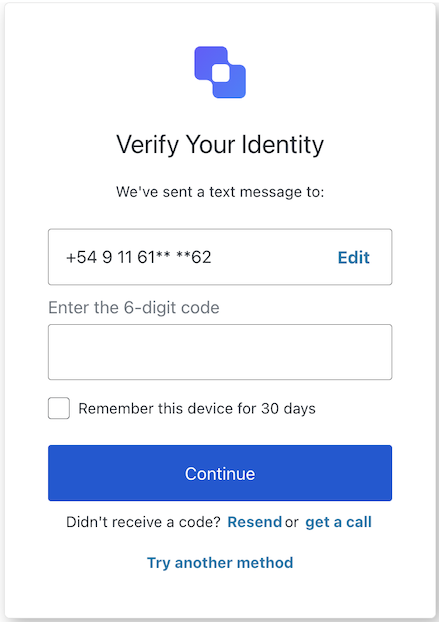
## MFA SMS Challenge screen class

The <Tooltip tip="Multi-factor authentication (MFA): User authentication process that uses a factor in addition to username and password such as a code via SMS." cta="View Glossary" href="/docs/glossary?term=MFA">MFA</Tooltip> SMS Challenge screen class provides methods associated with the mfa-sms-challenge screen.

<Frame>
  <img src="https://mintcdn.com/docs-staging-quickstart-revamp/fNPG21NgQLCA0axA/images/cdy7uua7fh8z/20G20ssvZiz0Z3OHp9QKmT/374f18dcf23be977240e53a51ea82012/Screenshot_2025-02-21_at_10.43.36.png?fit=max&auto=format&n=fNPG21NgQLCA0axA&q=85&s=cc2b545c47f08549f2c95829186e68f7" alt="" width="439" height="622" data-path="images/cdy7uua7fh8z/20G20ssvZiz0Z3OHp9QKmT/374f18dcf23be977240e53a51ea82012/Screenshot_2025-02-21_at_10.43.36.png" />
</Frame>

Import and instantiate the MFA SMS Challenge screen class:

```js lines
import MfaSmsChallenge from '@auth0/auth0-acul-js/mfa-sms-challenge';
const mfaSmsChallenge = new MfaSmsChallenge();

// SDK Properties return a string, number or boolean
// ex. "login-id"
mfaSmsChallenge.screen.name;

// SDK Methods return an object or array
await mfaSmsChallenge.continueMfaSmsChallenge({
  code: '123456',
  rememberBrowser: true,
});
```

### Properties

The MFA SMS Challenge screen class properties are:

<Tabs>
  <Tab title="branding">
    ```ts lines expandable
    interface branding {
      settings: null | BrandingSettings;
      themes: null | BrandingThemes;
    }

    interface BrandingSettings {
      colors?: {
        pageBackground?: string | {
          angleDeg: number;
          end: string;
          start: string;
          type: string;
        };
        primary?: string;
      };
      faviconUrl?: string;
      font?: {url: string;};
      logoUrl?: string;
    }

    interface BrandingThemes {
      default: {
        borders: Record<string, string | number | boolean>;
        colors: Record<string, string>;
        displayName: string;
        fonts: Record<string, string | boolean | object>;
        pageBackground: Record<string, string>;
        widget: Record<string, string | number>;
      };
    }
    ```
  </Tab>

  <Tab title="client">
    ```ts lines
    interface client {
      description: null | string;
      id: string;
      logoUrl: null | string;
      name: string;
      metadata: null | {[key: string]: string;};
    }
    ```
  </Tab>

  <Tab title="organization">
    ```ts lines
    interface organization {
      branding: null | {
        colors?: {
          pageBackground?: string;
          primary?: string;
        };
        logoUrl?: string;
      };
      displayName: null | string;
      id: null | string;
      metadata: null | {[key: string]: string;};
      name: null | string;
      usage: null | string;
    }
    ```
  </Tab>

  <Tab title="prompt">
    ```ts lines
    interface prompt{
      name: string;
    }
    ```
  </Tab>

  <Tab title="screen">
    ```ts lines
    interface screen {
      captcha: null | CaptchaContext;
      captchaImage: null | string;
      captchaProvider: null | string;
      captchaSiteKey: null | string;
      data: null | {
        phone_number?: string;
        remember_device?: boolean;
      };
      isCaptchaAvailable: boolean;
      links: null | Record<string, string>;
      name: string;
      texts: null | Record<string, string>;
    }

    interface CaptchaContext {
      image?: string;
      provider: string;
      siteKey?: string;
    }
    ```
  </Tab>

  <Tab title="tenant">
    ```ts lines
    interface tenant {
      enabledFactors: null | string[];
      enabledLocales: null | string[];
      friendlyName: null | string;
      name: null | string;
    }
    ```
  </Tab>

  <Tab title="transaction">
    ```ts lines expandable
    interface transaction {
      alternateConnections: null | (Connection | EnterpriseConnection)[];
      connectionStrategy: null | string;
      countryCode: null | string;
      countryPrefix: null | string;
      currentConnection: null | Connection;
      errors: null | Error[];  
      hasErrors: boolean;
      locale: string;
      state: string;
    }

    interface Connection {
      metadata?: Record<string, string>;
      name: string;
      strategy: string;
    }

    interface EnterpriseConnection {
      metadata?: Record<string, string>;
      name: string;
      options: {
        displayName?: string;
        iconUrl?: string;
        showAsButton: boolean;
      };
      strategy: string;
    }
    ```
  </Tab>

  <Tab title="untrustedData">
    ```ts lines
    interface untrustedData {
      authorizationParams: null | {
        login_hint?: string;
        screen_hint?: string;
        ui_locales?: string;
        [key: `ext-${string}`]: string;
      };
      submittedFormData: null | {
        [key: string]:
            | string
            | number
            | boolean
            | undefined;
      };
    }
    ```
  </Tab>

  <Tab title="user">
    ```ts lines
    interface user {
      appMetadata: null | {[key: string]: string;};
      email: null | string;
      enrolledDevices: null | ShortEntity<"device">[];
      enrolledEmails: null | ShortEntity<"email">[];
      enrolledFactors: null | string[];
      enrolledPhoneNumbers: null | ShortEntity<"phoneNumber">[];
      id: null | string;
      organizations: null | {
        branding: undefined | {logoUrl: undefined | string;};
        displayName: undefined | string;
        organizationId: undefined | string;
        organizationName: undefined | string;
      }[];
      phoneNumber: null | string;
      picture: null | string;
      userMetadata: null | {[key: string]: string;};
      username: null | string;
    }

    ShortEntity<Key>: {
        id: number;
    } & Record<Key, string>
    ```
  </Tab>
</Tabs>

### Methods

The MFA SMS Challenge screen class method are:

#### continueMfaSmsChallenge( options ?)

This method submits the entered verification code and rememberBrowser option.

```js lines
import MfaSmsChallenge from '@auth0/auth0-acul-js/mfa-sms-challenge';

const mfaSmsChallenge = new MfaSmsChallenge();
await mfaSmsChallenge.continueMfaSmsChallenge({
  code: '123456',
  rememberBrowser: true,
});
```

<table class="table">
  <thead>
    <tr>
      <th><strong>Parameter</strong>                 </th>
      <th><strong>Type</strong></th>
      <th><strong>Required</strong></th>
      <th><strong>Description</strong></th>
    </tr>
  </thead>

  <tbody>
    <tr>
      <td><code>code</code></td>
      <td>string</td>
      <td>Yes</td>
      <td>The code entered by the user.</td>
    </tr>

    <tr>
      <td><code>rememberBrowser</code></td>
      <td>boolean</td>
      <td>No</td>
      <td>Remember the user's browser configuration.</td>
    </tr>

    <tr>
      <td><code>\[key: string]</code></td>
      <td>string | number | boolean | undefined</td>
      <td>No</td>
      <td>Optional data collected from user.</td>
    </tr>
  </tbody>
</table>

#### getACall( options ?)

This method allows to send the verification code by voice call verification.

```js lines
import MfaSmsChallenge from '@auth0/auth0-acul-js/mfa-sms-challenge';

const mfaSmsChallenge = new MfaSmsChallenge();
await mfaSmsChallenge.getACall();
```

<table class="table">
  <thead>
    <tr>
      <th><strong>Parameter</strong>                 </th>
      <th><strong>Type</strong></th>
      <th><strong>Required</strong></th>
      <th><strong>Description</strong></th>
    </tr>
  </thead>

  <tbody>
    <tr>
      <td><code>\[key: string]</code></td>
      <td>string | number | boolean | undefined</td>
      <td>No</td>
      <td>Optional data collected from user.</td>
    </tr>
  </tbody>
</table>

#### pickSms( options ?)

This method allows the user to select a different SMS configuration, if available.

```js lines
import MfaSmsChallenge from '@auth0/auth0-acul-js/mfa-sms-challenge';

const mfaSmsChallenge = new MfaSmsChallenge();
await mfaSmsChallenge.pickSms();
```

<table class="table">
  <thead>
    <tr>
      <th><strong>Parameter</strong>                 </th>
      <th><strong>Type</strong></th>
      <th><strong>Required</strong></th>
      <th><strong>Description</strong></th>
    </tr>
  </thead>

  <tbody>
    <tr>
      <td><code>\[key: string]</code></td>
      <td>string | number | boolean | undefined</td>
      <td>No</td>
      <td>Optional data collected from user.</td>
    </tr>
  </tbody>
</table>

#### resendCode( options ?)

This method resends the SMS code.

```js lines
import MfaSmsChallenge from '@auth0/auth0-acul-js/mfa-sms-challenge';

const mfaSmsChallenge = new MfaSmsChallenge();
await mfaSmsChallenge.resendCode();
```

<table class="table">
  <thead>
    <tr>
      <th><strong>Parameter</strong>                 </th>
      <th><strong>Type</strong></th>
      <th><strong>Required</strong></th>
      <th><strong>Description</strong></th>
    </tr>
  </thead>

  <tbody>
    <tr>
      <td><code>\[key: string]</code></td>
      <td>string | number | boolean | undefined</td>
      <td>No</td>
      <td>Optional data collected from user.</td>
    </tr>
  </tbody>
</table>

#### tryAnotherMethod( options ?)

This method submits the action to try another MFA method.

```js lines
import MfaSmsChallenge from '@auth0/auth0-acul-js/mfa-sms-challenge';

const mfaSmsChallenge = new MfaSmsChallenge();
await mfaSmsChallenge.tryAnotherMethod();
```

<table class="table">
  <thead>
    <tr>
      <th><strong>Parameter</strong>                 </th>
      <th><strong>Type</strong></th>
      <th><strong>Required</strong></th>
      <th><strong>Description</strong></th>
    </tr>
  </thead>

  <tbody>
    <tr>
      <td><code>\[key: string]</code></td>
      <td>string | number | boolean | undefined</td>
      <td>No</td>
      <td>Optional data collected from user.</td>
    </tr>
  </tbody>
</table>

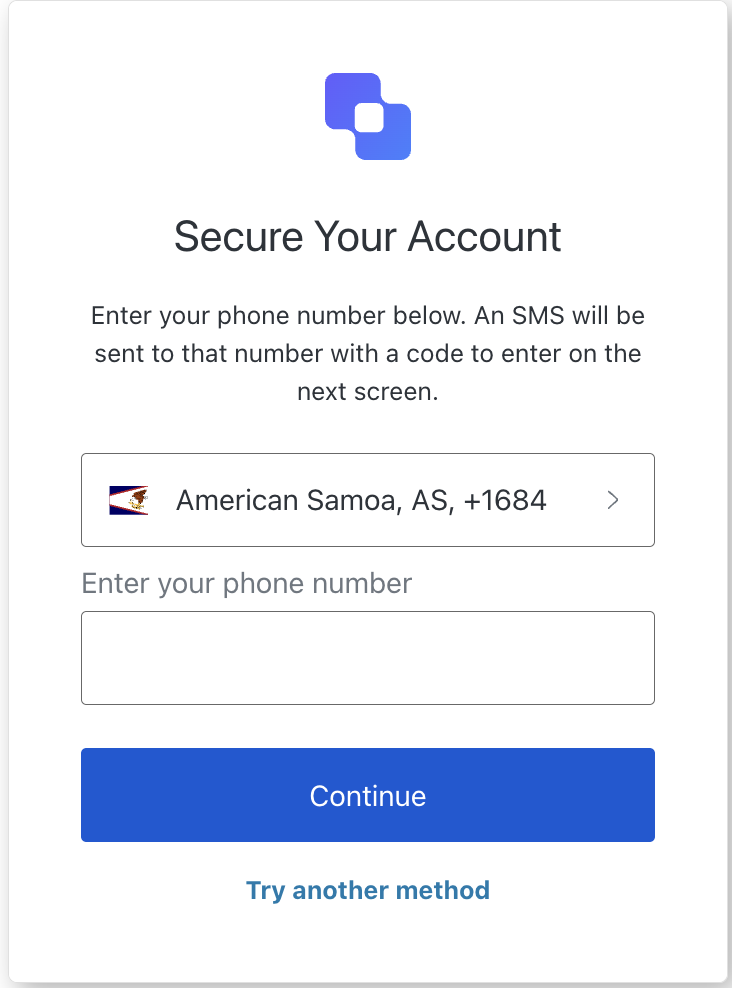
## MFA SMS Enrollment screen class

The MFA SMS Enrollment screen class provides methods associated with the mfa-sms-enrollment screen.

<Frame>
  <img src="https://mintcdn.com/docs-staging-quickstart-revamp/A1o6LcInzX_m5Dvq/images/cdy7uua7fh8z/5DG03Sm0FFKKt9JOxOl5WN/5df6ce785b080baa951b749b4c472793/Screenshot_2025-02-21_at_11.55.42.png?fit=max&auto=format&n=A1o6LcInzX_m5Dvq&q=85&s=eacaa19f9dea025233f0702e5043c58c" alt="" width="732" height="988" data-path="images/cdy7uua7fh8z/5DG03Sm0FFKKt9JOxOl5WN/5df6ce785b080baa951b749b4c472793/Screenshot_2025-02-21_at_11.55.42.png" />
</Frame>

Import and instantiate the MFA SMS Enrollment screen class:

```js lines
import MfaSmsEnrollment from '@auth0/auth0-acul-js/mfa-sms-enrollment';
const mfaSmsEnrollment = new MfaSmsEnrollment();

// SDK Properties return a string, number or boolean
// ex. "login-id"
mfaSmsEnrollment.screen.name;

// SDK Methods return an object or array
await mfaSmsEnrollment.pickCountryCode();
```

### Properties

The MFA SMS Enrollment screen class properties are:

<Tabs>
  <Tab title="branding">
    ```ts lines expandable
    interface branding {
      settings: null | BrandingSettings;
      themes: null | BrandingThemes;
    }

    interface BrandingSettings {
      colors?: {
        pageBackground?: string | {
          angleDeg: number;
          end: string;
          start: string;
          type: string;
        };
        primary?: string;
      };
      faviconUrl?: string;
      font?: {url: string;};
      logoUrl?: string;
    }

    interface BrandingThemes {
      default: {
        borders: Record<string, string | number | boolean>;
        colors: Record<string, string>;
        displayName: string;
        fonts: Record<string, string | boolean | object>;
        pageBackground: Record<string, string>;
        widget: Record<string, string | number>;
      };
    }
    ```
  </Tab>

  <Tab title="client">
    ```ts lines
    interface client {
      description: null | string;
      id: string;
      logoUrl: null | string;
      name: string;
      metadata: null | {[key: string]: string;};
    }
    ```
  </Tab>

  <Tab title="organization">
    ```ts lines
    interface organization {
      branding: null | {
        colors?: {
          pageBackground?: string;
          primary?: string;
        };
        logoUrl?: string;
      };
      displayName: null | string;
      id: null | string;
      metadata: null | {[key: string]: string;};
      name: null | string;
      usage: null | string;
    }
    ```
  </Tab>

  <Tab title="prompt">
    ```ts lines
    interface prompt{
      name: string;
    }
    ```
  </Tab>

  <Tab title="screen">
    ```ts lines
    interface screen {
      captcha: null | CaptchaContext;
      captchaImage: null | string;
      captchaProvider: null | string;
      captchaSiteKey: null | string;
      data: null | {phone?: string;};
      isCaptchaAvailable: boolean;
      links: null | Record<string, string>;
      name: string;
      texts: null | Record<string, string>;
    }

    interface CaptchaContext {
      image?: string;
      provider: string;
      siteKey?: string;
    }
    ```
  </Tab>

  <Tab title="tenant">
    ```ts lines
    interface tenant {
      enabledFactors: null | string[];
      enabledLocales: null | string[];
      friendlyName: null | string;
      name: null | string;
    }
    ```
  </Tab>

  <Tab title="transaction">
    ```ts lines expandable
    interface transaction {
      alternateConnections: null | (Connection | EnterpriseConnection)[];
      connectionStrategy: null | string;
      countryCode: null | string;
      countryPrefix: null | string;
      currentConnection: null | Connection;
      errors: null | Error[];  
      hasErrors: boolean;
      locale: string;
      state: string;
    }

    interface Connection {
      metadata?: Record<string, string>;
      name: string;
      strategy: string;
    }

    interface EnterpriseConnection {
      metadata?: Record<string, string>;
      name: string;
      options: {
        displayName?: string;
        iconUrl?: string;
        showAsButton: boolean;
      };
      strategy: string;
    }
    ```
  </Tab>

  <Tab title="untrustedData">
    ```ts lines
    interface untrustedData {
      authorizationParams: null | {
        login_hint?: string;
        screen_hint?: string;
        ui_locales?: string;
        [key: `ext-${string}`]: string;
      };
      submittedFormData: null | {
        [key: string]:
            | string
            | number
            | boolean
            | undefined;
      };
    }
    ```
  </Tab>

  <Tab title="user">
    ```ts lines
    interface user {
      appMetadata: null | {[key: string]: string;};
      email: null | string;
      enrolledDevices: null | ShortEntity<"device">[];
      enrolledEmails: null | ShortEntity<"email">[];
      enrolledFactors: null | string[];
      enrolledPhoneNumbers: null | ShortEntity<"phoneNumber">[];
      id: null | string;
      organizations: null | {
        branding: undefined | {logoUrl: undefined | string;};
        displayName: undefined | string;
        organizationId: undefined | string;
        organizationName: undefined | string;
      }[];
      phoneNumber: null | string;
      picture: null | string;
      userMetadata: null | {[key: string]: string;};
      username: null | string;
    }

    ShortEntity<Key>: {
        id: number;
    } & Record<Key, string>
    ```
  </Tab>
</Tabs>

### Methods

The MFA SMS Enrollment screen class method are:

#### continueEnrollment( options ?)

This method continues the SMS enrollment process with the provided phone number.

```js lines
import MfaSmsEnrollment from '@auth0/auth0-acul-js/mfa-sms-enrollment';

const mfaSmsEnrollment = new MfaSmsEnrollment();
await mfaSmsEnrollment.continueEnrollment({ phone: '1234567890' });
```

<table class="table">
  <thead>
    <tr>
      <th><strong>Parameter</strong>                 </th>
      <th><strong>Type</strong></th>
      <th><strong>Required</strong></th>
      <th><strong>Description</strong></th>
    </tr>
  </thead>

  <tbody>
    <tr>
      <td><code>captcha</code></td>
      <td>string</td>
      <td>Conditionally</td>
      <td>The captcha code or response from the captcha provider.</td>
    </tr>

    <tr>
      <td><code>phone</code></td>
      <td>string</td>
      <td>No</td>
      <td>The phone number entered by the user.</td>
    </tr>

    <tr>
      <td><code>\[key: string]</code></td>
      <td>string | number | boolean | undefined</td>
      <td>No</td>
      <td>Optional data collected from user.</td>
    </tr>
  </tbody>
</table>

#### pickCountryCode( options ?)

This method handles the action to select a country code for SMS enrollment.

```js lines
import MfaSmsEnrollment from '@auth0/auth0-acul-js/mfa-sms-enrollment';

const mfaSmsEnrollment = new MfaSmsEnrollment();
await mfaSmsEnrollment.pickCountryCode();
```

<table class="table">
  <thead>
    <tr>
      <th><strong>Parameter</strong>                 </th>
      <th><strong>Type</strong></th>
      <th><strong>Required</strong></th>
      <th><strong>Description</strong></th>
    </tr>
  </thead>

  <tbody>
    <tr>
      <td><code>\[key: string]</code></td>
      <td>string | number | boolean | undefined</td>
      <td>No</td>
      <td>Optional data collected from user.</td>
    </tr>
  </tbody>
</table>

#### tryAnotherMethod( options ?)

This method handles the action to try another method for MFA.

```js lines
import MfaSmsEnrollment from '@auth0/auth0-acul-js/mfa-sms-enrollment';

const mfaSmsEnrollment = new MfaSmsEnrollment();
await mfaSmsEnrollment.tryAnotherMethod();
```

<table class="table">
  <thead>
    <tr>
      <th><strong>Parameter</strong>                 </th>
      <th><strong>Type</strong></th>
      <th><strong>Required</strong></th>
      <th><strong>Description</strong></th>
    </tr>
  </thead>

  <tbody>
    <tr>
      <td><code>\[key: string]</code></td>
      <td>string | number | boolean | undefined</td>
      <td>No</td>
      <td>Optional data collected from user.</td>
    </tr>
  </tbody>
</table>

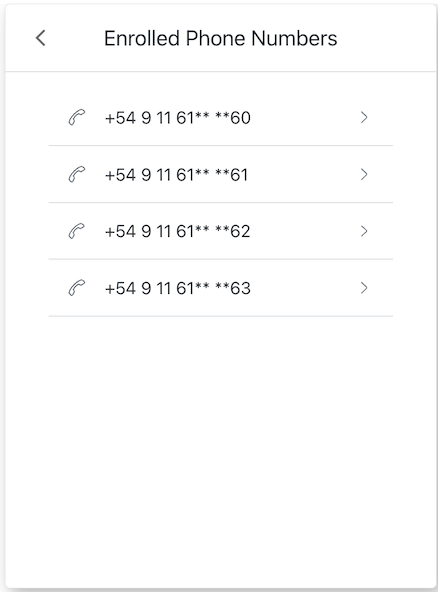
## MFA SMS List screen class

The MFA SMS List screen class provides methods associated with the mfa-sms-list screen.

<Frame>
  <img src="https://mintcdn.com/docs-staging-quickstart-revamp/OF4RJhPvadaf5sdD/images/cdy7uua7fh8z/5WKzkwCtJn5ZViHcl9xATn/6147dac2ff98da4ab190922ced35a1f2/Screenshot_2025-02-21_at_12.29.36.png?fit=max&auto=format&n=OF4RJhPvadaf5sdD&q=85&s=4ba986a93fc5be76647c7f8f1880c210" alt="" width="438" height="592" data-path="images/cdy7uua7fh8z/5WKzkwCtJn5ZViHcl9xATn/6147dac2ff98da4ab190922ced35a1f2/Screenshot_2025-02-21_at_12.29.36.png" />
</Frame>

Import and instantiate the MFA SMS List screen class:

```js lines
import MfaSmsList from '@auth0/auth0-acul-js/mfa-sms-list';
const mfaSmsList = new MfaSmsList();

// SDK Properties return a string, number or boolean
// ex. "login-id"
mfaSmsList.screen.name;

// SDK Methods return an object or array
// ex. { signup: "/signup_url", reset_password: "/reset_password_url"} 
await mfaSmsList.backAction();
```

### Properties

The MFA SMS List screen class properties are:

<Tabs>
  <Tab title="branding">
    ```ts lines expandable
    interface branding {
      settings: null | BrandingSettings;
      themes: null | BrandingThemes;
    }

    interface BrandingSettings {
      colors?: {
        pageBackground?: string | {
          angleDeg: number;
          end: string;
          start: string;
          type: string;
        };
        primary?: string;
      };
      faviconUrl?: string;
      font?: {url: string;};
      logoUrl?: string;
    }

    interface BrandingThemes {
      default: {
        borders: Record<string, string | number | boolean>;
        colors: Record<string, string>;
        displayName: string;
        fonts: Record<string, string | boolean | object>;
        pageBackground: Record<string, string>;
        widget: Record<string, string | number>;
      };
    }
    ```
  </Tab>

  <Tab title="client">
    ```ts lines
    interface client {
      description: null | string;
      id: string;
      logoUrl: null | string;
      name: string;
      metadata: null | {[key: string]: string;};
    }
    ```
  </Tab>

  <Tab title="organization">
    ```ts lines
    interface organization {
      branding: null | {
        colors?: {
          pageBackground?: string;
          primary?: string;
        };
        logoUrl?: string;
      };
      displayName: null | string;
      id: null | string;
      metadata: null | {[key: string]: string;};
      name: null | string;
      usage: null | string;
    }
    ```
  </Tab>

  <Tab title="prompt">
    ```ts lines
    interface prompt{
      name: string;
    }
    ```
  </Tab>

  <Tab title="screen">
    ```ts lines expandable
    interface screen {
      captcha: null | CaptchaContext;
      captchaImage: null | string;
      captchaProvider: null | string;
      captchaSiteKey: null | string;
      data: null | Record<string,
          | string
          | boolean
          | PasskeyCreate
          | string[]
          | PhonePrefix[]>
          | Record<string, string[]>>;
      isCaptchaAvailable: boolean;
      links: null | Record<string, string>;
      name: string;
      texts: null | Record<string, string>;
    }

    interface CaptchaContext {
      image?: string;
      provider: string;
      siteKey?: string;
    }

    interface PhonePrefix {
      country: string;
      country_code: string;
      phone_prefix: string;
    }

    interface PasskeyCreate {
        public_key: {
            authenticatorSelection: {
                residentKey: string;
                userVerification: string;
            };
            challenge: string;
            pubKeyCredParams: [{ alg: number; type: string }];
            rp: { id: string; name: string };
            user: { displayName: string; id: string; name: string };
        };
    }
    ```
  </Tab>

  <Tab title="tenant">
    ```ts lines
    interface tenant {
      enabledFactors: null | string[];
      enabledLocales: null | string[];
      friendlyName: null | string;
      name: null | string;
    }
    ```
  </Tab>

  <Tab title="transaction">
    ```ts lines expandable
    interface transaction {
      alternateConnections: null | (Connection | EnterpriseConnection)[];
      connectionStrategy: null | string;
      countryCode: null | string;
      countryPrefix: null | string;
      currentConnection: null | Connection;
      errors: null | Error[];  
      hasErrors: boolean;
      locale: string;
      state: string;
    }

    interface Connection {
      metadata?: Record<string, string>;
      name: string;
      strategy: string;
    }

    interface EnterpriseConnection {
      metadata?: Record<string, string>;
      name: string;
      options: {
        displayName?: string;
        iconUrl?: string;
        showAsButton: boolean;
      };
      strategy: string;
    }
    ```
  </Tab>

  <Tab title="untrustedData">
    ```ts lines
    interface untrustedData {
      authorizationParams: null | {
        login_hint?: string;
        screen_hint?: string;
        ui_locales?: string;
        [key: `ext-${string}`]: string;
      };
      submittedFormData: null | {
        [key: string]:
            | string
            | number
            | boolean
            | undefined;
      };
    }
    ```
  </Tab>

  <Tab title="user">
    ```ts lines
    interface user {
      appMetadata: null | {[key: string]: string;};
      email: null | string;
      enrolledDevices: null | ShortEntity<"device">[];
      enrolledEmails: null | ShortEntity<"email">[];
      enrolledFactors: null | string[];
      enrolledPhoneNumbers: null | ShortEntity<"phoneNumber">[];
      id: null | string;
      organizations: null | {
        branding: undefined | {logoUrl: undefined | string;};
        displayName: undefined | string;
        organizationId: undefined | string;
        organizationName: undefined | string;
      }[];
      phoneNumber: null | string;
      picture: null | string;
      userMetadata: null | {[key: string]: string;};
      username: null | string;
    }

    ShortEntity<Key>: {
        id: number;
    } & Record<Key, string>
    ```
  </Tab>
</Tabs>

### Methods

The MFA SMS List screen class method are:

#### backAction( options ?)

This method allows the user to navigate to the previous screen.

```js lines
import MfaSmsList from '@auth0/auth0-acul-js/mfa-sms-list';

const mfaSmsList = new MfaSmsList();
await mfaSmsList.backAction();
```

<table class="table">
  <thead>
    <tr>
      <th><strong>Parameter</strong>                 </th>
      <th><strong>Type</strong></th>
      <th><strong>Required</strong></th>
      <th><strong>Description</strong></th>
    </tr>
  </thead>

  <tbody>
    <tr>
      <td><code>\[key: string]</code></td>
      <td>string | number | boolean | undefined</td>
      <td>No</td>
      <td>Optional data collected from user.</td>
    </tr>
  </tbody>
</table>

#### selectPhoneNumber( options ?)

This method allows the user to select a phone number from the list of enrolled phone numbers.

```js lines
import MfaSmsList from '@auth0/auth0-acul-js/mfa-sms-list';

const mfaSmsList = new MfaSmsList();
await mfaSmsList.selectPhoneNumber({
  index: 0 // for demonstration we are selecting the first index
});
```

<table class="table">
  <thead>
    <tr>
      <th><strong>Parameter</strong>                 </th>
      <th><strong>Type</strong></th>
      <th><strong>Required</strong></th>
      <th><strong>Description</strong></th>
    </tr>
  </thead>

  <tbody>
    <tr>
      <td><code>index</code></td>
      <td>number</td>
      <td>Yes</td>
      <td>The index of the Phone number to select.</td>
    </tr>

    <tr>
      <td><code>\[key: string]</code></td>
      <td>string | number | boolean | undefined</td>
      <td>No</td>
      <td>Optional data collected from user.</td>
    </tr>
  </tbody>
</table>

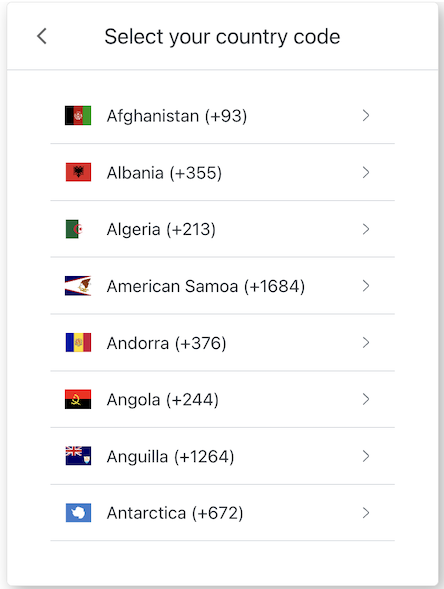
## MFA Country Codes screen class

The MFA Country Codes screen class allows users to select a country code for MFA phone number verification.

<Frame>
  <img src="https://mintcdn.com/docs-staging-quickstart-revamp/jp6vZz7DhptSlPIu/images/cdy7uua7fh8z/7hp8LeL9cbS3nbxw8wTuqK/3c862b1c47ae18fb43f22f55ea4d695a/Screenshot_2025-02-19_at_13.23.44.png?fit=max&auto=format&n=jp6vZz7DhptSlPIu&q=85&s=06b7c53e4b23cac098fa46033447c764" alt="" width="444" height="589" data-path="images/cdy7uua7fh8z/7hp8LeL9cbS3nbxw8wTuqK/3c862b1c47ae18fb43f22f55ea4d695a/Screenshot_2025-02-19_at_13.23.44.png" />
</Frame>

Import and instantiate the MFA Country Codes screen class:

```js lines
import MfaCountryCodes from '@auth0/auth0-acul-js/mfa-country-codes';
const mfaCountryCodesManager = new MfaCountryCodes();

// SDK Properties return a string, number or boolean
// ex. "login-id"
mfaCountryCodesManager.screen.name;

// SDK Methods return an object or array
// ex. { signup: "/signup_url", reset_password: "/reset_password_url"} 
await mfaCountryCodesManager.selectCountryCode({
 action: 'selection-action::US1'
});
```

### Properties

The MFA Country Codes screen class properties are:

<Tabs>
  <Tab title="branding">
    ```ts lines expandable
    interface branding {
      settings: null | BrandingSettings;
      themes: null | BrandingThemes;
    }

    interface BrandingSettings {
      colors?: {
        pageBackground?: string | {
          angleDeg: number;
          end: string;
          start: string;
          type: string;
        };
        primary?: string;
      };
      faviconUrl?: string;
      font?: {url: string;};
      logoUrl?: string;
    }

    interface BrandingThemes {
      default: {
        borders: Record<string, string | number | boolean>;
        colors: Record<string, string>;
        displayName: string;
        fonts: Record<string, string | boolean | object>;
        pageBackground: Record<string, string>;
        widget: Record<string, string | number>;
      };
    }
    ```
  </Tab>

  <Tab title="client">
    ```ts lines
    interface client {
      description: null | string;
      id: string;
      logoUrl: null | string;
      name: string;
      metadata: null | {[key: string]: string;};
    }
    ```
  </Tab>

  <Tab title="organization">
    ```ts lines
    interface organization {
      branding: null | {
        colors?: {
          pageBackground?: string;
          primary?: string;
        };
        logoUrl?: string;
      };
      displayName: null | string;
      id: null | string;
      metadata: null | {[key: string]: string;};
      name: null | string;
      usage: null | string;
    }
    ```
  </Tab>

  <Tab title="prompt">
    ```ts lines
    interface prompt{
      name: string;
    }
    ```
  </Tab>

  <Tab title="screen">
    ```ts lines
    interface screen {
      captcha: null | CaptchaContext;
      captchaImage: null | string;
      captchaProvider: null | string;
      captchaSiteKey: null | string;
      data: null | { phone_prefixes: PhonePrefix[]; };
      isCaptchaAvailable: boolean;
      links: null | Record<string, string>;
      name: string;
      texts: null | Record<string, string>;
    }

    interface CaptchaContext {
      image?: string;
      provider: string;
      siteKey?: string;
    }

    interface PhonePrefix {
      country: string;
      country_code: string;
      phone_prefix: string;
    }
    ```
  </Tab>

  <Tab title="tenant">
    ```ts lines
    interface tenant {
      enabledFactors: null | string[];
      enabledLocales: null | string[];
      friendlyName: null | string;
      name: null | string;
    }
    ```
  </Tab>

  <Tab title="transaction">
    ```ts lines expandable
    interface transaction {
      alternateConnections: null | (Connection | EnterpriseConnection)[];
      connectionStrategy: null | string;
      countryCode: null | string;
      countryPrefix: null | string;
      currentConnection: null | Connection;
      errors: null | Error[];  
      hasErrors: boolean;
      locale: string;
      state: string;
    }

    interface Connection {
      metadata?: Record<string, string>;
      name: string;
      strategy: string;
    }

    interface EnterpriseConnection {
      metadata?: Record<string, string>;
      name: string;
      options: {
        displayName?: string;
        iconUrl?: string;
        showAsButton: boolean;
      };
      strategy: string;
    }
    ```
  </Tab>

  <Tab title="untrustedData">
    ```ts lines
    interface untrustedData {
      authorizationParams: null | {
        login_hint?: string;
        screen_hint?: string;
        ui_locales?: string;
        [key: `ext-${string}`]: string;
      };
      submittedFormData: null | {
        [key: string]:
            | string
            | number
            | boolean
            | undefined;
      };
    }
    ```
  </Tab>

  <Tab title="user">
    ```ts lines
    interface user {
      appMetadata: null | {[key: string]: string;};
      email: null | string;
      enrolledDevices: null | ShortEntity<"device">[];
      enrolledEmails: null | ShortEntity<"email">[];
      enrolledFactors: null | string[];
      enrolledPhoneNumbers: null | ShortEntity<"phoneNumber">[];
      id: null | string;
      organizations: null | {
        branding: undefined | {logoUrl: undefined | string;};
        displayName: undefined | string;
        organizationId: undefined | string;
        organizationName: undefined | string;
      }[];
      phoneNumber: null | string;
      picture: null | string;
      userMetadata: null | {[key: string]: string;};
      username: null | string;
    }

    ShortEntity<Key>: {
        id: number;
    } & Record<Key, string>
    ```
  </Tab>
</Tabs>

### Methods

The MFA Country Codes screen class method are:

#### goBack( options ?)

This method navigates the user to the previous screen.

```js lines
import MfaCountryCodes from '@auth0/auth0-acul-js/mfa-country-codes';

const mfaCountryCodes = new MfaCountryCodes();
await mfaCountryCodes.goBack();
```

<table class="table">
  <thead>
    <tr>
      <th><strong>Parameter</strong>                 </th>
      <th><strong>Type</strong></th>
      <th><strong>Required</strong></th>
      <th><strong>Description</strong></th>
    </tr>
  </thead>

  <tbody>
    <tr>
      <td><code>\[key: string]</code></td>
      <td>string | number | boolean | undefined</td>
      <td>No</td>
      <td>Optional data collected from user.</td>
    </tr>
  </tbody>
</table>

#### selectCountryCode( options ?)

This method allows the user to select a country code.

```js lines
import MfaCountryCodes from '@auth0/auth0-acul-js/mfa-country-codes';

const mfaCountryCodes = new MfaCountryCodes();

// Get the available country codes and phone prefixes
const { screen } = mfaCountryCodes;
const { phone_prefixes } = screen.data
const {country_code, phone_prefix} = phone_prefixes[0]

await mfaCountryCodes.selectCountryCode({
  country_code: 'US',
  phone_prefix: '+1',
});
```

<table class="table">
  <thead>
    <tr>
      <th><strong>Parameter</strong>                 </th>
      <th><strong>Type</strong></th>
      <th><strong>Required</strong></th>
      <th><strong>Description</strong></th>
    </tr>
  </thead>

  <tbody>
    <tr>
      <td><code>country\_code</code></td>
      <td>string</td>
      <td>Yes</td>
      <td>Country code to select.</td>
    </tr>

    <tr>
      <td><code>phone\_prefix</code></td>
      <td>string</td>
      <td>Yes</td>
      <td>Phone prefix to select.</td>
    </tr>

    <tr>
      <td><code>\[key: string]</code></td>
      <td>string | number | boolean | undefined</td>
      <td>No</td>
      <td>Optional data collected from user.</td>
    </tr>
  </tbody>
</table>