> ## Documentation Index
> Fetch the complete documentation index at: https://docs-staging-quickstart-revamp.mintlify.site/llms.txt
> Use this file to discover all available pages before exploring further.

> Learn about the ACUL Multi-Factor Authentication Push screen classes

# Multi-Factor Authentication Push screen classes

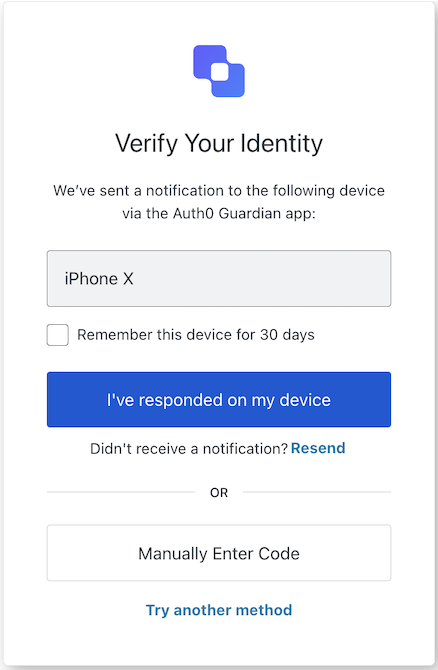
## MFA Push Challenge Push screen class

The <Tooltip tip="Multi-factor authentication (MFA): User authentication process that uses a factor in addition to username and password such as a code via SMS." cta="View Glossary" href="/docs/glossary?term=MFA">MFA</Tooltip> Push Challenge Push screen class is displayed when a push notification has been sent to user's device.

<Frame>
  <img src="https://mintcdn.com/docs-staging-quickstart-revamp/KCEsvkqT5-VRQ297/images/cdy7uua7fh8z/6n6fftBZDpoT5FdmipebK6/3a777c3c9a87a6f6cf53cf96aab67c8d/Screenshot_2025-02-20_at_22.13.55.png?fit=max&auto=format&n=KCEsvkqT5-VRQ297&q=85&s=3993a9c3f5f48a69cc90d721fa89da34" alt="" width="438" height="670" data-path="images/cdy7uua7fh8z/6n6fftBZDpoT5FdmipebK6/3a777c3c9a87a6f6cf53cf96aab67c8d/Screenshot_2025-02-20_at_22.13.55.png" />
</Frame>

Import and instantiate the MFA Push Challenge Push screen class:

```js lines
import MfaPushChallengePush from '@auth0/auth0-acul-js/mfa-push-challenge-push';
const mfaPushChallengePush = new MfaPushChallengePush();

// SDK Properties return a string, number or boolean
mfaPushChallengePush.screen.name;

// SDK Methods return an object or array
await mfaPushChallengePush.continue();
```

### Properties

The MFA Push Challenge Push screen class properties are:

<Tabs>
  <Tab title="branding">
    ```ts lines expandable
    interface branding {
      settings: null | BrandingSettings;
      themes: null | BrandingThemes;
    }

    interface BrandingSettings {
      colors?: {
        pageBackground?: string | {
          angleDeg: number;
          end: string;
          start: string;
          type: string;
        };
        primary?: string;
      };
      faviconUrl?: string;
      font?: {url: string;};
      logoUrl?: string;
    }

    interface BrandingThemes {
      default: {
        borders: Record<string, string | number | boolean>;
        colors: Record<string, string>;
        displayName: string;
        fonts: Record<string, string | boolean | object>;
        pageBackground: Record<string, string>;
        widget: Record<string, string | number>;
      };
    }
    ```
  </Tab>

  <Tab title="client">
    ```ts lines
    interface client {
      description: null | string;
      id: string;
      logoUrl: null | string;
      name: string;
      metadata: null | {[key: string]: string;};
    }
    ```
  </Tab>

  <Tab title="organization">
    ```ts lines
    interface organization {
      branding: null | {
        colors?: {
          pageBackground?: string;
          primary?: string;
        };
        logoUrl?: string;
      };
      displayName: null | string;
      id: null | string;
      metadata: null | {[key: string]: string;};
      name: null | string;
      usage: null | string;
    }
    ```
  </Tab>

  <Tab title="prompt">
    ```ts lines
    interface prompt{
      name: string;
    }
    ```
  </Tab>

  <Tab title="screen">
    ```ts lines
    interface screen {
      captcha: null | CaptchaContext;
      captchaImage: null | string;
      captchaProvider: null | string;
      captchaSiteKey: null | string;
      data: null | {
        deviceName: string;
        rememberDevice?: boolean
      };
      isCaptchaAvailable: boolean;
      links: null | Record<string, string>;
      name: string;
      texts: null | Record<string, string>;
    }

    interface CaptchaContext {
      image?: string;
      provider: string;
      siteKey?: string;
    }
    ```
  </Tab>

  <Tab title="tenant">
    ```ts lines
    interface tenant {
      enabledFactors: null | string[];
      enabledLocales: null | string[];
      friendlyName: null | string;
      name: null | string;
    }
    ```
  </Tab>

  <Tab title="transaction">
    ```ts lines expandable
    interface transaction {
      alternateConnections: null | (Connection | EnterpriseConnection)[];
      connectionStrategy: null | string;
      countryCode: null | string;
      countryPrefix: null | string;
      currentConnection: null | Connection;
      errors: null | Error[];  
      hasErrors: boolean;
      locale: string;
      state: string;
    }

    interface Connection {
      metadata?: Record<string, string>;
      name: string;
      strategy: string;
    }

    interface EnterpriseConnection {
      metadata?: Record<string, string>;
      name: string;
      options: {
        displayName?: string;
        iconUrl?: string;
        showAsButton: boolean;
      };
      strategy: string;
    }
    ```
  </Tab>

  <Tab title="untrustedData">
    ```ts lines
    interface untrustedData {
      authorizationParams: null | {
        login_hint?: string;
        screen_hint?: string;
        ui_locales?: string;
        [key: `ext-${string}`]: string;
      };
      submittedFormData: null | {
        [key: string]:
            | string
            | number
            | boolean
            | undefined;
      };
    }
    ```
  </Tab>

  <Tab title="user">
    ```ts lines
    interface user {
      appMetadata: null | {[key: string]: string;};
      email: null | string;
      enrolledDevices: null | ShortEntity<"device">[];
      enrolledEmails: null | ShortEntity<"email">[];
      enrolledFactors: null | string[];
      enrolledPhoneNumbers: null | ShortEntity<"phoneNumber">[];
      id: null | string;
      organizations: null | {
        branding: undefined | {logoUrl: undefined | string;};
        displayName: undefined | string;
        organizationId: undefined | string;
        organizationName: undefined | string;
      }[];
      phoneNumber: null | string;
      picture: null | string;
      userMetadata: null | {[key: string]: string;};
      username: null | string;
    }

    ShortEntity<Key>: {
        id: number;
    } & Record<Key, string>
    ```
  </Tab>
</Tabs>

### Methods

The MFA Push Challenge Push screen class method are:

#### continue( options ?)

This method continues with the push notification challenge.

```javascript lines
const mfaPushChallengePush = new MfaPushChallengePush();
await mfaPushChallengePush.continue();
```

<table class="table">
  <thead>
    <tr>
      <th><strong>Parameter</strong>                 </th>
      <th><strong>Type</strong></th>
      <th><strong>Required</strong></th>
      <th><strong>Description</strong></th>
    </tr>
  </thead>

  <tbody>
    <tr>
      <td><code>\[key: string]</code></td>
      <td>string | number | boolean | undefined</td>
      <td>No</td>
      <td>Optional data collected from user.</td>
    </tr>
  </tbody>
</table>

#### enterCodeManually( options ?)

This method allows the user to enter the verification code manually.

```javascript lines
const mfaPushChallengePush = new MfaPushChallengePush();
await mfaPushChallengePush.enterCodeManually();
```

<table class="table">
  <thead>
    <tr>
      <th><strong>Parameter</strong>                 </th>
      <th><strong>Type</strong></th>
      <th><strong>Required</strong></th>
      <th><strong>Description</strong></th>
    </tr>
  </thead>

  <tbody>
    <tr>
      <td><code>\[key: string]</code></td>
      <td>string | number | boolean | undefined</td>
      <td>No</td>
      <td>Optional data collected from user.</td>
    </tr>
  </tbody>
</table>

#### resendPushNotification( options ?)

This method resends the push notification.

```javascript lines
const mfaPushChallengePush = new MfaPushChallengePush();
await mfaPushChallengePush.resendPushNotification();
```

<table class="table">
  <thead>
    <tr>
      <th><strong>Parameter</strong>                 </th>
      <th><strong>Type</strong></th>
      <th><strong>Required</strong></th>
      <th><strong>Description</strong></th>
    </tr>
  </thead>

  <tbody>
    <tr>
      <td><code>\[key: string]</code></td>
      <td>string | number | boolean | undefined</td>
      <td>No</td>
      <td>Optional data collected from user.</td>
    </tr>
  </tbody>
</table>

#### tryAnotherMethod( options ?)

This method allows the user to try another authentication method.

```javascript lines
const mfaPushChallengePush = new MfaPushChallengePush();
await mfaPushChallengePush.tryAnotherMethod();
```

<table class="table">
  <thead>
    <tr>
      <th><strong>Parameter</strong>                 </th>
      <th><strong>Type</strong></th>
      <th><strong>Required</strong></th>
      <th><strong>Description</strong></th>
    </tr>
  </thead>

  <tbody>
    <tr>
      <td><code>\[key: string]</code></td>
      <td>string | number | boolean | undefined</td>
      <td>No</td>
      <td>Optional data collected from user.</td>
    </tr>
  </tbody>
</table>

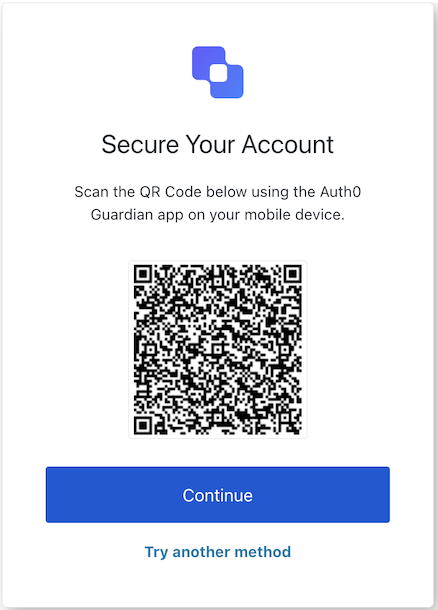
## MFA Push Enrollment QR screen class

The MFA Push Enrollment QR screen class implements the scan QR code screen.

<Frame>
  <img src="https://mintcdn.com/docs-staging-quickstart-revamp/3jbELjzzcIN-z8n3/images/cdy7uua7fh8z/13d9Riyyn389IFhaV2NxAC/792409a4ac81fdd75ead60451742ccde/Screenshot_2025-02-20_at_22.44.09.png?fit=max&auto=format&n=3jbELjzzcIN-z8n3&q=85&s=ec8ee31758fda408c5470bb4eaac181b" alt="" width="438" height="610" data-path="images/cdy7uua7fh8z/13d9Riyyn389IFhaV2NxAC/792409a4ac81fdd75ead60451742ccde/Screenshot_2025-02-20_at_22.44.09.png" />
</Frame>

Import and instantiate the MFA Push Enrollment QR screen class:

```js lines
import MfaPushEnrollmentQr from '@auth0/auth0-acul-js/mfa-push-enrollment-qr';
const mfaPushEnrollmentQr = new MfaPushEnrollmentQr();

// SDK Properties return a string, number or boolean
// ex. "login-id"
mfaPushEnrollmentQr.screen.name;

// SDK Methods return an object or array
await mfaPushEnrollmentQr.pickAuthenticator();
```

### Properties

The MFA Push Enrollment QR screen class properties are:

<Tabs>
  <Tab title="branding">
    ```ts lines expandable
    interface branding {
      settings: null | BrandingSettings;
      themes: null | BrandingThemes;
    }

    interface BrandingSettings {
      colors?: {
        pageBackground?: string | {
          angleDeg: number;
          end: string;
          start: string;
          type: string;
        };
        primary?: string;
      };
      faviconUrl?: string;
      font?: {url: string;};
      logoUrl?: string;
    }

    interface BrandingThemes {
      default: {
        borders: Record<string, string | number | boolean>;
        colors: Record<string, string>;
        displayName: string;
        fonts: Record<string, string | boolean | object>;
        pageBackground: Record<string, string>;
        widget: Record<string, string | number>;
      };
    }
    ```
  </Tab>

  <Tab title="client">
    ```ts lines
    interface client {
      description: null | string;
      id: string;
      logoUrl: null | string;
      name: string;
      metadata: null | {[key: string]: string;};
    }
    ```
  </Tab>

  <Tab title="organization">
    ```ts lines
    interface organization {
      branding: null | {
        colors?: {
          pageBackground?: string;
          primary?: string;
        };
        logoUrl?: string;
      };
      displayName: null | string;
      id: null | string;
      metadata: null | {[key: string]: string;};
      name: null | string;
      usage: null | string;
    }
    ```
  </Tab>

  <Tab title="prompt">
    ```ts lines
    interface prompt{
      name: string;
    }
    ```
  </Tab>

  <Tab title="screen">
    ```ts lines
    interface screen {
      captcha: null | CaptchaContext;
      captchaImage: null | string;
      captchaProvider: null | string;
      captchaSiteKey: null | string;
      data: null | { qr_code: string; qr_uri: string; show_code_copy: boolean };
      isCaptchaAvailable: boolean;
      links: null | Record<string, string>;
      name: string;
      texts: null | Record<string, string>;
    }

    interface CaptchaContext {
      image?: string;
      provider: string;
      siteKey?: string;
    }
    ```
  </Tab>

  <Tab title="tenant">
    ```ts lines
    interface tenant {
      enabledFactors: null | string[];
      enabledLocales: null | string[];
      friendlyName: null | string;
      name: null | string;
    }
    ```
  </Tab>

  <Tab title="transaction">
    ```ts lines expandable
    interface transaction {
      alternateConnections: null | (Connection | EnterpriseConnection)[];
      connectionStrategy: null | string;
      countryCode: null | string;
      countryPrefix: null | string;
      currentConnection: null | Connection;
      errors: null | Error[];  
      hasErrors: boolean;
      locale: string;
      state: string;
    }

    interface Connection {
      metadata?: Record<string, string>;
      name: string;
      strategy: string;
    }

    interface EnterpriseConnection {
      metadata?: Record<string, string>;
      name: string;
      options: {
        displayName?: string;
        iconUrl?: string;
        showAsButton: boolean;
      };
      strategy: string;
    }
    ```
  </Tab>

  <Tab title="untrustedData">
    ```ts lines
    interface untrustedData {
      authorizationParams: null | {
        login_hint?: string;
        screen_hint?: string;
        ui_locales?: string;
        [key: `ext-${string}`]: string;
      };
      submittedFormData: null | {
        [key: string]:
            | string
            | number
            | boolean
            | undefined;
      };
    }
    ```
  </Tab>

  <Tab title="user">
    ```ts lines
    interface user {
      appMetadata: null | {[key: string]: string;};
      email: null | string;
      enrolledDevices: null | ShortEntity<"device">[];
      enrolledEmails: null | ShortEntity<"email">[];
      enrolledFactors: null | string[];
      enrolledPhoneNumbers: null | ShortEntity<"phoneNumber">[];
      id: null | string;
      organizations: null | {
        branding: undefined | {logoUrl: undefined | string;};
        displayName: undefined | string;
        organizationId: undefined | string;
        organizationName: undefined | string;
      }[];
      phoneNumber: null | string;
      picture: null | string;
      userMetadata: null | {[key: string]: string;};
      username: null | string;
    }

    ShortEntity<Key>: {
        id: number;
    } & Record<Key, string>
    ```
  </Tab>
</Tabs>

### Methods

The MFA Push Enrollment QR screen class method is:

#### pickAuthenticator( options ?)

This method navigates the user to the authenticator selection screen.

```js lines
import MfaPushEnrollmentQr from '@auth0/auth0-acul-js/mfa-push-enrollment-qr';

const mfaPushEnrollmentQr = new MfaPushEnrollmentQr();
await mfaPushEnrollmentQr.pickAuthenticator();
```

<table class="table">
  <thead>
    <tr>
      <th><strong>Parameter</strong>                 </th>
      <th><strong>Type</strong></th>
      <th><strong>Required</strong></th>
      <th><strong>Description</strong></th>
    </tr>
  </thead>

  <tbody>
    <tr>
      <td><code>\[key: string]</code></td>
      <td>string | number | boolean | undefined</td>
      <td>No</td>
      <td>Optional data collected from user.</td>
    </tr>
  </tbody>
</table>

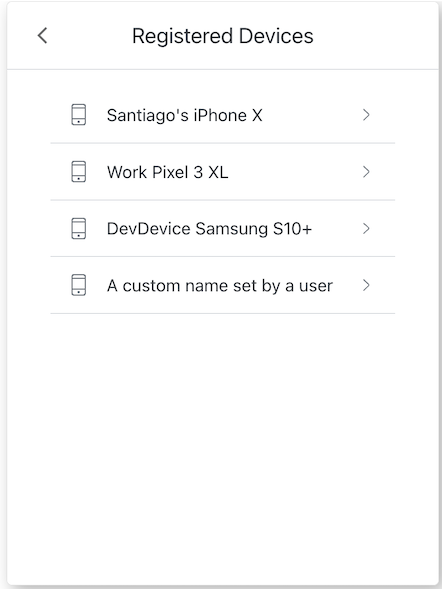
## MFA Push List screen class

The MFA Push List screen class implements the mfa-push-list screen functionality.

<Frame>
  <img src="https://mintcdn.com/docs-staging-quickstart-revamp/AmyDKn5Na0kFZtbL/images/cdy7uua7fh8z/1OXzeT38UHHXUNmGAWaBIg/af967dcd06ed74ede90d7425323a1de8/Screenshot_2025-02-20_at_23.02.21.png?fit=max&auto=format&n=AmyDKn5Na0kFZtbL&q=85&s=1172705e1332344c96351119761b23da" alt="" width="442" height="589" data-path="images/cdy7uua7fh8z/1OXzeT38UHHXUNmGAWaBIg/af967dcd06ed74ede90d7425323a1de8/Screenshot_2025-02-20_at_23.02.21.png" />
</Frame>

Import and instantiate the MFA Push List screen class:

```js lines
import MfaPushList from '@auth0/auth0-acul-js/mfa-push-list';
const mfaPushList = new MfaPushList();

// SDK Properties return a string, number or boolean
// ex. "login-id"
mfaPushList.screen.name;

// SDK Methods return an object or array
await mfaPushList.selectMfaPushDevice({ deviceIndex: 0 });
```

### Properties

The MFA Push List screen class properties are:

<Tabs>
  <Tab title="branding">
    ```ts lines expandable
    interface branding {
      settings: null | BrandingSettings;
      themes: null | BrandingThemes;
    }

    interface BrandingSettings {
      colors?: {
        pageBackground?: string | {
          angleDeg: number;
          end: string;
          start: string;
          type: string;
        };
        primary?: string;
      };
      faviconUrl?: string;
      font?: {url: string;};
      logoUrl?: string;
    }

    interface BrandingThemes {
      default: {
        borders: Record<string, string | number | boolean>;
        colors: Record<string, string>;
        displayName: string;
        fonts: Record<string, string | boolean | object>;
        pageBackground: Record<string, string>;
        widget: Record<string, string | number>;
      };
    }
    ```
  </Tab>

  <Tab title="client">
    ```ts lines
    interface client {
      description: null | string;
      id: string;
      logoUrl: null | string;
      name: string;
      metadata: null | {[key: string]: string;};
    }
    ```
  </Tab>

  <Tab title="organization">
    ```ts lines
    interface organization {
      branding: null | {
        colors?: {
          pageBackground?: string;
          primary?: string;
        };
        logoUrl?: string;
      };
      displayName: null | string;
      id: null | string;
      metadata: null | {[key: string]: string;};
      name: null | string;
      usage: null | string;
    }
    ```
  </Tab>

  <Tab title="prompt">
    ```ts lines
    interface prompt{
      name: string;
    }
    ```
  </Tab>

  <Tab title="screen">
    ```ts lines
    interface screen {
      captcha: null | CaptchaContext;
      captchaImage: null | string;
      captchaProvider: null | string;
      captchaSiteKey: null | string;
      data: null | {enrolled_devices: string[];};
      isCaptchaAvailable: boolean;
      links: null | Record<string, string>;
      name: string;
      texts: null | Record<string, string>;
    }

    interface CaptchaContext {
      image?: string;
      provider: string;
      siteKey?: string;
    }
    ```
  </Tab>

  <Tab title="tenant">
    ```ts lines
    interface tenant {
      enabledFactors: null | string[];
      enabledLocales: null | string[];
      friendlyName: null | string;
      name: null | string;
    }
    ```
  </Tab>

  <Tab title="transaction">
    ```ts lines expandable
    interface transaction {
      alternateConnections: null | (Connection | EnterpriseConnection)[];
      connectionStrategy: null | string;
      countryCode: null | string;
      countryPrefix: null | string;
      currentConnection: null | Connection;
      errors: null | Error[];  
      hasErrors: boolean;
      locale: string;
      state: string;
    }

    interface Connection {
      metadata?: Record<string, string>;
      name: string;
      strategy: string;
    }

    interface EnterpriseConnection {
      metadata?: Record<string, string>;
      name: string;
      options: {
        displayName?: string;
        iconUrl?: string;
        showAsButton: boolean;
      };
      strategy: string;
    }
    ```
  </Tab>

  <Tab title="untrustedData">
    ```ts lines
    interface untrustedData {
      authorizationParams: null | {
        login_hint?: string;
        screen_hint?: string;
        ui_locales?: string;
        [key: `ext-${string}`]: string;
      };
      submittedFormData: null | {
        [key: string]:
            | string
            | number
            | boolean
            | undefined;
      };
    }
    ```
  </Tab>

  <Tab title="user">
    ```ts lines
    interface user {
      appMetadata: null | {[key: string]: string;};
      email: null | string;
      enrolledDevices: null | ShortEntity<"device">[];
      enrolledEmails: null | ShortEntity<"email">[];
      enrolledFactors: null | string[];
      enrolledPhoneNumbers: null | ShortEntity<"phoneNumber">[];
      id: null | string;
      organizations: null | {
        branding: undefined | {logoUrl: undefined | string;};
        displayName: undefined | string;
        organizationId: undefined | string;
        organizationName: undefined | string;
      }[];
      phoneNumber: null | string;
      picture: null | string;
      userMetadata: null | {[key: string]: string;};
      username: null | string;
    }

    ShortEntity<Key>: {
        id: number;
    } & Record<Key, string>
    ```
  </Tab>
</Tabs>

### Methods

The MFA Push List screen class method are:

#### goBack( options ?)

This method allows the user to navigate to previous screen.

```js lines
import MfaPushList from '@auth0/auth0-acul-js/mfa-push-list';

const mfaPushList = new MfaPushList();
await mfaPushList.goBack();
```

<table class="table">
  <thead>
    <tr>
      <th><strong>Parameter</strong>                 </th>
      <th><strong>Type</strong></th>
      <th><strong>Required</strong></th>
      <th><strong>Description</strong></th>
    </tr>
  </thead>

  <tbody>
    <tr>
      <td><code>\[key: string]</code></td>
      <td>string | number | boolean | undefined</td>
      <td>No</td>
      <td>Optional data collected from user.</td>
    </tr>
  </tbody>
</table>

#### selectMfaPushDevice( options ?)

This method allows the user to select from a list of registered device to initiate MFA push.

```js lines
import MfaPushList from '@auth0/auth0-acul-js/mfa-push-list';

const mfaPushList = new MfaPushList();
await mfaPushList.selectMfaPushDevice({ deviceIndex: 0 });
```

<table class="table">
  <thead>
    <tr>
      <th><strong>Parameter</strong>                 </th>
      <th><strong>Type</strong></th>
      <th><strong>Required</strong></th>
      <th><strong>Description</strong></th>
    </tr>
  </thead>

  <tbody>
    <tr>
      <td><code>deviceIndex</code></td>
      <td>number</td>
      <td>Yes</td>
      <td>The index of the device to select from the list of enrolled devices.</td>
    </tr>

    <tr>
      <td><code>\[key: string]</code></td>
      <td>string | number | boolean | undefined</td>
      <td>No</td>
      <td>Optional data collected from user.</td>
    </tr>
  </tbody>
</table>

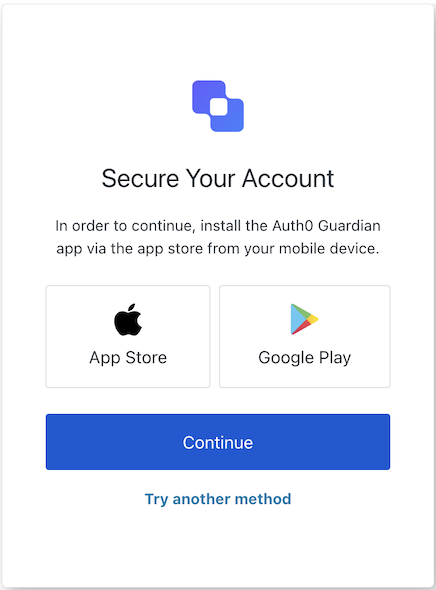
## MFA Push Welcome screen class

The MFA Push Welcome screen class initializes the MfaPushWelcome screen with data from the <Tooltip tip="Universal Login: Your application redirects to Universal Login, hosted on Auth0's Authorization Server, to verify a user's identity." cta="View Glossary" href="/docs/glossary?term=Universal+Login">Universal Login</Tooltip> Context.

<Frame>
  <img src="https://mintcdn.com/docs-staging-quickstart-revamp/fNPG21NgQLCA0axA/images/cdy7uua7fh8z/1eV1z2U3ivWXjGCWeQ9yhn/e70942ea41a29b32aa9797fba2cdf7cc/Screenshot_2025-02-21_at_10.09.24.png?fit=max&auto=format&n=fNPG21NgQLCA0axA&q=85&s=e2e00f3e082d48461586765ab580b804" alt="" width="436" height="590" data-path="images/cdy7uua7fh8z/1eV1z2U3ivWXjGCWeQ9yhn/e70942ea41a29b32aa9797fba2cdf7cc/Screenshot_2025-02-21_at_10.09.24.png" />
</Frame>

Import and instantiate the MFA Push Welcome screen class:

```js lines
import MfaPushWelcome from '@auth0/auth0-acul-js/mfa-push-welcome';
const mfaPushWelcome = new MfaPushWelcome();

// SDK Properties return a string, number or boolean
// ex. "login-id"
mfaPushWelcome.screen.name;

// SDK Methods return an object or array
await mfaPushWelcome.enroll();
```

### Properties

The MFA Push Welcome screen class properties are:

<Tabs>
  <Tab title="branding">
    ```ts lines expandable
    interface branding {
      settings: null | BrandingSettings;
      themes: null | BrandingThemes;
    }

    interface BrandingSettings {
      colors?: {
        pageBackground?: string | {
          angleDeg: number;
          end: string;
          start: string;
          type: string;
        };
        primary?: string;
      };
      faviconUrl?: string;
      font?: {url: string;};
      logoUrl?: string;
    }

    interface BrandingThemes {
      default: {
        borders: Record<string, string | number | boolean>;
        colors: Record<string, string>;
        displayName: string;
        fonts: Record<string, string | boolean | object>;
        pageBackground: Record<string, string>;
        widget: Record<string, string | number>;
      };
    }
    ```
  </Tab>

  <Tab title="client">
    ```ts lines
    interface client {
      description: null | string;
      id: string;
      logoUrl: null | string;
      name: string;
      metadata: null | {[key: string]: string;};
    }
    ```
  </Tab>

  <Tab title="organization">
    ```ts lines
    interface organization {
      branding: null | {
        colors?: {
          pageBackground?: string;
          primary?: string;
        };
        logoUrl?: string;
      };
      displayName: null | string;
      id: null | string;
      metadata: null | {[key: string]: string;};
      name: null | string;
      usage: null | string;
    }
    ```
  </Tab>

  <Tab title="prompt">
    ```ts lines
    interface prompt{
      name: string;
    }
    ```
  </Tab>

  <Tab title="screen">
    ```ts lines expandable
    interface screen {
      captcha: null | CaptchaContext;
      captchaImage: null | string;
      captchaProvider: null | string;
      captchaSiteKey: null | string;
      data: null | Record<string,
          | string
          | boolean
          | string[]
          | PhonePrefix[]>;
      isCaptchaAvailable: boolean;
      links: null | Record<string, string>;
      name: string;
      screen: {
        links: {
          android: string;
          ios: string;
        };
        name: string;
      };
      texts: null | Record<string, string>;
    }

    interface CaptchaContext {
      image?: string;
      provider: string;
      siteKey?: string;
    }

    interface PhonePrefix {
      country: string;
      country_code: string;
      phone_prefix: string;
    }
    ```
  </Tab>

  <Tab title="tenant">
    ```ts lines
    interface tenant {
      enabledFactors: null | string[];
      enabledLocales: null | string[];
      friendlyName: null | string;
      name: null | string;
    }
    ```
  </Tab>

  <Tab title="transaction">
    ```ts lines expandable
    interface transaction {
      alternateConnections: null | (Connection | EnterpriseConnection)[];
      connectionStrategy: null | string;
      countryCode: null | string;
      countryPrefix: null | string;
      currentConnection: null | Connection;
      errors: null | Error[];  
      hasErrors: boolean;
      locale: string;
      state: string;
    }

    interface Connection {
      metadata?: Record<string, string>;
      name: string;
      strategy: string;
    }

    interface EnterpriseConnection {
      metadata?: Record<string, string>;
      name: string;
      options: {
        displayName?: string;
        iconUrl?: string;
        showAsButton: boolean;
      };
      strategy: string;
    }
    ```
  </Tab>

  <Tab title="untrustedData">
    ```ts lines
    interface untrustedData {
      authorizationParams: null | {
        login_hint?: string;
        screen_hint?: string;
        ui_locales?: string;
        [key: `ext-${string}`]: string;
      };
      submittedFormData: null | {
        [key: string]:
            | string
            | number
            | boolean
            | undefined;
      };
    }
    ```
  </Tab>

  <Tab title="user">
    ```ts lines
    interface user {
      appMetadata: null | {[key: string]: string;};
      email: null | string;
      enrolledDevices: null | ShortEntity<"device">[];
      enrolledEmails: null | ShortEntity<"email">[];
      enrolledFactors: null | string[];
      enrolledPhoneNumbers: null | ShortEntity<"phoneNumber">[];
      id: null | string;
      organizations: null | {
        branding: undefined | {logoUrl: undefined | string;};
        displayName: undefined | string;
        organizationId: undefined | string;
        organizationName: undefined | string;
      }[];
      phoneNumber: null | string;
      picture: null | string;
      userMetadata: null | {[key: string]: string;};
      username: null | string;
    }

    ShortEntity<Key>: {
        id: number;
    } & Record<Key, string>
    ```
  </Tab>
</Tabs>

### Methods

The MFA Push Welcome screen class method are:

#### enroll( options ?)

This method navigates the user to the enrollment screen.

```js lines
import MfaPushWelcome from '@auth0/auth0-acul-js/mfa-push-welcome';

const mfaPushWelcome = new MfaPushWelcome();
await mfaPushWelcome.enroll();
```

<table class="table">
  <thead>
    <tr>
      <th><strong>Parameter</strong>                 </th>
      <th><strong>Type</strong></th>
      <th><strong>Required</strong></th>
      <th><strong>Description</strong></th>
    </tr>
  </thead>

  <tbody>
    <tr>
      <td><code>\[key: string]</code></td>
      <td>string | number | boolean | undefined</td>
      <td>No</td>
      <td>Optional data collected from user.</td>
    </tr>
  </tbody>
</table>

#### pickAuthenticator( options ?)

This method navigates the user to the authenticator selection screen.

```js lines
import MfaPushWelcome from '@auth0/auth0-acul-js/mfa-push-welcome';

const mfaPushWelcome = new MfaPushWelcome();
await mfaPushWelcome.pickAuthenticator();
```

<table class="table">
  <thead>
    <tr>
      <th><strong>Parameter</strong>                 </th>
      <th><strong>Type</strong></th>
      <th><strong>Required</strong></th>
      <th><strong>Description</strong></th>
    </tr>
  </thead>

  <tbody>
    <tr>
      <td><code>\[key: string]</code></td>
      <td>string | number | boolean | undefined</td>
      <td>No</td>
      <td>Optional data collected from user.</td>
    </tr>
  </tbody>
</table>