> ## Documentation Index
> Fetch the complete documentation index at: https://docs-staging-quickstart-revamp.mintlify.site/llms.txt
> Use this file to discover all available pages before exploring further.

> Learn about the ACUL Multi-Factor Authentication OTP screen classes

# Multi-Factor Authentication OTP screen classes

## MFA OTP Challenge screen class

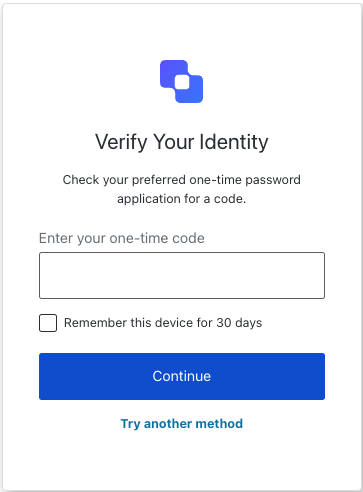
The <Tooltip tip="Multi-factor authentication (MFA): User authentication process that uses a factor in addition to username and password such as a code via SMS." cta="View Glossary" href="/docs/glossary?term=MFA">MFA</Tooltip> OTP Challenge screen class provides methods associated with the mfa-otp-challenge screen. This screen is shown when a user needs to enter an OTP code during MFA.

<Frame>
  <img src="https://mintcdn.com/docs-staging-quickstart-revamp/R8rXfTj95YBIEuC2/images/cdy7uua7fh8z/4EcKVu4uEjsNEpVcI5bW0b/e6fb47c9addc1c07f1f39516aafa5e0e/Screenshot_2025-03-26_at_00.01.07.png?fit=max&auto=format&n=R8rXfTj95YBIEuC2&q=85&s=a357058e634f7993eb3c0cbaa78af287" alt="" width="363" height="492" data-path="images/cdy7uua7fh8z/4EcKVu4uEjsNEpVcI5bW0b/e6fb47c9addc1c07f1f39516aafa5e0e/Screenshot_2025-03-26_at_00.01.07.png" />
</Frame>

Import and instantiate the MFA OTP Challenge screen class:

```js lines
import MfaOtpChallenge from '@auth0/auth0-acul-js/mfa-otp-challenge';
const mfaOtpChallenge = new MfaOtpChallenge();

// SDK Properties return a string, number or boolean
// ex. "login-id"
mfaOtpChallenge.screen.name;

// SDK Methods return an object or array
await mfaOtpChallenge.continue({
  code: '123456',
  rememberBrowser: true
});
```

### Properties

The MFA OTP Challenge screen class properties are:

<Tabs>
  <Tab title="branding">
    ```ts lines expandable
    interface branding {
      settings: null | BrandingSettings;
      themes: null | BrandingThemes;
    }

    interface BrandingSettings {
      colors?: {
        pageBackground?: string | {
          angleDeg: number;
          end: string;
          start: string;
          type: string;
        };
        primary?: string;
      };
      faviconUrl?: string;
      font?: {url: string;};
      logoUrl?: string;
    }

    interface BrandingThemes {
      default: {
        borders: Record<string, string | number | boolean>;
        colors: Record<string, string>;
        displayName: string;
        fonts: Record<string, string | boolean | object>;
        pageBackground: Record<string, string>;
        widget: Record<string, string | number>;
      };
    }
    ```
  </Tab>

  <Tab title="client">
    ```ts lines
    interface client {
      description: null | string;
      id: string;
      logoUrl: null | string;
      name: string;
      metadata: null | {[key: string]: string;};
    }
    ```
  </Tab>

  <Tab title="organization">
    ```ts lines
    interface organization {
      branding: null | {
        colors?: {
          pageBackground?: string;
          primary?: string;
        };
        logoUrl?: string;
      };
      displayName: null | string;
      id: null | string;
      metadata: null | {[key: string]: string;};
      name: null | string;
      usage: null | string;
    }
    ```
  </Tab>

  <Tab title="prompt">
    ```ts lines
    interface prompt{
      name: string;
    }
    ```
  </Tab>

  <Tab title="screen">
    ```ts lines
    interface screen {
      captcha: null | CaptchaContext;
      captchaImage: null | string;
      captchaProvider: null | string;
      captchaSiteKey: null | string;
      data: null | { remember_device?: boolean; };
      isCaptchaAvailable: boolean;
      links: null | Record<string, string>;
      name: string;
      texts: null | Record<string, string>;
    }

    interface CaptchaContext {
      image?: string;
      provider: string;
      siteKey?: string;
    }
    ```
  </Tab>

  <Tab title="tenant">
    ```ts lines
    interface tenant {
      enabledFactors: null | string[];
      enabledLocales: null | string[];
      friendlyName: null | string;
      name: null | string;
    }
    ```
  </Tab>

  <Tab title="transaction">
    ```ts lines expandable
    interface transaction {
      alternateConnections: null | (Connection | EnterpriseConnection)[];
      connectionStrategy: null | string;
      countryCode: null | string;
      countryPrefix: null | string;
      currentConnection: null | Connection;
      errors: null | Error[];  
      hasErrors: boolean;
      locale: string;
      state: string;
    }

    interface Connection {
      metadata?: Record<string, string>;
      name: string;
      strategy: string;
    }

    interface EnterpriseConnection {
      metadata?: Record<string, string>;
      name: string;
      options: {
        displayName?: string;
        iconUrl?: string;
        showAsButton: boolean;
      };
      strategy: string;
    }
    ```
  </Tab>

  <Tab title="untrustedData">
    ```ts lines
    interface untrustedData {
      authorizationParams: null | {
        login_hint?: string;
        screen_hint?: string;
        ui_locales?: string;
        [key: `ext-${string}`]: string;
      };
      submittedFormData: null | {
        [key: string]:
            | string
            | number
            | boolean
            | undefined;
      };
    }
    ```
  </Tab>

  <Tab title="user">
    ```ts lines
    interface user {
      appMetadata: null | {[key: string]: string;};
      email: null | string;
      enrolledDevices: null | ShortEntity<"device">[];
      enrolledEmails: null | ShortEntity<"email">[];
      enrolledFactors: null | string[];
      enrolledPhoneNumbers: null | ShortEntity<"phoneNumber">[];
      id: null | string;
      organizations: null | {
        branding: undefined | {logoUrl: undefined | string;};
        displayName: undefined | string;
        organizationId: undefined | string;
        organizationName: undefined | string;
      }[];
      phoneNumber: null | string;
      picture: null | string;
      userMetadata: null | {[key: string]: string;};
      username: null | string;
    }

    ShortEntity<Key>: {
        id: number;
    } & Record<Key, string>
    ```
  </Tab>
</Tabs>

### Methods

The MFA OTP Challenge screen class methods are:

#### continue( options ?)

This method continues with the OTP challenge using the provided code.

```js lines
import MfaOtpChallenge from '@auth0/auth0-acul-js/mfa-otp-challenge';
const mfaOtpChallenge = new MfaOtpChallenge();

await mfaOtpChallenge.continue({
  code: '123456',
  rememberBrowser: true
});
```

<table class="table">
  <thead>
    <tr>
      <th><strong>Parameter</strong>                 </th>
      <th><strong>Type</strong></th>
      <th><strong>Required</strong></th>
      <th><strong>Description</strong></th>
    </tr>
  </thead>

  <tbody>
    <tr>
      <td><code>code</code></td>
      <td>string</td>
      <td>Yes</td>
      <td>The code entered by the user.</td>
    </tr>

    <tr>
      <td><code>rememberBrowser</code></td>
      <td>boolean</td>
      <td>No</td>
      <td>Remember the user's browser configuration.</td>
    </tr>
  </tbody>
</table>

#### tryAnotherMethod( options ?)

This method allows the user to try another MFA method.

```js lines
import MfaOtpChallenge from '@auth0/auth0-acul-js/mfa-otp-challenge';
const mfaOtpChallenge = new MfaOtpChallenge();

await mfaOtpChallenge.tryAnotherMethod();
```

<table class="table">
  <thead>
    <tr>
      <th><strong>Parameter</strong>                 </th>
      <th><strong>Type</strong></th>
      <th><strong>Required</strong></th>
      <th><strong>Description</strong></th>
    </tr>
  </thead>

  <tbody>
    <tr>
      <td><code>\[key: string]</code></td>
      <td>string | number | boolean | undefined</td>
      <td>No</td>
      <td>Optional data collected from user.</td>
    </tr>
  </tbody>
</table>

## MFA OTP Enrollment Code screen class

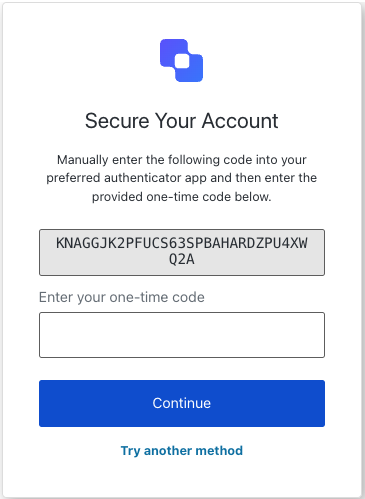
The MFA OTP Enrollment Code screen class provides methods associated with the mfa-otp-enrollment-code screen.

<Frame>
  <img src="https://mintcdn.com/docs-staging-quickstart-revamp/rHYM5iMy6d7A-FVR/images/cdy7uua7fh8z/5x7zKvx9RtgMzJqkIgvE5Z/17d50fc705c6e0bf0bd75444d2b486ff/Screenshot_2025-03-26_at_00.01.21.png?fit=max&auto=format&n=rHYM5iMy6d7A-FVR&q=85&s=028ea16a4c6343ab6893d9967f81191b" alt="" width="365" height="499" data-path="images/cdy7uua7fh8z/5x7zKvx9RtgMzJqkIgvE5Z/17d50fc705c6e0bf0bd75444d2b486ff/Screenshot_2025-03-26_at_00.01.21.png" />
</Frame>

Import and instantiate the MFA OTP Enrollment Code screen class:

```js lines
import MfaOtpEnrollmentCode from '@auth0/auth0-acul-js/mfa-otp-enrollment-code';
const mfaOtpEnrollmentCode = new MfaOtpEnrollmentCode();

// SDK Properties return a string, number or boolean
// ex. "login-id"
mfaOtpEnrollmentCode.screen.name;

// SDK Methods return an object or array
await mfaOtpEnrollmentCode.continue({
  code: '123456',
});
```

### Properties

The MFA OTP Enrollment Code screen class properties are:

<Tabs>
  <Tab title="branding">
    ```ts lines expandable
    interface branding {
      settings: null | BrandingSettings;
      themes: null | BrandingThemes;
    }

    interface BrandingSettings {
      colors?: {
        pageBackground?: string | {
          angleDeg: number;
          end: string;
          start: string;
          type: string;
        };
        primary?: string;
      };
      faviconUrl?: string;
      font?: {url: string;};
      logoUrl?: string;
    }

    interface BrandingThemes {
      default: {
        borders: Record<string, string | number | boolean>;
        colors: Record<string, string>;
        displayName: string;
        fonts: Record<string, string | boolean | object>;
        pageBackground: Record<string, string>;
        widget: Record<string, string | number>;
      };
    }
    ```
  </Tab>

  <Tab title="client">
    ```ts lines
    interface client {
      description: null | string;
      id: string;
      logoUrl: null | string;
      name: string;
      metadata: null | {[key: string]: string;};
    }
    ```
  </Tab>

  <Tab title="organization">
    ```ts lines
    interface organization {
      branding: null | {
        colors?: {
          pageBackground?: string;
          primary?: string;
        };
        logoUrl?: string;
      };
      displayName: null | string;
      id: null | string;
      metadata: null | {[key: string]: string;};
      name: null | string;
      usage: null | string;
    }
    ```
  </Tab>

  <Tab title="prompt">
    ```ts lines
    interface prompt{
      name: string;
    }
    ```
  </Tab>

  <Tab title="screen">
    ```ts lines
    interface screen {
      captcha: null | CaptchaContext;
      captchaImage: null | string;
      captchaProvider: null | string;
      captchaSiteKey: null | string;
      data: null | { text_code: string; };
      isCaptchaAvailable: boolean;
      links: null | Record<string, string>;
      name: string;
      texts: null | Record<string, string>;
    }

    interface CaptchaContext {
      image?: string;
      provider: string;
      siteKey?: string;
    }
    ```
  </Tab>

  <Tab title="tenant">
    ```ts lines
    interface tenant {
      enabledFactors: null | string[];
      enabledLocales: null | string[];
      friendlyName: null | string;
      name: null | string;
    }
    ```
  </Tab>

  <Tab title="transaction">
    ```ts lines expandable
    interface transaction {
      alternateConnections: null | (Connection | EnterpriseConnection)[];
      connectionStrategy: null | string;
      countryCode: null | string;
      countryPrefix: null | string;
      currentConnection: null | Connection;
      errors: null | Error[];  
      hasErrors: boolean;
      locale: string;
      state: string;
    }

    interface Connection {
      metadata?: Record<string, string>;
      name: string;
      strategy: string;
    }

    interface EnterpriseConnection {
      metadata?: Record<string, string>;
      name: string;
      options: {
        displayName?: string;
        iconUrl?: string;
        showAsButton: boolean;
      };
      strategy: string;
    }
    ```
  </Tab>

  <Tab title="untrustedData">
    ```ts lines
    interface untrustedData {
      authorizationParams: null | {
        login_hint?: string;
        screen_hint?: string;
        ui_locales?: string;
        [key: `ext-${string}`]: string;
      };
      submittedFormData: null | {
        [key: string]:
            | string
            | number
            | boolean
            | undefined;
      };
    }
    ```
  </Tab>

  <Tab title="user">
    ```ts lines
    interface user {
      appMetadata: null | {[key: string]: string;};
      email: null | string;
      enrolledDevices: null | ShortEntity<"device">[];
      enrolledEmails: null | ShortEntity<"email">[];
      enrolledFactors: null | string[];
      enrolledPhoneNumbers: null | ShortEntity<"phoneNumber">[];
      id: null | string;
      organizations: null | {
        branding: undefined | {logoUrl: undefined | string;};
        displayName: undefined | string;
        organizationId: undefined | string;
        organizationName: undefined | string;
      }[];
      phoneNumber: null | string;
      picture: null | string;
      userMetadata: null | {[key: string]: string;};
      username: null | string;
    }

    ShortEntity<Key>: {
        id: number;
    } & Record<Key, string>
    ```
  </Tab>
</Tabs>

### Methods

The MFA OTP Enrollment Code screen class methods are:

#### continue( options ?)

This method continues the MFA OTP enrollment process by submitting the OTP code.

```js lines
import MfaOtpEnrollmentCode from '@auth0/auth0-acul-js/mfa-otp-enrollment-code';
const mfaOtpEnrollmentCode = new MfaOtpEnrollmentCode();

await mfaOtpEnrollmentCode.continue({
  code: '123456',
});
```

<table class="table">
  <thead>
    <tr>
      <th><strong>Parameter</strong>                 </th>
      <th><strong>Type</strong></th>
      <th><strong>Required</strong></th>
      <th><strong>Description</strong></th>
    </tr>
  </thead>

  <tbody>
    <tr>
      <td><code>code</code></td>
      <td>string</td>
      <td>Yes</td>
      <td>The code entered by the user.</td>
    </tr>
  </tbody>
</table>

#### tryAnotherMethod( options ?)

This method allows the user to try another MFA method.

```js lines
import MfaOtpEnrollmentCode from '@auth0/auth0-acul-js/mfa-otp-enrollment-code';
const mfaOtpEnrollmentCode = new MfaOtpEnrollmentCode();

await mfaOtpEnrollmentCode.tryAnotherMethod();
```

<table class="table">
  <thead>
    <tr>
      <th><strong>Parameter</strong>                 </th>
      <th><strong>Type</strong></th>
      <th><strong>Required</strong></th>
      <th><strong>Description</strong></th>
    </tr>
  </thead>

  <tbody>
    <tr>
      <td><code>\[key: string]</code></td>
      <td>string | number | boolean | undefined</td>
      <td>No</td>
      <td>Optional data collected from user.</td>
    </tr>
  </tbody>
</table>

## MFA OTP Enrollment QR screen class

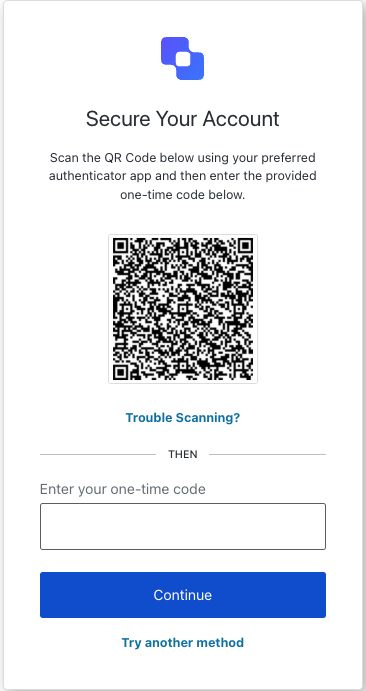
The MFA OTP Enrollment QR screen class provides methods associated with the mfa-otp-enrollment-qr screen.

<Frame>
  <img src="https://mintcdn.com/docs-staging-quickstart-revamp/TU1OUbCB6Vk1Wu6L/images/cdy7uua7fh8z/xgACud9b5L3UQ6OKH5rf8/8c3cce8d90c0b9d2162e2441df85bb01/Screenshot_2025-03-26_at_00.00.27.png?fit=max&auto=format&n=TU1OUbCB6Vk1Wu6L&q=85&s=5384f2cb43a9deff42e5f7b689fbfe2e" alt="" width="366" height="691" data-path="images/cdy7uua7fh8z/xgACud9b5L3UQ6OKH5rf8/8c3cce8d90c0b9d2162e2441df85bb01/Screenshot_2025-03-26_at_00.00.27.png" />
</Frame>

Import and instantiate the MFA OTP Enrollment QR screen class:

```js lines
import MfaOtpEnrollmentQr from '@auth0/auth0-acul-js/mfa-otp-enrollment-qr';
const mfaOtpEnrollmentQr = new MfaOtpEnrollmentQr();

// SDK Properties return a string, number or boolean
// ex. "login-id"
mfaOtpEnrollmentQr.screen.name;

// SDK Methods return an object or array
await mfaOtpEnrollmentQr.continue({ code: '123456' });
```

### Properties

The MFA OTP Enrollment QR screen class properties are:

<Tabs>
  <Tab title="branding">
    ```ts lines expandable
    interface branding {
      settings: null | BrandingSettings;
      themes: null | BrandingThemes;
    }

    interface BrandingSettings {
      colors?: {
        pageBackground?: string | {
          angleDeg: number;
          end: string;
          start: string;
          type: string;
        };
        primary?: string;
      };
      faviconUrl?: string;
      font?: {url: string;};
      logoUrl?: string;
    }

    interface BrandingThemes {
      default: {
        borders: Record<string, string | number | boolean>;
        colors: Record<string, string>;
        displayName: string;
        fonts: Record<string, string | boolean | object>;
        pageBackground: Record<string, string>;
        widget: Record<string, string | number>;
      };
    }
    ```
  </Tab>

  <Tab title="client">
    ```ts lines
    interface client {
      description: null | string;
      id: string;
      logoUrl: null | string;
      name: string;
      metadata: null | {[key: string]: string;};
    }
    ```
  </Tab>

  <Tab title="organization">
    ```ts lines
    interface organization {
      branding: null | {
        colors?: {
          pageBackground?: string;
          primary?: string;
        };
        logoUrl?: string;
      };
      displayName: null | string;
      id: null | string;
      metadata: null | {[key: string]: string;};
      name: null | string;
      usage: null | string;
    }
    ```
  </Tab>

  <Tab title="prompt">
    ```ts lines
    interface prompt{
      name: string;
    }
    ```
  </Tab>

  <Tab title="screen">
    ```ts lines
    interface screen {
      captcha: null | CaptchaContext;
      captchaImage: null | string;
      captchaProvider: null | string;
      captchaSiteKey: null | string;
      data: null | { qr_code: string;};
      isCaptchaAvailable: boolean;
      links: null | Record<string, string>;
      name: string;
      texts: null | Record<string, string>;
    }

    interface CaptchaContext {
      image?: string;
      provider: string;
      siteKey?: string;
    }
    ```
  </Tab>

  <Tab title="tenant">
    ```ts lines
    interface tenant {
      enabledFactors: null | string[];
      enabledLocales: null | string[];
      friendlyName: null | string;
      name: null | string;
    }
    ```
  </Tab>

  <Tab title="transaction">
    ```ts lines expandable
    interface transaction {
      alternateConnections: null | (Connection | EnterpriseConnection)[];
      connectionStrategy: null | string;
      countryCode: null | string;
      countryPrefix: null | string;
      currentConnection: null | Connection;
      errors: null | Error[];  
      hasErrors: boolean;
      locale: string;
      state: string;
    }

    interface Connection {
      metadata?: Record<string, string>;
      name: string;
      strategy: string;
    }

    interface EnterpriseConnection {
      metadata?: Record<string, string>;
      name: string;
      options: {
        displayName?: string;
        iconUrl?: string;
        showAsButton: boolean;
      };
      strategy: string;
    }
    ```
  </Tab>

  <Tab title="untrustedData">
    ```ts lines
    interface untrustedData {
      authorizationParams: null | {
        login_hint?: string;
        screen_hint?: string;
        ui_locales?: string;
        [key: `ext-${string}`]: string;
      };
      submittedFormData: null | {
        [key: string]:
            | string
            | number
            | boolean
            | undefined;
      };
    }
    ```
  </Tab>

  <Tab title="user">
    ```ts lines
    interface user {
      appMetadata: null | {[key: string]: string;};
      email: null | string;
      enrolledDevices: null | ShortEntity<"device">[];
      enrolledEmails: null | ShortEntity<"email">[];
      enrolledFactors: null | string[];
      enrolledPhoneNumbers: null | ShortEntity<"phoneNumber">[];
      id: null | string;
      organizations: null | {
        branding: undefined | {logoUrl: undefined | string;};
        displayName: undefined | string;
        organizationId: undefined | string;
        organizationName: undefined | string;
      }[];
      phoneNumber: null | string;
      picture: null | string;
      userMetadata: null | {[key: string]: string;};
      username: null | string;
    }

    ShortEntity<Key>: {
        id: number;
    } & Record<Key, string>
    ```
  </Tab>
</Tabs>

### Methods

The MFA OTP Enrollment QR screen class methods are:

#### continue( options ?)

This method continues the MFA OTP enrollment QR process by submitting the OTP code.

```js lines
import MfaOtpEnrollmentQr from '@auth0/auth0-acul-js/mfa-otp-enrollment-qr';
const mfaOtpEnrollmentQr = new MfaOtpEnrollmentQr();

await mfaOtpEnrollmentQr.continue({ code: '123456' });
```

<table class="table">
  <thead>
    <tr>
      <th><strong>Parameter</strong>                 </th>
      <th><strong>Type</strong></th>
      <th><strong>Required</strong></th>
      <th><strong>Description</strong></th>
    </tr>
  </thead>

  <tbody>
    <tr>
      <td><code>code</code></td>
      <td>string</td>
      <td>Yes</td>
      <td>The code entered by the user.</td>
    </tr>

    <tr>
      <td><code>\[key: string]</code></td>
      <td>string | number | boolean | undefined</td>
      <td>No</td>
      <td>Optional data collected from user.</td>
    </tr>
  </tbody>
</table>

#### toggleView( options ?)

This method navigates to the authenticator selection screen.

```js lines
import MfaOtpEnrollmentQr from '@auth0/auth0-acul-js/mfa-otp-enrollment-qr';
const mfaOtpEnrollmentQr = new MfaOtpEnrollmentQr();

await mfaOtpEnrollmentQr.toggleView();
```

<table class="table">
  <thead>
    <tr>
      <th><strong>Parameter</strong>                 </th>
      <th><strong>Type</strong></th>
      <th><strong>Required</strong></th>
      <th><strong>Description</strong></th>
    </tr>
  </thead>

  <tbody>
    <tr>
      <td><code>rememberBrowser</code></td>
      <td>boolean</td>
      <td>No</td>
      <td>Remember the user's browser configuration.</td>
    </tr>

    <tr>
      <td><code>\[key: string]</code></td>
      <td>string | number | boolean | undefined</td>
      <td>No</td>
      <td>Optional data collected from user.</td>
    </tr>
  </tbody>
</table>

#### tryAnotherMethod( options ?)

This method allows the user to try another MFA method.

```js lines
import MfaOtpEnrollmentQr from '@auth0/auth0-acul-js/mfa-otp-enrollment-qr';
const mfaOtpEnrollmentQr = new MfaOtpEnrollmentQr();

await mfaOtpEnrollmentQr.tryAnotherMethod();
```

<table class="table">
  <thead>
    <tr>
      <th><strong>Parameter</strong>                 </th>
      <th><strong>Type</strong></th>
      <th><strong>Required</strong></th>
      <th><strong>Description</strong></th>
    </tr>
  </thead>

  <tbody>
    <tr>
      <td><code>rememberBrowser</code></td>
      <td>boolean</td>
      <td>No</td>
      <td>Remember the user's browser configuration.</td>
    </tr>

    <tr>
      <td><code>\[key: string]</code></td>
      <td>string | number | boolean | undefined</td>
      <td>No</td>
      <td>Optional data collected from user.</td>
    </tr>
  </tbody>
</table>