> ## Documentation Index
> Fetch the complete documentation index at: https://docs-staging-quickstart-revamp.mintlify.site/llms.txt
> Use this file to discover all available pages before exploring further.
> Code and instructions for Advanced Customizations of Universal Login
# Deploy and Host Advanced Customizations
The following guide will help you deploy your customized Universal Login screens to production and create a continuous integration and continuous delivery pipeline.
## Set up your project
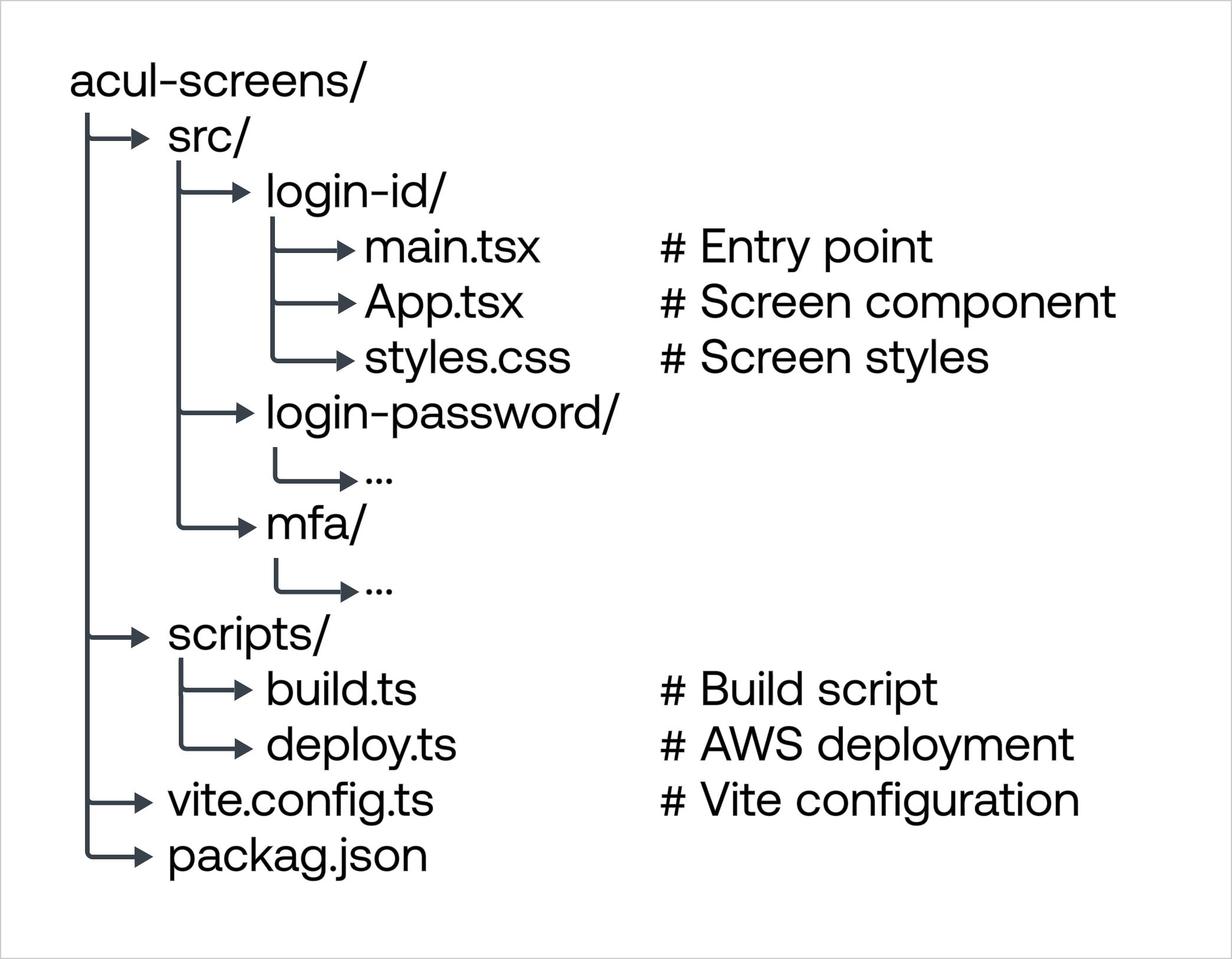
Prepare all your Screens to be uploaded and use the following file structure for your ACUL project:
 ### Create a new Vite configuration
Add the following to a new file named `vite.config.ts`:
```jsx lines expandable
import { defineConfig } from 'vite';
import react from '@vitejs/plugin-react';
import { resolve } from 'path';
// Screen definitions
const screens = [
{
name: 'login-id',
prompt: 'login-id',
screen: 'login-id'
},
{
name: 'login-password',
prompt: 'login-password',
screen: 'login-password'
},
{
name: 'mfa',
prompt: 'mfa-otp',
screen: 'mfa'
}
];
// Generate input object for all screens
const input = Object.fromEntries(
screens.map(screen => [
screen.name,
resolve(__dirname, `src/${screen.name}/main.tsx`)
])
);
export default defineConfig({
plugins: [react()],
build: {
rollupOptions: {
input,
output: {
// Ensure each screen gets its own directory
dir: 'dist',
entryFileNames: '[name]/index.js',
assetFileNames: '[name]/[name][extname]',
chunkFileNames: '[name]/chunks/[name]-[hash].js',
manualChunks: {
// Split React into a vendor chunk
'vendor-react': ['react', 'react-dom'],
// Split Auth0 SDK into a vendor chunk
'vendor-auth0': ['@auth0/auth0-acul-js']
}
}
},
// Generate sourcemaps for production debugging
sourcemap: true,
// Minify output
minify: 'terser'
}
});
```
### Set up build scripts
Create `scripts/build.ts` to run your Vite build:
```jsx lines
import { build } from 'vite';
async function buildScreens() {
try {
await build();
console.log('Build completed successfully');
} catch (err) {
console.error('Build failed:', err);
process.exit(1);
}
}
buildScreens();
```
### Build your AWS infrastructure
Create an S3 bucket and CloudFront distribution:
```bash lines
#Create bucket
aws s3 mb s3://your-acul-assets --region us-east-1
#Enable versioning
aws s3api put-bucket-versioning \
--bucket your-acul-assets \
--versioning-configuration Status=Enabled
#Create CloudFront distribution
aws cloudfront create-distribution \
--origin-domain-name your-acul-assets.s3.amazonaws.com \
--default-root-object index.html \
--default-cache-behavior '{"TargetOriginId":"S3Origin","ViewerProtocolPolicy":"redirect-to-https","AllowedMethods":{"Quantity":2,"Items":["GET","HEAD"]},"CachePolicyId":"658327ea-f89d-4fab-a63d-7e88639e58f6"}'
```
### Configure CORS for Auth0
```json lines
{
"CORSRules": [{
"AllowedHeaders": ["*"],
"AllowedMethods": ["GET"],
"AllowedOrigins": [
"https://*.auth0.com",
"https://your-custom-domain.com"
],
"MaxAgeSeconds": 3000
}]
}
```
### Create a deployment script
Create `scripts/deploy.ts` for AWS deployment:
```jsx lines expandable
import { S3Client, PutObjectCommand } from '@aws-sdk/client-s3';
import { CloudFrontClient, CreateInvalidationCommand } from '@aws-sdk/client-cloudfront';
import { readFileSync } from 'fs';
import { resolve } from 'path';
// Screen definitions (keep in sync with vite.config.ts)
const screens = [
'login-id',
'login-password',
'mfa'
];
async function deploy() {
const s3 = new S3Client({ region: 'us-east-1' });
const cloudfront = new CloudFrontClient({ region: 'us-east-1' });
const bucket = process.env.S3_BUCKET;
const distributionId = process.env.CLOUDFRONT_ID;
for (const screen of screens) {
const distPath = resolve(__dirname, `../dist/${screen}`);
// Upload assets
const files = ['index.js', 'index.css', 'vendor-react.js', 'vendor-auth0.js'];
for (const file of files) {
try {
const content = readFileSync(`${distPath}/${file}`);
await s3.send(new PutObjectCommand({
Bucket: bucket,
Key: `${screen}/${file}`,
Body: content,
ContentType: file.endsWith('.js') ? 'application/javascript' : 'text/css',
CacheControl: 'max-age=31536000'
}));
} catch (err) {
console.warn(`Skipping ${file} for ${screen}: ${err.message}`);
}
}
}
// Invalidate cache
await cloudfront.send(new CreateInvalidationCommand({
DistributionId: distributionId,
InvalidationBatch: {
CallerReference: Date.now().toString(),
Paths: { Quantity: 1, Items: ['/*'] }
}
}));
}
deploy().catch(console.error);
```
### Set up GitHub Actions workflow
Create `.github/workflows/deploy.yml`:
```yaml lines expandable
name: Deploy ACUL Screens
on:
push:
branches: [ main ]
workflow_dispatch:
jobs:
deploy:
runs-on: ubuntu-latest
steps:
- uses: actions/checkout@v3
- name: Setup Node.js
uses: actions/setup-node@v3
with:
node-version: '18'
- name: Install Dependencies
run: npm ci
- name: Build Screens
run: npm run build
- name: Configure AWS Credentials
uses: aws-actions/configure-aws-credentials@v1
with:
aws-access-key-id: ${{ secrets.AWS_ACCESS_KEY_ID }}
aws-secret-access-key: ${{ secrets.AWS_SECRET_ACCESS_KEY }}
aws-region: us-east-1
- name: Deploy to CloudFront
run: npm run deploy
env:
S3_BUCKET: your-acul-assets
CLOUDFRONT_ID: ${{ secrets.CLOUDFRONT_ID }}
CLOUDFRONT_DOMAIN: ${{ secrets.CLOUDFRONT_DOMAIN }}
- name: Setup Auth0 CLI
run: npm install -g auth0-cli
- name: Configure Auth0 Screens
run: |
# Login to Auth0
auth0 login --token ${{ secrets.AUTH0_DEPLOY_TOKEN }}
# Configure each screen
for screen in login-id login-password mfa; do
# Generate settings file
cat > settings.json << EOF
{
"rendering_mode": "advanced",
"context_configuration": [
"screen.texts",
"branding.settings",
"organization.branding",
"tenant.name",
"tenant.friendly_name"
],
"head_tags": [
{
"tag": "script",
"attributes": {
"src": "https://${{ secrets.CLOUDFRONT_DOMAIN }}/${screen}/vendor-react.js",
"defer": true
}
},
{
"tag": "script",
"attributes": {
"src": "https://${{ secrets.CLOUDFRONT_DOMAIN }}/${screen}/vendor-auth0.js",
"defer": true
}
},
{
"tag": "script",
"attributes": {
"src": "https://${{ secrets.CLOUDFRONT_DOMAIN }}/${screen}/index.js",
"defer": true
}
},
{
"tag": "link",
"attributes": {
"rel": "stylesheet",
"href": "https://${{ secrets.CLOUDFRONT_DOMAIN }}/${screen}/index.css"
}
}
]
}
EOF
# Configure screen
auth0 ul customize \
--rendering-mode advanced \
--prompt ${screen} \
--screen ${screen} \
--settings-file settings.json
done
```
Finally, add these secrets to your GitHub repository:
* `AWS_ACCESS_KEY_ID`
* `AWS_SECRET_ACCESS_KEY`
* `CLOUDFRONT_ID`
* `CLOUDFRONT_DOMAIN`
* `AUTH0_DEPLOY_TOKEN`
### Create a new Vite configuration
Add the following to a new file named `vite.config.ts`:
```jsx lines expandable
import { defineConfig } from 'vite';
import react from '@vitejs/plugin-react';
import { resolve } from 'path';
// Screen definitions
const screens = [
{
name: 'login-id',
prompt: 'login-id',
screen: 'login-id'
},
{
name: 'login-password',
prompt: 'login-password',
screen: 'login-password'
},
{
name: 'mfa',
prompt: 'mfa-otp',
screen: 'mfa'
}
];
// Generate input object for all screens
const input = Object.fromEntries(
screens.map(screen => [
screen.name,
resolve(__dirname, `src/${screen.name}/main.tsx`)
])
);
export default defineConfig({
plugins: [react()],
build: {
rollupOptions: {
input,
output: {
// Ensure each screen gets its own directory
dir: 'dist',
entryFileNames: '[name]/index.js',
assetFileNames: '[name]/[name][extname]',
chunkFileNames: '[name]/chunks/[name]-[hash].js',
manualChunks: {
// Split React into a vendor chunk
'vendor-react': ['react', 'react-dom'],
// Split Auth0 SDK into a vendor chunk
'vendor-auth0': ['@auth0/auth0-acul-js']
}
}
},
// Generate sourcemaps for production debugging
sourcemap: true,
// Minify output
minify: 'terser'
}
});
```
### Set up build scripts
Create `scripts/build.ts` to run your Vite build:
```jsx lines
import { build } from 'vite';
async function buildScreens() {
try {
await build();
console.log('Build completed successfully');
} catch (err) {
console.error('Build failed:', err);
process.exit(1);
}
}
buildScreens();
```
### Build your AWS infrastructure
Create an S3 bucket and CloudFront distribution:
```bash lines
#Create bucket
aws s3 mb s3://your-acul-assets --region us-east-1
#Enable versioning
aws s3api put-bucket-versioning \
--bucket your-acul-assets \
--versioning-configuration Status=Enabled
#Create CloudFront distribution
aws cloudfront create-distribution \
--origin-domain-name your-acul-assets.s3.amazonaws.com \
--default-root-object index.html \
--default-cache-behavior '{"TargetOriginId":"S3Origin","ViewerProtocolPolicy":"redirect-to-https","AllowedMethods":{"Quantity":2,"Items":["GET","HEAD"]},"CachePolicyId":"658327ea-f89d-4fab-a63d-7e88639e58f6"}'
```
### Configure CORS for Auth0
```json lines
{
"CORSRules": [{
"AllowedHeaders": ["*"],
"AllowedMethods": ["GET"],
"AllowedOrigins": [
"https://*.auth0.com",
"https://your-custom-domain.com"
],
"MaxAgeSeconds": 3000
}]
}
```
### Create a deployment script
Create `scripts/deploy.ts` for AWS deployment:
```jsx lines expandable
import { S3Client, PutObjectCommand } from '@aws-sdk/client-s3';
import { CloudFrontClient, CreateInvalidationCommand } from '@aws-sdk/client-cloudfront';
import { readFileSync } from 'fs';
import { resolve } from 'path';
// Screen definitions (keep in sync with vite.config.ts)
const screens = [
'login-id',
'login-password',
'mfa'
];
async function deploy() {
const s3 = new S3Client({ region: 'us-east-1' });
const cloudfront = new CloudFrontClient({ region: 'us-east-1' });
const bucket = process.env.S3_BUCKET;
const distributionId = process.env.CLOUDFRONT_ID;
for (const screen of screens) {
const distPath = resolve(__dirname, `../dist/${screen}`);
// Upload assets
const files = ['index.js', 'index.css', 'vendor-react.js', 'vendor-auth0.js'];
for (const file of files) {
try {
const content = readFileSync(`${distPath}/${file}`);
await s3.send(new PutObjectCommand({
Bucket: bucket,
Key: `${screen}/${file}`,
Body: content,
ContentType: file.endsWith('.js') ? 'application/javascript' : 'text/css',
CacheControl: 'max-age=31536000'
}));
} catch (err) {
console.warn(`Skipping ${file} for ${screen}: ${err.message}`);
}
}
}
// Invalidate cache
await cloudfront.send(new CreateInvalidationCommand({
DistributionId: distributionId,
InvalidationBatch: {
CallerReference: Date.now().toString(),
Paths: { Quantity: 1, Items: ['/*'] }
}
}));
}
deploy().catch(console.error);
```
### Set up GitHub Actions workflow
Create `.github/workflows/deploy.yml`:
```yaml lines expandable
name: Deploy ACUL Screens
on:
push:
branches: [ main ]
workflow_dispatch:
jobs:
deploy:
runs-on: ubuntu-latest
steps:
- uses: actions/checkout@v3
- name: Setup Node.js
uses: actions/setup-node@v3
with:
node-version: '18'
- name: Install Dependencies
run: npm ci
- name: Build Screens
run: npm run build
- name: Configure AWS Credentials
uses: aws-actions/configure-aws-credentials@v1
with:
aws-access-key-id: ${{ secrets.AWS_ACCESS_KEY_ID }}
aws-secret-access-key: ${{ secrets.AWS_SECRET_ACCESS_KEY }}
aws-region: us-east-1
- name: Deploy to CloudFront
run: npm run deploy
env:
S3_BUCKET: your-acul-assets
CLOUDFRONT_ID: ${{ secrets.CLOUDFRONT_ID }}
CLOUDFRONT_DOMAIN: ${{ secrets.CLOUDFRONT_DOMAIN }}
- name: Setup Auth0 CLI
run: npm install -g auth0-cli
- name: Configure Auth0 Screens
run: |
# Login to Auth0
auth0 login --token ${{ secrets.AUTH0_DEPLOY_TOKEN }}
# Configure each screen
for screen in login-id login-password mfa; do
# Generate settings file
cat > settings.json << EOF
{
"rendering_mode": "advanced",
"context_configuration": [
"screen.texts",
"branding.settings",
"organization.branding",
"tenant.name",
"tenant.friendly_name"
],
"head_tags": [
{
"tag": "script",
"attributes": {
"src": "https://${{ secrets.CLOUDFRONT_DOMAIN }}/${screen}/vendor-react.js",
"defer": true
}
},
{
"tag": "script",
"attributes": {
"src": "https://${{ secrets.CLOUDFRONT_DOMAIN }}/${screen}/vendor-auth0.js",
"defer": true
}
},
{
"tag": "script",
"attributes": {
"src": "https://${{ secrets.CLOUDFRONT_DOMAIN }}/${screen}/index.js",
"defer": true
}
},
{
"tag": "link",
"attributes": {
"rel": "stylesheet",
"href": "https://${{ secrets.CLOUDFRONT_DOMAIN }}/${screen}/index.css"
}
}
]
}
EOF
# Configure screen
auth0 ul customize \
--rendering-mode advanced \
--prompt ${screen} \
--screen ${screen} \
--settings-file settings.json
done
```
Finally, add these secrets to your GitHub repository:
* `AWS_ACCESS_KEY_ID`
* `AWS_SECRET_ACCESS_KEY`
* `CLOUDFRONT_ID`
* `CLOUDFRONT_DOMAIN`
* `AUTH0_DEPLOY_TOKEN`