> ## Documentation Index
> Fetch the complete documentation index at: https://docs-staging-quickstart-revamp.mintlify.site/llms.txt
> Use this file to discover all available pages before exploring further.

> How to secure a Google Cloud Endpoints API with Auth0.

# Secure Google Cloud Endpoints with Auth0

[Google Cloud Endpoints (GCE)](https://cloud.google.com/endpoints/) is an API management system providing features to help you create, maintain, and secure your APIs. GCE uses [OpenAPI](https://www.openapis.org/) to define your API's endpoints, input and output, errors, and security description.

For more information on the OpenAPI spec, see the [OpenAPI Specification](https://github.com/OAI/OpenAPI-Specification) repository on GitHub.

This tutorial will cover how to secure Google Cloud Endpoints with Auth0.

## Prerequisites

Before you begin you'll need a deployed GCE API. If you haven't already created an API, complete the [Cloud Endpoints Quickstart](https://cloud.google.com/endpoints/docs/quickstart-endpoints) located in Google documentation.

The quickstart will walk you through creating a simple GCE API with a single endpoint, `/airportName`, that returns the name of an airport from its three-letter [IATA code](https://en.wikipedia.org/wiki/IATA_airport_code).

<CodeGroup>
  ```bash cURL lines
  curl --request GET \
    --url 'https://%7ByourGceProject%7D.appspot.com/airportName?iataCode=SFO'
  ```

  ```csharp C# lines
  var client = new RestClient("https://%7ByourGceProject%7D.appspot.com/airportName?iataCode=SFO");
  var request = new RestRequest(Method.GET);
  IRestResponse response = client.Execute(request);
  ```

  ```go Go lines
  package main

  import (
  	"fmt"
  	"net/http"
  	"io/ioutil"
  )

  func main() {

  	url := "https://%7ByourGceProject%7D.appspot.com/airportName?iataCode=SFO"

  	req, _ := http.NewRequest("GET", url, nil)

  	res, _ := http.DefaultClient.Do(req)

  	defer res.Body.Close()
  	body, _ := ioutil.ReadAll(res.Body)

  	fmt.Println(res)
  	fmt.Println(string(body))

  }
  ```

  ```java Java lines
  HttpResponse<String> response = Unirest.get("https://%7ByourGceProject%7D.appspot.com/airportName?iataCode=SFO")
    .asString();
  ```

  ```javascript Node.JS lines
  var axios = require("axios").default;

  var options = {
    method: 'GET',
    url: 'https://%7ByourGceProject%7D.appspot.com/airportName',
    params: {iataCode: 'SFO'}
  };

  axios.request(options).then(function (response) {
    console.log(response.data);
  }).catch(function (error) {
    console.error(error);
  });
  ```

  ```obj-c Obj-C lines
  #import <Foundation/Foundation.h>

  NSMutableURLRequest *request = [NSMutableURLRequest requestWithURL:[NSURL URLWithString:@"https://%7ByourGceProject%7D.appspot.com/airportName?iataCode=SFO"]
                                                         cachePolicy:NSURLRequestUseProtocolCachePolicy
                                                     timeoutInterval:10.0];
  [request setHTTPMethod:@"GET"];

  NSURLSession *session = [NSURLSession sharedSession];
  NSURLSessionDataTask *dataTask = [session dataTaskWithRequest:request
                                              completionHandler:^(NSData *data, NSURLResponse *response, NSError *error) {
                                                  if (error) {
                                                      NSLog(@"%@", error);
                                                  } else {
                                                      NSHTTPURLResponse *httpResponse = (NSHTTPURLResponse *) response;
                                                      NSLog(@"%@", httpResponse);
                                                  }
                                              }];
  [dataTask resume];
  ```

  ```php PHP lines
  $curl = curl_init();

  curl_setopt_array($curl, [
    CURLOPT_URL => "https://%7ByourGceProject%7D.appspot.com/airportName?iataCode=SFO",
    CURLOPT_RETURNTRANSFER => true,
    CURLOPT_ENCODING => "",
    CURLOPT_MAXREDIRS => 10,
    CURLOPT_TIMEOUT => 30,
    CURLOPT_HTTP_VERSION => CURL_HTTP_VERSION_1_1,
    CURLOPT_CUSTOMREQUEST => "GET",
  ]);

  $response = curl_exec($curl);
  $err = curl_error($curl);

  curl_close($curl);

  if ($err) {
    echo "cURL Error #:" . $err;
  } else {
    echo $response;
  }
  ```

  ```python Python lines
  import http.client

  conn = http.client.HTTPSConnection("")

  conn.request("GET", "%7ByourGceProject%7D.appspot.com/airportName?iataCode=SFO")

  res = conn.getresponse()
  data = res.read()

  print(data.decode("utf-8"))
  ```

  ```ruby Ruby lines
  require 'uri'
  require 'net/http'
  require 'openssl'

  url = URI("https://%7ByourGceProject%7D.appspot.com/airportName?iataCode=SFO")

  http = Net::HTTP.new(url.host, url.port)
  http.use_ssl = true
  http.verify_mode = OpenSSL::SSL::VERIFY_NONE

  request = Net::HTTP::Get.new(url)

  response = http.request(request)
  puts response.read_body
  ```

  ```swift Swift lines
  import Foundation

  let request = NSMutableURLRequest(url: NSURL(string: "https://%7ByourGceProject%7D.appspot.com/airportName?iataCode=SFO")! as URL,
                                          cachePolicy: .useProtocolCachePolicy,
                                      timeoutInterval: 10.0)
  request.httpMethod = "GET"

  let session = URLSession.shared
  let dataTask = session.dataTask(with: request as URLRequest, completionHandler: { (data, response, error) -> Void in
    if (error != nil) {
      print(error)
    } else {
      let httpResponse = response as? HTTPURLResponse
      print(httpResponse)
    }
  })

  dataTask.resume()
  ```
</CodeGroup>

## Define the API in Auth0

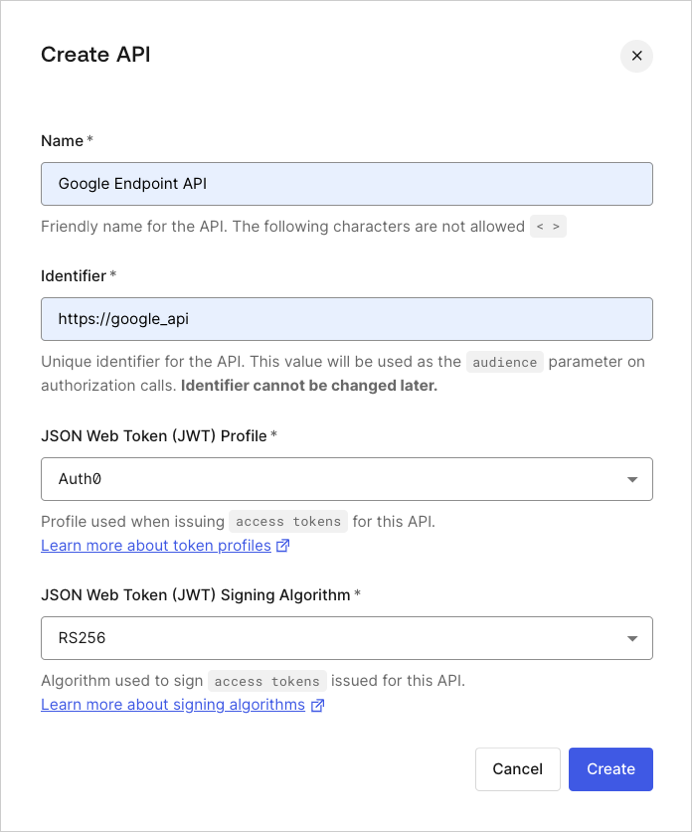
Go to [Auth0 Dashboard > Applications > APIs](https://manage.auth0.com/#/apis), and create a new API.

<Frame>
  <img src="https://mintcdn.com/docs-staging-quickstart-revamp/jp6vZz7DhptSlPIu/images/cdy7uua7fh8z/7wUHnYBFp1jnbBurqoThpD/c3a31b64884c3adc2251a225a1ddd1dd/Create_API_-_EN.png?fit=max&auto=format&n=jp6vZz7DhptSlPIu&q=85&s=316587ed3a615df4763dcf148448517e" alt="Dashboard - Create APIs - Integrations -Google Endpoints" width="692" height="832" data-path="images/cdy7uua7fh8z/7wUHnYBFp1jnbBurqoThpD/c3a31b64884c3adc2251a225a1ddd1dd/Create_API_-_EN.png" />
</Frame>

Make note of the **API <Tooltip tip="Audience: Unique identifier of the audience for an issued token. Named aud in a token, its value contains the ID of either an application (Client ID) for an ID Token or an API (API Identifier) for an Access Token." cta="View Glossary" href="/docs/glossary?term=Audience">Audience</Tooltip>** identifier (`http://google_api` in the screenshot above) to use in the following step.

## Update the API Configuration

Next, we'll update the OpenAPI configuration file for the GCE API. For the sample API created during the quickstart this file is `openapi.yaml`.

### Add Security Definitions

Open the configuration file and add a new `securityDefinitions` section. In this section, add a new definition (`auth0_jwt`) with the following fields:

<table class="table">
  <thead>
    <tr>
      <th>Field</th>
      <th>Description</th>
    </tr>
  </thead>

  <tbody>
    <tr>
      <td><code>authorizationUrl</code></td>
      <td>The authorization URL, should be set to <code>"https\://{yourDomain}/authorize"</code></td>
    </tr>

    <tr>
      <td><code>flow</code></td>
      <td>The flow used by the OAuth2 security scheme. Valid values are <code>"implicit"</code>, <code>"password"</code>, <code>"application"</code> or <code>"accessCode"</code>.</td>
    </tr>

    <tr>
      <td><code>type</code></td>
      <td>The type of the security scheme. Valid values are <code>"basic"</code>, <code>"apiKey"</code> or <code>"oauth2"</code></td>
    </tr>

    <tr>
      <td><code>x-google-issuer</code></td>
      <td>The issuer of a credential, should be set to <code>"https\://{yourDomain}/"</code></td>
    </tr>

    <tr>
      <td><code>x-google-jwks\_uri</code></td>
      <td>The URI of the public key set to validate the <Tooltip tip="Standard ID Token format (and often Access Token format) used to represent claims securely between two parties." cta="View Glossary" href="/docs/glossary?term=JSON+Web+Token+%28JWT%29">JSON Web Token (JWT)</Tooltip> signature. Set this to `"https://\{yourDomain}/.well-known/jwks.json"`</td>
    </tr>

    <tr>
      <td><code>x-google-audiences</code></td>
      <td>The API's identifier, make sure this value matches what you defined on the Auth0 dashboard for the API.</td>
    </tr>
  </tbody>
</table>

{/* codeblockOld.header.login.logInButton codeblockOld.header.login.configureSnippet */}

```yaml lines
securityDefinitions:
  auth0_jwt:
    authorizationUrl: "https://{yourDomain}/authorize"
    flow: "implicit"
    type: "oauth2"
    x-google-issuer: "https://{yourDomain}/"
    x-google-jwks_uri: "https://{yourDomain}/.well-known/jwks.json"
    x-google-audiences: "{yourApiIdentifier}"
```

### Update the Endpoint

Now, update the endpoint by adding a `security` field with the `securityDefinition` we created in the previous step.

```yaml lines
paths:
  "/airportName":
    get:
      description: "Get the airport name for a given IATA code."
      operationId: "airportName"
      parameters:
        -
          name: iataCode
          in: query
          required: true
          type: string
      responses:
        200:
          description: "Success."
          schema:
            type: string
        400:
          description: "The IATA code is invalid or missing."
      security:
       - auth0_jwt: []
```

In the above example, the `security` field tells the GCE proxy that our `/airportName` path expects to be secured with the `auth0-jwt` definition.

After updating the OpenAPI configuration, it should look something like this:

{/* codeblockOld.header.login.logInButton codeblockOld.header.login.configureSnippet */}

```yaml lines expandable
---
swagger: "2.0"
info:
  title: "Airport Codes"
  description: "Get the name of an airport from its three-letter IATA code."
  version: "1.0.0"
host: "{yourGceProject}.appspot.com"
schemes:
  - "https"
paths:
  "/airportName":
    get:
      description: "Get the airport name for a given IATA code."
      operationId: "airportName"
      parameters:
        -
          name: iataCode
          in: query
          required: true
          type: string
      responses:
        200:
          description: "Success."
          schema:
            type: string
        400:
          description: "The IATA code is invalid or missing."
      security:
       - auth0_jwt: []
securityDefinitions:
  auth0_jwt:
    authorizationUrl: "https://{yourDomain}/authorize"
    flow: "implicit"
    type: "oauth2"
    x-google-issuer: "https://{yourDomain}/"
    x-google-jwks_uri: "https://{yourDomain}/.well-known/jwks.json"
    x-google-audiences: "{yourApiIdentifier}"
```

### Redeploy the API

Next, redeploy your GCE API to apply the configuration changes. If you followed along with the [Cloud Endpoints Quickstart](https://cloud.google.com/endpoints/docs/quickstart-endpoints) you can redeploy by entering the following in Google's Cloud Shell:

```bash lines
cd endpoints-quickstart/scripts
./deploy_api.sh
```

## Test the API

Once you've redeployed, call the API again with no security.

<CodeGroup>
  ```bash cURL lines
  curl --request GET \
    --url 'https://%7ByourGceProject%7D.appspot.com/airportName?iataCode=SFO'
  ```

  ```csharp C# lines
  var client = new RestClient("https://%7ByourGceProject%7D.appspot.com/airportName?iataCode=SFO");
  var request = new RestRequest(Method.GET);
  IRestResponse response = client.Execute(request);
  ```

  ```go Go lines
  package main

  import (
  	"fmt"
  	"net/http"
  	"io/ioutil"
  )

  func main() {

  	url := "https://%7ByourGceProject%7D.appspot.com/airportName?iataCode=SFO"

  	req, _ := http.NewRequest("GET", url, nil)

  	res, _ := http.DefaultClient.Do(req)

  	defer res.Body.Close()
  	body, _ := ioutil.ReadAll(res.Body)

  	fmt.Println(res)
  	fmt.Println(string(body))

  }
  ```

  ```java Java lines
  HttpResponse<String> response = Unirest.get("https://%7ByourGceProject%7D.appspot.com/airportName?iataCode=SFO")
    .asString();
  ```

  ```javascript Node.JS lines
  var axios = require("axios").default;

  var options = {
    method: 'GET',
    url: 'https://%7ByourGceProject%7D.appspot.com/airportName',
    params: {iataCode: 'SFO'}
  };

  axios.request(options).then(function (response) {
    console.log(response.data);
  }).catch(function (error) {
    console.error(error);
  });
  ```

  ```obj-c Obj-C lines
  #import <Foundation/Foundation.h>

  NSMutableURLRequest *request = [NSMutableURLRequest requestWithURL:[NSURL URLWithString:@"https://%7ByourGceProject%7D.appspot.com/airportName?iataCode=SFO"]
                                                         cachePolicy:NSURLRequestUseProtocolCachePolicy
                                                     timeoutInterval:10.0];
  [request setHTTPMethod:@"GET"];

  NSURLSession *session = [NSURLSession sharedSession];
  NSURLSessionDataTask *dataTask = [session dataTaskWithRequest:request
                                              completionHandler:^(NSData *data, NSURLResponse *response, NSError *error) {
                                                  if (error) {
                                                      NSLog(@"%@", error);
                                                  } else {
                                                      NSHTTPURLResponse *httpResponse = (NSHTTPURLResponse *) response;
                                                      NSLog(@"%@", httpResponse);
                                                  }
                                              }];
  [dataTask resume];
  ```

  ```php PHP lines
  $curl = curl_init();

  curl_setopt_array($curl, [
    CURLOPT_URL => "https://%7ByourGceProject%7D.appspot.com/airportName?iataCode=SFO",
    CURLOPT_RETURNTRANSFER => true,
    CURLOPT_ENCODING => "",
    CURLOPT_MAXREDIRS => 10,
    CURLOPT_TIMEOUT => 30,
    CURLOPT_HTTP_VERSION => CURL_HTTP_VERSION_1_1,
    CURLOPT_CUSTOMREQUEST => "GET",
  ]);

  $response = curl_exec($curl);
  $err = curl_error($curl);

  curl_close($curl);

  if ($err) {
    echo "cURL Error #:" . $err;
  } else {
    echo $response;
  }
  ```

  ```python Python lines
  import http.client

  conn = http.client.HTTPSConnection("")

  conn.request("GET", "%7ByourGceProject%7D.appspot.com/airportName?iataCode=SFO")

  res = conn.getresponse()
  data = res.read()

  print(data.decode("utf-8"))
  ```

  ```ruby Ruby lines
  require 'uri'
  require 'net/http'
  require 'openssl'

  url = URI("https://%7ByourGceProject%7D.appspot.com/airportName?iataCode=SFO")

  http = Net::HTTP.new(url.host, url.port)
  http.use_ssl = true
  http.verify_mode = OpenSSL::SSL::VERIFY_NONE

  request = Net::HTTP::Get.new(url)

  response = http.request(request)
  puts response.read_body
  ```

  ```swift Swift lines
  import Foundation

  let request = NSMutableURLRequest(url: NSURL(string: "https://%7ByourGceProject%7D.appspot.com/airportName?iataCode=SFO")! as URL,
                                          cachePolicy: .useProtocolCachePolicy,
                                      timeoutInterval: 10.0)
  request.httpMethod = "GET"

  let session = URLSession.shared
  let dataTask = session.dataTask(with: request as URLRequest, completionHandler: { (data, response, error) -> Void in
    if (error != nil) {
      print(error)
    } else {
      let httpResponse = response as? HTTPURLResponse
      print(httpResponse)
    }
  })

  dataTask.resume()
  ```
</CodeGroup>

You'll get the following response:

```json lines
{
 "code": 16,
 "message": "JWT validation failed: Missing or invalid credentials",
 "details": [
  {
   "@type": "type.googleapis.com/google.rpc.DebugInfo",
   "stackEntries": [],
   "detail": "auth"
  }
 ]
}
```

Which is exactly what we want!

Now go to the **Test** page of your Google Endpoints API definition on the [Auth0 Dashboard](https://manage.auth0.com/#/apis), and copy the <Tooltip tip="Access Token: Authorization credential, in the form of an opaque string or JWT, used to access an API." cta="View Glossary" href="/docs/glossary?term=Access+Token">Access Token</Tooltip> under the Response:

Perform a `GET` request to your API with an Authorization Header of `Bearer {ACCESS_TOKEN}` to obtain authorized access:

<CodeGroup>
  ```bash cURL lines
  curl --request GET \
    --url 'https://%7ByourGceProject%7D.appspot.com/airportName?iataCode=SFO' \
    --header 'authorization: Bearer {accessToken}'
  ```

  ```csharp C# lines
  var client = new RestClient("https://%7ByourGceProject%7D.appspot.com/airportName?iataCode=SFO");
  var request = new RestRequest(Method.GET);
  request.AddHeader("authorization", "Bearer {accessToken}");
  IRestResponse response = client.Execute(request);
  ```

  ```go Go lines
  package main

  import (
  	"fmt"
  	"net/http"
  	"io/ioutil"
  )

  func main() {

  	url := "https://%7ByourGceProject%7D.appspot.com/airportName?iataCode=SFO"

  	req, _ := http.NewRequest("GET", url, nil)

  	req.Header.Add("authorization", "Bearer {accessToken}")

  	res, _ := http.DefaultClient.Do(req)

  	defer res.Body.Close()
  	body, _ := ioutil.ReadAll(res.Body)

  	fmt.Println(res)
  	fmt.Println(string(body))

  }
  ```

  ```java Java lines
  HttpResponse<String> response = Unirest.get("https://%7ByourGceProject%7D.appspot.com/airportName?iataCode=SFO")
    .header("authorization", "Bearer {accessToken}")
    .asString();
  ```

  ```javascript Node.JS lines
  var axios = require("axios").default;

  var options = {
    method: 'GET',
    url: 'https://%7ByourGceProject%7D.appspot.com/airportName',
    params: {iataCode: 'SFO'},
    headers: {authorization: 'Bearer {accessToken}'}
  };

  axios.request(options).then(function (response) {
    console.log(response.data);
  }).catch(function (error) {
    console.error(error);
  });
  ```

  ```obj-c Obj-C lines
  #import <Foundation/Foundation.h>

  NSDictionary *headers = @{ @"authorization": @"Bearer {accessToken}" };

  NSMutableURLRequest *request = [NSMutableURLRequest requestWithURL:[NSURL URLWithString:@"https://%7ByourGceProject%7D.appspot.com/airportName?iataCode=SFO"]
                                                         cachePolicy:NSURLRequestUseProtocolCachePolicy
                                                     timeoutInterval:10.0];
  [request setHTTPMethod:@"GET"];
  [request setAllHTTPHeaderFields:headers];

  NSURLSession *session = [NSURLSession sharedSession];
  NSURLSessionDataTask *dataTask = [session dataTaskWithRequest:request
                                              completionHandler:^(NSData *data, NSURLResponse *response, NSError *error) {
                                                  if (error) {
                                                      NSLog(@"%@", error);
                                                  } else {
                                                      NSHTTPURLResponse *httpResponse = (NSHTTPURLResponse *) response;
                                                      NSLog(@"%@", httpResponse);
                                                  }
                                              }];
  [dataTask resume];
  ```

  ```php PHP lines
  $curl = curl_init();

  curl_setopt_array($curl, [
    CURLOPT_URL => "https://%7ByourGceProject%7D.appspot.com/airportName?iataCode=SFO",
    CURLOPT_RETURNTRANSFER => true,
    CURLOPT_ENCODING => "",
    CURLOPT_MAXREDIRS => 10,
    CURLOPT_TIMEOUT => 30,
    CURLOPT_HTTP_VERSION => CURL_HTTP_VERSION_1_1,
    CURLOPT_CUSTOMREQUEST => "GET",
    CURLOPT_HTTPHEADER => [
      "authorization: Bearer {accessToken}"
    ],
  ]);

  $response = curl_exec($curl);
  $err = curl_error($curl);

  curl_close($curl);

  if ($err) {
    echo "cURL Error #:" . $err;
  } else {
    echo $response;
  }
  ```

  ```python Python lines
  import http.client

  conn = http.client.HTTPSConnection("")

  headers = { 'authorization': "Bearer {accessToken}" }

  conn.request("GET", "%7ByourGceProject%7D.appspot.com/airportName?iataCode=SFO", headers=headers)

  res = conn.getresponse()
  data = res.read()

  print(data.decode("utf-8"))
  ```

  ```ruby Ruby lines
  require 'uri'
  require 'net/http'
  require 'openssl'

  url = URI("https://%7ByourGceProject%7D.appspot.com/airportName?iataCode=SFO")

  http = Net::HTTP.new(url.host, url.port)
  http.use_ssl = true
  http.verify_mode = OpenSSL::SSL::VERIFY_NONE

  request = Net::HTTP::Get.new(url)
  request["authorization"] = 'Bearer {accessToken}'

  response = http.request(request)
  puts response.read_body
  ```

  ```swift Swift lines
  import Foundation

  let headers = ["authorization": "Bearer {accessToken}"]

  let request = NSMutableURLRequest(url: NSURL(string: "https://%7ByourGceProject%7D.appspot.com/airportName?iataCode=SFO")! as URL,
                                          cachePolicy: .useProtocolCachePolicy,
                                      timeoutInterval: 10.0)
  request.httpMethod = "GET"
  request.allHTTPHeaderFields = headers

  let session = URLSession.shared
  let dataTask = session.dataTask(with: request as URLRequest, completionHandler: { (data, response, error) -> Void in
    if (error != nil) {
      print(error)
    } else {
      let httpResponse = response as? HTTPURLResponse
      print(httpResponse)
    }
  })

  dataTask.resume()
  ```
</CodeGroup>

And that's it!