> ## Documentation Index
> Fetch the complete documentation index at: https://docs-staging-quickstart-revamp.mintlify.site/llms.txt
> Use this file to discover all available pages before exploring further.

> Learn how to update Hooks using the Dashboard or Management API. Hooks may also be imported and exported using the Auth0 Deploy Command-Line Interface (CLI) tool.

# Update Hooks

<Warning>
  The End of Life (EOL) date of Rules and Hooks will be **November 18, 2026**, and they are no longer available to new tenants created as of **October 16, 2023**. Existing tenants with active Hooks will retain Hooks product access through end of life.

  We highly recommend that you use Actions to extend Auth0. With Actions, you have access to rich type information, inline documentation, and public `npm` packages, and can connect external integrations that enhance your overall extensibility experience. To learn more about what Actions offer, read [Understand How Auth0 Actions Work](/docs/customize/actions/actions-overview).

  To help with your migration, we offer guides that will help you [migrate from Rules to Actions](/docs/customize/actions/migrate/migrate-from-rules-to-actions) and [migrate from Hooks to Actions](/docs/customize/actions/migrate/migrate-from-hooks-to-actions). We also have a dedicated [Move to Actions](https://auth0.com/extensibility/movetoactions) page that highlights feature comparisons, [an Actions demo](https://www.youtube.com/watch?v=UesFSY1klrI), and other resources to help you on your migration journey.

  To read more about the Rules and Hooks deprecation, read our blog post: [Preparing for Rules and Hooks End of Life](https://auth0.com/blog/preparing-for-rules-and-hooks-end-of-life/).
</Warning>

<Warning>
  Because we plan to remove Rules and Hooks functions in 2026, you should create new Rules or Hooks only in your Development environment and only to test migration to Actions.

  To learn how to migrate your Rules to Actions, read [Migrate from Rules to Actions](/docs/customize/actions/migrate/migrate-from-rules-to-actions). To learn how to migrate your Hooks to Actions, read [Migrate from Hooks to Actions](/docs/customize/actions/migrate/migrate-from-hooks-to-actions).
</Warning>

You can update Hooks using the Dashboard or <Tooltip tip="Management API: A product to allow customers to perform administrative tasks." cta="View Glossary" href="/docs/glossary?term=Management+API">Management API</Tooltip>.

You can also import and export hooks using the [Deploy Command-Line Interface (CLI) tool](/docs/deploy-monitor/deploy-cli-tool).

<Callout icon="file-lines" color="#0EA5E9" iconType="regular">
  Optionally, you can add secrets (such as Twilio Keys or database connection strings) to hooks.
</Callout>

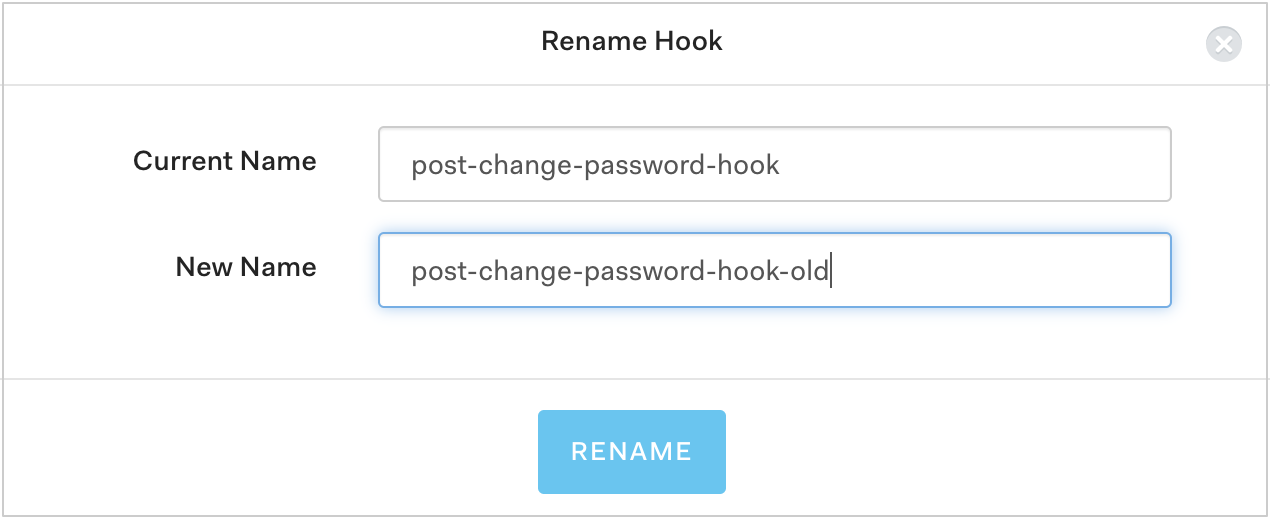
## Rename hooks using the Dashboard

1. Go to [Auth0 Dashboard > Auth Pipeline > Hooks](https://manage.auth0.com/#/) and click the gear icon next to the hook you want to rename.
2. Click **Rename**.
3. Type a new name for the Hook and click **Rename**.

   <Frame>
     <img src="https://mintcdn.com/docs-staging-quickstart-revamp/MuTsjoV4fPPSGZz9/images/cdy7uua7fh8z/2Xp8Z3uYGoGZrF5EGXLPLQ/6c68c77f97133b2066219a68540b1e73/Screen_Shot_2021-05-19_at_12.08.00_PM.png?fit=max&auto=format&n=MuTsjoV4fPPSGZz9&q=85&s=7076f5cbfe5ab57625e459910300beeb" alt="Auth0 Rename Hooks" width="1270" height="518" data-path="images/cdy7uua7fh8z/2Xp8Z3uYGoGZrF5EGXLPLQ/6c68c77f97133b2066219a68540b1e73/Screen_Shot_2021-05-19_at_12.08.00_PM.png" />
   </Frame>

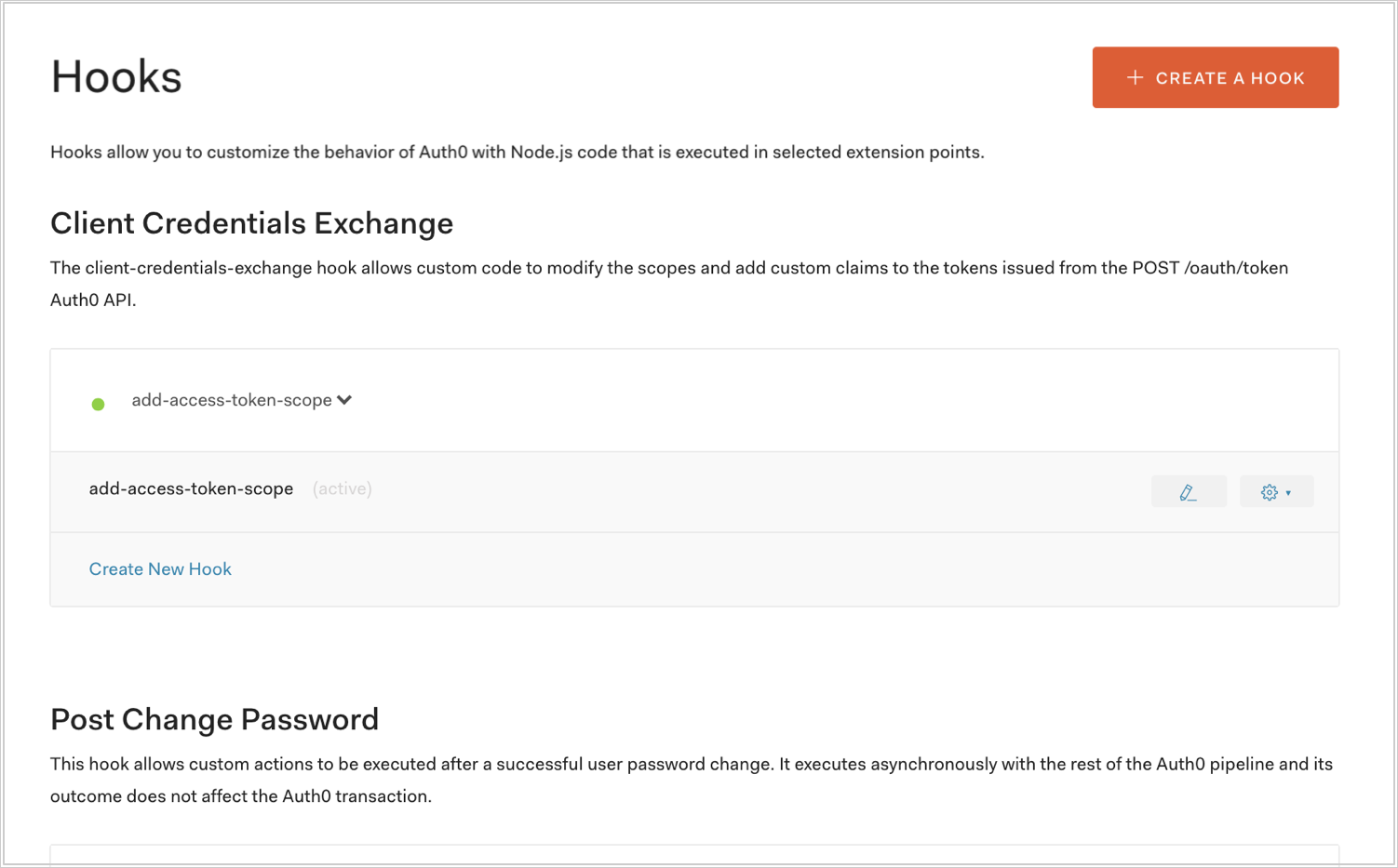
## Update hook scripts using the Dashboard

1. Go to [Auth0 Dashboard > Auth Pipeline > Hooks](https://manage.auth0.com/#/) and click the pencil icon next to the hook you want to update.
   <Frame>
     <img src="https://mintcdn.com/docs-staging-quickstart-revamp/MuTsjoV4fPPSGZz9/images/cdy7uua7fh8z/2y2R713TkAvQWIMZPMd1zh/bf0a657261f2d090492660ea5962e0a3/dashboard-hooks-list.png?fit=max&auto=format&n=MuTsjoV4fPPSGZz9&q=85&s=b1691525c8b876cab7d2c7a5ba70c9b6" alt="Auth0 Hooks select a Hook" width="1502" height="933" data-path="images/cdy7uua7fh8z/2y2R713TkAvQWIMZPMd1zh/bf0a657261f2d090492660ea5962e0a3/dashboard-hooks-list.png" />
   </Frame>
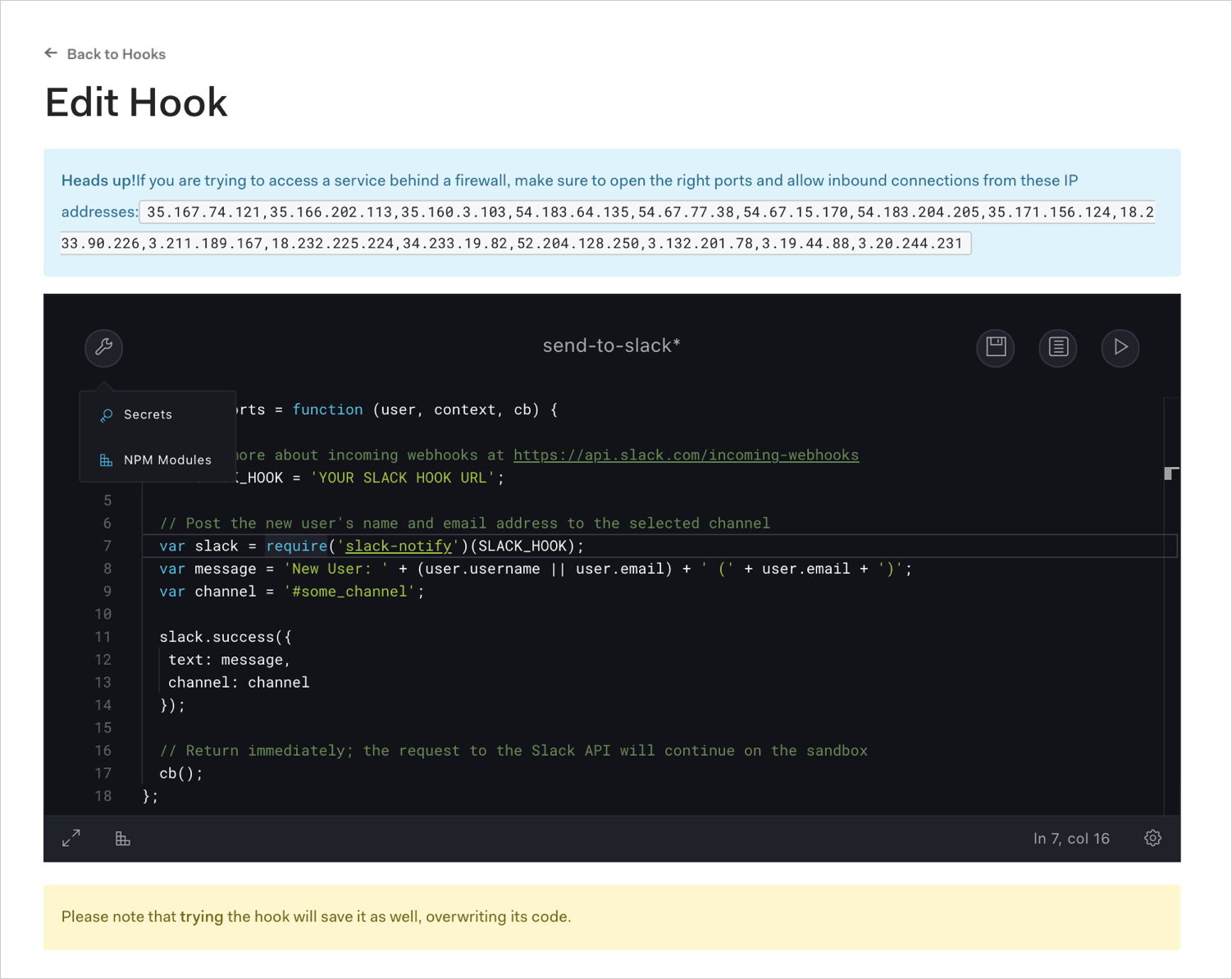
2. Update the hook using the Hook Editor and click the disk icon to save.
   <Frame>
     <img src="https://mintcdn.com/docs-staging-quickstart-revamp/95MUIRU4PPeO3xcE/images/cdy7uua7fh8z/26u71QdXxZxg5zIH8SJQAg/e9bbd25b99d9b8fd44c281b6de83a5a3/dashboard-hooks-edit_menu.png?fit=max&auto=format&n=95MUIRU4PPeO3xcE&q=85&s=922bdb5a9cf31d2d6c2dfd10d51cb6a5" alt="Auth0 Hook Editor" width="1502" height="1193" data-path="images/cdy7uua7fh8z/26u71QdXxZxg5zIH8SJQAg/e9bbd25b99d9b8fd44c281b6de83a5a3/dashboard-hooks-edit_menu.png" />
   </Frame>

## Update hooks using the Management API

Make a `PATCH` call to the [Update a Hook endpoint](https://auth0.com/docs/api/management/v2/#!/Hooks/patch_hooks_by_id). Be sure to replace `HOOK_ID` and `MGMT_API_ACCESS_TOKEN` placeholder values with your Hook ID and Management API <Tooltip tip="Access Token: Authorization credential, in the form of an opaque string or JWT, used to access an API." cta="View Glossary" href="/docs/glossary?term=Access+Token">Access Token</Tooltip>, respectively.

<CodeGroup>
  ```bash cURL lines
  curl --request PATCH \
    --url 'https://{yourDomain}/api/v2/hooks/HOOK_ID' \
    --header 'authorization: Bearer MGMT_API_ACCESS_TOKEN' \
    --header 'cache-control: no-cache' \
    --header 'content-type: application/json' \
    --data '{ "name": "HOOK_NAME", "script": "HOOK_SCRIPT", "enabled": "true" }'
  ```

  ```csharp C# lines
  var client = new RestClient("https://{yourDomain}/api/v2/hooks/HOOK_ID");
  var request = new RestRequest(Method.PATCH);
  request.AddHeader("content-type", "application/json");
  request.AddHeader("authorization", "Bearer MGMT_API_ACCESS_TOKEN");
  request.AddHeader("cache-control", "no-cache");
  request.AddParameter("application/json", "{ \"name\": \"HOOK_NAME\", \"script\": \"HOOK_SCRIPT\", \"enabled\": \"true\" }", ParameterType.RequestBody);
  IRestResponse response = client.Execute(request);
  ```

  ```go Go lines expandable
  package main

  import (
  	"fmt"
  	"strings"
  	"net/http"
  	"io/ioutil"
  )

  func main() {

  	url := "https://{yourDomain}/api/v2/hooks/HOOK_ID"

  	payload := strings.NewReader("{ \"name\": \"HOOK_NAME\", \"script\": \"HOOK_SCRIPT\", \"enabled\": \"true\" }")

  	req, _ := http.NewRequest("PATCH", url, payload)

  	req.Header.Add("content-type", "application/json")
  	req.Header.Add("authorization", "Bearer MGMT_API_ACCESS_TOKEN")
  	req.Header.Add("cache-control", "no-cache")

  	res, _ := http.DefaultClient.Do(req)

  	defer res.Body.Close()
  	body, _ := ioutil.ReadAll(res.Body)

  	fmt.Println(res)
  	fmt.Println(string(body))

  }
  ```

  ```java Java lines
  HttpResponse<String> response = Unirest.patch("https://{yourDomain}/api/v2/hooks/HOOK_ID")
    .header("content-type", "application/json")
    .header("authorization", "Bearer MGMT_API_ACCESS_TOKEN")
    .header("cache-control", "no-cache")
    .body("{ \"name\": \"HOOK_NAME\", \"script\": \"HOOK_SCRIPT\", \"enabled\": \"true\" }")
    .asString();
  ```

  ```javascript Node.JS lines
  var axios = require("axios").default;

  var options = {
    method: 'PATCH',
    url: 'https://{yourDomain}/api/v2/hooks/HOOK_ID',
    headers: {
      'content-type': 'application/json',
      authorization: 'Bearer MGMT_API_ACCESS_TOKEN',
      'cache-control': 'no-cache'
    },
    data: {name: 'HOOK_NAME', script: 'HOOK_SCRIPT', enabled: 'true'}
  };

  axios.request(options).then(function (response) {
    console.log(response.data);
  }).catch(function (error) {
    console.error(error);
  });
  ```

  ```obj-c Obj-C lines expandable
  #import <Foundation/Foundation.h>

  NSDictionary *headers = @{ @"content-type": @"application/json",
                             @"authorization": @"Bearer MGMT_API_ACCESS_TOKEN",
                             @"cache-control": @"no-cache" };
  NSDictionary *parameters = @{ @"name": @"HOOK_NAME",
                                @"script": @"HOOK_SCRIPT",
                                @"enabled": @"true" };

  NSData *postData = [NSJSONSerialization dataWithJSONObject:parameters options:0 error:nil];

  NSMutableURLRequest *request = [NSMutableURLRequest requestWithURL:[NSURL URLWithString:@"https://{yourDomain}/api/v2/hooks/HOOK_ID"]
                                                         cachePolicy:NSURLRequestUseProtocolCachePolicy
                                                     timeoutInterval:10.0];
  [request setHTTPMethod:@"PATCH"];
  [request setAllHTTPHeaderFields:headers];
  [request setHTTPBody:postData];

  NSURLSession *session = [NSURLSession sharedSession];
  NSURLSessionDataTask *dataTask = [session dataTaskWithRequest:request
                                              completionHandler:^(NSData *data, NSURLResponse *response, NSError *error) {
                                                  if (error) {
                                                      NSLog(@"%@", error);
                                                  } else {
                                                      NSHTTPURLResponse *httpResponse = (NSHTTPURLResponse *) response;
                                                      NSLog(@"%@", httpResponse);
                                                  }
                                              }];
  [dataTask resume];
  ```

  ```php PHP lines expandable
  $curl = curl_init();

  curl_setopt_array($curl, [
    CURLOPT_URL => "https://{yourDomain}/api/v2/hooks/HOOK_ID",
    CURLOPT_RETURNTRANSFER => true,
    CURLOPT_ENCODING => "",
    CURLOPT_MAXREDIRS => 10,
    CURLOPT_TIMEOUT => 30,
    CURLOPT_HTTP_VERSION => CURL_HTTP_VERSION_1_1,
    CURLOPT_CUSTOMREQUEST => "PATCH",
    CURLOPT_POSTFIELDS => "{ \"name\": \"HOOK_NAME\", \"script\": \"HOOK_SCRIPT\", \"enabled\": \"true\" }",
    CURLOPT_HTTPHEADER => [
      "authorization: Bearer MGMT_API_ACCESS_TOKEN",
      "cache-control: no-cache",
      "content-type: application/json"
    ],
  ]);

  $response = curl_exec($curl);
  $err = curl_error($curl);

  curl_close($curl);

  if ($err) {
    echo "cURL Error #:" . $err;
  } else {
    echo $response;
  }
  ```

  ```python Python lines
  import http.client

  conn = http.client.HTTPSConnection("")

  payload = "{ \"name\": \"HOOK_NAME\", \"script\": \"HOOK_SCRIPT\", \"enabled\": \"true\" }"

  headers = {
      'content-type': "application/json",
      'authorization': "Bearer MGMT_API_ACCESS_TOKEN",
      'cache-control': "no-cache"
      }

  conn.request("PATCH", "/{yourDomain}/api/v2/hooks/HOOK_ID", payload, headers)

  res = conn.getresponse()
  data = res.read()

  print(data.decode("utf-8"))
  ```

  ```ruby Ruby lines
  require 'uri'
  require 'net/http'
  require 'openssl'

  url = URI("https://{yourDomain}/api/v2/hooks/HOOK_ID")

  http = Net::HTTP.new(url.host, url.port)
  http.use_ssl = true
  http.verify_mode = OpenSSL::SSL::VERIFY_NONE

  request = Net::HTTP::Patch.new(url)
  request["content-type"] = 'application/json'
  request["authorization"] = 'Bearer MGMT_API_ACCESS_TOKEN'
  request["cache-control"] = 'no-cache'
  request.body = "{ \"name\": \"HOOK_NAME\", \"script\": \"HOOK_SCRIPT\", \"enabled\": \"true\" }"

  response = http.request(request)
  puts response.read_body
  ```

  ```swift Swift lines expandable
  import Foundation

  let headers = [
    "content-type": "application/json",
    "authorization": "Bearer MGMT_API_ACCESS_TOKEN",
    "cache-control": "no-cache"
  ]
  let parameters = [
    "name": "HOOK_NAME",
    "script": "HOOK_SCRIPT",
    "enabled": "true"
  ] as [String : Any]

  let postData = JSONSerialization.data(withJSONObject: parameters, options: [])

  let request = NSMutableURLRequest(url: NSURL(string: "https://{yourDomain}/api/v2/hooks/HOOK_ID")! as URL,
                                          cachePolicy: .useProtocolCachePolicy,
                                      timeoutInterval: 10.0)
  request.httpMethod = "PATCH"
  request.allHTTPHeaderFields = headers
  request.httpBody = postData as Data

  let session = URLSession.shared
  let dataTask = session.dataTask(with: request as URLRequest, completionHandler: { (data, response, error) -> Void in
    if (error != nil) {
      print(error)
    } else {
      let httpResponse = response as? HTTPURLResponse
      print(httpResponse)
    }
  })

  dataTask.resume()
  ```
</CodeGroup>

<table class="table">
  <thead>
    <tr>
      <th>Value</th>
      <th>Description</th>
    </tr>
  </thead>

  <tbody>
    <tr>
      <td><code>HOOK\_ID</code></td>
      <td>ID of the Hook to update.</td>
    </tr>

    <tr>
      <td><code>MGMT\_API\_ACCESS\_TOKEN</code></td>
      <td>Access Tokens for the Management API with the <Tooltip tip="Mechanism that determines actions applications can perform on a user's behalf with information previously created in an online resource." cta="View Glossary" href="/docs/glossary?term=scope">scope</Tooltip> <code>update:hooks</code>. To learn more, read <a href="https://auth0.com/docs/api/management/v2/tokens">Management API Access Tokens</a>.</td>
    </tr>

    <tr>
      <td><code>HOOK\_NAME</code></td>
      <td>Name of the Hook to create.</td>
    </tr>

    <tr>
      <td><code>HOOK\_SCRIPT</code></td>
      <td>Script that contains the code for the Hook. Should match what you would enter if you were creating a new hook using the Dashboard.</td>
    </tr>
  </tbody>
</table>

<Callout icon="file-lines" color="#0EA5E9" iconType="regular">
  The `enabled` property represents whether the rule is enabled (`true`) or disabled (`false`).
</Callout>

<Card title="Handle rate limits when calling APIs from within Hooks">
  If you call Auth0 APIs from within a Hook's script, you will need to handle rate limits. To do so, check the `X-RateLimit-Remaining` header and act appropriately when the number returned nears 0.

  Additionally, add logic to handle cases in which you exceed the provided rate limits and receive the `429` HTTP Status Code (`Too Many Requests`). In this case, if a re-try is needed, it is best to allow for a back-off to avoid going into an infinite retry loop.
</Card>
