> ## Documentation Index
> Fetch the complete documentation index at: https://docs-staging-quickstart-revamp.mintlify.site/llms.txt
> Use this file to discover all available pages before exploring further.

> Learn how to use variables in Forms for Actions.

# Variables and helper functions

Variables allow you to access data contained in Forms and Flows to create custom business logic and automations.

Some basic considerations to using variables are:

* Variables are surrounded by curly brackets `{{ variable }}`.
* If a variable doesn't exist or can't be resolved, it has the same effect as an `undefined` variable.
* You can use nullish operators to handle `null` or `undefined` variables, for example:`{{fields.foo ?? fields.bar}}`.

## Available variables

You can use different types of variables to reference and transform data you gather from customers with Forms and Flows.

<table class="table">
  <thead>
    <tr>
      <th><strong>Variable</strong></th>
      <th><strong>Syntax</strong></th>
      <th><strong>Where</strong></th>
      <th><strong>Description</strong></th>
    </tr>
  </thead>

  <tbody>
    <tr>
      <td>Context</td>

      <td>
        `{{context.*}}`
      </td>

      <td>Forms / Flows</td>
      <td>Reference context data of the current transaction</td>
    </tr>

    <tr>
      <td>Form fields</td>

      <td>
        `{{fields.*}}`
      </td>

      <td>Forms / Flows</td>
      <td>Reference data from your form fields and hidden fields</td>
    </tr>

    <tr>
      <td>Shared variables</td>

      <td>
        `{{vars.*}}`
      </td>

      <td>Forms / Flows</td>
      <td>Reference data stored as shared variables</td>
    </tr>

    <tr>
      <td>Flow actions output</td>

      <td>
        `{{actions.*}}`
      </td>

      <td>Flows</td>
      <td>Reference data from the output response of previous flow actions</td>
    </tr>

    <tr>
      <td>Helper functions</td>

      <td>
        `{{functions.*}}`
      </td>

      <td>Forms / Flows</td>
      <td>Helper functions to transform data</td>
    </tr>
  </tbody>
</table>

### Context variables

Forms and flows automatically inherit context variables from the current transaction. You can access the following context variables:

* The `user` object, with access to the following properties:

  * `user.user_id`
  * `user.username`
  * `user.name`
  * `user.given_name`
  * `user.family_name`
  * `user.nickname`
  * `user.email`
  * `user.email_verified`
  * `user.phone_number`
  * `user.phone_verified`
  * `user.picture`
  * `user.user_metadata`
  * `user.app_metadata`
  * `user.created_at`
  * `user.updated_at`
  * `user.last_password_reset`
  * `user.identities`
* The `organization` object, with access to the following properties:

  * `organization.id`
  * `organization.name`
  * `organization.display_name`
  * `organization.metadata`
* The `client` object, with access to the following properties:

  * `client.client_id`
  * `client.name`
* The `tenant` object, with access to the following property:

  * `tenant.name`
* The `transaction` object, with access to the following property:

  * `transaction.state`

<Accordion title="Example of context object">
  ```json lines expandable
  {
    "user": {
      "user_id": "auth0|658409...",
      "name": "ana@travel0.com",
      "nickname": "ana",
      "email": "ana@travel0.com",
      "email_verified": true,
      "picture": "https://s.gravatar.com/avatar/8eb1b522f6...",
      "user_metadata": {},
      "app_metadata": {},
      "created_at": "2023-12-21T09:46:40.487Z",
      "updated_at": "2024-05-07T10:44:26.271Z",
      "last_password_reset": "2023-12-21T09:49:08.932Z",
      "identities": [
        {
          "user_id": "6584...",
          "isSocial": false,
          "provider": "auth0",
          "connection": "Username-Password-Authentication"
        }
      ]
    },
    "client": {
      "client_id": "xpeg5...",
      "name": "My App"
    },
    "tenant": {
      "name": "tenant-testing"
    },
    "transaction": {
      "state": "hKFo2SBId2M0..."
    }
  }
  ```
</Accordion>

For example:  `{{context.user.user_id}}` references the `user_id` of the `user` object.

<Frame>
  <img src="https://mintcdn.com/docs-staging-quickstart-revamp/TO6FS4AgTzQGgpsU/images/cdy7uua7fh8z/3B8DRhXO2wGqeqSFb8KbQv/0a61cdbbb7f1d290950a2ddb9857aac3/Contex-variable.png?fit=max&auto=format&n=TO6FS4AgTzQGgpsU&q=85&s=525a6957f7597fe8b2639bfd6abdae7a" alt="Dashboard > Forms > Flows" data-og-width="1141" width="1141" data-og-height="219" height="219" data-path="images/cdy7uua7fh8z/3B8DRhXO2wGqeqSFb8KbQv/0a61cdbbb7f1d290950a2ddb9857aac3/Contex-variable.png" data-optimize="true" data-opv="3" srcset="https://mintcdn.com/docs-staging-quickstart-revamp/TO6FS4AgTzQGgpsU/images/cdy7uua7fh8z/3B8DRhXO2wGqeqSFb8KbQv/0a61cdbbb7f1d290950a2ddb9857aac3/Contex-variable.png?w=280&fit=max&auto=format&n=TO6FS4AgTzQGgpsU&q=85&s=8fe10b834bfb4f16ba5074f0f9b2961e 280w, https://mintcdn.com/docs-staging-quickstart-revamp/TO6FS4AgTzQGgpsU/images/cdy7uua7fh8z/3B8DRhXO2wGqeqSFb8KbQv/0a61cdbbb7f1d290950a2ddb9857aac3/Contex-variable.png?w=560&fit=max&auto=format&n=TO6FS4AgTzQGgpsU&q=85&s=0acdd90849b102c3916ea873999a9fcb 560w, https://mintcdn.com/docs-staging-quickstart-revamp/TO6FS4AgTzQGgpsU/images/cdy7uua7fh8z/3B8DRhXO2wGqeqSFb8KbQv/0a61cdbbb7f1d290950a2ddb9857aac3/Contex-variable.png?w=840&fit=max&auto=format&n=TO6FS4AgTzQGgpsU&q=85&s=4962310c95baefdb210300268238a374 840w, https://mintcdn.com/docs-staging-quickstart-revamp/TO6FS4AgTzQGgpsU/images/cdy7uua7fh8z/3B8DRhXO2wGqeqSFb8KbQv/0a61cdbbb7f1d290950a2ddb9857aac3/Contex-variable.png?w=1100&fit=max&auto=format&n=TO6FS4AgTzQGgpsU&q=85&s=9396f61f7a182e2dce6789c41bb8d5c0 1100w, https://mintcdn.com/docs-staging-quickstart-revamp/TO6FS4AgTzQGgpsU/images/cdy7uua7fh8z/3B8DRhXO2wGqeqSFb8KbQv/0a61cdbbb7f1d290950a2ddb9857aac3/Contex-variable.png?w=1650&fit=max&auto=format&n=TO6FS4AgTzQGgpsU&q=85&s=2a492e48013450ff04d88bc120d29a7b 1650w, https://mintcdn.com/docs-staging-quickstart-revamp/TO6FS4AgTzQGgpsU/images/cdy7uua7fh8z/3B8DRhXO2wGqeqSFb8KbQv/0a61cdbbb7f1d290950a2ddb9857aac3/Contex-variable.png?w=2500&fit=max&auto=format&n=TO6FS4AgTzQGgpsU&q=85&s=d236253c12eae2877377b172aba53a23 2500w" />
</Frame>

### Form fields variables

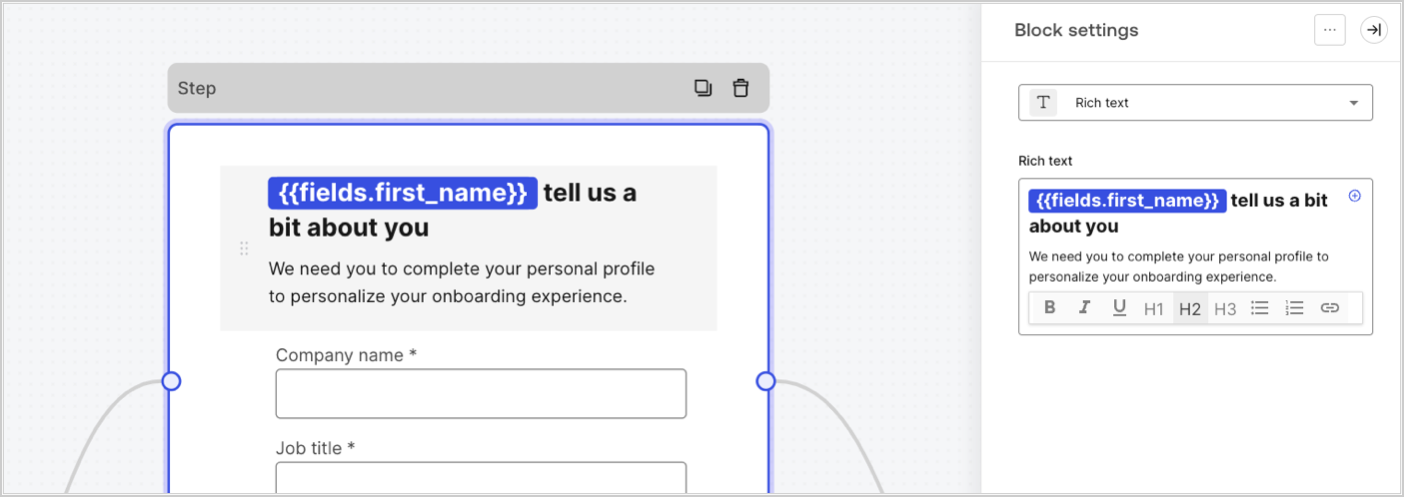
Field variables contain data collected from the user from input fields in the form and data from hidden fields. The data of each field varies depending on the field type. For example: `{{fields.first_name}}` references the input value of a field with the ID `first_name`.
<Frame>
  <img src="https://mintcdn.com/docs-staging-quickstart-revamp/R8rXfTj95YBIEuC2/images/cdy7uua7fh8z/4D42A6ww4XvFxweoxh04Rd/016c2ed9d25bc2267ed3ed31bf8b2bf6/form-fields-variable.png?fit=max&auto=format&n=R8rXfTj95YBIEuC2&q=85&s=b56f184d448f83f5f303a9cd6d2491b2" alt="Dashboard > Actions > Forms > Form" data-og-width="1404" width="1404" data-og-height="497" height="497" data-path="images/cdy7uua7fh8z/4D42A6ww4XvFxweoxh04Rd/016c2ed9d25bc2267ed3ed31bf8b2bf6/form-fields-variable.png" data-optimize="true" data-opv="3" srcset="https://mintcdn.com/docs-staging-quickstart-revamp/R8rXfTj95YBIEuC2/images/cdy7uua7fh8z/4D42A6ww4XvFxweoxh04Rd/016c2ed9d25bc2267ed3ed31bf8b2bf6/form-fields-variable.png?w=280&fit=max&auto=format&n=R8rXfTj95YBIEuC2&q=85&s=c3725cdf5ba1e36c9e9fe1a30e2a2b63 280w, https://mintcdn.com/docs-staging-quickstart-revamp/R8rXfTj95YBIEuC2/images/cdy7uua7fh8z/4D42A6ww4XvFxweoxh04Rd/016c2ed9d25bc2267ed3ed31bf8b2bf6/form-fields-variable.png?w=560&fit=max&auto=format&n=R8rXfTj95YBIEuC2&q=85&s=34b868d22af7798ee60945dc7ade8c5b 560w, https://mintcdn.com/docs-staging-quickstart-revamp/R8rXfTj95YBIEuC2/images/cdy7uua7fh8z/4D42A6ww4XvFxweoxh04Rd/016c2ed9d25bc2267ed3ed31bf8b2bf6/form-fields-variable.png?w=840&fit=max&auto=format&n=R8rXfTj95YBIEuC2&q=85&s=46badbbd74a270dbea2d0d29585c0388 840w, https://mintcdn.com/docs-staging-quickstart-revamp/R8rXfTj95YBIEuC2/images/cdy7uua7fh8z/4D42A6ww4XvFxweoxh04Rd/016c2ed9d25bc2267ed3ed31bf8b2bf6/form-fields-variable.png?w=1100&fit=max&auto=format&n=R8rXfTj95YBIEuC2&q=85&s=bc706457ccae7b25647d9007ced6cd31 1100w, https://mintcdn.com/docs-staging-quickstart-revamp/R8rXfTj95YBIEuC2/images/cdy7uua7fh8z/4D42A6ww4XvFxweoxh04Rd/016c2ed9d25bc2267ed3ed31bf8b2bf6/form-fields-variable.png?w=1650&fit=max&auto=format&n=R8rXfTj95YBIEuC2&q=85&s=914f111b98063f62b6fe1bb92d604afb 1650w, https://mintcdn.com/docs-staging-quickstart-revamp/R8rXfTj95YBIEuC2/images/cdy7uua7fh8z/4D42A6ww4XvFxweoxh04Rd/016c2ed9d25bc2267ed3ed31bf8b2bf6/form-fields-variable.png?w=2500&fit=max&auto=format&n=R8rXfTj95YBIEuC2&q=85&s=b4f59db811195c6fa95b912da6272181 2500w" />
</Frame>

### Flow output actions variables

When a flow action is executed, it generates an output object response that can be referenced in subsequent actions. For example: `{{actions.generate_otp.code}}` references the output code of the action with ID `generate_otp`.

<Frame>
  <img src="https://mintcdn.com/docs-staging-quickstart-revamp/0yzvW89mU3tfXF-c/images/cdy7uua7fh8z/6jYtEdYqSGXm3DDv0mxQ0o/2d48012629745e07137bf6ba42f4d829/flow-output-variable.png?fit=max&auto=format&n=0yzvW89mU3tfXF-c&q=85&s=1731310eb9e1abcd78a81eb955e7e6fa" alt="Dashboard > Actions > Forms > Flows" data-og-width="1404" width="1404" data-og-height="253" height="253" data-path="images/cdy7uua7fh8z/6jYtEdYqSGXm3DDv0mxQ0o/2d48012629745e07137bf6ba42f4d829/flow-output-variable.png" data-optimize="true" data-opv="3" srcset="https://mintcdn.com/docs-staging-quickstart-revamp/0yzvW89mU3tfXF-c/images/cdy7uua7fh8z/6jYtEdYqSGXm3DDv0mxQ0o/2d48012629745e07137bf6ba42f4d829/flow-output-variable.png?w=280&fit=max&auto=format&n=0yzvW89mU3tfXF-c&q=85&s=dccbb860bcd8f75e00e0b85783a8baae 280w, https://mintcdn.com/docs-staging-quickstart-revamp/0yzvW89mU3tfXF-c/images/cdy7uua7fh8z/6jYtEdYqSGXm3DDv0mxQ0o/2d48012629745e07137bf6ba42f4d829/flow-output-variable.png?w=560&fit=max&auto=format&n=0yzvW89mU3tfXF-c&q=85&s=0954e25e768f26dcd39d9d4b444afa08 560w, https://mintcdn.com/docs-staging-quickstart-revamp/0yzvW89mU3tfXF-c/images/cdy7uua7fh8z/6jYtEdYqSGXm3DDv0mxQ0o/2d48012629745e07137bf6ba42f4d829/flow-output-variable.png?w=840&fit=max&auto=format&n=0yzvW89mU3tfXF-c&q=85&s=183f948a778fe4cb0bdb359d18eb8371 840w, https://mintcdn.com/docs-staging-quickstart-revamp/0yzvW89mU3tfXF-c/images/cdy7uua7fh8z/6jYtEdYqSGXm3DDv0mxQ0o/2d48012629745e07137bf6ba42f4d829/flow-output-variable.png?w=1100&fit=max&auto=format&n=0yzvW89mU3tfXF-c&q=85&s=4f09efc1a5f53d65230a948802a3c8f7 1100w, https://mintcdn.com/docs-staging-quickstart-revamp/0yzvW89mU3tfXF-c/images/cdy7uua7fh8z/6jYtEdYqSGXm3DDv0mxQ0o/2d48012629745e07137bf6ba42f4d829/flow-output-variable.png?w=1650&fit=max&auto=format&n=0yzvW89mU3tfXF-c&q=85&s=c92c083b20a4f4c896b9546142061688 1650w, https://mintcdn.com/docs-staging-quickstart-revamp/0yzvW89mU3tfXF-c/images/cdy7uua7fh8z/6jYtEdYqSGXm3DDv0mxQ0o/2d48012629745e07137bf6ba42f4d829/flow-output-variable.png?w=2500&fit=max&auto=format&n=0yzvW89mU3tfXF-c&q=85&s=5d8e543e53183a24670bc9a117e60bd6 2500w" />
</Frame>

### Shared variables

You can store variables to be shared with subsequent flows or even with form components in the same transaction. Shared variables are ephemeral and are associated with a specific form journey. Their values cannot be accessed outside of that journey. For example: `{{vars.external_id}}` references the value of a shared variable with ID `external_id`.

<Frame>
  <img src="https://mintcdn.com/docs-staging-quickstart-revamp/R8rXfTj95YBIEuC2/images/cdy7uua7fh8z/4571ExRTHL0KZKJKX9pNwj/abb631b8608a6356b0e5b3784cf8b02f/flow-shared-variable.png?fit=max&auto=format&n=R8rXfTj95YBIEuC2&q=85&s=5fa6c86c5c69671f1bb5ec8c9299f285" alt="Dashboard > Actions > Forms > Flows" data-og-width="1215" width="1215" data-og-height="162" height="162" data-path="images/cdy7uua7fh8z/4571ExRTHL0KZKJKX9pNwj/abb631b8608a6356b0e5b3784cf8b02f/flow-shared-variable.png" data-optimize="true" data-opv="3" srcset="https://mintcdn.com/docs-staging-quickstart-revamp/R8rXfTj95YBIEuC2/images/cdy7uua7fh8z/4571ExRTHL0KZKJKX9pNwj/abb631b8608a6356b0e5b3784cf8b02f/flow-shared-variable.png?w=280&fit=max&auto=format&n=R8rXfTj95YBIEuC2&q=85&s=c3f55dc7a5da64de9130799bdcb47998 280w, https://mintcdn.com/docs-staging-quickstart-revamp/R8rXfTj95YBIEuC2/images/cdy7uua7fh8z/4571ExRTHL0KZKJKX9pNwj/abb631b8608a6356b0e5b3784cf8b02f/flow-shared-variable.png?w=560&fit=max&auto=format&n=R8rXfTj95YBIEuC2&q=85&s=25c3d75afc21fa75efb98fb6620d0ecd 560w, https://mintcdn.com/docs-staging-quickstart-revamp/R8rXfTj95YBIEuC2/images/cdy7uua7fh8z/4571ExRTHL0KZKJKX9pNwj/abb631b8608a6356b0e5b3784cf8b02f/flow-shared-variable.png?w=840&fit=max&auto=format&n=R8rXfTj95YBIEuC2&q=85&s=2aa2d5fd50be5708da8ae8a6cb9f81fd 840w, https://mintcdn.com/docs-staging-quickstart-revamp/R8rXfTj95YBIEuC2/images/cdy7uua7fh8z/4571ExRTHL0KZKJKX9pNwj/abb631b8608a6356b0e5b3784cf8b02f/flow-shared-variable.png?w=1100&fit=max&auto=format&n=R8rXfTj95YBIEuC2&q=85&s=c5ee5daaf33baf0b7f21a15a54707edd 1100w, https://mintcdn.com/docs-staging-quickstart-revamp/R8rXfTj95YBIEuC2/images/cdy7uua7fh8z/4571ExRTHL0KZKJKX9pNwj/abb631b8608a6356b0e5b3784cf8b02f/flow-shared-variable.png?w=1650&fit=max&auto=format&n=R8rXfTj95YBIEuC2&q=85&s=b5158b3f0aa2deffeaacac7f60c420d0 1650w, https://mintcdn.com/docs-staging-quickstart-revamp/R8rXfTj95YBIEuC2/images/cdy7uua7fh8z/4571ExRTHL0KZKJKX9pNwj/abb631b8608a6356b0e5b3784cf8b02f/flow-shared-variable.png?w=2500&fit=max&auto=format&n=R8rXfTj95YBIEuC2&q=85&s=f0768cffef40d4395ec7c1c9eb70633c 2500w" />
</Frame>

<Warning>
  Shared variables:

  * are internal (server-side) and not exposed to the browser (client-side).
  * can be resolved and exposed to the browser if you referenced a shared variable in the form component.
  * might have sensitive information, so take care when you access shared variable to avoid any unnecessary or unintentional exposure.
</Warning>

### Helper functions

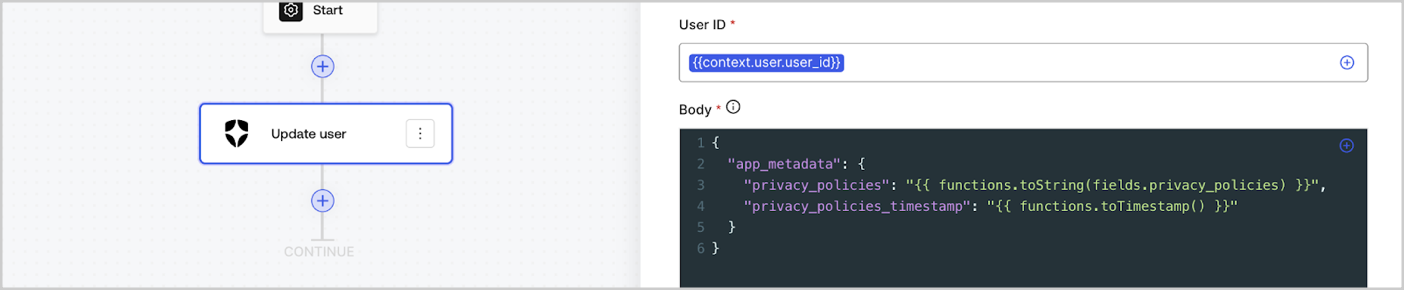
Helper functions let you transform data and perform simple operations. For example: `{{functions.toString(fields.privacy_policies)}}` transform the value of the field with ID `privacy_policies` using the `toString()` function.

<Frame>
  <img src="https://mintcdn.com/docs-staging-quickstart-revamp/fNPG21NgQLCA0axA/images/cdy7uua7fh8z/1gyox33XJEtdkT43NppblT/0e878cc5ae2bde11b4207e105bbac6c5/flow-helper-functions.png?fit=max&auto=format&n=fNPG21NgQLCA0axA&q=85&s=3a854e4e170858bf1cda4ad5776b9103" alt="Dashboard > Actions > Forms > Flows" data-og-width="1404" width="1404" data-og-height="290" height="290" data-path="images/cdy7uua7fh8z/1gyox33XJEtdkT43NppblT/0e878cc5ae2bde11b4207e105bbac6c5/flow-helper-functions.png" data-optimize="true" data-opv="3" srcset="https://mintcdn.com/docs-staging-quickstart-revamp/fNPG21NgQLCA0axA/images/cdy7uua7fh8z/1gyox33XJEtdkT43NppblT/0e878cc5ae2bde11b4207e105bbac6c5/flow-helper-functions.png?w=280&fit=max&auto=format&n=fNPG21NgQLCA0axA&q=85&s=52bc13ba91568fc9779de3fe121e7a65 280w, https://mintcdn.com/docs-staging-quickstart-revamp/fNPG21NgQLCA0axA/images/cdy7uua7fh8z/1gyox33XJEtdkT43NppblT/0e878cc5ae2bde11b4207e105bbac6c5/flow-helper-functions.png?w=560&fit=max&auto=format&n=fNPG21NgQLCA0axA&q=85&s=ec1a5ec26cf8e875686f27b29e6be430 560w, https://mintcdn.com/docs-staging-quickstart-revamp/fNPG21NgQLCA0axA/images/cdy7uua7fh8z/1gyox33XJEtdkT43NppblT/0e878cc5ae2bde11b4207e105bbac6c5/flow-helper-functions.png?w=840&fit=max&auto=format&n=fNPG21NgQLCA0axA&q=85&s=3c10fe2efbe326c62ee5ebf0c2174f63 840w, https://mintcdn.com/docs-staging-quickstart-revamp/fNPG21NgQLCA0axA/images/cdy7uua7fh8z/1gyox33XJEtdkT43NppblT/0e878cc5ae2bde11b4207e105bbac6c5/flow-helper-functions.png?w=1100&fit=max&auto=format&n=fNPG21NgQLCA0axA&q=85&s=e19db66843788514dfbe017cd0e8f8ca 1100w, https://mintcdn.com/docs-staging-quickstart-revamp/fNPG21NgQLCA0axA/images/cdy7uua7fh8z/1gyox33XJEtdkT43NppblT/0e878cc5ae2bde11b4207e105bbac6c5/flow-helper-functions.png?w=1650&fit=max&auto=format&n=fNPG21NgQLCA0axA&q=85&s=ed45d54d6ede0353b1d97f7f5cc2d8e4 1650w, https://mintcdn.com/docs-staging-quickstart-revamp/fNPG21NgQLCA0axA/images/cdy7uua7fh8z/1gyox33XJEtdkT43NppblT/0e878cc5ae2bde11b4207e105bbac6c5/flow-helper-functions.png?w=2500&fit=max&auto=format&n=fNPG21NgQLCA0axA&q=85&s=c572882e40a380bc989f911403db28eb 2500w" />
</Frame>

The available helper functions are:

<table class="table">
  <thead>
    <tr>
      <th><strong>Function</strong></th>
      <th><strong>Description</strong></th>
      <th><strong>Example</strong></th>
    </tr>
  </thead>

  <tbody>
    <tr>
      <td><code>toArray(value)</code></td>
      <td>Converts value to an array.</td>

      <td>
        `{{ functions.toArray('abc') }} // ['abc']`
      </td>
    </tr>

    <tr>
      <td><code>toBoolean(value)</code></td>
      <td>Converts value to a boolean value.</td>

      <td>
        `{{ functions.toBoolean(1) }} // true&lt;br /&gt;&lt;br /&gt;\{\{ functions.toBoolean(0) }} // false`
      </td>
    </tr>

    <tr>
      <td><code>length(value)</code></td>
      <td>Returns the length of the parameter value.</td>

      <td>
        `{{ functions.length('auth0') }} // 5`
      </td>
    </tr>

    <tr>
      <td><code>mask(value)</code></td>
      <td>Masks a value to avoid be exposed in Executions.</td>

      <td>
        `{{ functions.mask('my_awesome_secret') }} // ███`
      </td>
    </tr>

    <tr>
      <td><code>toNumber(value)</code></td>
      <td>Converts value to a number.</td>

      <td>
        `{{ functions.toNumber('123') }} // 123`
      </td>
    </tr>

    <tr>
      <td><code>random(min, max, \[boolean])</code></td>
      <td>Returns a random number between the inclusive min and max.</td>

      <td>
        `{{ functions.random(0, 6) }} // 4 &lt;br /&gt;&lt;br /&gt;\{\{ functions.random(0, 6, true) }} // 3.8523497...`
      </td>
    </tr>

    <tr>
      <td><code>slice(value, start, end)</code></td>
      <td>Returns a section of a value array or string between the start and end indexes.</td>

      <td>
        `{{ functions.slice( 'example', 3, 5) }} // 'mp'`
      </td>
    </tr>

    <tr>
      <td><code>toString(value)</code></td>
      <td>Converts value to a string.</td>

      <td>
        `{{ functions.toString(123) }} // '123'`
      </td>
    </tr>

    <tr>
      <td><code>substring(value, start, end)</code></td>
      <td>Returns a section of a value between the start and end indexes. Read about the <a href="https://developer.mozilla.org/en-US/docs/Web/JavaScript/Reference/Global_Objects/String/substring#differences_between_substring_and_slice">differences of slice and substring functions</a></td>

      <td>
        `{{ functions.substring( 'example’', 3, 5) }} // 'mp'`
      </td>
    </tr>

    <tr>
      <td><code>toTimestamp()</code></td>
      <td>Returns the current UNIX timestamp.</td>

      <td>
        `{{ functions.toTimestamp() }} // 1628761483`
      </td>
    </tr>

    <tr>
      <td><code>toTimestamp(date)</code></td>
      <td>Returns the provided date in UNIX time.</td>

      <td>
        `{{ functions.toTimestamp('2021-04-30T10:02:50.876Z') }} // 1619776970`
      </td>
    </tr>

    <tr>
      <td><code>toTimestamp(date)</code></td>
      <td>Returns the provided date in UNIX time.</td>

      <td>
        `{{ functions.toTimestamp('2021-04-30T10:02:50.876Z') }} // 1619776970`
      </td>
    </tr>

    <tr>
      <td><code>replaceAll(value, string, replacement)</code></td>
      <td>Returns a new string with all matches of a pattern replaced by a replacement.</td>

      <td>
        `{{ functions.replaceAll('2021-04-30', '-', '/') }} // 2021/04/30`
      </td>
    </tr>

    <tr>
      <td><code>replace(value, string, replacement)</code></td>
      <td>Returns a new string with all matches of a pattern replaced by a replacement. If pattern is a string, only the first occurence will be replaced.</td>

      <td>
        `{{ functions.replace('2021-04-30', '-', '/') }} // 2021/04-30`
      </td>
    </tr>

    <tr>
      <td><code>split(value, separator, limit?)</code></td>
      <td>Returns an ordered list of substrings divided by the separator.</td>

      <td>
        `{{ functions.split('2021-04-30', '-') }} // ['2021', '04', '30']`
      </td>
    </tr>

    <tr>
      <td><code>now()</code></td>
      <td>Returns the current date in ISO 8601 format.</td>

      <td>
        `{{ functions.now() }} // 2021-04-30T10:31:28.576Z`
      </td>
    </tr>

    <tr>
      <td><code>includes(collection, item, fromIndex?)</code></td>
      <td>Returns whether an array includes a certain value among its entries.</td>

      <td>
        `{{ functions.includes(['auth0', 'identity', 'authentication'], 'identity') }} // true`
      </td>
    </tr>

    <tr>
      <td><code>indexOf(collection, item, fromIndex?)</code></td>
      <td>Returns the first index at which a given element can be found in the array, or -1 if it is not present.</td>

      <td>
        `{{ functions.indexOf(['auth0', 'identity', 'authentication'], 'identity') }} // 1`
      </td>
    </tr>

    <tr>
      <td><code>merge(base, value)</code></td>
      <td>Returns a merged array, object or concatenates a string depending on the base data type.</td>

      <td>
        `{{ functions.merge(['auth0', 'identity'], ['authentication']) }} // ['auth0', 'identity', 'authentication']`
      </td>
    </tr>

    <tr>
      <td><code>md5(value)</code></td>
      <td>Returns a MD5 hashed value.</td>

      <td>
        `{{ functions.md5('auth0') }} // 7bbb597...`
      </td>
    </tr>

    <tr>
      <td><code>sha1(value)</code></td>
      <td>Returns a SHA1 hashed value.</td>

      <td>
        `{{ functions.sha1('auth0') }} // b4ec5339...`
      </td>
    </tr>

    <tr>
      <td><code>sha256(value)</code></td>
      <td>Returns a SHA256 hashed value.</td>

      <td>
        `{{ functions.sha256('auth0') }} // d9082bdc...`
      </td>
    </tr>

    <tr>
      <td><code>sha512(value)</code></td>
      <td>Returns a SHA512 hashed value.</td>

      <td>
        `{{ functions.sha512('auth0') }} // c0d588069d...`
      </td>
    </tr>

    <tr>
      <td><code>uuid()</code></td>
      <td>Returns a random v4 UUID.</td>

      <td>
        `{{ functions.uuid() }} // 36b8f84d-df4e-4d49-b662-bcde71a8764`
      </td>
    </tr>
  </tbody>
</table>

## Variables best practices

### Use meaningful IDs

When you add a Form field or a Flow action, the ID is automatically generated.

Update the ID to a more descriptive value so you can identify the information it contains. For example, if you create a Form field that stores the user’s first name, update the ID to `first_name`.

### Be mindful when updating existing IDs

If a variable is already in use and you need to modify the ID, identify where you have referenced it and update the ID accordingly to avoid undefined or empty values.

### Check Flow executions

If you see an unexpected variable value, use the [**Executions**](/docs/customize/forms/flows/flow-execution-and-debugger) view to troubleshoot the variable.

### Use the autocomplete menu

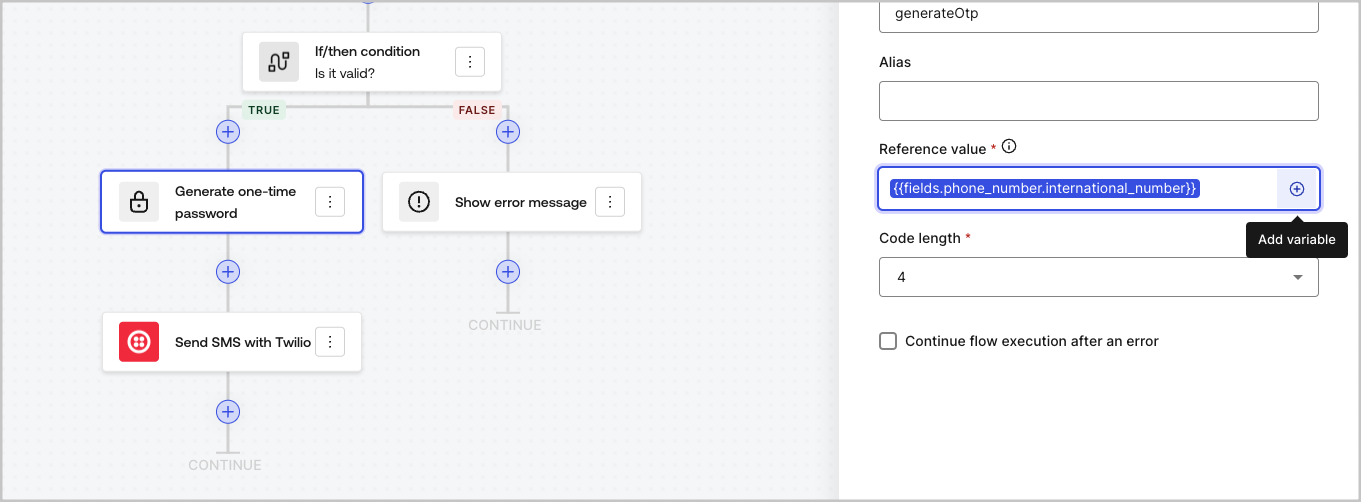
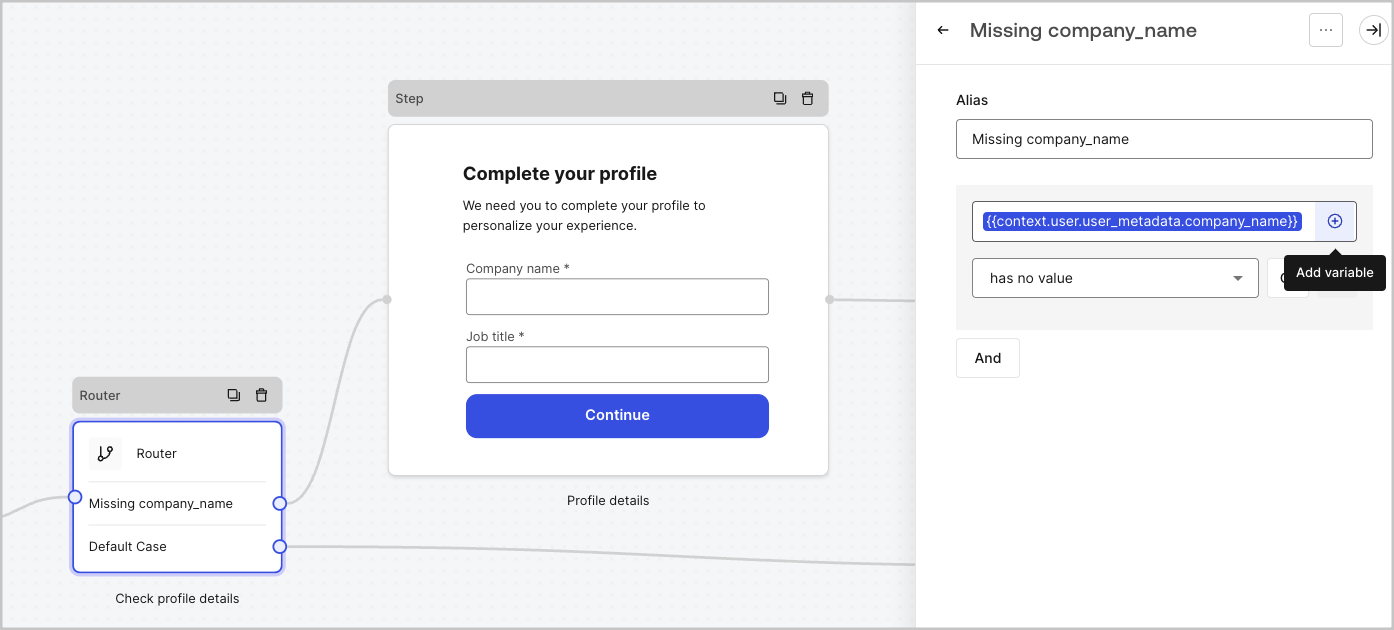
The autocomplete menu helps you locate and properly reference existing variables.

<Frame>
  <img src="https://mintcdn.com/docs-staging-quickstart-revamp/TO6FS4AgTzQGgpsU/images/cdy7uua7fh8z/3SKnDuaMzSImxZtDDAoZaz/9ea800fad29ef71d1ded3c72b87660a4/Autocomplete-flows.png?fit=max&auto=format&n=TO6FS4AgTzQGgpsU&q=85&s=cd77751c5751648733a3dc2b28d1236b" alt="Dashboard > Actions > Forms > Flows" data-og-width="1361" width="1361" data-og-height="502" height="502" data-path="images/cdy7uua7fh8z/3SKnDuaMzSImxZtDDAoZaz/9ea800fad29ef71d1ded3c72b87660a4/Autocomplete-flows.png" data-optimize="true" data-opv="3" srcset="https://mintcdn.com/docs-staging-quickstart-revamp/TO6FS4AgTzQGgpsU/images/cdy7uua7fh8z/3SKnDuaMzSImxZtDDAoZaz/9ea800fad29ef71d1ded3c72b87660a4/Autocomplete-flows.png?w=280&fit=max&auto=format&n=TO6FS4AgTzQGgpsU&q=85&s=2b032143aff98f077a019bf110e43ecf 280w, https://mintcdn.com/docs-staging-quickstart-revamp/TO6FS4AgTzQGgpsU/images/cdy7uua7fh8z/3SKnDuaMzSImxZtDDAoZaz/9ea800fad29ef71d1ded3c72b87660a4/Autocomplete-flows.png?w=560&fit=max&auto=format&n=TO6FS4AgTzQGgpsU&q=85&s=393e067d3f68d518f3a495be0de7fa03 560w, https://mintcdn.com/docs-staging-quickstart-revamp/TO6FS4AgTzQGgpsU/images/cdy7uua7fh8z/3SKnDuaMzSImxZtDDAoZaz/9ea800fad29ef71d1ded3c72b87660a4/Autocomplete-flows.png?w=840&fit=max&auto=format&n=TO6FS4AgTzQGgpsU&q=85&s=aa6ce00778cf4969dfe6b30176d05d7a 840w, https://mintcdn.com/docs-staging-quickstart-revamp/TO6FS4AgTzQGgpsU/images/cdy7uua7fh8z/3SKnDuaMzSImxZtDDAoZaz/9ea800fad29ef71d1ded3c72b87660a4/Autocomplete-flows.png?w=1100&fit=max&auto=format&n=TO6FS4AgTzQGgpsU&q=85&s=2d8bf3ab6992a97ec1e6028d8021c250 1100w, https://mintcdn.com/docs-staging-quickstart-revamp/TO6FS4AgTzQGgpsU/images/cdy7uua7fh8z/3SKnDuaMzSImxZtDDAoZaz/9ea800fad29ef71d1ded3c72b87660a4/Autocomplete-flows.png?w=1650&fit=max&auto=format&n=TO6FS4AgTzQGgpsU&q=85&s=a78f00dcd7109c1f31e9b30e34d9b238 1650w, https://mintcdn.com/docs-staging-quickstart-revamp/TO6FS4AgTzQGgpsU/images/cdy7uua7fh8z/3SKnDuaMzSImxZtDDAoZaz/9ea800fad29ef71d1ded3c72b87660a4/Autocomplete-flows.png?w=2500&fit=max&auto=format&n=TO6FS4AgTzQGgpsU&q=85&s=3a23d652d344578bf649d810c04870d1 2500w" />
</Frame>

<Frame>
  <img src="https://mintcdn.com/docs-staging-quickstart-revamp/MuTsjoV4fPPSGZz9/images/cdy7uua7fh8z/2kjRKozVgrd2a7UJXOANaN/ee5452d7210cd2f13b0e97763f11c82a/Autocomplete-forms.png?fit=max&auto=format&n=MuTsjoV4fPPSGZz9&q=85&s=9740229b441b621a038ce197a643a179" alt="Dashboard > Actions > Forms > Form" data-og-width="1394" width="1394" data-og-height="630" height="630" data-path="images/cdy7uua7fh8z/2kjRKozVgrd2a7UJXOANaN/ee5452d7210cd2f13b0e97763f11c82a/Autocomplete-forms.png" data-optimize="true" data-opv="3" srcset="https://mintcdn.com/docs-staging-quickstart-revamp/MuTsjoV4fPPSGZz9/images/cdy7uua7fh8z/2kjRKozVgrd2a7UJXOANaN/ee5452d7210cd2f13b0e97763f11c82a/Autocomplete-forms.png?w=280&fit=max&auto=format&n=MuTsjoV4fPPSGZz9&q=85&s=bf792dbd8454177b41fdb2d990253619 280w, https://mintcdn.com/docs-staging-quickstart-revamp/MuTsjoV4fPPSGZz9/images/cdy7uua7fh8z/2kjRKozVgrd2a7UJXOANaN/ee5452d7210cd2f13b0e97763f11c82a/Autocomplete-forms.png?w=560&fit=max&auto=format&n=MuTsjoV4fPPSGZz9&q=85&s=e54a1bfe49b6f58a78aa167b69c2461b 560w, https://mintcdn.com/docs-staging-quickstart-revamp/MuTsjoV4fPPSGZz9/images/cdy7uua7fh8z/2kjRKozVgrd2a7UJXOANaN/ee5452d7210cd2f13b0e97763f11c82a/Autocomplete-forms.png?w=840&fit=max&auto=format&n=MuTsjoV4fPPSGZz9&q=85&s=84599e71b223e8296b5072269330c603 840w, https://mintcdn.com/docs-staging-quickstart-revamp/MuTsjoV4fPPSGZz9/images/cdy7uua7fh8z/2kjRKozVgrd2a7UJXOANaN/ee5452d7210cd2f13b0e97763f11c82a/Autocomplete-forms.png?w=1100&fit=max&auto=format&n=MuTsjoV4fPPSGZz9&q=85&s=0c3937d410edb9d177648a407a701ea6 1100w, https://mintcdn.com/docs-staging-quickstart-revamp/MuTsjoV4fPPSGZz9/images/cdy7uua7fh8z/2kjRKozVgrd2a7UJXOANaN/ee5452d7210cd2f13b0e97763f11c82a/Autocomplete-forms.png?w=1650&fit=max&auto=format&n=MuTsjoV4fPPSGZz9&q=85&s=0bfb3d120e932734e0173fc494b11883 1650w, https://mintcdn.com/docs-staging-quickstart-revamp/MuTsjoV4fPPSGZz9/images/cdy7uua7fh8z/2kjRKozVgrd2a7UJXOANaN/ee5452d7210cd2f13b0e97763f11c82a/Autocomplete-forms.png?w=2500&fit=max&auto=format&n=MuTsjoV4fPPSGZz9&q=85&s=458b0f059ee8287b19d5056736131706 2500w" />
</Frame>