> ## Documentation Index
> Fetch the complete documentation index at: https://docs-staging-quickstart-revamp.mintlify.site/llms.txt
> Use this file to discover all available pages before exploring further.

> Learn how to configure your XML flow actions to convert JSON to XML and XML to JSON.

# XML

This list of XML actions allows you to convert JSON objects to XML string and XML string to JSON objects.

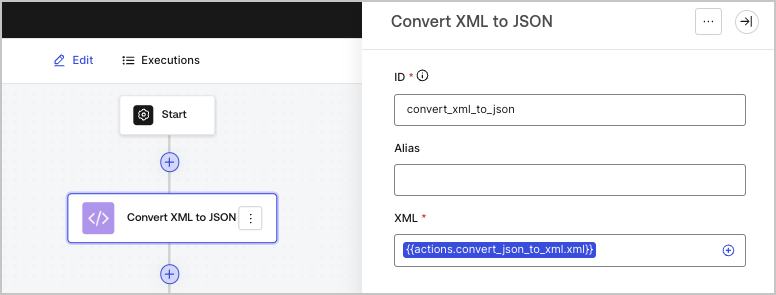
## Convert JSON to XML

Converts a JSON object to an XML string.

<Frame>
  <img src="https://mintcdn.com/docs-staging-quickstart-revamp/TO6FS4AgTzQGgpsU/images/cdy7uua7fh8z/3GW2EhBMIX3YDPaqc3rXrZ/7706a863700df51376d645a7d9292a27/convertjsontoxml.png?fit=max&auto=format&n=TO6FS4AgTzQGgpsU&q=85&s=e50ddd92401555da21cb4384a9691982" alt="" width="765" height="292" data-path="images/cdy7uua7fh8z/3GW2EhBMIX3YDPaqc3rXrZ/7706a863700df51376d645a7d9292a27/convertjsontoxml.png" />
</Frame>

### Input settings

<table class="table">
  <thead>
    <tr>
      <th><b>Parameter</b></th>
      <th><b>Description</b></th>
    </tr>
  </thead>

  <tbody>
    <tr>
      <td>JSON (required)</td>

      <td>
        The JSON object that will be converted to an XML string.
      </td>
    </tr>
  </tbody>
</table>

### Output object

<table class="table">
  <thead>
    <tr>
      <th><b>Property</b></th>
      <th><b>Type</b></th>
      <th><b>Description</b></th>
    </tr>
  </thead>

  <tbody>
    <tr>
      <td><code>xml</code></td>
      <td>String</td>
      <td>The converted XML string.</td>
    </tr>
  </tbody>
</table>

### Output object example

```json lines
{
  "xml": "<?xml version=\"1.0\" encoding=\"UTF-8\" standalone=\"yes\"?>\n<name>John Doe</name>"
}
```

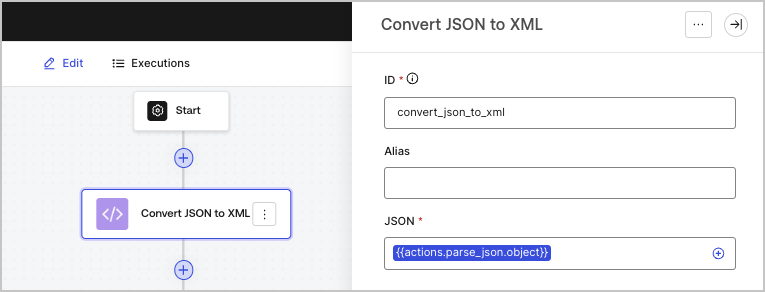
## Convert XML to JSON

Converts a XML string to a JSON object.

<Frame>
  <img src="https://mintcdn.com/docs-staging-quickstart-revamp/R8rXfTj95YBIEuC2/images/cdy7uua7fh8z/42fO7BelEN4bnlUj70WhV8/e53ada552f7cc05c192466db4777471a/covertxmltojson.png?fit=max&auto=format&n=R8rXfTj95YBIEuC2&q=85&s=b2d0631bc4060d9d23ae8559ac9e6519" alt="" width="776" height="295" data-path="images/cdy7uua7fh8z/42fO7BelEN4bnlUj70WhV8/e53ada552f7cc05c192466db4777471a/covertxmltojson.png" />
</Frame>

### Input settings

<table class="table">
  <thead>
    <tr>
      <th><b>Parameter</b></th>
      <th><b>Description</b></th>
    </tr>
  </thead>

  <tbody>
    <tr>
      <td>XML (required)</td>

      <td>
        The XML string that will be converted to a JSON object.
      </td>
    </tr>
  </tbody>
</table>

### Output object

<table class="table">
  <thead>
    <tr>
      <th><b>Property</b></th>
      <th><b>Type</b></th>
      <th><b>Description</b></th>
    </tr>
  </thead>

  <tbody>
    <tr>
      <td><code>object</code></td>
      <td>Object</td>
      <td>The converted JSON object.</td>
    </tr>
  </tbody>
</table>

### Output object example

```json lines
{
  "object": {
    "name": "John Doe"
  }
}
```

##