> ## Documentation Index
> Fetch the complete documentation index at: https://docs-staging-quickstart-revamp.mintlify.site/llms.txt
> Use this file to discover all available pages before exploring further.

> Learn how to configure your JSON flow actions to create JSON objects, parse JSON and convert JSON to string.

# JSON

This list of JSON actions allows you to create, parse, and convert JSON to strings.

## Create JSON object

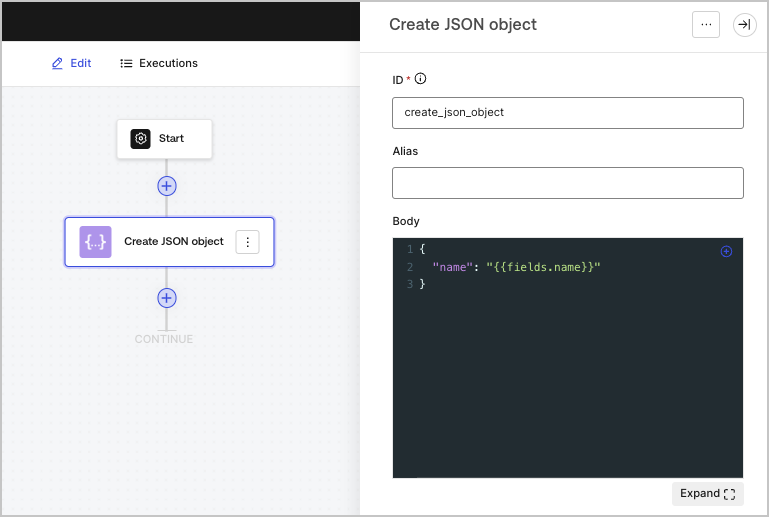
Creates a JSON object. This is especially useful to reuse its content in other actions of the flow.

<Frame>
  <img src="https://mintcdn.com/docs-staging-quickstart-revamp/fNPG21NgQLCA0axA/images/cdy7uua7fh8z/1zJEENRPI2uONuCApPY98p/f1fce88a42fb13fb9856c95c562bd506/createjsonobject.png?fit=max&auto=format&n=fNPG21NgQLCA0axA&q=85&s=6d51225e16c50997a7b2a6c9570b6bac" alt="" width="769" height="517" data-path="images/cdy7uua7fh8z/1zJEENRPI2uONuCApPY98p/f1fce88a42fb13fb9856c95c562bd506/createjsonobject.png" />
</Frame>

### Input settings

<table class="table">
  <thead>
    <tr>
      <th><b>Parameter</b></th>
      <th><b>Description</b></th>
    </tr>
  </thead>

  <tbody>
    <tr>
      <td>Body</td>

      <td>
        The JSON object.
      </td>
    </tr>
  </tbody>
</table>

### Output object

<table class="table">
  <thead>
    <tr>
      <th><b>Property</b></th>
      <th><b>Type</b></th>
      <th><b>Description</b></th>
    </tr>
  </thead>

  <tbody>
    <tr>
      <td><code>result</code></td>
      <td>Object</td>
      <td>The JSON object.</td>
    </tr>
  </tbody>
</table>

### Output object example

```json lines
{
	"result": {
		"name": "John Doe"
	}
}
```

## Parse JSON

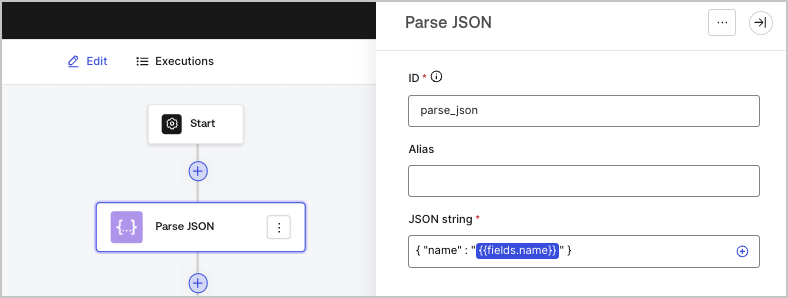
Parses a JSON object contained in a text string into a JSON object.

<Frame>
  <img src="https://mintcdn.com/docs-staging-quickstart-revamp/A1o6LcInzX_m5Dvq/images/cdy7uua7fh8z/5HjIGbBiWik1XozAZczxg5/fe2b0c6f7c657c4209921f1a0978e54b/parsejson.png?fit=max&auto=format&n=A1o6LcInzX_m5Dvq&q=85&s=53fd0c8a3b926d61687e4bb3f426b915" alt="" width="788" height="298" data-path="images/cdy7uua7fh8z/5HjIGbBiWik1XozAZczxg5/fe2b0c6f7c657c4209921f1a0978e54b/parsejson.png" />
</Frame>

### Input settings

<table class="table">
  <thead>
    <tr>
      <th><b>Parameter</b></th>
      <th><b>Description</b></th>
    </tr>
  </thead>

  <tbody>
    <tr>
      <td>JSON string (required)</td>

      <td>
        The JSON string.
      </td>
    </tr>
  </tbody>
</table>

### Output object

<table class="table">
  <thead>
    <tr>
      <th><b>Property</b></th>
      <th><b>Type</b></th>
      <th><b>Description</b></th>
    </tr>
  </thead>

  <tbody>
    <tr>
      <td><code>object</code></td>
      <td>Object</td>
      <td>The parsed JSON object.</td>
    </tr>
  </tbody>
</table>

### Output object example

```json lines
{
  "object": {
    "name": "John Doe"
  }
}
```

## Convert JSON to string

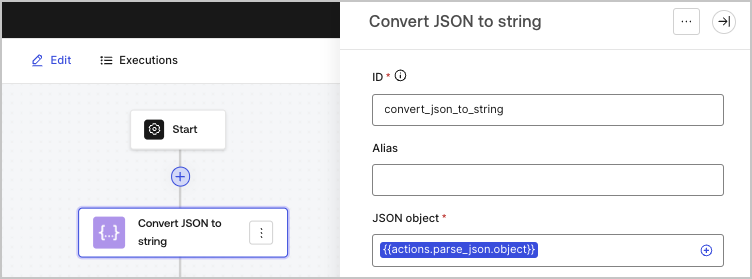
Converts a JSON object to a string.

<Frame>
  <img src="https://mintcdn.com/docs-staging-quickstart-revamp/R8rXfTj95YBIEuC2/images/cdy7uua7fh8z/45acWYMlTGc5ZWMzK5Cqqr/6974ea640a76d2d9cc5814225e52734a/convertjsontostring.png?fit=max&auto=format&n=R8rXfTj95YBIEuC2&q=85&s=de796efb2e51570f70e1f311ca48f7d2" alt="" width="752" height="279" data-path="images/cdy7uua7fh8z/45acWYMlTGc5ZWMzK5Cqqr/6974ea640a76d2d9cc5814225e52734a/convertjsontostring.png" />
</Frame>

### Input settings

<table class="table">
  <thead>
    <tr>
      <th><b>Parameter</b></th>
      <th><b>Description</b></th>
    </tr>
  </thead>

  <tbody>
    <tr>
      <td>JSON object (required)</td>

      <td>
        The JSON object that will be serialized to a string.
      </td>
    </tr>
  </tbody>
</table>

### Output object

<table class="table">
  <thead>
    <tr>
      <th><b>Property</b></th>
      <th><b>Type</b></th>
      <th><b>Description</b></th>
    </tr>
  </thead>

  <tbody>
    <tr>
      <td><code>json</code></td>
      <td>String</td>
      <td>The serialized JSON object.</td>
    </tr>
  </tbody>
</table>

### Output object example

```json lines
{
  "json": "{\"name\":\"John Doe\"}"
}
```