> ## Documentation Index
> Fetch the complete documentation index at: https://docs-staging-quickstart-revamp.mintlify.site/llms.txt
> Use this file to discover all available pages before exploring further.

> Learn how to configure your HTTP Request flow actions to send custom requests to external APIs or services.

# HTTP Request

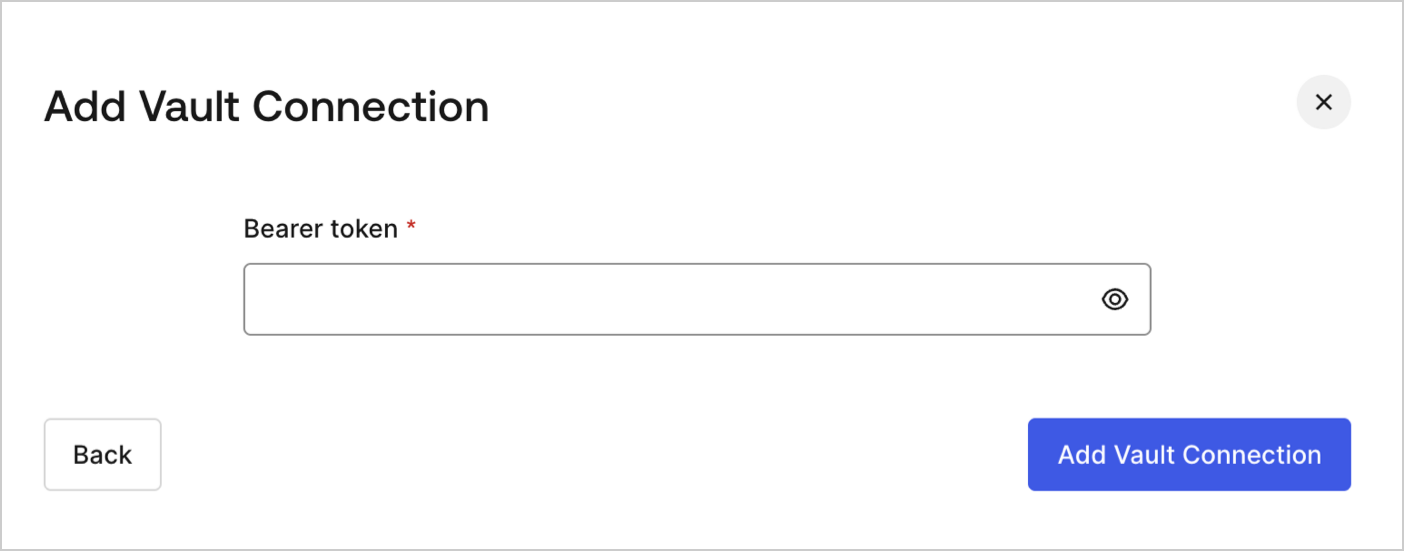
## Configure your Vault connection

To configure a Vault connection for your HTTP Request actions, you will need a **Bearer token:**

<Frame>
  <img src="https://mintcdn.com/docs-staging-quickstart-revamp/TO6FS4AgTzQGgpsU/images/cdy7uua7fh8z/3X0Qbe9o1bx8q9ctxYZTO2/468b4d9b81bad93ab38b0b01dc773788/http-vault-connection.png?fit=max&auto=format&n=TO6FS4AgTzQGgpsU&q=85&s=737ca6d058a4d72a5903b5960c60c523" alt="Dashboard > Actions > Forms > Flows > Actions > HTTP Request " data-og-width="1404" width="1404" data-og-height="551" height="551" data-path="images/cdy7uua7fh8z/3X0Qbe9o1bx8q9ctxYZTO2/468b4d9b81bad93ab38b0b01dc773788/http-vault-connection.png" data-optimize="true" data-opv="3" srcset="https://mintcdn.com/docs-staging-quickstart-revamp/TO6FS4AgTzQGgpsU/images/cdy7uua7fh8z/3X0Qbe9o1bx8q9ctxYZTO2/468b4d9b81bad93ab38b0b01dc773788/http-vault-connection.png?w=280&fit=max&auto=format&n=TO6FS4AgTzQGgpsU&q=85&s=c8c501e0b9376d303eb183ec5a13e0fa 280w, https://mintcdn.com/docs-staging-quickstart-revamp/TO6FS4AgTzQGgpsU/images/cdy7uua7fh8z/3X0Qbe9o1bx8q9ctxYZTO2/468b4d9b81bad93ab38b0b01dc773788/http-vault-connection.png?w=560&fit=max&auto=format&n=TO6FS4AgTzQGgpsU&q=85&s=3e6235d0239d4fcdbe0b6ddc6b5bbb7a 560w, https://mintcdn.com/docs-staging-quickstart-revamp/TO6FS4AgTzQGgpsU/images/cdy7uua7fh8z/3X0Qbe9o1bx8q9ctxYZTO2/468b4d9b81bad93ab38b0b01dc773788/http-vault-connection.png?w=840&fit=max&auto=format&n=TO6FS4AgTzQGgpsU&q=85&s=6082be3806c527373154beacd3b1f7da 840w, https://mintcdn.com/docs-staging-quickstart-revamp/TO6FS4AgTzQGgpsU/images/cdy7uua7fh8z/3X0Qbe9o1bx8q9ctxYZTO2/468b4d9b81bad93ab38b0b01dc773788/http-vault-connection.png?w=1100&fit=max&auto=format&n=TO6FS4AgTzQGgpsU&q=85&s=b671a464871cceb15d19e7b45212baaa 1100w, https://mintcdn.com/docs-staging-quickstart-revamp/TO6FS4AgTzQGgpsU/images/cdy7uua7fh8z/3X0Qbe9o1bx8q9ctxYZTO2/468b4d9b81bad93ab38b0b01dc773788/http-vault-connection.png?w=1650&fit=max&auto=format&n=TO6FS4AgTzQGgpsU&q=85&s=45cc8048ed8be3005b97312b3c3c7ad6 1650w, https://mintcdn.com/docs-staging-quickstart-revamp/TO6FS4AgTzQGgpsU/images/cdy7uua7fh8z/3X0Qbe9o1bx8q9ctxYZTO2/468b4d9b81bad93ab38b0b01dc773788/http-vault-connection.png?w=2500&fit=max&auto=format&n=TO6FS4AgTzQGgpsU&q=85&s=b920f874fed497e48ea7445d1a93cb35 2500w" />
</Frame>

## HTTP Request

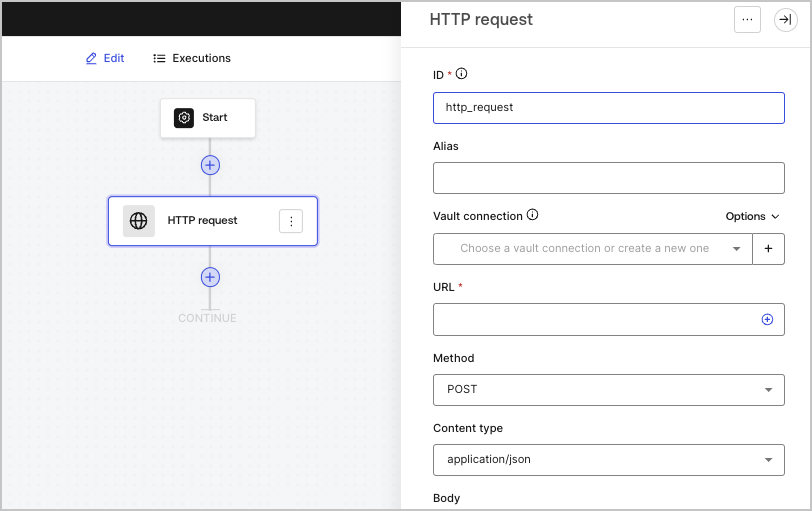
The HTTP request action lets you call an external API or service, and process the response.
<Frame>
  <img src="https://mintcdn.com/docs-staging-quickstart-revamp/0yzvW89mU3tfXF-c/images/cdy7uua7fh8z/6eIOv07XenyaazzKixigei/2e9efd632137829a8ddb03aacd3197df/http-request-action.png?fit=max&auto=format&n=0yzvW89mU3tfXF-c&q=85&s=ebcc781361670cc53bcce64d9ef94110" alt="" width="812" height="511" data-path="images/cdy7uua7fh8z/6eIOv07XenyaazzKixigei/2e9efd632137829a8ddb03aacd3197df/http-request-action.png" />
</Frame>

### Input settings

<table class="table">
  <thead>
    <tr>
      <th><b>Parameter</b></th>
      <th><b>Description</b></th>
    </tr>
  </thead>

  <tbody>
    <tr>
      <td>Method</td>

      <td>
        The HTTP method. Available values include:

        <ul>
          <li><code>GET</code></li>
          <li><code>POST</code></li>
          <li><code>PUT</code></li>
          <li><code>PATCH</code></li>
          <li><code>DELETE</code></li>
        </ul>
      </td>
    </tr>

    <tr>
      <td>Content type</td>

      <td>
        The <code>Content-Type</code> header. Available values include:

        <ul>
          <li><code>application/json</code></li>
          <li><code>application/x-www-form-urlenconded</code></li>
          <li><code>application/xml</code></li>
        </ul>
      </td>
    </tr>

    <tr>
      <td>Body</td>

      <td>
        The body of the request.
      </td>
    </tr>

    <tr>
      <td>Headers</td>

      <td>
        The headers of the request.
      </td>
    </tr>

    <tr>
      <td>URL params</td>

      <td>
        The URL parameters. These parameters will be automatically URL-encoded.
      </td>
    </tr>

    <tr>
      <td>Enable Basic Auth</td>

      <td>
        Enables authentication with username and password.
      </td>
    </tr>
  </tbody>
</table>

### Output object

<table class="table">
  <thead>
    <tr>
      <th><b>Property</b></th>
      <th><b>Type</b></th>
      <th><b>Description</b></th>
    </tr>
  </thead>

  <tbody>
    <tr>
      <td><code>headers</code></td>

      <td>
        Object
      </td>

      <td>
        The headers of the response.
      </td>
    </tr>

    <tr>
      <td><code>body</code></td>

      <td>
        Object
      </td>

      <td>
        The body of the response.
      </td>
    </tr>

    <tr>
      <td><code>status</code></td>

      <td>
        Number
      </td>

      <td>The status code of the response.</td>
    </tr>

    <tr>
      <td><code>success</code></td>

      <td>
        Boolean
      </td>

      <td>
        Returns <code>true</code> or <code>false</code> based on the <code>status</code> of the response.
      </td>
    </tr>
  </tbody>
</table>

### Output object example

```json lines
{
  "headers": {
    ...
  },
  "status": 200,
  "body": {
    ...
  },
  "success": true
}
```
