> ## Documentation Index
> Fetch the complete documentation index at: https://docs-staging-quickstart-revamp.mintlify.site/llms.txt
> Use this file to discover all available pages before exploring further.

> Learn how to configure your data verification flow actions to generate and verify one-time passwords (OTPs), and verify email addresses.

# Data verification

This list of data verification actions allows you to verify emails addresses and to generate and verify one-time passwords.

## Generate one-time password

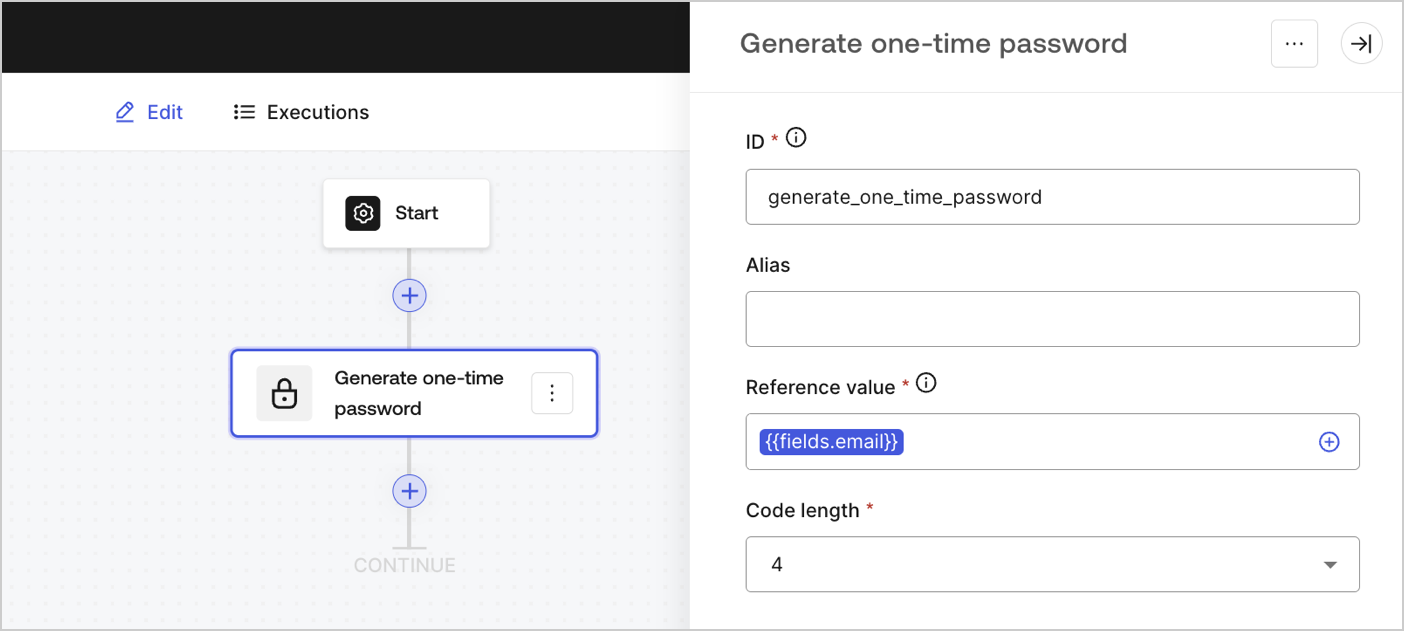
Generates a numeric code with a validity of 5 minutes that can be sent via email, SMS or any messaging apps.

<Frame>
  <img src="https://mintcdn.com/docs-staging-quickstart-revamp/fNPG21NgQLCA0axA/images/cdy7uua7fh8z/1h69FWzZwk9beKKjB4Cq38/16aa515e61cc6e9ebdfd0849201e3141/generate-one-time-password.png?fit=max&auto=format&n=fNPG21NgQLCA0axA&q=85&s=fa1c0290059dc1bb25f94cd1b9711cf9" alt="" width="1404" height="631" data-path="images/cdy7uua7fh8z/1h69FWzZwk9beKKjB4Cq38/16aa515e61cc6e9ebdfd0849201e3141/generate-one-time-password.png" />
</Frame>

### Input settings

<table class="table">
  <thead>
    <tr>
      <th><b>Parameter</b></th>
      <th><b>Description</b></th>
    </tr>
  </thead>

  <tbody>
    <tr>
      <td>
        Reference value (required)
      </td>

      <td>
        You can bind your generated code to a phone number, email address or any value.
      </td>
    </tr>

    <tr>
      <td>
        Code length (required)
      </td>

      <td>
        The number of digits of the generated code.
      </td>
    </tr>
  </tbody>
</table>

### Output object

<table class="table">
  <thead>
    <tr>
      <th><b>Property</b></th>
      <th><b>Type</b></th>
      <th><b>Description</b></th>
    </tr>
  </thead>

  <tbody>
    <tr>
      <td><code>code</code></td>
      <td>String</td>
      <td>The generated code</td>
    </tr>
  </tbody>
</table>

### Output object example

```json lines
{
  "code": "███",
}
```

## Verify one-time password

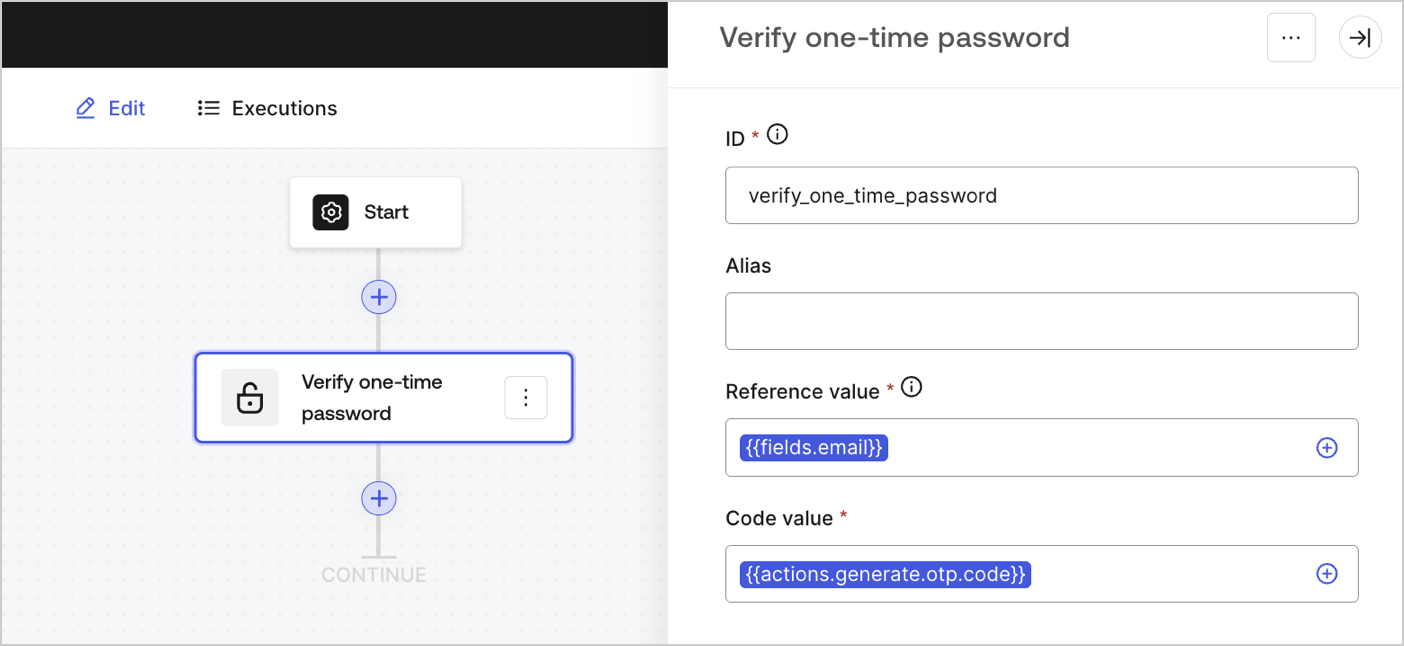
Verifies if the provided one-time password code is valid or not.

<Frame>
  <img src="https://mintcdn.com/docs-staging-quickstart-revamp/d9I4PO9-WombE4fE/images/cdy7uua7fh8z/3bkT8QDN4dcl0YHTrSOIGj/9698a07f55353a11ca98164377cd4217/verify-otp.png?fit=max&auto=format&n=d9I4PO9-WombE4fE&q=85&s=d36d57235f1d8c3b403df39b281b0160" alt="" width="1404" height="646" data-path="images/cdy7uua7fh8z/3bkT8QDN4dcl0YHTrSOIGj/9698a07f55353a11ca98164377cd4217/verify-otp.png" />
</Frame>

### Input settings

<table class="table">
  <thead>
    <tr>
      <th><b>Parameter</b></th>
      <th><b>Description</b></th>
    </tr>
  </thead>

  <tbody>
    <tr>
      <td>
        Reference value (required)
      </td>

      <td>
        Use the same reference value configured in the Generate one-time password action.
      </td>
    </tr>

    <tr>
      <td>
        Code length (required)
      </td>

      <td>
        The number of digits of the generated code.
      </td>
    </tr>
  </tbody>
</table>

### Output object

<table class="table">
  <thead>
    <tr>
      <th><b>Property</b></th>
      <th><b>Type</b></th>
      <th><b>Description</b></th>
    </tr>
  </thead>

  <tbody>
    <tr>
      <td><code>valid</code></td>
      <td>Boolean</td>
      <td>Indicates if the provided code is valid or not returning a <code>true</code> or <code>false</code> value.</td>
    </tr>

    <tr>
      <td>
        <code>result</code>
      </td>

      <td>
        String
      </td>

      <td>
        Returns different result codes based on the provided code:

        <ul>
          <li>
            <code>MISSING:</code>
            The provided code does not exist.
          </li>

          <li>
            <code>EXPIRED:</code> The provided code has expired.
          </li>

          <li>
            <code>VALID:</code> The provided code is valid.
          </li>

          <li>
            <code>UNEQUAL:</code> The provided code is not valid.
          </li>
        </ul>
      </td>
    </tr>
  </tbody>
</table>

### Output object examples

```json lines
{
  "valid": false,
  "result": "UNEQUAL"
}
```

```json lines
{
  "valid": true
}
```

## Verify email address

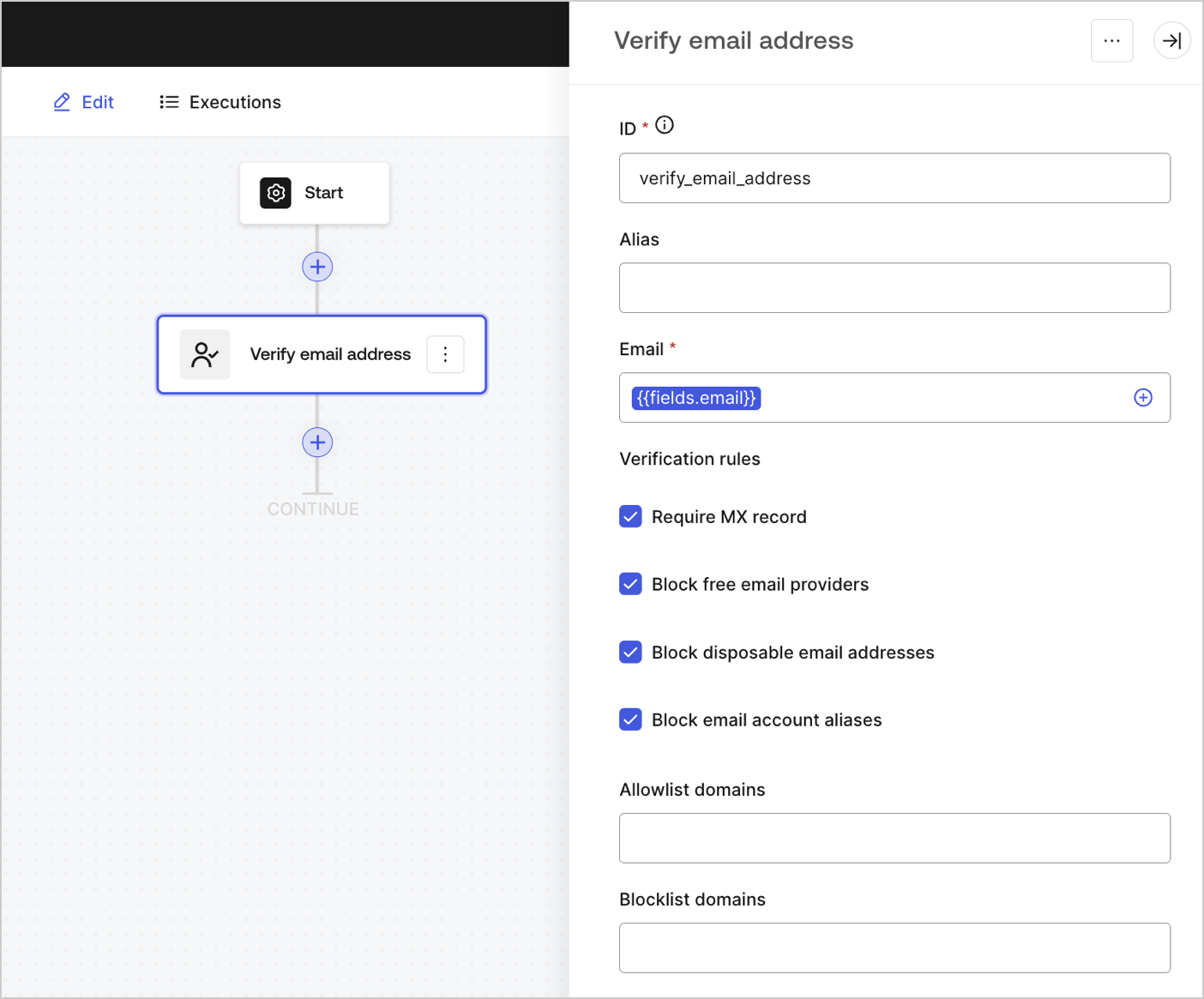
Performs a number of selected verification rules against a provided email address.

<Frame>
  <img src="https://mintcdn.com/docs-staging-quickstart-revamp/KCEsvkqT5-VRQ297/images/cdy7uua7fh8z/6qkqny1hhObFalHwdEG342/1a2e18195b29102c3f68744f42277917/verify-email.png?fit=max&auto=format&n=KCEsvkqT5-VRQ297&q=85&s=e6d5bbbd586cb7147c22db9ebfb75b98" alt="" width="1404" height="1165" data-path="images/cdy7uua7fh8z/6qkqny1hhObFalHwdEG342/1a2e18195b29102c3f68744f42277917/verify-email.png" />
</Frame>

### Input settings

<table class="table">
  <thead>
    <tr>
      <th><b>Parameter</b></th>
      <th><b>Description</b></th>
    </tr>
  </thead>

  <tbody>
    <tr>
      <td>
        Email (required)
      </td>

      <td>
        email address to verify.
      </td>
    </tr>

    <tr>
      <td>
        Require MX record
      </td>

      <td>
        Require MX records. When a domain lacks MX records, email servers do not know where to send emails for that domain.
      </td>
    </tr>

    <tr>
      <td>
        Block free email providers
      </td>

      <td>
        Block free email providers like @gmail.com, @hotmail.com, etc.
      </td>
    </tr>

    <tr>
      <td>Block disposable email providers</td>
      <td>Block disposable emails like @mailnator.com, @maildrop.cc, etc.</td>
    </tr>

    <tr>
      <td>Block email account aliases</td>
      <td>Block email with aliases like `jane.doe+alias@gmail.com`</td>
    </tr>

    <tr>
      <td>Allowlist domains</td>
      <td>Allow emails only from approved domains in your list.</td>
    </tr>

    <tr>
      <td>Blocklist domains</td>
      <td>Block specific email domains.</td>
    </tr>
  </tbody>
</table>

### Output object

<table class="table">
  <thead>
    <tr>
      <th><b>Property</b></th>
      <th><b>Type</b></th>
      <th><b>Description</b></th>
    </tr>
  </thead>

  <tbody>
    <tr>
      <td><code>valid</code></td>
      <td>Boolean</td>
      <td>Returns <code>true</code> or <code>false</code> depending on whether or not the email has met the verification rules.</td>
    </tr>

    <tr>
      <td>
        <code>cause</code>
      </td>

      <td>String</td>

      <td>
        If the valid property is

        <code>
          false
        </code>

        , returns a reference of the first rule that the email did not meet:

        <ul>
          <li>
            <code>MISSING\_MX\_RECORD:</code> The email domain does not have MX records.
          </li>

          <li> <code>FREE\_EMAIL:</code> The email domain is a free email provider.</li>
          <li> <code>DISPOSABLE\_EMAIL:</code> The email is a disposable email address.</li>
          <li> <code>BLOCKLISTED:</code> The email domain is included in the Blocklist domains setting.</li>
          <li> <code>NOT\_ALLOWED:</code> The email domain is not included in the Allowlist domains setting.</li>
        </ul>
      </td>
    </tr>
  </tbody>
</table>

### Output object example

```json lines
{
  "valid": false,
  "cause": "FREE_EMAIL"
}
```

```json lines
{
  "valid": true,
  "cause": null
}
```