> ## Documentation Index
> Fetch the complete documentation index at: https://docs-staging-quickstart-revamp.mintlify.site/llms.txt
> Use this file to discover all available pages before exploring further.

> Configure an update policy form using Forms for Actions

# Use Cases: Configure an update policy form using Forms

<Card title="Before you start">
  1. Create a [Machine-to-Machine Application](/docs/get-started/auth0-overview/create-applications/machine-to-machine-apps) with the following scopes enabled:

  * `read:users`
  * `update:users`
  * `create:users`
  * `read:users_app_metadata`
  * `update:users_app_metadata`
  * `create:users_app_metadata`

  2. Add a [Vault connection](/docs/customize/forms/vault) using the M2M application credentials.
</Card>

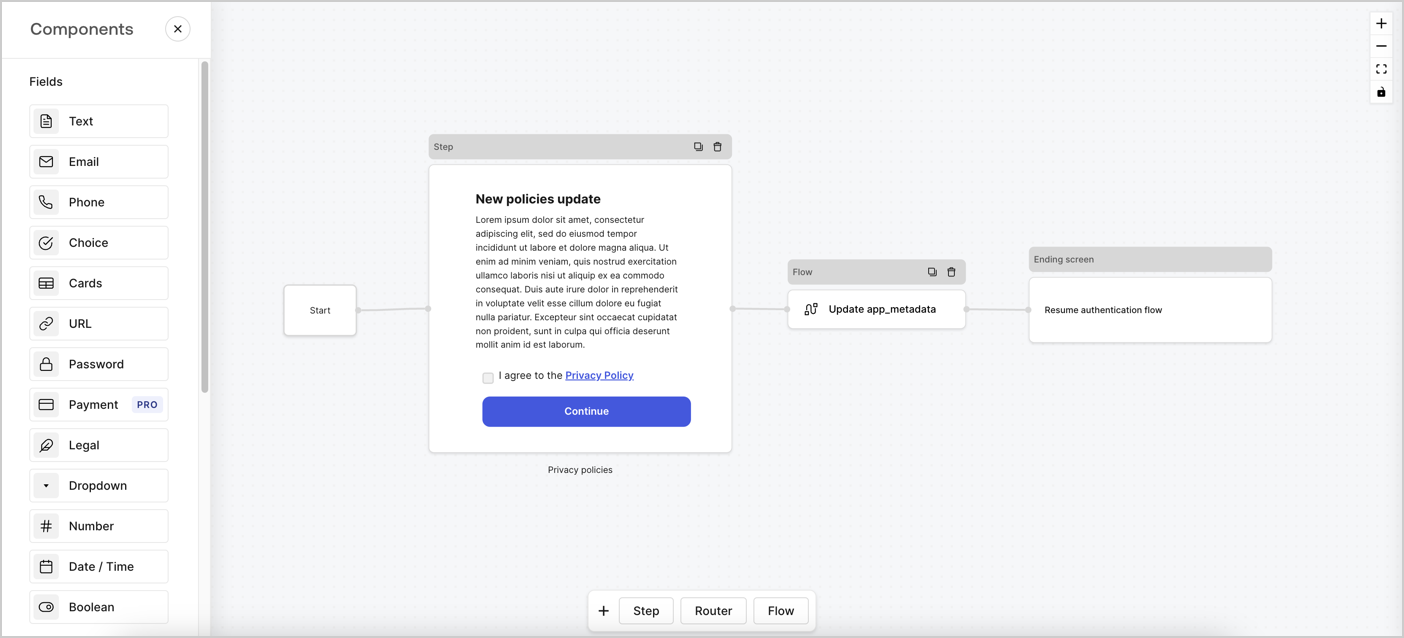
Forms for Actions allows you to create custom privacy policies flows and store the consent under the `app_metadata` object.
<Frame>
  <img src="https://mintcdn.com/docs-staging-quickstart-revamp/0yzvW89mU3tfXF-c/images/cdy7uua7fh8z/6i68dMvHDTijfRmSgN1x8Q/ad900e7d4c0fb34645921435472b8684/privavy-policy-form.png?fit=max&auto=format&n=0yzvW89mU3tfXF-c&q=85&s=92c2fe824135a012c24b0a605f0cc7e2" alt="Dashboard > Actions > Forms > Privacy policy use case" data-og-width="1404" width="1404" data-og-height="638" height="638" data-path="images/cdy7uua7fh8z/6i68dMvHDTijfRmSgN1x8Q/ad900e7d4c0fb34645921435472b8684/privavy-policy-form.png" data-optimize="true" data-opv="3" srcset="https://mintcdn.com/docs-staging-quickstart-revamp/0yzvW89mU3tfXF-c/images/cdy7uua7fh8z/6i68dMvHDTijfRmSgN1x8Q/ad900e7d4c0fb34645921435472b8684/privavy-policy-form.png?w=280&fit=max&auto=format&n=0yzvW89mU3tfXF-c&q=85&s=aed01c470fa95b35ea354312ef5584c5 280w, https://mintcdn.com/docs-staging-quickstart-revamp/0yzvW89mU3tfXF-c/images/cdy7uua7fh8z/6i68dMvHDTijfRmSgN1x8Q/ad900e7d4c0fb34645921435472b8684/privavy-policy-form.png?w=560&fit=max&auto=format&n=0yzvW89mU3tfXF-c&q=85&s=8f0964b72e460cb7614790ffa61d6099 560w, https://mintcdn.com/docs-staging-quickstart-revamp/0yzvW89mU3tfXF-c/images/cdy7uua7fh8z/6i68dMvHDTijfRmSgN1x8Q/ad900e7d4c0fb34645921435472b8684/privavy-policy-form.png?w=840&fit=max&auto=format&n=0yzvW89mU3tfXF-c&q=85&s=77199a45ebee405f89b40feea0a295e8 840w, https://mintcdn.com/docs-staging-quickstart-revamp/0yzvW89mU3tfXF-c/images/cdy7uua7fh8z/6i68dMvHDTijfRmSgN1x8Q/ad900e7d4c0fb34645921435472b8684/privavy-policy-form.png?w=1100&fit=max&auto=format&n=0yzvW89mU3tfXF-c&q=85&s=76ea2709f5d5f94849acfab3249ecd1d 1100w, https://mintcdn.com/docs-staging-quickstart-revamp/0yzvW89mU3tfXF-c/images/cdy7uua7fh8z/6i68dMvHDTijfRmSgN1x8Q/ad900e7d4c0fb34645921435472b8684/privavy-policy-form.png?w=1650&fit=max&auto=format&n=0yzvW89mU3tfXF-c&q=85&s=c0c1cf7387b7820f66b515360403645a 1650w, https://mintcdn.com/docs-staging-quickstart-revamp/0yzvW89mU3tfXF-c/images/cdy7uua7fh8z/6i68dMvHDTijfRmSgN1x8Q/ad900e7d4c0fb34645921435472b8684/privavy-policy-form.png?w=2500&fit=max&auto=format&n=0yzvW89mU3tfXF-c&q=85&s=1046f1cf9c4de0e562fa3e1c46bd9de4 2500w" />
</Frame>

The sections below outline how you can create an Update Policy form using nodes and flows, along with steps for adding your form to a [Post Login](/docs/customize/actions/explore-triggers/signup-and-login-triggers/login-trigger) Action.

## Create a form from scratch

Follow these steps to create a form to gather information:

1. Open the Form editor by selecting **Auth0 Dashboard > Actions > Forms.**
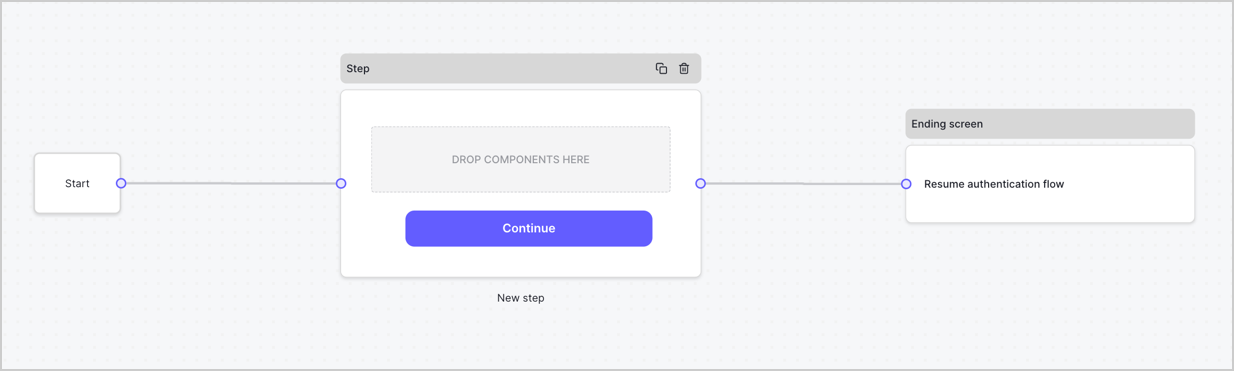
2. Select **Create Form** > **Start from scratch**.

By default, a new form contains a Start node, a Step node, and an Ending screen node.
<Frame>
  <img src="https://mintcdn.com/docs-staging-quickstart-revamp/95MUIRU4PPeO3xcE/images/cdy7uua7fh8z/2TZ9jSjgEcARFpULI6hz4R/a4319a1bd482f2ee5cc23100fdb2f42c/New-form-Forms-for-action-use-case.png?fit=max&auto=format&n=95MUIRU4PPeO3xcE&q=85&s=a2424d88c261a1bb4b5aab92a4bd1c74" alt="Dashboard > Forms > Use Cases > Form" data-og-width="1234" width="1234" data-og-height="371" height="371" data-path="images/cdy7uua7fh8z/2TZ9jSjgEcARFpULI6hz4R/a4319a1bd482f2ee5cc23100fdb2f42c/New-form-Forms-for-action-use-case.png" data-optimize="true" data-opv="3" srcset="https://mintcdn.com/docs-staging-quickstart-revamp/95MUIRU4PPeO3xcE/images/cdy7uua7fh8z/2TZ9jSjgEcARFpULI6hz4R/a4319a1bd482f2ee5cc23100fdb2f42c/New-form-Forms-for-action-use-case.png?w=280&fit=max&auto=format&n=95MUIRU4PPeO3xcE&q=85&s=efa304aebb98545c8be20e1c8386b360 280w, https://mintcdn.com/docs-staging-quickstart-revamp/95MUIRU4PPeO3xcE/images/cdy7uua7fh8z/2TZ9jSjgEcARFpULI6hz4R/a4319a1bd482f2ee5cc23100fdb2f42c/New-form-Forms-for-action-use-case.png?w=560&fit=max&auto=format&n=95MUIRU4PPeO3xcE&q=85&s=61d8422b9a9d4c58f7eec69ca4c71eab 560w, https://mintcdn.com/docs-staging-quickstart-revamp/95MUIRU4PPeO3xcE/images/cdy7uua7fh8z/2TZ9jSjgEcARFpULI6hz4R/a4319a1bd482f2ee5cc23100fdb2f42c/New-form-Forms-for-action-use-case.png?w=840&fit=max&auto=format&n=95MUIRU4PPeO3xcE&q=85&s=be562a29523f4f9d076d36d429f57104 840w, https://mintcdn.com/docs-staging-quickstart-revamp/95MUIRU4PPeO3xcE/images/cdy7uua7fh8z/2TZ9jSjgEcARFpULI6hz4R/a4319a1bd482f2ee5cc23100fdb2f42c/New-form-Forms-for-action-use-case.png?w=1100&fit=max&auto=format&n=95MUIRU4PPeO3xcE&q=85&s=f583982cde19603ca5589b8fb7474cc5 1100w, https://mintcdn.com/docs-staging-quickstart-revamp/95MUIRU4PPeO3xcE/images/cdy7uua7fh8z/2TZ9jSjgEcARFpULI6hz4R/a4319a1bd482f2ee5cc23100fdb2f42c/New-form-Forms-for-action-use-case.png?w=1650&fit=max&auto=format&n=95MUIRU4PPeO3xcE&q=85&s=d6a5fc151e577d15712088a13bcd79cb 1650w, https://mintcdn.com/docs-staging-quickstart-revamp/95MUIRU4PPeO3xcE/images/cdy7uua7fh8z/2TZ9jSjgEcARFpULI6hz4R/a4319a1bd482f2ee5cc23100fdb2f42c/New-form-Forms-for-action-use-case.png?w=2500&fit=max&auto=format&n=95MUIRU4PPeO3xcE&q=85&s=3eefd03de3bcdb84150e7509efb3136a 2500w" />
</Frame>

### Configure the Step node

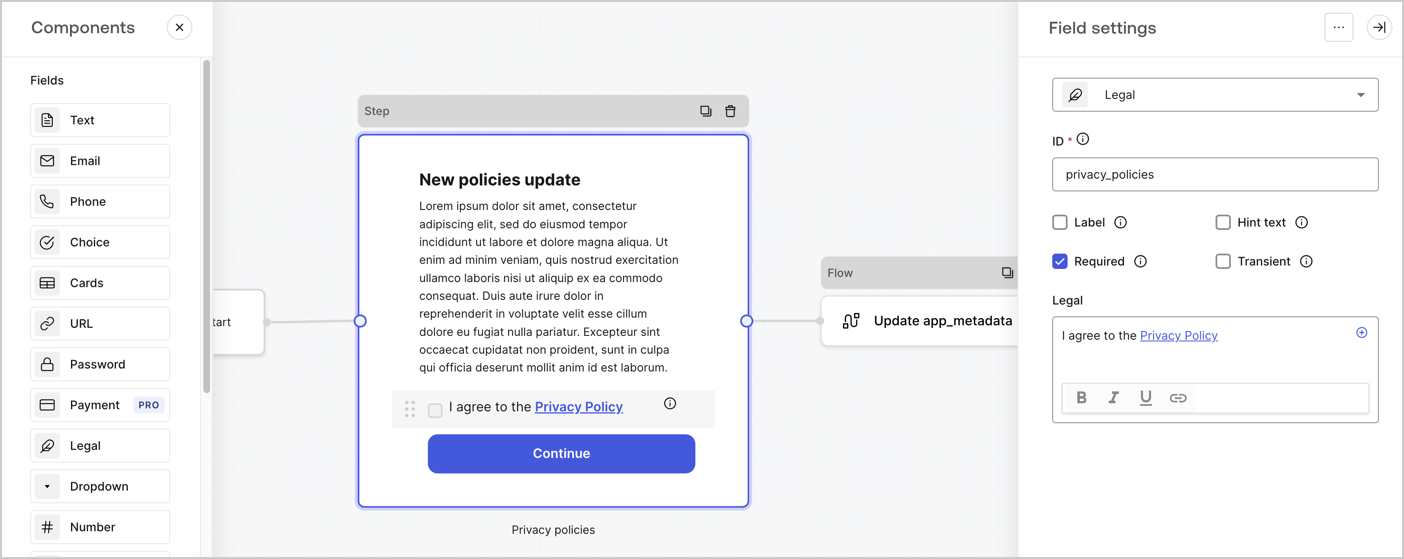
The Step node is the graphical interface visible to users. Add [Fields](/docs/customize/forms/nodes-and-components) to the Step node to collect the new agreement acceptance value by following these steps:

1. Drag a **Rich text** field from the **Components menu** into the **Step** node.

   * **Rich text**: Enter a description of your privacy policies updates.
   * Select **Save**.
2. Drag a **Legal** field into the **Step** node.

   * **ID**: Enter `privacy_policies`.
   * **Required**: Enable the checkbox.
   * **Legal**: Enter `I agree to the Privacy Policy`.
   * Select **Save**.
3. Select **Publish** to save.
<Frame>
  <img src="https://mintcdn.com/docs-staging-quickstart-revamp/A1o6LcInzX_m5Dvq/images/cdy7uua7fh8z/59zFFjQjAnjogkc2QGIqqJ/0ad66b1b636544122aa4e65968b76c2c/privacy-policy-step-node.png?fit=max&auto=format&n=A1o6LcInzX_m5Dvq&q=85&s=94a2917edf1989ca666ca82d8f96e954" alt="Dashboard > Actions > Forms > Use case privacy policy step node" data-og-width="1404" width="1404" data-og-height="559" height="559" data-path="images/cdy7uua7fh8z/59zFFjQjAnjogkc2QGIqqJ/0ad66b1b636544122aa4e65968b76c2c/privacy-policy-step-node.png" data-optimize="true" data-opv="3" srcset="https://mintcdn.com/docs-staging-quickstart-revamp/A1o6LcInzX_m5Dvq/images/cdy7uua7fh8z/59zFFjQjAnjogkc2QGIqqJ/0ad66b1b636544122aa4e65968b76c2c/privacy-policy-step-node.png?w=280&fit=max&auto=format&n=A1o6LcInzX_m5Dvq&q=85&s=0874b8fbae329723bf30145861450be0 280w, https://mintcdn.com/docs-staging-quickstart-revamp/A1o6LcInzX_m5Dvq/images/cdy7uua7fh8z/59zFFjQjAnjogkc2QGIqqJ/0ad66b1b636544122aa4e65968b76c2c/privacy-policy-step-node.png?w=560&fit=max&auto=format&n=A1o6LcInzX_m5Dvq&q=85&s=13d5536d6b46cb56def8a0d71176c239 560w, https://mintcdn.com/docs-staging-quickstart-revamp/A1o6LcInzX_m5Dvq/images/cdy7uua7fh8z/59zFFjQjAnjogkc2QGIqqJ/0ad66b1b636544122aa4e65968b76c2c/privacy-policy-step-node.png?w=840&fit=max&auto=format&n=A1o6LcInzX_m5Dvq&q=85&s=d3325985876b5e00931b48dd871d301c 840w, https://mintcdn.com/docs-staging-quickstart-revamp/A1o6LcInzX_m5Dvq/images/cdy7uua7fh8z/59zFFjQjAnjogkc2QGIqqJ/0ad66b1b636544122aa4e65968b76c2c/privacy-policy-step-node.png?w=1100&fit=max&auto=format&n=A1o6LcInzX_m5Dvq&q=85&s=5e4a210cf94c745c956c74206091fd80 1100w, https://mintcdn.com/docs-staging-quickstart-revamp/A1o6LcInzX_m5Dvq/images/cdy7uua7fh8z/59zFFjQjAnjogkc2QGIqqJ/0ad66b1b636544122aa4e65968b76c2c/privacy-policy-step-node.png?w=1650&fit=max&auto=format&n=A1o6LcInzX_m5Dvq&q=85&s=4e65670045c2b8e66396ab06cd335a46 1650w, https://mintcdn.com/docs-staging-quickstart-revamp/A1o6LcInzX_m5Dvq/images/cdy7uua7fh8z/59zFFjQjAnjogkc2QGIqqJ/0ad66b1b636544122aa4e65968b76c2c/privacy-policy-step-node.png?w=2500&fit=max&auto=format&n=A1o6LcInzX_m5Dvq&q=85&s=757bb80d786467e6e2711487811162b2 2500w" />
</Frame>

### Configure the Flow node

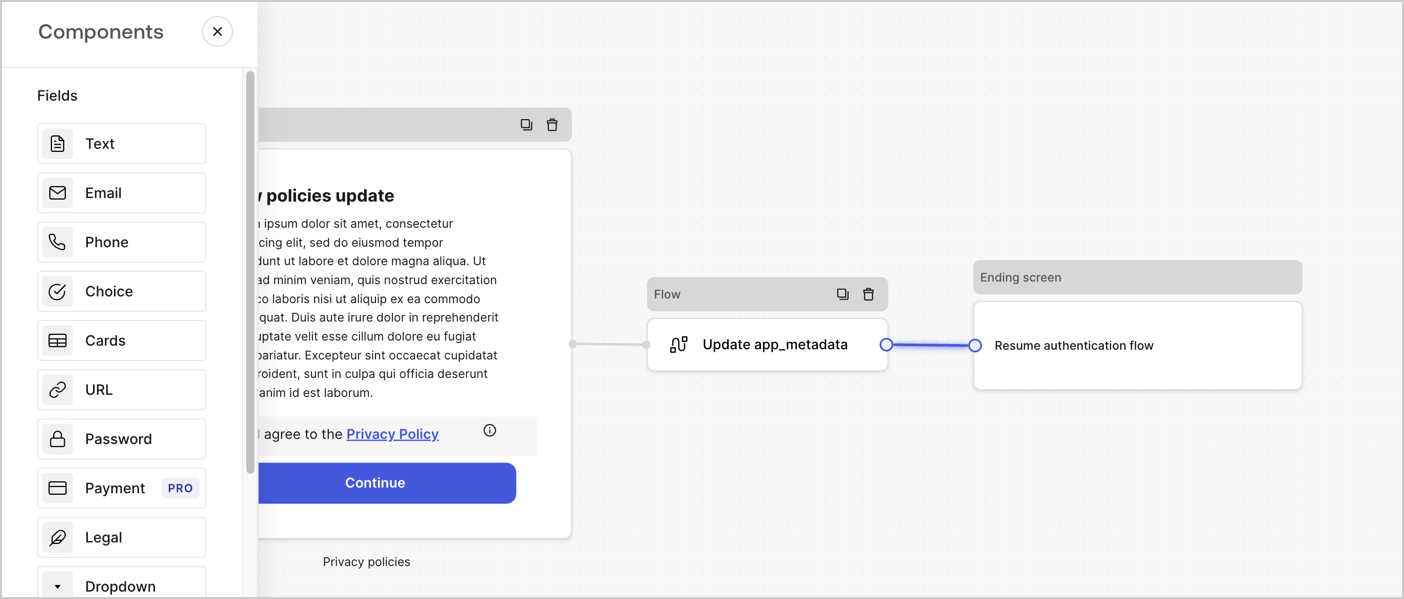
Add a **Flow** node after the **Step** node to update the `app_metadata` and resume the authentication flow by following these steps:

1. Select **Flow** from the bottom of the Form editor.
2. Remove the existing link between the **Step** and **Ending Screen** nodes.
3. Select the new **Flow** > **Click to add a flow** > **Create a new flow.**

   * Enter `Update app_metadata` in the **Name** field.
   * Select **Create**.
   * Select **Save**.
4. Link the **Flow** node to the **Step** and **Ending Screen** nodes as pictured below.
5. Select **Publish** to save.
<Frame>
  <img src="https://mintcdn.com/docs-staging-quickstart-revamp/0yzvW89mU3tfXF-c/images/cdy7uua7fh8z/6YIkzm7SrpM9LW76AXuRzh/353c518fe82bbaa440836da1d83596d6/link-policies.png?fit=max&auto=format&n=0yzvW89mU3tfXF-c&q=85&s=d15bb7d7b4f717bc16e752fff48fb365" alt="Dashboard > Actions > Forms > Form" data-og-width="1404" width="1404" data-og-height="599" height="599" data-path="images/cdy7uua7fh8z/6YIkzm7SrpM9LW76AXuRzh/353c518fe82bbaa440836da1d83596d6/link-policies.png" data-optimize="true" data-opv="3" srcset="https://mintcdn.com/docs-staging-quickstart-revamp/0yzvW89mU3tfXF-c/images/cdy7uua7fh8z/6YIkzm7SrpM9LW76AXuRzh/353c518fe82bbaa440836da1d83596d6/link-policies.png?w=280&fit=max&auto=format&n=0yzvW89mU3tfXF-c&q=85&s=1c81ffe3749633c41576b2a345a0e8dc 280w, https://mintcdn.com/docs-staging-quickstart-revamp/0yzvW89mU3tfXF-c/images/cdy7uua7fh8z/6YIkzm7SrpM9LW76AXuRzh/353c518fe82bbaa440836da1d83596d6/link-policies.png?w=560&fit=max&auto=format&n=0yzvW89mU3tfXF-c&q=85&s=dc13c1fb6b6ffd9aad0b29316b109927 560w, https://mintcdn.com/docs-staging-quickstart-revamp/0yzvW89mU3tfXF-c/images/cdy7uua7fh8z/6YIkzm7SrpM9LW76AXuRzh/353c518fe82bbaa440836da1d83596d6/link-policies.png?w=840&fit=max&auto=format&n=0yzvW89mU3tfXF-c&q=85&s=521d55f5c67bc6aba5c3f5397d795d91 840w, https://mintcdn.com/docs-staging-quickstart-revamp/0yzvW89mU3tfXF-c/images/cdy7uua7fh8z/6YIkzm7SrpM9LW76AXuRzh/353c518fe82bbaa440836da1d83596d6/link-policies.png?w=1100&fit=max&auto=format&n=0yzvW89mU3tfXF-c&q=85&s=4a9144d4ca893a21dd25a47022d0b774 1100w, https://mintcdn.com/docs-staging-quickstart-revamp/0yzvW89mU3tfXF-c/images/cdy7uua7fh8z/6YIkzm7SrpM9LW76AXuRzh/353c518fe82bbaa440836da1d83596d6/link-policies.png?w=1650&fit=max&auto=format&n=0yzvW89mU3tfXF-c&q=85&s=47b2a9f871f6dabeaf518fdd560a93cb 1650w, https://mintcdn.com/docs-staging-quickstart-revamp/0yzvW89mU3tfXF-c/images/cdy7uua7fh8z/6YIkzm7SrpM9LW76AXuRzh/353c518fe82bbaa440836da1d83596d6/link-policies.png?w=2500&fit=max&auto=format&n=0yzvW89mU3tfXF-c&q=85&s=d05e43233f22b0c6f383b36b66b4c5e1 2500w" />
</Frame>

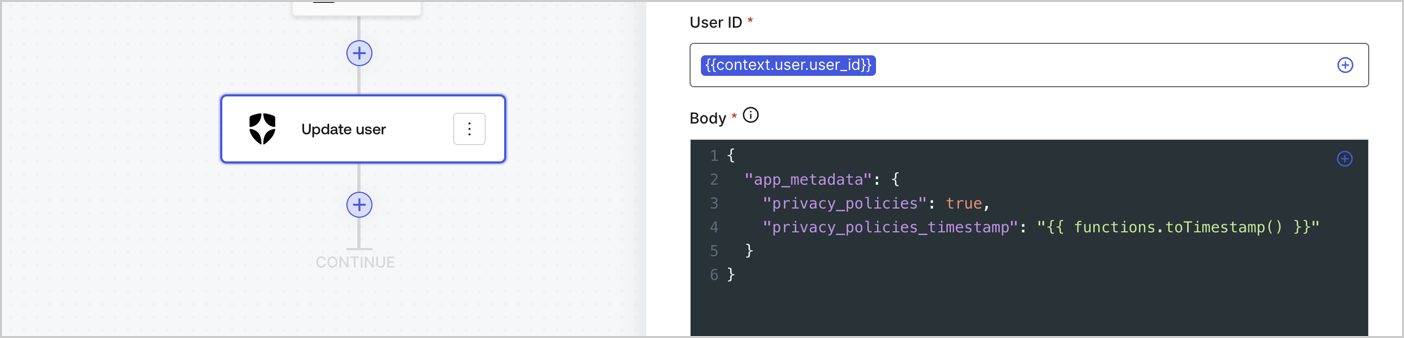
Add an Auth0 Update user action to the flow by following these steps:

1. Select the **Flow** **Update app\_metadata** > **Edit flow** to open the Flow editor in a new tab.
2. Below the StartAction, select the **+** icon to add an **Update user** action. Complete the fields below, then select **Save** to continue.

   * **Connection**: Select from the dropdown the Vault connection to your M2M application.

   * **User ID**: Enter `{{context.user.user_id}}`.

   * **Body**: Copy and paste the following code to update the app\_metadata with the privacy\_policies and privacy\_policies\_timestamp properties.

     ```text lines
     {
       "app_metadata": {
         "privacy_policies": true,
         "privacy_policies_timestamp": "{{ functions.toTimestamp() }}"
       }
     }
     ```

   * Select **Save**.
3. Select **Publish** to save.
<Frame>
  <img src="https://mintcdn.com/docs-staging-quickstart-revamp/cn1eMmAiJHX3hF4T/images/cdy7uua7fh8z/CvMNIwWrOUwaFW4X3G28p/1fb70ae57a20749d9ffaaba8dc0b7e26/update-user-privacy.png?fit=max&auto=format&n=cn1eMmAiJHX3hF4T&q=85&s=599c8f4a530a85cbea2f6515188dc953" alt="Dashboard > Actions > Forms > User case privacy policy code" data-og-width="1404" width="1404" data-og-height="338" height="338" data-path="images/cdy7uua7fh8z/CvMNIwWrOUwaFW4X3G28p/1fb70ae57a20749d9ffaaba8dc0b7e26/update-user-privacy.png" data-optimize="true" data-opv="3" srcset="https://mintcdn.com/docs-staging-quickstart-revamp/cn1eMmAiJHX3hF4T/images/cdy7uua7fh8z/CvMNIwWrOUwaFW4X3G28p/1fb70ae57a20749d9ffaaba8dc0b7e26/update-user-privacy.png?w=280&fit=max&auto=format&n=cn1eMmAiJHX3hF4T&q=85&s=462a37d911a83014c2c1289e29d33f77 280w, https://mintcdn.com/docs-staging-quickstart-revamp/cn1eMmAiJHX3hF4T/images/cdy7uua7fh8z/CvMNIwWrOUwaFW4X3G28p/1fb70ae57a20749d9ffaaba8dc0b7e26/update-user-privacy.png?w=560&fit=max&auto=format&n=cn1eMmAiJHX3hF4T&q=85&s=06c0a4f44aa6e6cb4540d3ba1daf112a 560w, https://mintcdn.com/docs-staging-quickstart-revamp/cn1eMmAiJHX3hF4T/images/cdy7uua7fh8z/CvMNIwWrOUwaFW4X3G28p/1fb70ae57a20749d9ffaaba8dc0b7e26/update-user-privacy.png?w=840&fit=max&auto=format&n=cn1eMmAiJHX3hF4T&q=85&s=a6bec6dc9b8d84673bc637935bd6c554 840w, https://mintcdn.com/docs-staging-quickstart-revamp/cn1eMmAiJHX3hF4T/images/cdy7uua7fh8z/CvMNIwWrOUwaFW4X3G28p/1fb70ae57a20749d9ffaaba8dc0b7e26/update-user-privacy.png?w=1100&fit=max&auto=format&n=cn1eMmAiJHX3hF4T&q=85&s=8c6ab283d4809ad9cf3ca93529bc830b 1100w, https://mintcdn.com/docs-staging-quickstart-revamp/cn1eMmAiJHX3hF4T/images/cdy7uua7fh8z/CvMNIwWrOUwaFW4X3G28p/1fb70ae57a20749d9ffaaba8dc0b7e26/update-user-privacy.png?w=1650&fit=max&auto=format&n=cn1eMmAiJHX3hF4T&q=85&s=e0d7a25b81113d60feb6c695f1538109 1650w, https://mintcdn.com/docs-staging-quickstart-revamp/cn1eMmAiJHX3hF4T/images/cdy7uua7fh8z/CvMNIwWrOUwaFW4X3G28p/1fb70ae57a20749d9ffaaba8dc0b7e26/update-user-privacy.png?w=2500&fit=max&auto=format&n=cn1eMmAiJHX3hF4T&q=85&s=16dd62f650ad361d3450d3956103e4b1 2500w" />
</Frame>

<Callout icon="file-lines" color="#0EA5E9" iconType="regular">
  The flow **Update app\_metadata** adds a `privacy_policies true` value to the app`_metadata` object and also generates a timestamp with a [helper function.](/docs/customize/forms/variables)
</Callout>

## Retrieve the form render code

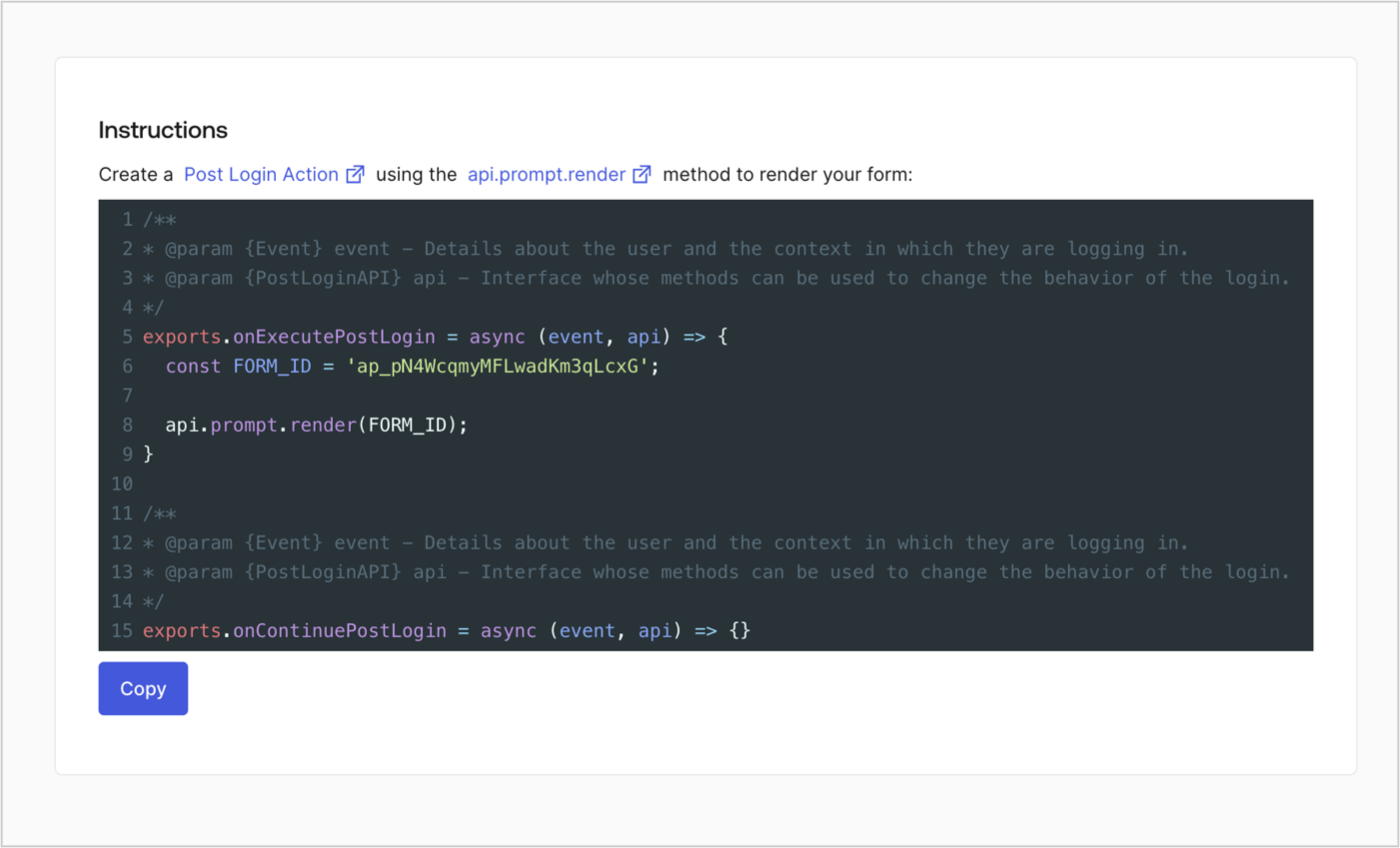
Retrieve your form render code to visually render the form with a custom Post Login Action by following these steps:

* From the Form editor, select **`<> Render`**.
* Select **Copy**.
<Frame>
  <img src="https://mintcdn.com/docs-staging-quickstart-revamp/95MUIRU4PPeO3xcE/images/cdy7uua7fh8z/2EIUzc539sq9lwoTKbjoJv/496a864c0fc44a782c9cadca119dbfb0/embed.png?fit=max&auto=format&n=95MUIRU4PPeO3xcE&q=85&s=5f7fbab79b46d0c43bf3bacd332d281b" alt="Dashboard > Actions > Forms > Form > Embed" data-og-width="1400" width="1400" data-og-height="848" height="848" data-path="images/cdy7uua7fh8z/2EIUzc539sq9lwoTKbjoJv/496a864c0fc44a782c9cadca119dbfb0/embed.png" data-optimize="true" data-opv="3" srcset="https://mintcdn.com/docs-staging-quickstart-revamp/95MUIRU4PPeO3xcE/images/cdy7uua7fh8z/2EIUzc539sq9lwoTKbjoJv/496a864c0fc44a782c9cadca119dbfb0/embed.png?w=280&fit=max&auto=format&n=95MUIRU4PPeO3xcE&q=85&s=334cb2eaf1609e4010a4f71271862dba 280w, https://mintcdn.com/docs-staging-quickstart-revamp/95MUIRU4PPeO3xcE/images/cdy7uua7fh8z/2EIUzc539sq9lwoTKbjoJv/496a864c0fc44a782c9cadca119dbfb0/embed.png?w=560&fit=max&auto=format&n=95MUIRU4PPeO3xcE&q=85&s=c2baeafe7dad1598cd7a0f871b655855 560w, https://mintcdn.com/docs-staging-quickstart-revamp/95MUIRU4PPeO3xcE/images/cdy7uua7fh8z/2EIUzc539sq9lwoTKbjoJv/496a864c0fc44a782c9cadca119dbfb0/embed.png?w=840&fit=max&auto=format&n=95MUIRU4PPeO3xcE&q=85&s=1e3d96bd913ff0a8e5140a3fd83f7e55 840w, https://mintcdn.com/docs-staging-quickstart-revamp/95MUIRU4PPeO3xcE/images/cdy7uua7fh8z/2EIUzc539sq9lwoTKbjoJv/496a864c0fc44a782c9cadca119dbfb0/embed.png?w=1100&fit=max&auto=format&n=95MUIRU4PPeO3xcE&q=85&s=ebe9a98d2f1e526891eda4caf5e2266c 1100w, https://mintcdn.com/docs-staging-quickstart-revamp/95MUIRU4PPeO3xcE/images/cdy7uua7fh8z/2EIUzc539sq9lwoTKbjoJv/496a864c0fc44a782c9cadca119dbfb0/embed.png?w=1650&fit=max&auto=format&n=95MUIRU4PPeO3xcE&q=85&s=f76cf0dc9643d68ef792551bf8d8dc09 1650w, https://mintcdn.com/docs-staging-quickstart-revamp/95MUIRU4PPeO3xcE/images/cdy7uua7fh8z/2EIUzc539sq9lwoTKbjoJv/496a864c0fc44a782c9cadca119dbfb0/embed.png?w=2500&fit=max&auto=format&n=95MUIRU4PPeO3xcE&q=85&s=a694a5dd0c072b21c96d22dea6a83f1a 2500w" />
</Frame>

## Create a Post Login Action

Create a post-login Action to render your form by following these steps:

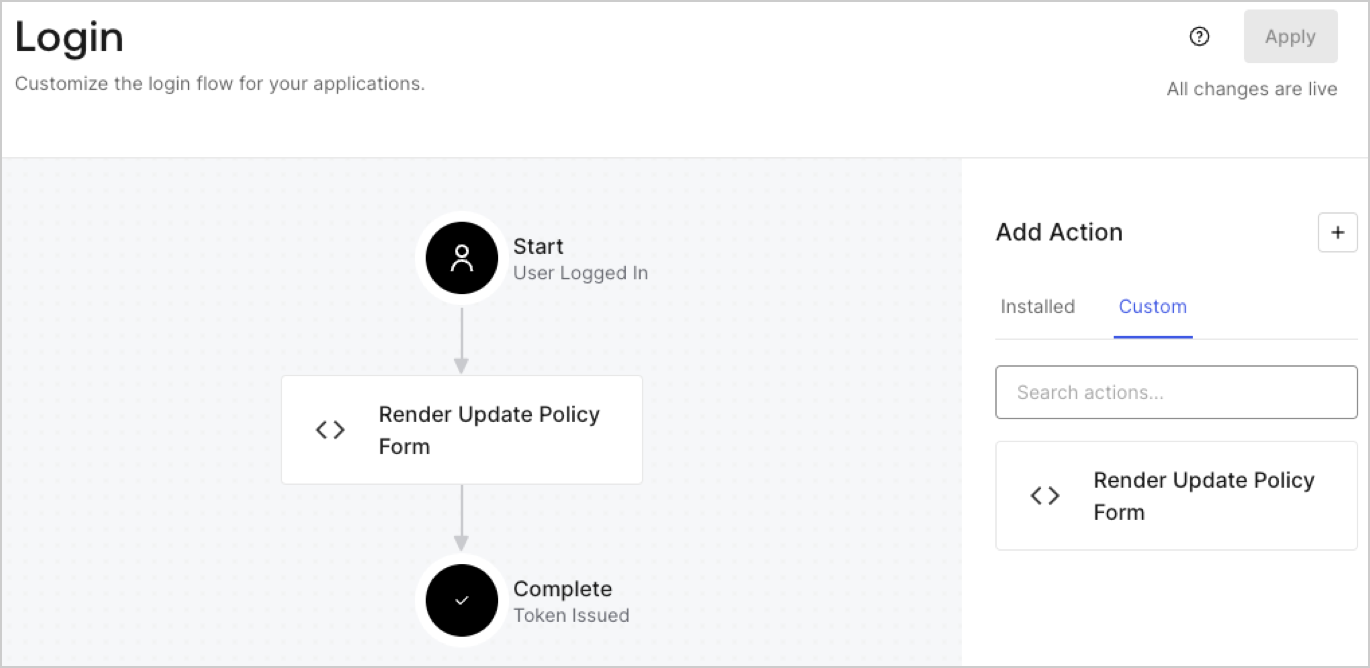
1. Navigate to **Auth0 Dashboard > Actions > Flows > Login.**
2. Select the **+** icon and Select **Build from scratch**:

   * **Name**: Enter `Render Update Policy Form`.
   * **Trigger**: Select `Login / Post Login`.
   * **Runtime**: Select the recommended version.
3. Select **Create**.

To configure the post-login Action:

1. Delete the existing code from the Code editor.
2. Paste the form render code into the Code editor.
3. Edit the code to define the conditional logic that will render the form.

   ```javascript lines
   /**
   * @param {Event} event - Details about the user and the context in which they are logging in.
   * @param {PostLoginAPI} api - Interface whose methods can be used to change the behavior of the login.
   */
   exports.onExecutePostLogin = async (event, api) => {
     const FORM_ID = 'REPLACE_WITH_YOUR_FORM_ID';

     if (event.user.app_metadata.privacy_policies !== true) {
       api.prompt.render(FORM_ID);
     }
   }

   exports.onContinuePostLogin = async (event, api) => { }
   ```

   <Callout icon="file-lines" color="#0EA5E9" iconType="regular">
     The example code above will render the form when a user is missing the app metadata `privacy_policies` property.
   </Callout>
4. Select **Deploy.**
5. Drag and Drop the **Render Update Policy Form** Action to the **Login** flow.
   <Frame>
     <img src="https://mintcdn.com/docs-staging-quickstart-revamp/OF4RJhPvadaf5sdD/images/cdy7uua7fh8z/5TOwDgevZsBqd7yZynUYWU/41ca909dc3007aed4f40ff794a05efa5/postlogin.png?fit=max&auto=format&n=OF4RJhPvadaf5sdD&q=85&s=4b00fd8929323d6fa8c22f57ffe2f1d8" alt="Dashboard > Forms > Use Case > Render update policy form login action" data-og-width="1370" width="1370" data-og-height="668" height="668" data-path="images/cdy7uua7fh8z/5TOwDgevZsBqd7yZynUYWU/41ca909dc3007aed4f40ff794a05efa5/postlogin.png" data-optimize="true" data-opv="3" srcset="https://mintcdn.com/docs-staging-quickstart-revamp/OF4RJhPvadaf5sdD/images/cdy7uua7fh8z/5TOwDgevZsBqd7yZynUYWU/41ca909dc3007aed4f40ff794a05efa5/postlogin.png?w=280&fit=max&auto=format&n=OF4RJhPvadaf5sdD&q=85&s=7bcc747fcd4b3c9f32dd9332a3125a67 280w, https://mintcdn.com/docs-staging-quickstart-revamp/OF4RJhPvadaf5sdD/images/cdy7uua7fh8z/5TOwDgevZsBqd7yZynUYWU/41ca909dc3007aed4f40ff794a05efa5/postlogin.png?w=560&fit=max&auto=format&n=OF4RJhPvadaf5sdD&q=85&s=75cd2ee19956e802a942f7fb4c0ce529 560w, https://mintcdn.com/docs-staging-quickstart-revamp/OF4RJhPvadaf5sdD/images/cdy7uua7fh8z/5TOwDgevZsBqd7yZynUYWU/41ca909dc3007aed4f40ff794a05efa5/postlogin.png?w=840&fit=max&auto=format&n=OF4RJhPvadaf5sdD&q=85&s=05ab9007ea26a1ebb37b906eff555624 840w, https://mintcdn.com/docs-staging-quickstart-revamp/OF4RJhPvadaf5sdD/images/cdy7uua7fh8z/5TOwDgevZsBqd7yZynUYWU/41ca909dc3007aed4f40ff794a05efa5/postlogin.png?w=1100&fit=max&auto=format&n=OF4RJhPvadaf5sdD&q=85&s=0cb9677dcca20feae25905839e770e34 1100w, https://mintcdn.com/docs-staging-quickstart-revamp/OF4RJhPvadaf5sdD/images/cdy7uua7fh8z/5TOwDgevZsBqd7yZynUYWU/41ca909dc3007aed4f40ff794a05efa5/postlogin.png?w=1650&fit=max&auto=format&n=OF4RJhPvadaf5sdD&q=85&s=d20e0b98e1eb14e83e45ba7a2fa5d1de 1650w, https://mintcdn.com/docs-staging-quickstart-revamp/OF4RJhPvadaf5sdD/images/cdy7uua7fh8z/5TOwDgevZsBqd7yZynUYWU/41ca909dc3007aed4f40ff794a05efa5/postlogin.png?w=2500&fit=max&auto=format&n=OF4RJhPvadaf5sdD&q=85&s=06918cb9cdf7098e46f6f91f20e3b878 2500w" />
   </Frame>
6. Select **Apply.**

### Test implementation

Test the implementation by following these steps:

1. Log in with an existing user whose app`_metadata` attribute `privacy_policies` does not have a value.
2. The post-login Action in the Login flow will render the form and prompt for acceptance.
3. Select **Auth0 Dashboard > User Management > Users,** locate the user and verify that the `app_metadata` attribute `privacy_policies` contains a `true` value and a timestamp.
