> ## Documentation Index
> Fetch the complete documentation index at: https://docs-staging-quickstart-revamp.mintlify.site/llms.txt
> Use this file to discover all available pages before exploring further.

> Overview of how to configure Inbound SCIM for Enterprise connections

# Configure Inbound SCIM

<Card title="Before you start">
  Your Auth0 plan or custom agreement must include Enterprise Connections to use this feature. To learn more, read [Auth0's Pricing Page](https://auth0.com/pricing).

  [Postman](https://www.postman.com/downloads/) must be installed on a local machine to test your Inbound SCIM connections.
</Card>

[SCIM](/docs/authenticate/protocols/scim) is a [protocol](https://tools.ietf.org/html/rfc7644) and [schema](https://tools.ietf.org/html/rfc7643) standard used by enterprise organizations to provision, de-provision, and manage user identity-related information.

Auth0's Inbound SCIM feature supports B2B SaaS developer integrations with Enterprise <Tooltip tip="Identity Provider (IdP): Service that stores and manages digital identities." cta="View Glossary" href="/docs/glossary?term=identity+providers">identity providers</Tooltip>. The following Auth0 connection types are currently supported: [SAML](/docs/authenticate/identity-providers/enterprise-identity-providers/saml), [OpenID Connect](/docs/authenticate/identity-providers/enterprise-identity-providers/oidc), [Okta Workforce Identity](/docs/authenticate/identity-providers/enterprise-identity-providers/okta), and [Microsoft Azure AD / Entra ID](/docs/authenticate/identity-providers/enterprise-identity-providers/azure-active-directory/v2).

## Enable Inbound SCIM for an Enterprise Connection

1. Launch the [Auth0 Dashboard](https://manage.auth0.com/#/), then choose the tenant you want to configure.
2. Navigate to [**Authentication > Enterprise**](https://manage.auth0.com/#/connections/enterprise/)**,** then select from **SAML, OpenID Connect, Okta Workforce,** or **Microsoft Azure AD.**
3. Choose an existing connection or create a new one using [Create Connection](/docs/authenticate/database-connections/custom-db/create-db-connection).
4. Under the **Provisioning** tab for your connection, toggle **Sync user profile attributes at each login** to **Off,** then switch **Sync user profiles using SCIM** to **On.**
5. Select the **Setup** tab under **Sync user profiles using SCIM** to get the SCIM endpoint URL and SCIM tokens needed for testing with Postman.

### Test with Postman

You can download the Postman collection below to test your SCIM configuration:

* [SCIM 2.0 Postman Collection](https://cdn.auth0.com/scim/collections/scim_postman_collection.json)

1. Launch Postman, then select **File > Import…** and move the file **scim\_postman\_collection.json** into the import dialog box.
2. Select the **SCIM 2.0 Tests** collection, then choose the **Variables** tab.
3. Copy the **SCIM Endpoint URL** value from the Auth0 Dashboard and paste it into the **Current Value** field next to the **SCIM-ENDPOINT-URL** variable.
4. In the Auth0 Dashboard choose **Generate New Token**, then pick **Generate Token** and select **Copy and Close.**
5. Switch back to Postman, select the **Authorization** tab, and paste the token value into the **Token** field.
6. Choose **Save.**
7. Run the tests in the order shown, starting with the `POST` command and finishing with `DELETE`. The result of each user operation is in your Auth0 Dashboard under [**User Management > Users**](https://manage.auth0.com/#/users)and in the tenant logs under [**Monitoring > Logs**](https://manage.auth0.com/#/logs).

To test with specific identity providers, see [Configure Inbound SCIM for Identity Providers using SAML or OpenID](/docs/authenticate/protocols/scim/configure-inbound-scim-for-identity-providers-using-saml-or-openid).

## Supported SCIM Operations

Auth0 supports the following SCIM 2.0 operations for managing users:

<table class="table">
  <thead>
    <tr>
      <th>Command</th>
      <th>Description</th>
    </tr>
  </thead>

  <tbody>
    <tr>
      <td><code>POST</code></td>
      <td>Creates a user in Auth0 with attributes from the SCIM 2.0 core schema and enterprise schema extension, described in <a href="https://tools.ietf.org/html/rfc7644#section-3.3">RFC7644 Section 3.3</a>.</td>
    </tr>

    <tr>
      <td><code>GET</code></td>
      <td>Retrieves a user that has already been created in Auth0, using their user\_id value in Auth0 and described in <a href="https://tools.ietf.org/html/rfc7644#section-3.4.1">RFC7644 Section 3.4.1</a>.</td>
    </tr>

    <tr>
      <td><code>PUT</code></td>
      <td>Replaces a user in Auth0 with attributes from the SCIM 2.0 core schema and enterprise schema extension, described in <a href="https://tools.ietf.org/html/rfc7644#section-3.5.1">RFC7644 Section 3.5.1</a>.</td>
    </tr>

    <tr>
      <td><code>PATCH</code></td>
      <td>Updates a user in Auth0 with attributes from the SCIM 2.0 core schema and enterprise schema extension, described in <a href="https://tools.ietf.org/html/rfc7644#section-3.5.2">RFC7644 Section 3.5.2</a>.</td>
    </tr>

    <tr>
      <td><code>DELETE</code></td>
      <td>Deletes a user in Auth0, using their user\_id value in Auth0, described in <a href="https://tools.ietf.org/html/rfc7644#section-3.6">RFC7644 Section 3.6</a>.</td>
    </tr>

    <tr>
      <td><code>SEARCH</code></td>
      <td>Searches for a user in Auth0 using a SCIM filter, described in <a href="https://tools.ietf.org/html/rfc7644#section-3.4.2">RFC7644 Section 3.4.2</a>. Supported operators are Equals (EQ), and (AND), and or (OR).</td>
    </tr>

    <tr>
      <td><code>PUT</code> (Deactivate)</td>
      <td>Replaces a user stored in Auth0 and sets the SCIM active attribute to false, which results in the user being blocked in Auth0.</td>
    </tr>

    <tr>
      <td><code>PATCH</code> (Deactivate)</td>
      <td>Updates a user stored in Auth0 and sets the SCIM active attribute to false, which results in the user being blocked in Auth0.</td>
    </tr>
  </tbody>
</table>

Auth0 uses the SCIM 2.0 [core schema for user resources](https://tools.ietf.org/html/rfc7643) and [Enterprise schema for user resources](https://tools.ietf.org/html/rfc7643), as well as client authentication bearer tokens for broad compatibility with multiple Enterprise identity providers.

### SCIM endpoints and tokens

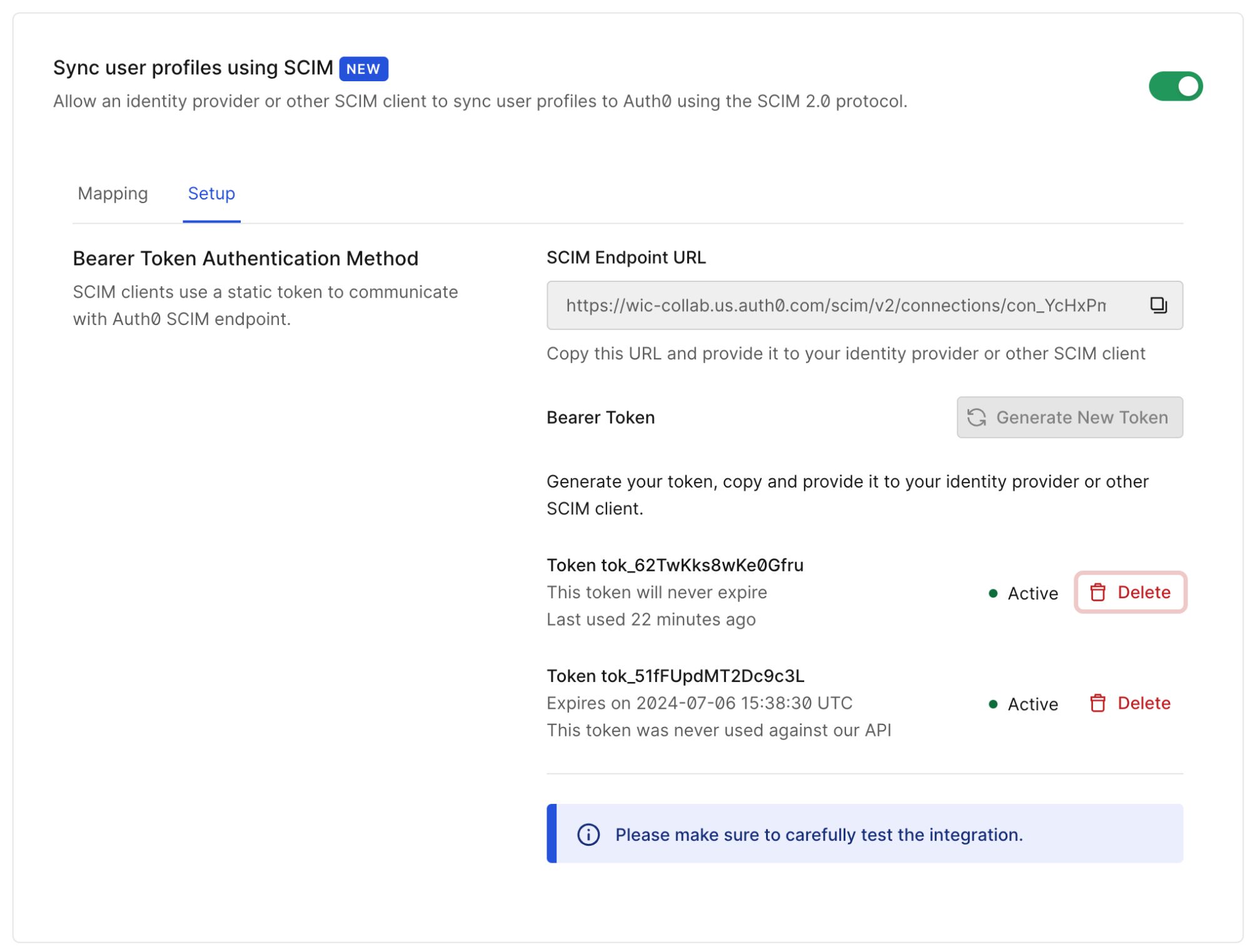
Each enterprise customer gets a connection-specific SCIM endpoint and token that allows them to provision, de-provision, and manage their user accounts stored in the Auth0 tenant.

The endpoints and tokens are visible and configurable in the <Tooltip tip="Auth0 Dashboard: Auth0's main product to configure your services." cta="View Glossary" href="/docs/glossary?term=Auth0+Dashboard">Auth0 Dashboard</Tooltip> at **Authentication > Enterprise > \[connecton-type] > \[your-connection] > Provisioning >  Sync user profiles using SCIM >  Setup**.

<Frame>
  <img src="https://mintcdn.com/docs-staging-quickstart-revamp/TYcLtS8UbiQUCV_p/images/cdy7uua7fh8z/4jsLx8sZiy9WRhqaV5uCqt/09e0bc4d690742b16b8535f07c3a64a9/setup.png?fit=max&auto=format&n=TYcLtS8UbiQUCV_p&q=85&s=7eff30eecdeb2cbd3054abe5a32275da" alt="Dashboard screenshot of SCIM setup" width="1999" height="1523" data-path="images/cdy7uua7fh8z/4jsLx8sZiy9WRhqaV5uCqt/09e0bc4d690742b16b8535f07c3a64a9/setup.png" />
</Frame>

The **SCIM Endpoint URL** allows SCIM clients to manage user accounts stored in Auth0 for a given identity provider.

The **Generate New Token** option generates up to two active tokens for this SCIM endpoint, allowing the token used by the SCIM client to be updated without downtime. Tokens may also be revoked on this screen by choosing **Delete**.
<Frame>
  <img src="https://mintcdn.com/docs-staging-quickstart-revamp/OF4RJhPvadaf5sdD/images/cdy7uua7fh8z/5TUDyHPvAKFffK76gxUHY4/5ab3e28268afa11abb31c679e2e64bcc/Tokens.jpg?fit=max&auto=format&n=OF4RJhPvadaf5sdD&q=85&s=6ad05e7418d782a26e2812cb40c973dc" alt="Dashboard screen for the SCIM token settings" width="2000" height="1462" data-path="images/cdy7uua7fh8z/5TUDyHPvAKFffK76gxUHY4/5ab3e28268afa11abb31c679e2e64bcc/Tokens.jpg" />
</Frame>

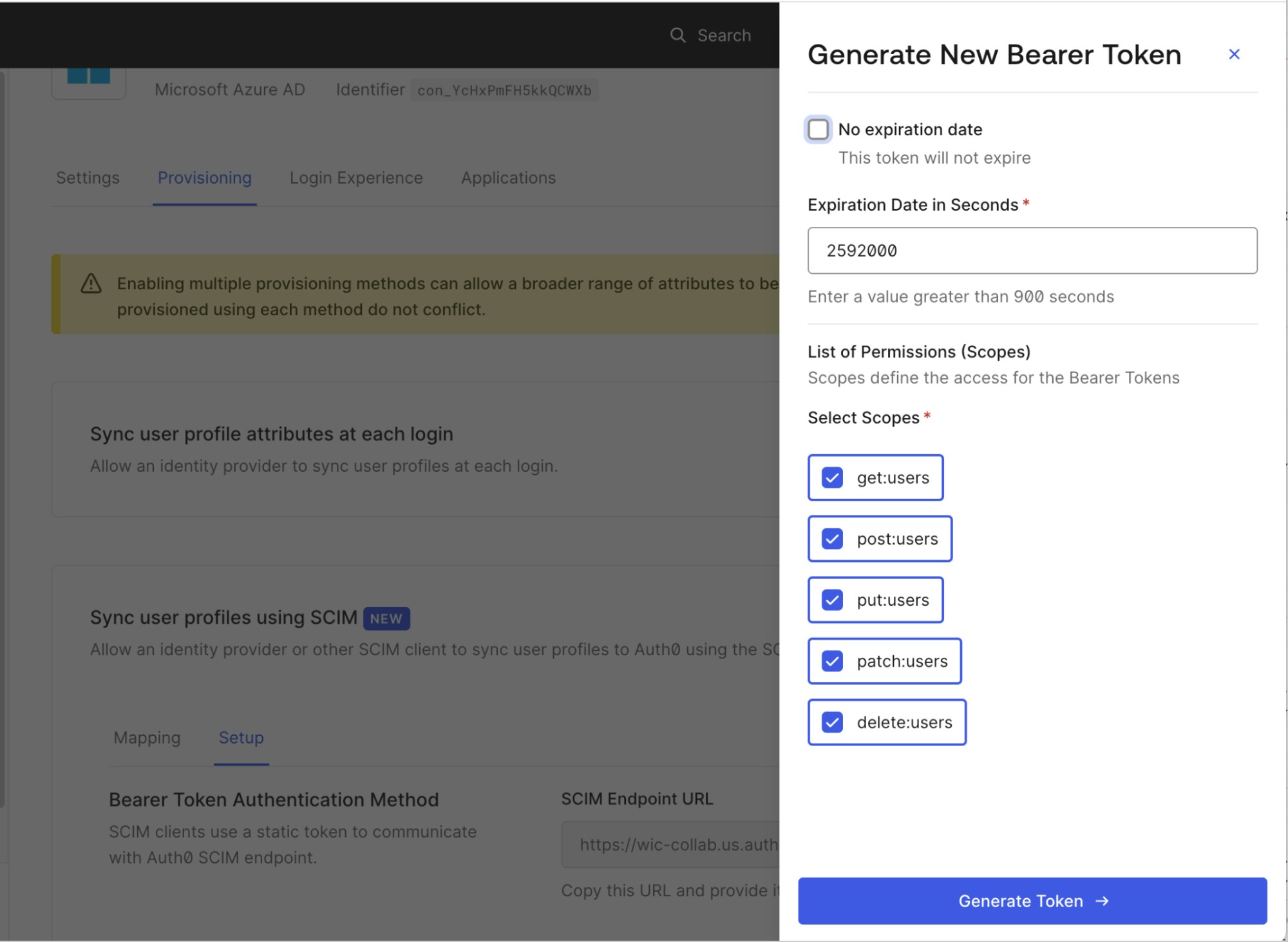
The following token generation settings are available:

* **No expiration date:** Select whether the token expires or not.
* **Expiration date in seconds**: if the token has no expiration date, you can choose an expiration time for the token. When the token expires, the SCIM endpoint will return an error response the next time it is used. The minimum allowed expiration time is 900 seconds.
* **List of permissions (scopes):** details which SCIM operations may be performed using this token. The available permissions are:

  * **get:users** - Allows users to be retrieved and searched.
  * **post:users** - Allows users to be created
  * **put:users** - Allows users to be updated using the PUT method.
  * **patch:users** - Allows users to be updated using the PATCH method.
  * **delete:users** - Allows users to be deleted.

### Attribute mapping

Each new connection uses the default attribute map found in the Auth0 Dashboard at **Authentication > Enterprise > \[connecton-type] > \[your-connection] > Provisioning >  Sync user profiles using SCIM >  Mapping,** where the map can be edited and customized to fit your connection's needs.

Core SCIM user attributes defined [RFC 7643 sections 3.1, 4.1,  and 4.3](https://tools.ietf.org/html/rfc7643) may be used.

<table class="table">
  <thead>
    <tr>
      <th>Notes</th>

      <th />
    </tr>
  </thead>

  <tbody>
    <tr>
      <td>One-to-one mapping</td>
      <td>A selected SCIM attribute (or sub-attribute) can only be mapped to one Auth0 attribute.</td>
    </tr>

    <tr>
      <td>Sub-attribute mapping</td>
      <td>Sub-attribute values within multi-value SCIM attributes such as emails and phoneNumbers can be referenced using SCIM filter syntax with the eq operator. See the default attribute maps for examples.</td>
    </tr>

    <tr>
      <td>Unmappable attributes</td>
      <td>The SCIM id and meta attributes cannot be mapped,  as they are only sent by Auth0 in the SCIM protocol responses. The id value in SCIM responses is always set to the Auth0 user\_id, and the SCIM  password  attribute is not usable for Enterprise connections.</td>
    </tr>

    <tr>
      <td>Omitting SCIM attributes</td>
      <td>If a specific SCIM attribute is not configured to be handled in your attribute map, it will be ignored in all SCIM requests and responses.</td>
    </tr>
  </tbody>
</table>

These SCIM attributes can be mapped to Auth0 [root](/docs/manage-users/user-accounts/user-profiles/root-attributes) and [metadata](/docs/manage-users/user-accounts/metadata/metadata-fields-data) attributes on the user profile.

<table class="table">
  <thead>
    <tr>
      <th>Notes</th>

      <th />
    </tr>
  </thead>

  <tbody>
    <tr>
      <td>One-to-one mapping</td>
      <td>A selected Auth0 attribute can only be mapped to one SCIM attribute.</td>
    </tr>

    <tr>
      <td>Root attribute mapping</td>
      <td>When mapping to <a href="/docs/manage-users/user-accounts/user-profiles/root-attributes">root</a> attributes, note that only the root attributes listed in <a href="/docs/manage-users/user-accounts/user-profiles/user-profile-structure#user-profile-attributes">User profile attributes</a> can be searched using a SCIM query. If you need an attribute to be searchable that is not in this list, place it in app\_metadata.</td>
    </tr>

    <tr>
      <td>Metadata attribute mapping</td>
      <td>The use of user\_metadata is allowed, but generally not recommended for synchronized attributes as it is intended to store attributes that can be edited directly by the end user. Use app\_metadata or root attributes instead.</td>
    </tr>

    <tr>
      <td>Blocked attribute behavior</td>
      <td>The mapping to the Auth0 blocked attribute has a special behavior when it is mapped to the SCIM active attribute. When active contains a value of true or false, Auth0 reverses the value and sets Auth0 blocked attribute to false or true, respectively.</td>
    </tr>
  </tbody>
</table>

Auth0 also allows you to provision attributes using SCIM in parallel with attributes provisioned during login. For more information, see **Sync additional attributes at login** below.

### Logs and outbound notifications

You can view the full details of all the SCIM requests that Auth0 receives in the [**Monitoring > Logs**](https://manage.auth0.com/#/logs) section of the Auth0 Dashboard. In addition, you can integrate with [Custom Log Streams](/docs/customize/log-streams) to be notified when a user is created, updated, or deleted using SCIM and the SCIM log stream [filter category](/docs/customize/log-streams/event-filters#scim-events).

### Session revocation and backchannel logout

When Auth0 receives a SCIM message to deactivate and block a user, it terminates all Auth0 sessions for the user, revokes <Tooltip tip="Refresh Token: Token used to obtain a renewed Access Token without forcing users to log in again." cta="View Glossary" href="/docs/glossary?term=refresh+tokens">refresh tokens</Tooltip>, and (if configured) triggers [OpenID Connect backchannel logout](/docs/authenticate/login/logout/back-channel-logout/configure-back-channel-logout) for your applications.

## Deployment guidelines

#### Leverage integration galleries for streamlined setup

To give your customers a tailored experience for setting up both SCIM and <Tooltip tip="Single Sign-On (SSO): Service that, after a user logs into one applicaton, automatically logs that user in to other applications." cta="View Glossary" href="/docs/glossary?term=SSO">SSO</Tooltip>, consider listing your application in the [Okta Integration Network](https://www.okta.com/integrations/) and other workforce identity provider integration galleries that you plan to integrate with.

#### Test SCIM in lower-level environments first

Do not enable SCIM in a production Auth0 tenant before thoroughly testing your integration in a development or staging Auth0 tenant.

#### Send SCIM tokens securely

Never send SCIM tokens in plaintext, over email, or via insecure channels. Use a secure communication service like [SendSafely](https://www.sendsafely.com/) or integrate your app's self-service console with the [Auth0 Management API](/docs/authenticate/protocols/scim/manage-an-inbound-scim-deployment-with-the-management-api) to issue SCIM tokens directly to your customers.

#### Information exchange

When providing an Auth0 SCIM endpoint to your customer, they will require the following information to use it successfully:

* The SCIM endpoint URL for the Auth0 connection
* The SCIM token required for the SCIM endpoint URL

These are also recommended:

* The list of SCIM attributes supported for the Auth0 connection, as configured in your SCIM attribute map
* Any additional instructions required to configure their SCIM client to work with your SCIM configuration. For Okta Workforce and Microsoft Entra ID setup guidance, see [Configure Inbound SCIM for Identity Providers using SAML or OpenID](/docs/authenticate/protocols/scim/configure-inbound-scim-for-identity-providers-using-saml-or-openid)

## Advanced topics

#### Sync additional attributes at login

If you are integrating with an identity provider that does not support the same set of user attributes across <Tooltip tip="Security Assertion Markup Language (SAML): Standardized protocol allowing two parties to exchange authentication information without a password." cta="View Glossary" href="/docs/glossary?term=SAML">SAML</Tooltip>/OIDC, and SCIM, you can access the additional attributes by enabling **Sync user profile attributes at login** in parallel with SCIM provisioning.

When **Sync user profile attributes at login** is enabled, all [root](/docs/manage-users/user-accounts/user-profiles/root-attributes) attributes on the user profile are overwritten each time a user logs in. To avoid potential conflicts between SCIM and login sync, follow these guidelines:

* Ensure common Auth0 root attributes like `email` and `username` are mapped in your [SAML](/docs/authenticate/protocols/saml/saml-configuration) or [OpenID Connect](/docs/authenticate/identity-providers/enterprise-identity-providers/configure-pkce-claim-mapping-for-oidc) attribute map if they are also present in your SCIM attribute map.
* In your SCIM attribute map, map all of the other SCIM attributes (except the `active` attribute) to values inside the Auth0 `app_metadata` attribute.

#### Sync roles

Auth0 supports syncing the SCIM 2.0 `roles` user attribute as defined in [RFC7643](https://datatracker.ietf.org/doc/html/rfc7643). To accept roles, ensure the SCIM attribute map for your connection maps the SCIM `roles` attribute to an Auth0 user attribute like `app_metadata.roles`.

To learn how to sync application-specific roles from Okta Workforce Identity, read [How to Add Multi-value Roles in SCIM Cloud Integration](https://support.okta.com/help/s/article/How-to-add-multivalue-roles-in-SCIM-Cloud-integration). For Microsoft Entra ID roles, read [Customize user provisioning attribute-mappings for SaaS applications in Microsoft Entra ID](https://learn.microsoft.com/en-us/entra/identity/app-provisioning/customize-application-attributes#provisioning-a-role-to-a-scim-app).

#### Sync groups

Auth0 does not support a `/groups` endpoint for provisioning full group objects and group memberships as defined in [RFC7644 Section 3.2](https://datatracker.ietf.org/doc/html/rfc7644#section-3.2). However, if an identity provider supports sending a list of groups over SAML or <Tooltip tip="OpenID: Open standard for authentication that allows applications to verify users' identities without collecting and storing login information." cta="View Glossary" href="/docs/glossary?term=OpenID">OpenID</Tooltip> Connect, read the previous section for guidelines on how to sync attributes at login.

#### Organizations

For SCIM-provisioned users to become members of an Organization, the connection must be configured to **Enable Auto-Membership** as described in [Grant Just-In-Time Membership to an Organization Connection](/docs/manage-users/organizations/configure-organizations/grant-just-in-time-membership).

#### Account linking

When using [user account linking](/docs/manage-users/user-accounts/user-account-linking), the SCIM-provisioned user account must be set as the primary user account. Setting as a secondary account will change the SCIM `id` attribute which goes against the [SCIM 2.0 core schema specification](https://datatracker.ietf.org/doc/html/rfc7643#section-3.1). Account linking Enterprise user accounts to social and personal user accounts is not recommended.

## Learn more

* [Configure Inbound SCIM for Identity Providers using SAML or OpenID](/docs/authenticate/protocols/scim/configure-inbound-scim-for-identity-providers-using-saml-or-openid)
* [Inbound SCIM for Okta Workforce Connections](/docs/authenticate/protocols/scim/inbound-scim-for-okta-workforce-connections)
* [Inbound SCIM for Okta Workforce SAML Connections](/docs/authenticate/protocols/scim/inbound-scim-for-okta-workforce-saml-connections)
* [Inbound SCIM for Azure AD SAML Connections](/docs/authenticate/protocols/scim/inbound-scim-for-azure-ad-saml-connections)
* [Inbound SCIM for New Azure AD Connections](/docs/authenticate/protocols/scim/inbound-scim-for-new-azure-ad-connections)
* [Inbound SCIM for Older Azure AD Connections](/docs/authenticate/protocols/scim/inbound-scim-for-older-azure-ad-connections)