> ## Documentation Index
> Fetch the complete documentation index at: https://docs-staging-quickstart-revamp.mintlify.site/llms.txt
> Use this file to discover all available pages before exploring further.
> Describes how to add scopes to your IdP connection.
# Add Scopes/Permissions to Call Identity Provider APIs
Once a user is logged in, you can get their user profile and then the associated `accessToken` to call the Identity Provider (IdP) APIs as described in [Call an Identity Provider API](/docs/authenticate/identity-providers/calling-an-external-idp-api).
However, if you are receiving `Access Denied` when calling the IdP API, you probably have not requested the correct permissions for the user during login. You can request the correct permissions in one of two ways.
## Change Identity Provider Settings
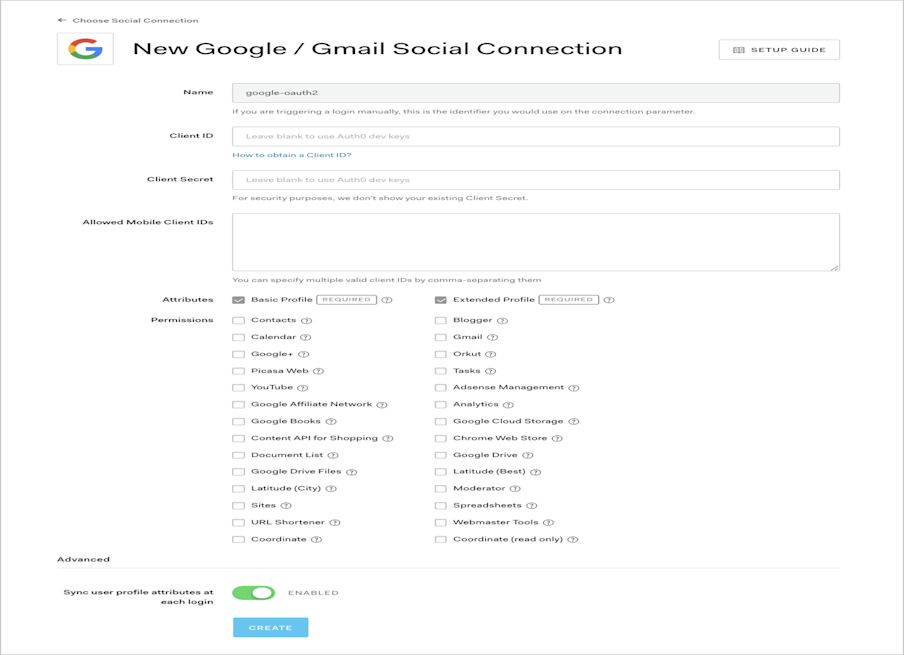
To configure the scopes/permissions needed from the user, go to [Auth0 Dashboard > Authentication > Social](https://manage.auth0.com/#/connections/social), and select an IdP. You can select the required permissions listed on the configuration screen.
For example, if you click the **Google / Gmail** connection, you can configure Google-specific permissions:
 ## Pass Scopes to Authorize endpoint
You can also pass the scopes/permissions you wish to request as a comma-separated list in the `connection_scope` parameter when calling the [authorize endpoint](https://auth0.com/docs/api/authentication#login). For example, if you want to request the `https://www.googleapis.com/auth/contacts.readonly` and `https://www.googleapis.com/auth/analytics` scopes from Google, you can pass these along with the `connection` parameter to ensure the user logs in with their Google account:
```sh lines
https://{yourDomain}/authorize
?response_type=id_token
&client_id={yourClientId}
&redirect_uri={https://yourApp/callback}
&scope=openid%20profile
&connection=google-oauth2
&connection_scope=https%3A%2F%2Fwww.googleapis.com%2Fauth%2Fanalytics%2Chttps%3A%2F%2Fwww.googleapis.com%2Fauth%2Fcontacts.readonly
&nonce=abc
```
Please note that in the example request above, the value of the `connection_scope` parameter is URL encoded. The decoded value that is passed to Google is `https://www.googleapis.com/auth/analytics, https://www.googleapis.com/auth/contacts.readonly`
## Pass Scopes to Authorize endpoint
You can also pass the scopes/permissions you wish to request as a comma-separated list in the `connection_scope` parameter when calling the [authorize endpoint](https://auth0.com/docs/api/authentication#login). For example, if you want to request the `https://www.googleapis.com/auth/contacts.readonly` and `https://www.googleapis.com/auth/analytics` scopes from Google, you can pass these along with the `connection` parameter to ensure the user logs in with their Google account:
```sh lines
https://{yourDomain}/authorize
?response_type=id_token
&client_id={yourClientId}
&redirect_uri={https://yourApp/callback}
&scope=openid%20profile
&connection=google-oauth2
&connection_scope=https%3A%2F%2Fwww.googleapis.com%2Fauth%2Fanalytics%2Chttps%3A%2F%2Fwww.googleapis.com%2Fauth%2Fcontacts.readonly
&nonce=abc
```
Please note that in the example request above, the value of the `connection_scope` parameter is URL encoded. The decoded value that is passed to Google is `https://www.googleapis.com/auth/analytics, https://www.googleapis.com/auth/contacts.readonly`